
1. Introducció
Thank you for choosing the Firstnum CPE C600 WiFi Router. This device is a versatile 4G LTE CAT7 wireless internet hotspot designed to provide reliable and high-speed internet connectivity in various environments, including homes, offices, RVs, boats, and other remote locations. With its integrated SIM card slot, you can enjoy Wi-Fi without the need for traditional wired internet connections.
The C600 supports a wide range of frequency bands and offers Wi-Fi 5 (802.11b/g/n) at 2.4GHz, delivering speeds up to 300Mbps. Its MIMO 2x2 antenna system ensures extended transmission distance and enhanced signal quality. This manual provides detailed instructions for setting up, operating, maintaining, and troubleshooting your CPE C600 router.
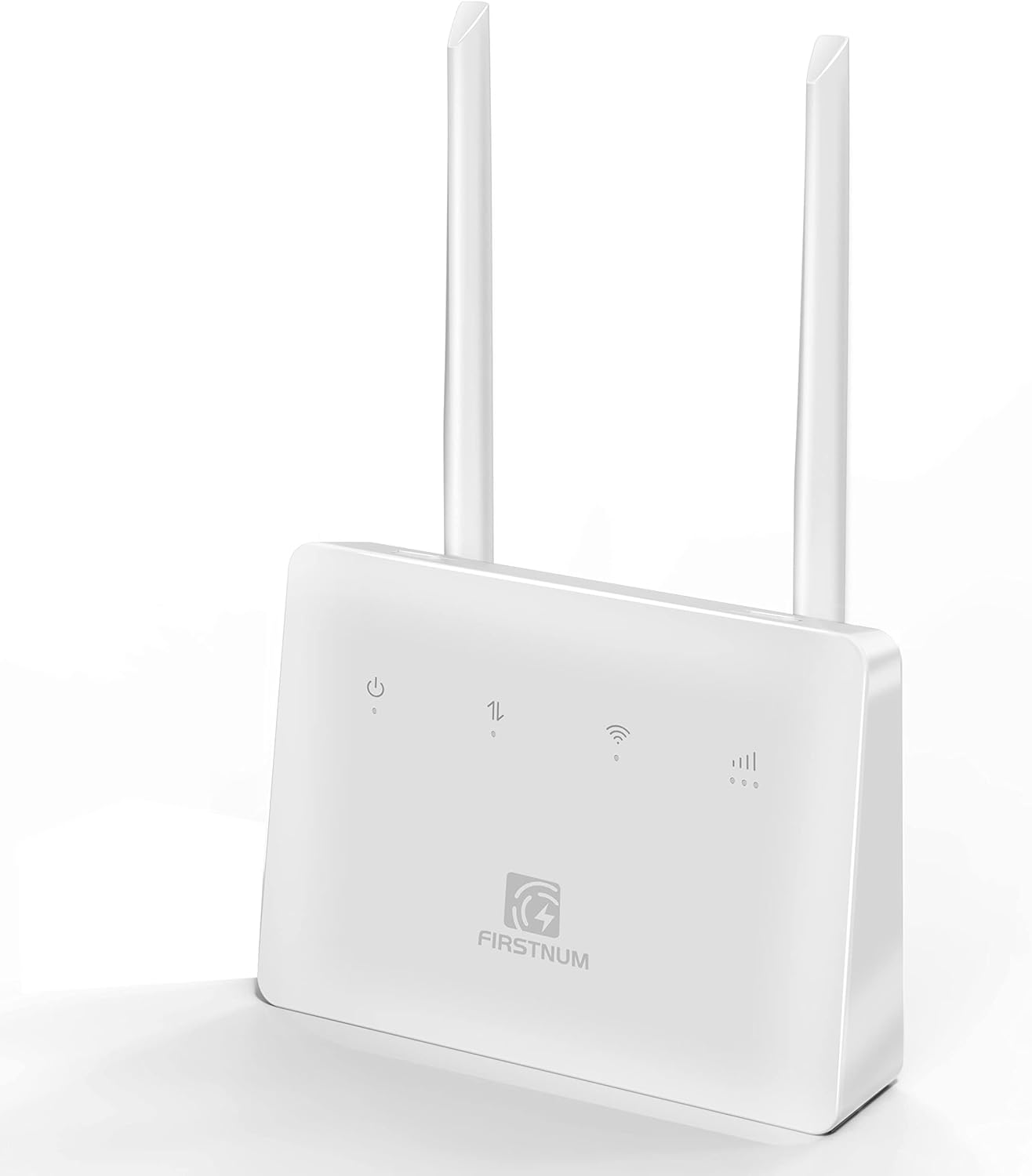
Figure 1.1: Firstnum CPE C600 WiFi Router
This image displays the Firstnum CPE C600 WiFi Router from a front-facing perspective, showcasing its compact design and two external antennas. The device is white with indicator lights and the Firstnum logo on the front panel.
2. Informació de seguretat
Please read and follow these safety guidelines to ensure safe and optimal operation of your device:
- No exposeu el dispositiu a temperatures extremes, humitat o llum solar directa.
- Mantingueu el dispositiu allunyat de l'aigua i altres líquids.
- Utilitzeu només l'adaptador d'alimentació subministrat amb el dispositiu.
- No intenteu obrir ni reparar el dispositiu vosaltres mateixos. Encarregueu totes les tasques de manteniment a personal qualificat.
- Assegureu-vos una ventilació adequada al voltant del dispositiu per evitar el sobreescalfament.
- Desfeu-vos del dispositiu i dels seus components de manera responsable d'acord amb la normativa local.
3. Producte acabatview
3.1 Contingut del paquet
El paquet del producte ha de contenir els elements següents:
- Firstnum CPE C600 WiFi Router
- Adaptador d'alimentació
- Cable Ethernet
- Manual d'usuari (aquest document)
3.2 Disposició i indicadors del dispositiu

Figure 3.1: C600 Router Front, Back, and Bottom Views with Labels
This image provides detailed views of the Firstnum CPE C600 router, highlighting its front panel indicators (Power LED, Network LED, WiFi LED, Signal LED), rear ports (LAN/WAN, USB, Power, Reset button), and bottom power button. Each component is clearly labeled.
The C600 router features several indicator lights and ports for easy operation and connectivity:
- LED d'alimentació: Indica l'estat d'alimentació del dispositiu.
- LED de xarxa: Shows the status of the cellular network connection.
- LED de Wi-Fi: Indica activitat Wi-Fi.
- LED de senyal: Mostra la intensitat del senyal cel·lular.
- LAN/WAN Ports (RJ45 x 4): For connecting wired devices or an external internet source.
- Ranura per a targeta SIM: For inserting a Micro SIM card.
- Port USB: For potential future functionalities or accessories.
- Port d'alimentació: Per connectar l'adaptador de corrent.
- Botó de restabliment: To restore factory settings (press and hold for 5-7 seconds).
- Botó WPS: Per a una configuració ràpida i segura de la connexió Wi-Fi.
4. Guia de configuració
4.1 Instal·lació de la targeta SIM
The C600 router requires a Micro SIM card for cellular internet connectivity. Ensure your SIM card is activated and supports hotspot services before insertion.
- Localitza la ranura de la targeta SIM al router.
- Carefully insert your Micro SIM card into the slot with the gold contacts facing down and the notched corner oriented correctly. Push until it clicks into place.
- To remove the SIM card, gently push it in again until it springs out.

Figure 4.1: SIM Card Slot and Multi-Scenario Use
This image highlights the SIM card slot on the Firstnum CPE C600 router and illustrates various scenarios where the router can be used, such as shops, farms, backyards, and RVs, emphasizing its portability and versatility.
4.2 Encès
- Connect the provided power adapter to the power port on the router.
- Connecteu l'adaptador de corrent a una presa de corrent.
- Press the power button on the router. The Power LED should illuminate.
4.3 Configuració inicial
The router is designed for easy setup. Follow these general steps:
- After powering on, wait for the Network LED and WiFi LED to stabilize, indicating a successful connection to the cellular network and Wi-Fi broadcast.
- Connect your computer or mobile device to the router's Wi-Fi network using the default SSID and password printed on a label on the router (usually on the bottom).
- Obre a web navegador i entreu 192.168.1.1 into the address bar to access the router's web interfície de gestió.
- Log in using the default username and password (typically 'admin' for both, check the label if different).
- Follow the on-screen wizard for initial setup, including changing the default Wi-Fi name (SSID) and password for security.
5. Instruccions de funcionament
5.1 Connexió de dispositius
You can connect devices to the C600 router via Wi-Fi or Ethernet cable.
- Connexió Wi-Fi: On your device, search for available Wi-Fi networks, select your router's SSID, and enter the Wi-Fi password. You can also use the WPS button for a quick connection if your device supports it.
- Connexió Ethernet: Use an Ethernet cable to connect a device (e.g., computer, gaming console) to one of the LAN ports on the back of the router.
5.2 Gestió de la xarxa
El web interfície de gestió (192.168.1.1) permet gestionar diversos paràmetres:
- Configuració de Wi-Fi: Change SSID, password, security type, and Wi-Fi channel.
- Configuració de la xarxa: Configure WAN connection type, LAN IP address, and DHCP server.
- Seguretat: Set up firewall rules, port forwarding, and parental controls.
- Eines del sistema: View system logs, update firmware, and reboot the router.

Figure 5.1: Key Features of the C600 Router
This image highlights the core features of the Firstnum CPE C600 router, including its portability, fast and secure network capabilities, 4G LTE-A support, 2.4 GHz Wi-Fi, strong coverage, plug-and-play functionality, SIM card support, ability to connect up to 32 devices, and a WPS button for easy setup.
5.3 Multi-Scenario Usage
The C600 router's design allows for flexible deployment in various environments:
- Llar i oficina: Provides primary or backup internet access.
- RV & Boat: Ideal for mobile internet access during travel.
- Outdoor & Remote Areas: Suitable for farms, orchards, construction sites, or any location without wired internet.

Figure 5.2: Enjoying Connectivity in an RV
This image shows a woman comfortably working on two laptops inside an RV, with the Firstnum CPE C600 router visible on the table, illustrating its utility for mobile internet access during travel.

Figure 5.3: Providing Wi-Fi in Rural Areas
This image depicts individuals enjoying internet connectivity outdoors by a lake, with the Firstnum CPE C600 router providing Wi-Fi, demonstrating its capability to deliver internet in rural or remote settings.
6. Manteniment
To ensure the longevity and optimal performance of your Firstnum CPE C600 router, follow these maintenance tips:
- Neteja: Netegeu suaument el dispositiu amb un drap suau i sec. No utilitzeu netejadors líquids ni aerosols.
- Ventilació: Ensure that the ventilation holes are not blocked to prevent overheating.
- Actualitzacions de firmware: Reviseu periòdicament el router web management interface for available firmware updates. Keeping the firmware updated can improve performance, add new features, and enhance security.
- Cicle d'alimentació: If you experience minor issues, try power cycling the router (unplug the power adapter, wait 10 seconds, then plug it back in).
7. Solució De Problemes
If you encounter problems with your Firstnum CPE C600 router, refer to the following common issues and solutions:
| Problema | Causa possible | Solució |
|---|---|---|
| Sense connexió a Internet | SIM card not inserted correctly or not activated; no cellular signal; incorrect APN settings. | Ensure SIM card is properly inserted and activated. Check Signal LED. Verify APN settings in the web management interface. Contact your SIM card operator. |
| Senyal Wi-Fi feble o velocitat lenta | Router too far from devices; interference from other devices; physical obstructions. | Move router closer to devices. Reduce interference by moving other electronic devices. Adjust antenna orientation. Consider changing Wi-Fi channel in settings. |
| No es pot accedir Web Interfície de gestió | Incorrect IP address; device not connected to router's network; browser issue. | Ensure you are connected to the router's Wi-Fi or via Ethernet. Verify you are typing 192.168.1.1 correctly. Try a different browser or clear browser cache. |
| Forgotten Login Password | Password for web interface is lost. | Perform a factory reset by pressing and holding the Reset button for 5-7 seconds. This will revert all settings to default, including the login password. |
If the problem persists after trying these solutions, please contact Firstnum customer support for further assistance.
8. Especificacions
Key technical specifications for the Firstnum CPE C600 WiFi Router:
| Característica | Descripció |
|---|---|
| Número de model | C600 |
| Suport de banda de freqüència | FDD-LTE: B2/4/5/7/12/13/17/66/71, TDD-LTE: B38/40/41, WCDMA/HSPA: B2/4/5, GSM-B2/3/5/8 |
| Taxes màximes de dades | Up to 300Mbps (DL) / 100Mbps (UL) |
| Wi-Fi estàndard | IEEE 802.11b/g/n (Wi-Fi 5) |
| Velocitat Wi-Fi | 2.4 GHz: 300 Mbps |
| Antenes | Two external 4G cellular antennas with MIMO 2x2 system |
| Tipus de targeta SIM | Micro SIM |
| Ports Ethernet | 4 x RJ45 LAN ports |
| Tecnologia de connectivitat | Ethernet, LTE |
| Característiques especials | WPS Button, Supports up to 32 devices simultaneously |
| Temperatura de funcionament | Typically -20°C to 50°C (Refer to product packaging for exact range) |
| Fabricant | Firstnum |
9. Garantia i Suport
The Firstnum CPE C600 WiFi Router comes with a standard manufacturer's warranty. Please refer to the warranty card included in your product packaging or visit the official Firstnum weblloc web per obtenir informació detallada sobre els termes i condicions de la garantia.
For technical support, troubleshooting assistance, or any inquiries regarding your device, please contact Firstnum customer support through their official channels. Contact information can typically be found on the Firstnum weblloc web o a l'embalatge del producte.