
1. Introducció
Thank you for choosing the Rii RK908 Mechanical Gaming Keyboard. This manual provides detailed instructions on how to set up, operate, maintain, and troubleshoot your new keyboard. Please read this manual thoroughly to ensure optimal performance and longevity of your device.
The Rii RK908 is a high-performance mechanical keyboard designed for gaming and everyday use, featuring durable BlueSwitch switches, customizable RGB backlighting, and anti-ghosting capabilities for a superior typing and gaming experience.
2. Característiques del producte
- BlueSwitch Mechanical Switches: Provides tactile feedback and an audible click, with a service life of up to 60 million clicks.
- Compact 88-Key Tenkeyless Design: Space-saving layout without sacrificing essential functionality.
- Anti-ghosting complet: Ensures all 88 keys are conflict-free, allowing for simultaneous key presses without missed commands.
- 22 RGB Backlight Modes: Customizable lighting effects to enhance your gaming setup and personal preference.
- Funció d'enregistrament de macro: Customize up to 5 keyboard shortcuts for frequently used commands or complex sequences.
- Spill-Resistant Performance: Designed with drain holes to protect against accidental liquid spills.
- Disseny ergonòmic: Helps reduce fatigue during long periods of use.
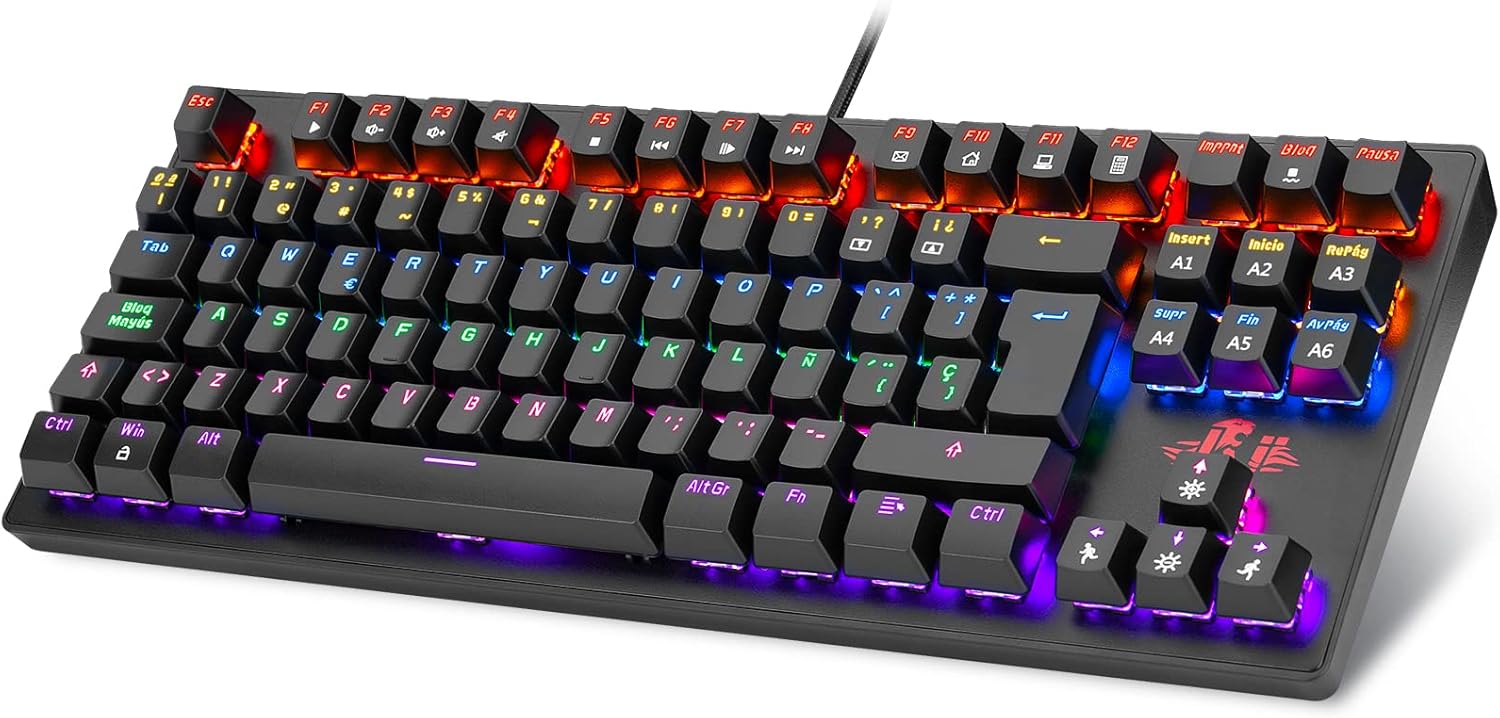
Figura 2.1: Mésview of the Rii RK908 Mechanical Gaming Keyboard.

Figura 2.2: Primer pla view of the BlueSwitch mechanical key switches, known for their tactile and audible feedback.

Figure 2.3: Illustration of the compact 88-key tenkeyless design, optimizing desk space.

Figure 2.4: Visual representation of the full anti-ghosting feature, ensuring all key presses are registered accurately.

Figure 2.5: The keyboard demonstrating its spill-resistant design with integrated drain holes.

Figura 2.6: Pro lateralfile of the keyboard highlighting its ergonomic curve for comfortable use.
3. Configuració
3.1 Connexió del teclat
- Unpack the Rii RK908 keyboard from its packaging.
- Locate an available USB port on your computer (PC, Mac, Linux) or gaming console (PS4, Xbox).
- Plug the USB connector of the keyboard firmly into the USB port.
- El sistema operatiu detectarà i instal·larà automàticament els controladors necessaris. Aquest procés pot trigar uns instants.
- Once installed, the keyboard's backlight will illuminate, indicating it is ready for use.
3.2 Requisits del sistema
- Operating System: Windows 98/XP/2000/ME/Vista/Win7/Win8/Win10, Linux, Mac OS.
- Available USB 2.0 or 3.0 port.
4. Instruccions de funcionament
4.1 Backlight Modes
The Rii RK908 keyboard features 22 different RGB backlight modes. Use the following key combinations to control the backlighting:
- Fn + INS: Cicle entre els diferents modes de retroiluminació.
- Fn + HOME: Activate specific backlight effects.
- Fn + PGUP: Ajusta la brillantor de la retroiluminació (5 nivells).
- Fn + PGDN: Adjust backlight speed (5 levels).
- Fn + Supr: Change backlight color in certain modes.
- Fn + END: Activa/desactiva la retroiluminació.

Figure 4.1: The keyboard displaying multiple rainbow LED backlight effects.
4.2 Macro Recording Function
The keyboard allows you to record up to 5 custom macros (M1-M5) to automate frequently used key sequences.
- Entra al mode d'enregistrament: Premeu Fn + M1 (or M2, M3, M4, M5) to select the macro key you wish to program. The backlight of the selected macro key will start blinking to indicate recording mode.
- Seqüència de registre: Type the desired key sequence. You can record up to 32 characters.
- Save Macro: Premeu Fn + M1 (or the same M key you started with) again to save the macro. The backlight of the macro key will stop blinking and return to its normal state.
- Execute Macro: To execute a recorded macro, simply press the corresponding macro key (M1-M5).
Note: Macros are stored in the keyboard's memory and will persist even after disconnecting the keyboard.

Figure 4.2: Keys involved in the macro recording function, allowing for custom shortcuts.
5. Manteniment
5.1 Neteja del teclat
- Desconnecteu el teclat de l'ordinador abans de netejar-lo.
- Utilitzeu un drap suau i sense pelusa lleugerament dampEsbandiu amb aigua o una solució netejadora suau per netejar la superfície del teclat.
- Per a la pols i les restes entre les tecles, feu servir aire comprimit.
- No utilitzeu productes químics agressius, netejadors abrasius ni submergiu el teclat en aigua.
- Assegureu-vos que el teclat estigui completament sec abans de tornar-lo a connectar.
5.2 Emmagatzematge
Quan no l'utilitzeu durant períodes prolongats, guardeu el teclat en un lloc fresc i sec, allunyat de la llum solar directa i de temperatures extremes.
6. Solució De Problemes
- El teclat no respon:
- Assegureu-vos que el cable USB estigui ben connectat tant al teclat com a l'ordinador/consola.
- Prova de connectar el teclat a un port USB diferent.
- Reinicieu l'ordinador/consola.
- Prova el teclat en un altre ordinador per descartar problemes específics del sistema.
- Backlight not working or stuck:
- Premeu Fn + FI to ensure the backlight is not turned off.
- Ajusta la brillantor amb Fn + PGUP.
- Cycle through modes using Fn + INS a veure si respon.
- Claus que no es registren o queden sense res:
- Assegureu-vos que el teclat estigui net i lliure de residus que puguin obstruir la pulsació de les tecles.
- The keyboard has full anti-ghosting; if issues persist, try restarting your system.
7. Especificacions
| Dimensions del producte | 14.57 x 6.69 x 0.98 polzades |
| Pes de l'article | 2.46 unces |
| Fabricant | veure |
| Número de model | RK908 |
| Nombre de claus | 88 |
| Tipus de canvi | BlueSwitch Mechanical |
| Llum de fons | RGB (22 Modes) |
| Material | Acer |
| Color | Negre/Blanc |
| Dispositius compatibles | PC, Windows, Linux, Mac OS, PS4, Xbox |
8. Garantia i Suport
Rii offers a professional after-sales service, referred to as "Carefree" (Worry-free), for this product. For any issues, questions, or support needs, please refer to the contact information provided with your purchase or visit the official Rii weblloc d'assistència.
Conserveu el vostre comprovant de compra per a reclamacions de garantia.