
Introducció
This manual provides instructions for the proper setup, operation, and maintenance of your Comix C-2031 Desk Calculator. This calculator is designed for general arithmetic tasks in home, office, or school environments, featuring a large 12-digit LCD display and dual power sources.

Característiques clau
The Comix C-2031 Desk Calculator is equipped with several features designed for ease of use and reliability:
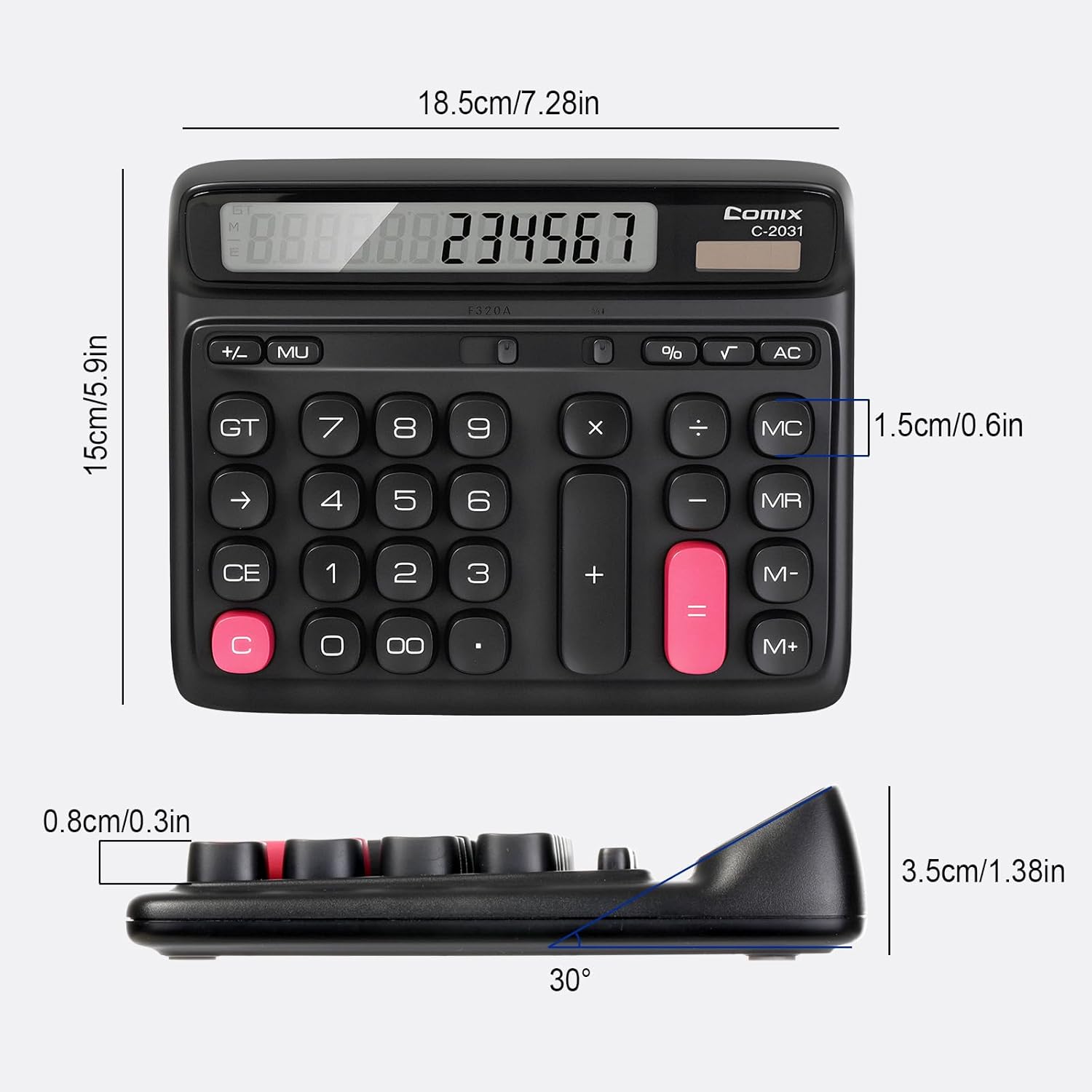
- Pantalla LCD gran de 12 dígits: Provides clear and accurate readings with a 30° tilt for comfortable viewing.
- Ergonomic Computer Key Design: Features round keys for comfortable touch and clear feedback, designed for efficient data entry.
- Font d'alimentació dual: Operates on solar energy in well-lit conditions and includes a 1 AA battery for consistent performance, especially in low light.
- Peus antilliscants: Equipped with four non-slip feet to ensure stability on your desk during use.
- Mida compacta: Measures 7.28 x 5.9 x 1.38 inches, fitting conveniently on any desk.

Configuració
Font d'alimentació
The Comix C-2031 calculator utilizes a dual power system, operating on both solar energy and a single AA battery. For optimal display clarity and consistent operation, especially in environments with varying light conditions, using the AA battery is recommended.
- Energia solar: The calculator will automatically use solar power when sufficient light is available. Ensure the solar panel (located above the display) is exposed to light for operation without battery power.
- Instal·lació de la bateria:
- Localitza el compartiment de la bateria a la part posterior de la calculadora.
- Obriu la tapa del compartiment de la bateria.
- Inseriu una pila AA, assegurant-vos de la polaritat correcta (+/-).
- Tanqueu bé la tapa del compartiment de la bateria.

Instruccions de funcionament
Familiarize yourself with the calculator's key functions for efficient use.

Operacions bàsiques
- Entrada de número: Press the number keys (0-9) to input digits.
- Punt decimal: Press the "." key for decimal values.
- Addition (+), Subtraction (-), Multiplication (×), Division (÷): Press the corresponding operator key after entering the first number, then enter the second number, and press "=" for the result.
- Igual (=): Displays the result of a calculation.
Funcions clares
- C (Clear the Screen): Clears the current entry on the display without affecting memory or ongoing calculations.
- CE (Entrada clara): Clears the last entered number or operation.
- AC (Clear All): Clears all entries, operations, and memory content, resetting the calculator to its initial state.
- Backspace (→): Elimina l'últim dígit introduït.
Funcions de memòria
- M+ (Memòria Plus): Afegeix el número mostrat a la memòria.
- M- (menys de memòria): Resta el número mostrat de la memòria.
- MR (recuperació de memòria): Recalls the value stored in memory to the display.
- MC (esborrat de memòria): Clears the memory content.
Funcions avançades
- % (percenttage): S'utilitza per a percentatgestage càlculs. Per example, to calculate 10% of 200, enter 200 × 10 %, which will display 20.
- √ (Arrel quadrada): Calcula l'arrel quadrada del nombre mostrat.
- GT (Gran Total): Accumulates the results of all calculations. Pressing GT displays the grand total.
- MU (Mark-Up): S'utilitza per calcular el marge de benefici.
Producte acabatview Vídeo
Manteniment
- Neteja: Wipe the calculator with a soft, dry cloth. Do not use liquid cleaners or abrasive materials.
- Substitució de la bateria: If the display becomes dim or unresponsive, replace the AA battery in the compartment on the back of the unit. Ensure proper polarity.
- Emmagatzematge: Guardeu la calculadora en un lloc fresc i sec, allunyat de la llum solar directa i de temperatures extremes.
Resolució de problemes
| Problema | Causa possible | Solució |
|---|---|---|
| La pantalla està en blanc o tènue. | Insufficient light for solar power, or low battery. | Move the calculator to a brighter area or replace the AA battery. |
| Les tecles no responen. | Temporary software glitch or low power. | Press the AC button to reset. If the issue persists, replace the battery. |
| Resultats de càlcul incorrectes. | Incorrect key sequence or function usage. | Review the operating instructions for the specific function. Press AC to clear all previous entries and start a new calculation. |
Especificacions
- Model: C-2031
- Visualització: 12-Digit Large LCD Display
- Font d'alimentació: Solar and 1 x AA Battery (included)
- Dimensions del producte: 7.28 x 5.9 x 1.38 polzades (18.5 x 15 x 3.5 cm)
- Pes de l'article: 10.5 unces (297.67 grams)
- Tipus de clau: Ergonomic Computer Keys
- Característiques: 30° Tilt Display, Non-Slip Feet
Garantia i Suport
Comix products are manufactured with quality and reliability in mind. For any questions, technical support, or warranty inquiries, please refer to the contact information provided with your purchase or visit the official Comix weblloc web. Si us plau, conserveu el comprovant de compra per a reclamacions de garantia.