
1. Introducció
This manual provides comprehensive instructions for the installation, operation, and maintenance of your SURFOU Smart WiFi Socket, Model BSD60. This smart plug is designed to integrate seamlessly into your smart home ecosystem, offering remote control, energy monitoring, and scheduling capabilities. It is compatible with popular voice assistants like Amazon Alexa, Google Home, and SmartThings.
2. Producte acabatview
The SURFOU Smart WiFi Socket (Model BSD60) is an Italian Type L smart plug that allows you to control connected appliances remotely and monitor their energy consumption. Its compact design ensures it fits well in various settings.
2.1 Característiques clau
- Control de veu: Compatible amb Amazon Alexa, Google Home i SmartThings per a un funcionament amb mans lliures.
- Comandament a distància: Manage connected devices from anywhere using the Smart Life or Tuya app.
- Funció de cronometratge: Set schedules and timers for automatic power on/off.
- Monitorització energètica: Seguiment del consum d'energia en temps real dels aparells connectats.
- Característiques de seguretat: Includes protection against overcharge, overheating, short circuits, and surges.
- Disseny compacte: Space-saving form factor (6 x 6 x 8.5 cm).
- Alta potència nominal: Supports up to 16A / 3680W.
2.2 Product Diagram and Dimensions

Figura 1: SURFOU Smart WiFi Socket with dimensions and feature icons.
This image displays the physical dimensions of the smart socket, measuring approximately 7.7 cm in height, 7.5 cm in depth, and 5 cm in width. It also highlights key functionalities such as energy monitoring, remote control, timer function, 16A current rating, 2.4 GHz WLAN connectivity, and voice control compatibility.
3. Informació de seguretat
Si us plau, llegiu atentament tots els avisos i instruccions de seguretat abans d'utilitzar aquest producte per evitar lesions o danys. Conserveu aquest manual per a futures consultes.
- Només per a ús interior: Aquest dispositiu està dissenyat per a ús interior en llocs secs. No l'exposeu a l'aigua ni a la humitat.
- Valoració elèctrica: Do not exceed the maximum load of 16A / 3680W. Overloading can cause overheating, fire, or electric shock.
- Voltage: Operate only within the specified voltagel rang de 230 volts.
- Seguretat dels nens: Keep out of reach of children. The smart plug features hidden contacts to prevent accidental shock.
- Desmuntatge: Do not attempt to disassemble or modify the device. This will void the warranty and may cause safety hazards.
- Neteja: Unplug the device before cleaning. Use a dry cloth; do not use liquid cleaners.
- Protecció contra el sobreescalfament: The smart plug is equipped with automatic shut-off in case of overcharge or overheating.

Figura 2: Child safety and protection features of the smart socket.
This image displays a child reaching towards a wall socket, with an overlay highlighting the safety features of the SURFOU Smart WiFi Socket, such as protection from short circuits, overvoltages, overheating, and lightning, emphasizing child safety.
4. Guia de configuració
4.1 Què hi ha a la caixa
- 1 x SURFOU Smart WiFi Socket (Model BSD60)
- 1 x Manual d'usuari (aquest document)
4.2 Descàrrega i instal·lació d'aplicacions
To control your smart socket, you need to download the companion app:
- Scan the QR code provided in the packaging or search for "Smart Life" or "Tuya Smart" in your smartphone's app store (Google Play for Android, App Store for iOS).
- Baixeu i instal·leu l'aplicació.
- Registra un compte nou o inicia la sessió si ja en tens un.
4.3 Connexió a Wi-Fi
Ensure your Wi-Fi network is 2.4GHz. The smart socket does not support 5GHz Wi-Fi networks.
- Plug the SURFOU Smart WiFi Socket into a wall outlet.
- Obre l'aplicació Smart Life o Tuya Smart.
- Toqueu la icona "+" a la cantonada superior dreta per afegir un dispositiu.
- Seleccioneu "Presa elèctrica" o "Presa (Wi-Fi)".
- Follow the on-screen instructions to put the device into pairing mode (usually by pressing and holding the power button on the socket until the indicator light blinks rapidly).
- Introduïu el nom i la contrasenya de la vostra xarxa Wi-Fi de 2.4 GHz.
- Wait for the app to connect to the device. Once connected, you can rename the socket for easier identification.
5. Instruccions de funcionament
5.1 Control bàsic d'encesa/apagada
Once connected, you can turn the smart socket on or off directly from the app by tapping the device icon. You can also manually press the power button on the socket to toggle its state.
5.2 Control remot
Control your appliances from anywhere with an internet connection. Open the Smart Life or Tuya Smart app on your smartphone to manage the smart socket's power state, even when you are away from home.
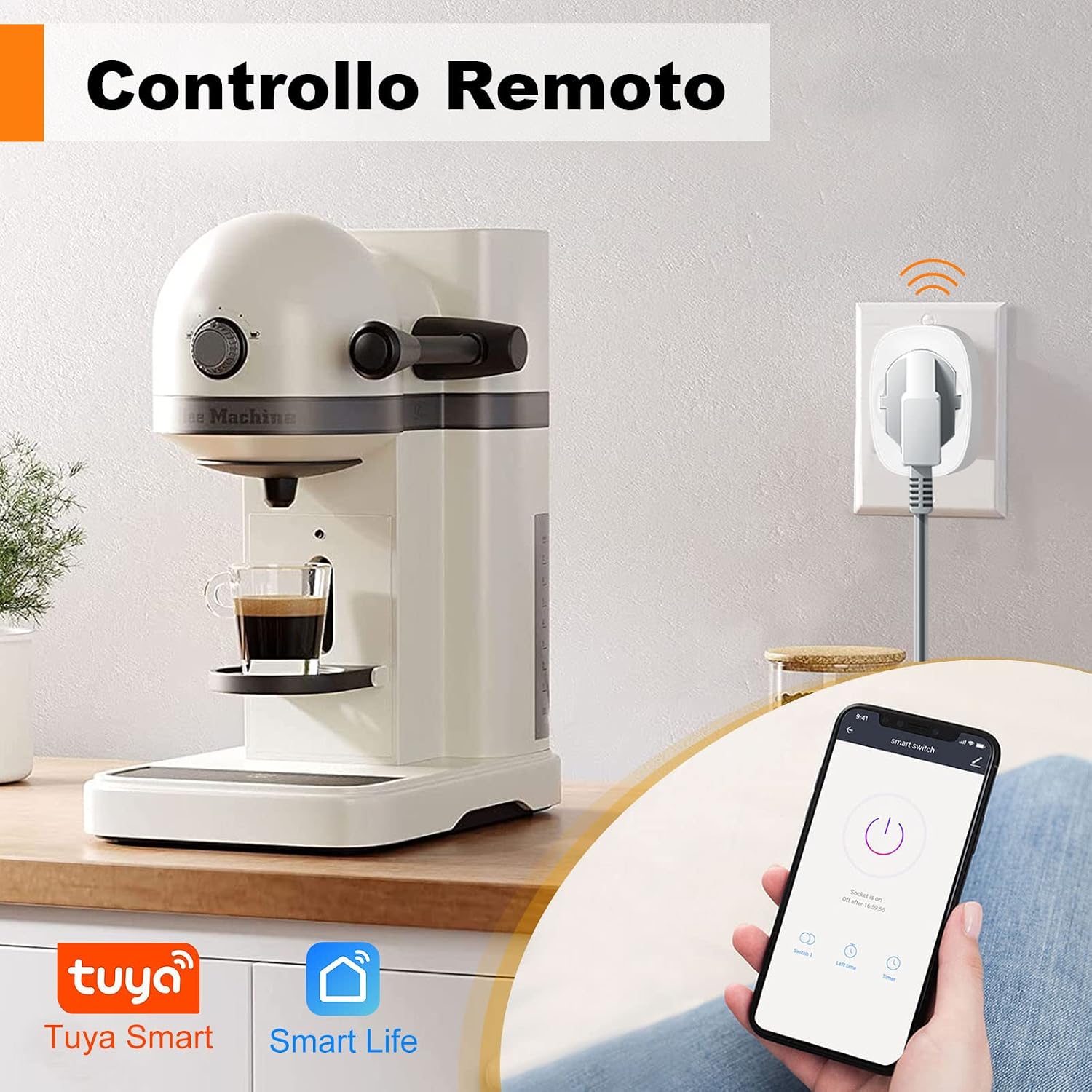
Figura 3: Remote control functionality via smartphone app.
This image demonstrates how to remotely control an appliance, such as a coffee machine, connected to the smart socket using the Smart Life or Tuya Smart mobile application.
5.3 Timing Function (Schedules and Timers)
Automate your devices by setting schedules or countdown timers:
- In the app, select your smart socket.
- Tap on the "Timer" or "Schedule" option.
- Set specific times for the socket to turn on or off, and choose the days of the week for repetition.
- You can also set a countdown timer for a one-time event.

Figura 4: Setting schedules for automatic operation.
This image illustrates the timer function within the smart plug application, showing how users can program specific on/off times for appliances, such as a microwave or oven, in a kitchen environment.
5.4 Integració del control per veu
Integrate your SURFOU Smart WiFi Socket with Amazon Alexa, Google Home, or SmartThings for voice-activated control:
- Ensure your smart socket is successfully added to the Smart Life or Tuya Smart app.
- Open your Alexa, Google Home, or SmartThings app.
- Go to the "Skills" or "Works with" section and search for "Smart Life" or "Tuya Smart".
- Enable the skill/service and link your Smart Life/Tuya account.
- Discover devices. Once discovered, you can use voice commands like:
- "Alexa, activa [Nom del dispositiu]"
- "Ei Google, desactiva [Nom del dispositiu]"

Figura 5: Voice control with Alexa and Google Assistant.
This image demonstrates the convenience of controlling a lamp connected to the smart socket using voice commands through an Alexa device, showcasing the product's compatibility with major voice assistants.
5.5 Monitorització energètica
The SURFOU Smart WiFi Socket features a built-in energy meter to track power consumption:
- In the Smart Life or Tuya Smart app, select your smart socket.
- Look for the "Power Statistics" or "Energy Monitoring" section.
- View real-time power usage, daily, weekly, or monthly consumption reports.

Figura 6: Monitorització del consum d'energia.
This image displays a graphical representation of energy consumption data, showing how the smart socket tracks and reports power usage over time, helping users monitor and manage their electricity consumption.
6. Manteniment
- Neteja: Disconnect the smart socket from the power outlet before cleaning. Use a soft, dry cloth to wipe the surface. Do not use liquid or aerosol cleaners.
- Emmagatzematge: Quan no l'utilitzeu durant períodes prolongats, guardeu el dispositiu en un lloc fresc i sec, allunyat de la llum solar directa i de la humitat.
- Inspecció: Periodically check the smart socket and connected appliance cords for any signs of damage.
7. Solució De Problemes
| Problema | Causa possible | Solució |
|---|---|---|
| El dispositiu no es pot connectar a la Wi-Fi. | Incorrect Wi-Fi band (5GHz), wrong password, weak signal, or device not in pairing mode. |
|
| El comandament a distància no funciona. | No internet connection on phone or smart socket, or app is not logged in. |
|
| El control per veu no respon. | Incorrect device name, voice assistant skill not enabled, or account not linked. |
|
| Energy monitoring data is inaccurate or not updating. | Temporary app glitch or connectivity issue. |
|
8. Especificacions
| Marca | SURFOU |
| Número de model | BSD60 |
| Valoració actual | 16 Amps |
| Vol. Operatiutage | 230 Volts |
| Wattage | 3680 watts |
| Protocol de connectivitat | Wi-Fi de 2.4 GHz (IEEE 802.11 b/g/n) |
| Tipus de controlador | Compatible with Amazon Alexa, Google Assistant, SmartThings |
| Mètode de control | App (Smart Life / Tuya Smart) |
| Dimensions de l'article (L x A x A) | 6 x 6 x 8.5 centímetres |
| Pes de l'article | 58 grams |
| Tipus de material | Acrilonitril butadiè estirè (ABS) |
| Material de contacte | Alumini |
| Classificació de protecció internacional | IP68 |
| Certificacions | CE, RoHS, TUV |
| Mode d'operació | ON-NONE-OFF |
| Tipus de canvi | DIAC |
| Tipus de muntatge | Muntatge de paret |
9. Garantia i Suport
SURFOU products are manufactured to high quality standards. For information regarding warranty coverage, technical support, or service, please refer to the contact information provided with your purchase or visit the official SURFOU weblloc web. Si us plau, conserveu el comprovant de compra per a reclamacions de garantia.