
Introducció
Welcome to the user manual for your new VERTU iVERTU-81 5G smartphone. This guide provides essential information to help you set up, operate, maintain, and troubleshoot your device. Please read this manual thoroughly to ensure optimal performance and longevity of your smartphone.
Què hi ha a la caixa
Upon unboxing your VERTU iVERTU-81, please verify that all components are present:
- VERTU iVERTU-81 5G Smartphone
- Adaptador d'alimentació
- USB-C Cable (not explicitly listed but implied for charging)
- SIM Ejector Tool (not explicitly listed but implied for SIM tray)
- Quick Start Guide (not explicitly listed but implied)
Si falta algun element o està malmès, poseu-vos en contacte amb l'atenció al client.
Configuració
1. Inserció de targetes SIM
The VERTU iVERTU-81 supports dual Nano SIM cards for 5G dual card dual standby functionality.
- Localitza la safata de la targeta SIM al lateral del telèfon.
- Introduïu l'eina d'expulsió de la SIM al forat petit que hi ha al costat de la safata i premeu suaument fins que la safata surti.
- Place your Nano SIM cards into the designated slots on the tray, ensuring the gold contacts face down.
- Torneu a inserir amb cura la safata de la targeta SIM al telèfon fins que encaixi al seu lloc.
2. Engegada i configuració inicials
- Press and hold the power button until the VERTU logo appears.
- Segueix les instruccions que apareixen a la pantalla per seleccionar l'idioma, connectar-te a una xarxa Wi-Fi i configurar el teu compte de Google.
- Configura els paràmetres de seguretat com ara l'empremta digital, el desbloqueig facial o un PIN/patró.
3. Carregant la bateria
Before first use, it is recommended to fully charge your device. Use the provided power adapter and USB-C cable.
- Connecteu el cable USB-C al port de càrrega de la part inferior del telèfon.
- Connecteu l'altre extrem del cable a l'adaptador de corrent i, a continuació, endolleu l'adaptador a una presa de corrent.
- The phone supports 55W fast charging. A full charge can be achieved rapidly.

Image: The VERTU iVERTU-81 smartphone connected to a charger, displaying a '55W Fast Charge' notification on its screen, indicating rapid battery replenishment.
Funcionament del vostre dispositiu
Visualització i navegació
The iVERTU-81 features a 6.67-inch OLED FHD+ display with a 120Hz high refresh rate, providing a clear and immersive viewing experience. The display is designed to adapt to blue light, caring for your eyes.
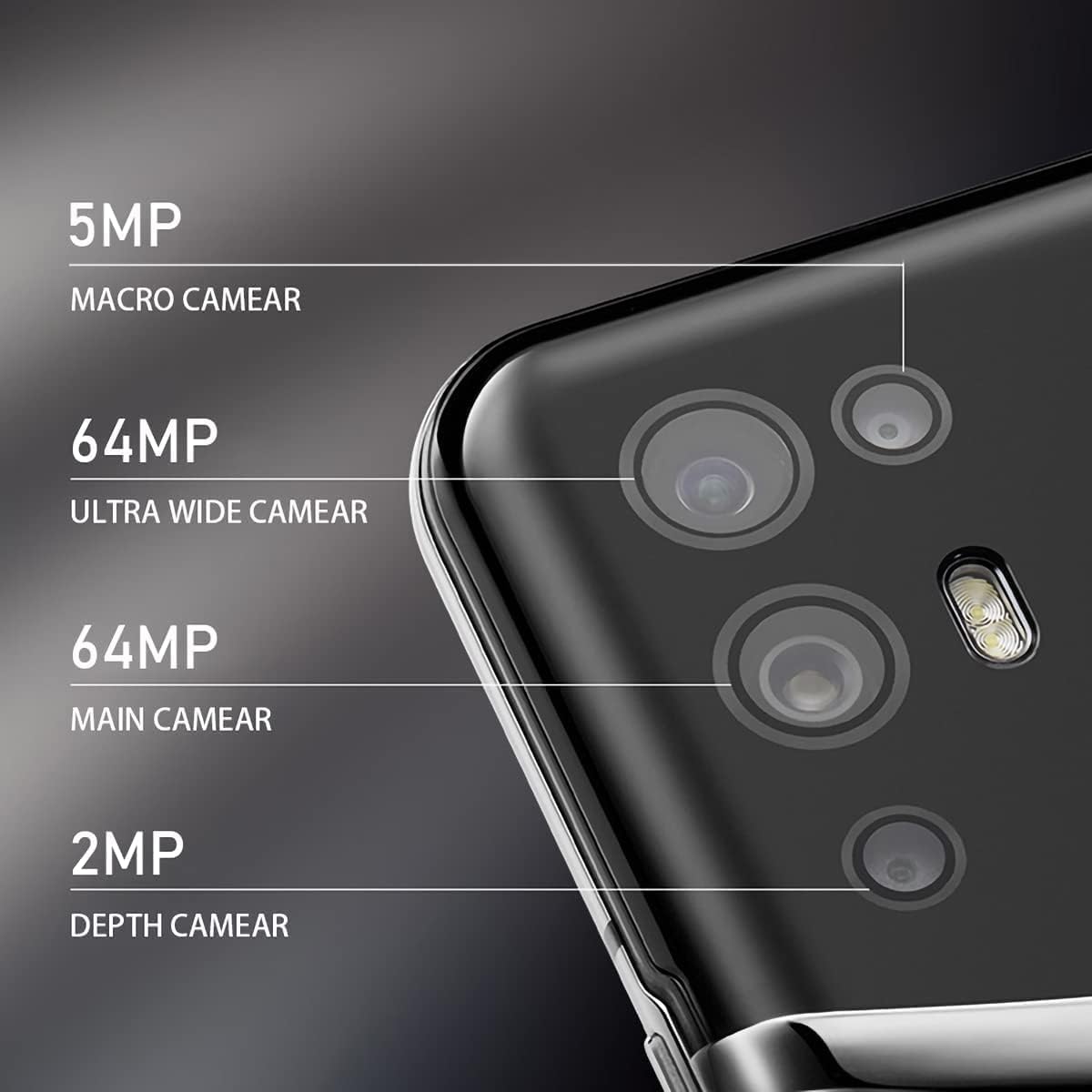
Image: The VERTU iVERTU-81 smartphone showcasing its 6.67-inch OLED display with vibrant colors, featuring a dancer and text highlighting '6.67" OLED Display' and '90hZ' (likely indicating refresh rate).
Rendiment
Powered by a Snapdragon 888 octa-core chip and 12GB RAM, the iVERTU-81 delivers powerful performance for a smooth gaming and multitasking experience.

Image: Two hands holding the VERTU iVERTU-81 smartphone, which displays a graphically intensive game, illustrating the device's 'Powerful Performance'.
Qualitat d'àudio
Experience master sound quality with 3D audio technology and HiFi sound. The device also features exclusive ringtones compiled by the London Symphony Orchestra.

Image: The VERTU iVERTU-81 smartphone displaying an image of an orchestra, accompanied by text highlighting 'Master Sound Quality', '3D audio technology', 'HiFi sound quality', and 'London Symphony Orchestra compiled exclusive ringtones'.
Característiques de la càmera
The iVERTU-81 is equipped with a professional photography configuration, allowing you to capture high-quality images and videos.
Sistema de càmeres posteriors
- Càmera principal de 64MP: Per a fotos d'alta resolució.
- 64MP Ultra Wide Angle Camera: For expansive landscape and group shots.
- Càmera macro de 5MP: For detailed close-up photography.
- Càmera de profunditat de 2MP: For enhanced portrait mode with bokeh effects.
Càmera frontal
- Càmera frontal de 16MP: Per a selfies i videotrucades nítides.
Gravació de vídeo
Support for 4K 60FPS high-definition video shooting with two-way anti-shake technology ensures smooth and stable video capture. Intelligent focus assists in sharp and clear recordings.

Imatge: Una imatge detallada view of the VERTU iVERTU-81's rear camera module, labeling its four lenses: 5MP Macro, 64MP Ultra Wide, 64MP Main, and 2MP Depth cameras.

Image: The VERTU iVERTU-81 smartphone displaying its camera interface, capturing a snowboarder in action, with text emphasizing 'Professional Photography' and support for '4K 60FPS HD video shooting, two-way anti-shake, intelligent focus'.
Manteniment
To ensure the longevity and optimal performance of your VERTU iVERTU-81 smartphone, follow these maintenance guidelines:
- Neteja: Feu servir un drap suau i sense borrissol per netejar la pantalla i la carcassa del telèfon. Eviteu materials abrasius o productes químics agressius.
- Actualitzacions de programari: Comproveu i instal·leu regularment si hi ha actualitzacions del sistema per assegurar-vos que el vostre dispositiu tingui els pegats i les funcions de seguretat més recents.
- Cura de la bateria: Avoid extreme temperatures. Do not fully discharge the battery frequently. Use only the provided or certified charging accessories.
- Gestió d'emmagatzematge: Netegeu periòdicament els innecessaris files and apps to maintain optimal performance. The phone comes with 512GB ROM.
- Protecció: Penseu en utilitzar una funda protectora i un protector de pantalla per protegir-vos contra danys físics.
Resolució de problemes
If you encounter issues with your VERTU iVERTU-81, refer to the following common troubleshooting steps:
El dispositiu no s'encén
- Assegureu-vos que la bateria estigui carregada. Connecteu el telèfon al carregador durant almenys 15 minuts abans d'intentar tornar-lo a encendre.
- Premeu i manteniu premut el botó d'engegada durant 10-15 segons per forçar un reinici.
Senyal de xarxa deficient
- Comproveu si la targeta SIM està inserida correctament.
- Traslladeu-vos a una zona amb millor cobertura de xarxa.
- Reinicieu el telèfon.
- Verify that your mobile data or 5G settings are correctly configured.
Les aplicacions es bloquegen o es bloquegen
- Tanca l'aplicació problemàtica i torna-la a obrir.
- Clear the app's cache and data in the phone's settings.
- Assegureu-vos que l'aplicació estigui actualitzada a la seva darrera versió.
- Reinicieu el telèfon.
La bateria s'esgota ràpidament
- Redueix la brillantor de la pantalla i estableix un temps d'espera més curt.
- Disable unused features like Wi-Fi, Bluetooth, GPS, or 5G when not needed.
- Identify and close power-intensive apps running in the background.
- Check for system updates, as they often include battery optimizations.

Image: The VERTU iVERTU-81 smartphone connected to a charger, displaying '4200mAh Long Battery Life' and '55W fast charge' text, emphasizing its battery capacity and quick charging capability.
Communication Encryption
The device features communication encryption for double protection of your data and privacy.

Image: A visual representation of a safe door, overlaid with various security-related terms such as 'encryption', 'firewalls', 'privacy', and 'information security', illustrating the concept of 'Communication Encryption Double Protection'.
Especificacions
| Característica | Especificació |
|---|---|
| Nom del model | iVERTU-81 |
| Sistema operatiu | Android |
| Processador | Snapdragon 888 (octa-nucli) |
| RAM | 12 GB |
| Capacitat d'emmagatzematge de memòria | 512 GB |
| Mida de la pantalla | 6.67 polzades |
| Tipus de visualització | OLED |
| Resolució | 2400 x 1080 |
| Freqüència d'actualització | 120 Hz |
| Càmera posterior | 64MP Main + 64MP Ultra Wide + 5MP Macro + 2MP Depth |
| Càmera frontal | 16MP |
| Capacitat de la bateria | 4200 milionsamp Hores |
| Carregant | Càrrega ràpida de 55 W |
| Operador sense fil | Desbloquejat |
| Tecnologia cel·lular | 5G |
| Tecnologies de connectivitat | Wi-Fi, GPS |
| Color | Calf Leather-Brown |
Garantia i Suport
For warranty information and customer support, please refer to the warranty card included with your product or visit the official VERTU weblloc web. Conserveu el comprovant de compra per a reclamacions de garantia.
For technical assistance or service inquiries, please contact VERTU customer service through the channels provided on their official weblloc.