
MageGee BOX-white-bd
MageGee Portable 60% Mechanical Gaming Keyboard User Manual
Model: BOX-white-bd
Brand: MageGee
Introducció
This manual provides comprehensive instructions for the setup, operation, and maintenance of your MageGee Portable 60% Mechanical Gaming Keyboard. Please read this manual thoroughly before using the product to ensure optimal performance and longevity.
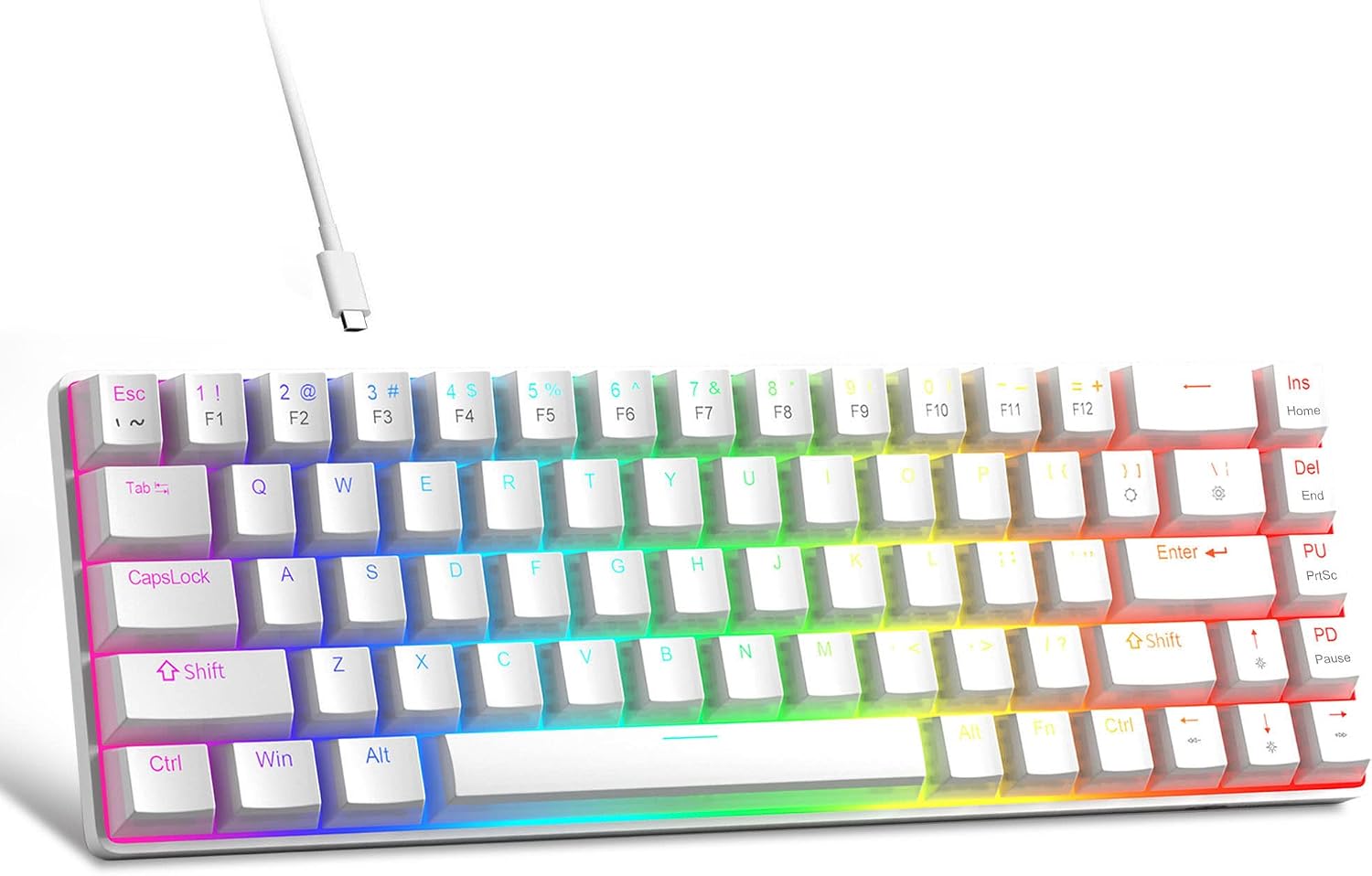
Image: The MageGee Portable 60% Mechanical Gaming Keyboard, featuring its compact design and RGB backlighting.
Característiques clau
- Mini Portable 60% Compact Layout: The MK-Box is a 68-key full anti-ghosting mechanical keyboard with a small size, retaining separate arrow keys and F1-F12 function keys for gaming or work while saving space.
- Double Shot Injection PBT Pudding Keycaps: High-quality PBT material double-layered translucent pudding keycaps offer high wear resistance, excellent tactile feel, and good light transmission for enhanced illumination.
- Cool True RGB Backlight Keyboard: Features a wide choice of backlight effects and colors.
- Red Switch Mechanical Keyboard: Characterized by linear and smoother key presses with minimal resistance and fast action, providing a quiet typing experience without a tactile bump.
- Compatibilitat àmplia: Uses a USB 2.0 connector, compatible with Windows (2000, XP, ME, Vista, 7, 8), Linux, and Mac. Plug and play, no drivers or software required.

Image: Diagram illustrating the compact 60% layout of the keyboard, highlighting its 68 keys and space-saving design compared to a full-size keyboard.

Imatge: Primer pla view of the PBT pudding keycaps, showcasing their translucent design and durable material.

Image: The keyboard displaying its vibrant RGB backlight effects, highlighting the customizable lighting options.

Imatge: Un primer pla view of the red mechanical switches beneath the keycaps, illustrating their linear design.
Contingut del paquet
Assegureu-vos que hi hagi tots els articles presents en desempaquetar:
- MageGee Portable 60% Mechanical Gaming Keyboard
- Cable USB
- Extractor de tecles
- Manual d'usuari (aquest document)
Guia de configuració
- Connecteu el teclat: Insert the USB-C end of the provided USB cable into the port on the back of the keyboard.
- Connexió a l'ordinador: Plug the USB-A end of the cable into an available USB port on your computer (Windows PC, Linux, or Mac).
- Instal·lació automàtica: The keyboard is plug-and-play. Your operating system should automatically detect and install the necessary drivers. No additional software is required.
- Prova inicial: Once connected, the keyboard backlight should illuminate. Test typing in a text editor to ensure all keys are functioning correctly.
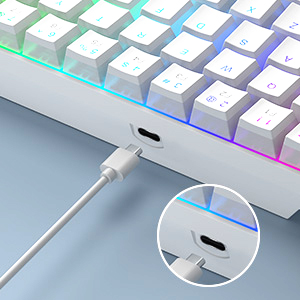
Image: Close-up of the USB-C port on the keyboard, showing where to connect the cable.
Instruccions de funcionament
Function Key Combinations (Fn Key)
Due to its compact 60% layout, many functions are accessed using the Fn clau en combinació amb altres tecles.
| Combinació | Funció |
|---|---|
| Fn + | | Toggle between approximately 16 backlight modes (static and dynamic). |
| Fn + ] } | Toggle between 9 backlight colors (including RGB and 8 single colors). |
| Fn + ↑ (Fletxa amunt) | Augmenta la brillantor de la retroiluminació. |
| Fn + ↓ (Fletxa avall) | Reduir la brillantor de la retroiluminació. |
| Fn + ← (Fletxa esquerra) | Redueix la velocitat de la retroiluminació (per als modes dinàmics). |
| Fn + → (Fletxa dreta) | Augmenta la velocitat de la retroiluminació (per a modes dinàmics). |
| Fn + 1-0, -, = | Access F1-F12 function keys (e.g., Fn+1 for F1, Fn+= for F12). |
| Fn + Esc | Access the grave accent (`) or tilde (~) symbol. |

Image: Visual guide to common function key combinations for backlight control.
Experiència de mecanografia
The keyboard features Red Switches, known for their linear and smooth keystrokes. This provides a consistent feel without a tactile bump, making them suitable for both fast typing and gaming.
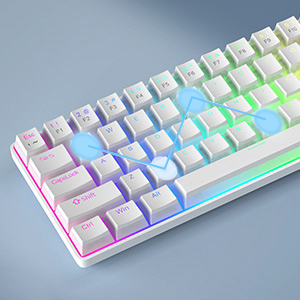
Image: An illustration demonstrating the anti-ghosting capability of the keyboard, allowing multiple simultaneous key presses to be registered accurately.
Manteniment
Per garantir la longevitat i el rendiment òptim del teclat, seguiu aquestes pautes de manteniment:
- Neteja: Regularly clean the keycaps and the area between them using a soft brush or compressed air to remove dust and debris. For stubborn dirt, gently wipe keycaps with a damp cloth (ensure the keyboard is disconnected).
- Eliminació de la tapa de les tecles: Use the provided keycap puller to safely remove keycaps for deeper cleaning or replacement. Insert the puller onto the keycap and pull straight up.
- Eviteu líquids: No exposeu el teclat a líquids. En cas de vessament, desconnecteu immediatament el teclat i deixeu-lo assecar completament abans de tornar-lo a connectar.
- Emmagatzematge: When not in use, store the keyboard in a dry, cool place away from direct sunlight.
Resolució de problemes
Si teniu problemes amb el teclat, consulteu els problemes i solucions més comuns següents:
- El teclat no respon:
- - Ensure the USB cable is securely connected to both the keyboard and the computer.
- - Try plugging the keyboard into a different USB port on your computer.
- - Test the keyboard on another computer to rule out a computer-specific issue.
- - Reinicieu l'ordinador.
- La retroiluminació no funciona o és incorrecta:
- - Use Fn + ↑ / ↓ to adjust brightness.
- - Use Fn + | to cycle through different backlight modes.
- - Use Fn + ] } to change backlight colors.
- Certain keys not working:
- - Check if there is any debris or obstruction under the keycap. Carefully remove the keycap using the keycap puller and clean the switch area.
- - Ensure the keyboard is not in a special mode that disables certain keys (refer to operating instructions).
- Input lag or ghosting:
- - Ensure the keyboard is connected directly to a USB port on your computer, not through a USB hub or KVM switch, which can sometimes introduce lag.
- - The keyboard features anti-ghosting, but extreme scenarios or system issues could still cause problems. Try restarting your computer.
Especificacions
| Característica | Detall |
|---|---|
| Número de model | BOX-white-bd |
| Disseny | 60% Compact, 68 Keys |
| Tipus de canvi | Interruptors mecànics vermells |
| Taps de claus | Double Shot Injection PBT Pudding Keycaps |
| Llum de fons | True RGB Backlit (16 modes, 9 colors) |
| Connectivitat | USB 2.0 per cable |
| Compatibilitat | Windows (2000, XP, ME, Vista, 7, 8), Linux, Mac |
| Dimensions del producte | 12.13 x 3.98 x 1.54 polzades (30.8 x 10.1 x 3.9 cm) |
| Pes de l'article | 1.46 lliures (662 grams) |
| Color | Ivory White /Red Switch |

Image: Diagram showing the physical dimensions of the keyboard in centimeters and inches.
Garantia i Suport
MageGee products are designed for reliability and performance. For information regarding warranty coverage, technical support, or service inquiries, please refer to the official MageGee weblloc web o contacteu directament amb el seu servei d'atenció al client.
Conserveu el vostre comprovant de compra per a reclamacions de garantia.
Ask a question about this manual
Ask about setup, troubleshooting, compatibility, parts, safety, or missing instructions. Manuals+ will review the question and use this page’s manual context to help answer it.