
1. Producte acabatview
The GIGABYTE G24F 2 is a 23.8-inch gaming monitor designed for an immersive visual experience. It features a Super Speed IPS panel, Full HD (1920 x 1080) resolution, and a high refresh rate for smooth gameplay.

Figura 1.1: Frontal view of the GIGABYTE G24F 2 gaming monitor.
Característiques principals:
- Mida del panell: 23.8-inch SS IPS display
- Resolució: 1920 x 1080 (FHD)
- Temps de resposta: MPRT d'1 ms
- Freqüència d'actualització: 165 Hz (Overclockable fins a 180 Hz)
- Saturació del color: 95% DCI-P3, 125% sRGB
- Brillantor: 300 cd/m2 (TYP)
- Relació de contrast: 1100:1
- Connectivitat: 2 x HDMI 2.0, 1 x DisplayPort 1.2 (HDR capable), 2 x USB 3.2 Gen 1 Downstream, 1 x USB 3.2 Gen 1 Upstream, 1 x Earphone Jack
- Característiques especials: OSD Sidekick, Aim Stabilizer, Black Equalizer, Dashboard, Crosshair, Timer, Counter, Auto-Update, Smart OD, HDR Ready, Flicker-free, Kensington lock
2. Informació de seguretat
Si us plau, llegiu atentament totes les instruccions abans d'utilitzar el monitor. Conserveu aquest manual per a futures consultes.
- No exposeu el monitor a la pluja ni a la humitat per evitar riscos d'incendi o descàrrega elèctrica.
- No obriu el monitor casing. No hi ha peces a l'interior que l'usuari pugui reparar. Demaneu totes les tasques de manteniment a personal qualificat.
- Col·loqueu el monitor sobre una superfície estable i plana per evitar que caigui.
- Assegureu-vos que hi hagi una ventilació adequada al voltant del monitor. No bloquegeu les obertures de ventilació.
- Feu servir només l'adaptador de corrent i els cables proporcionats pel fabricant.
- Desendolleu el monitor de la presa de corrent durant tempestes o quan no el feu servir durant períodes prolongats.
- Clean the screen with a soft, lint-free cloth. Avoid using liquid cleaners directly on the screen.
3. Contingut del paquet
Verifiqueu que tots els elements siguin presents al vostre paquet:
- GIGABYTE G24F 2 Monitor
- Suport de monitor (base i coll)
- Cable d'alimentació
- Cable HDMI
- USB Cable (Upstream)
- Guia d'inici ràpid (QSG)
- Targeta de garantia

Figura 3.1: posterior view of the monitor, illustrating the stand attachment area.
4. Configuració
4.1 Muntatge del suport
- Traieu amb cura els components del monitor i del suport de l'embalatge.
- Fixeu el coll del suport al panell del monitor. Assegureu-vos que encaixi correctament al seu lloc o que estigui fixat amb cargols si n'hi ha.
- Fixeu la base del suport al coll del suport. Estrenyeu el cargol o cargols de polze a la part inferior de la base.
- Col·loqueu el monitor muntat sobre una superfície plana i estable.
4.2 Connexió del monitor
Connect the monitor to your computer and other devices using the appropriate cables.

Figure 4.1: Monitor connectivity ports.
- Connexió d'alimentació: Connecteu el cable d'alimentació a l'entrada d'alimentació del monitor i després a una presa de corrent.
- Connexió de vídeo:
- For optimal performance, use the DisplayPort 1.2 cable to connect to your computer's graphics card.
- Alternatively, use one of the two HDMI 2.0 ports.
- Connexió USB aigües amunt: Connect the provided USB 3.2 Gen 1 Upstream cable from your computer to the monitor's upstream USB port to enable the monitor's downstream USB ports.
- USB Downstream Connections: Connect USB devices (e.g., keyboard, mouse) to the monitor's two USB 3.2 Gen 1 Downstream ports.
- Sortida d'àudio: Connect headphones or external speakers to the Earphone Jack.
5. Funcionament del monitor
5.1 Encès/Apagat
Press the power button, usually located on the bottom or rear of the monitor, to turn the monitor on or off. The power indicator light will show the monitor's status.
5.2 Menú de visualització en pantalla (OSD)
The OSD menu allows you to adjust various monitor settings. Navigate the OSD using the joystick or buttons typically found on the rear of the monitor.

Figure 5.1: OSD Sidekick software for convenient monitor control.
For advanced control, install the OSD Sidekick software on your PC. This utility allows you to adjust monitor settings directly from your desktop.
5.3 Característiques del joc
The GIGABYTE G24F 2 includes several features to enhance your gaming experience:
- Aim Stabilizer: Reduces motion blur and improves visual clarity in fast-paced games.
- Equalitzador negre: Enhances visibility in dark areas of the game without overexposing bright areas.

Figure 5.2: Black Equalizer in action.
- Tauler de control: Displays real-time hardware information (e.g., CPU/GPU temperature, usage) directly on the screen.

Figure 5.3: Dashboard displaying system metrics.
- Punt de mira: Provides a customizable on-screen crosshair to assist with aiming.

Figure 5.4: On-screen Crosshair.
- Timer/Counter: On-screen timers and counters for in-game tracking.
- Smart OD: Optimizes overdrive settings for the best response time.
- Actualització automàtica: Ensures the monitor's firmware and OSD Sidekick software are up-to-date.
5.4 Configuració de la pantalla
- Freqüència d'actualització: The monitor supports up to 165Hz, with an overclock option to 180Hz, for fluid motion.
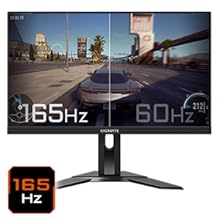
Figure 5.5: Visual comparison of 165Hz vs. 60Hz refresh rate.
- Temps de resposta: Enjoy a 1ms MPRT (Moving Picture Response Time) for minimal ghosting.
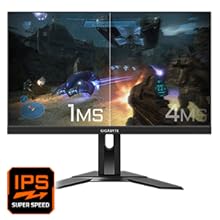
Figure 5.6: Visual comparison of 1ms vs. 4ms response time.
- Gamma de colors: The monitor covers 95% DCI-P3 and 125% sRGB for vibrant and accurate colors.
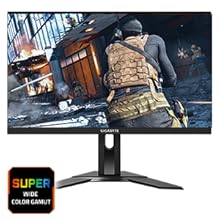
Figure 5.7: Wide color gamut for rich visuals.
- Llum blava baixa: Reduces blue light emissions to protect your eyes during extended use.
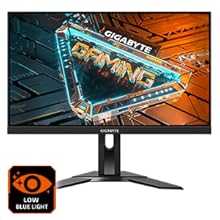
Figure 5.8: Low Blue Light feature for reduced eye strain.
- Sense parpelleig: Elimina el parpelleig de la pantalla per a una major comoditat viewexperiència.

Figure 5.9: Flicker-Free technology for comfortable viewing.
5.5 Product Feature Video
Vídeo 5.1: Un overview of the GIGABYTE G24F 2 monitor's features and specifications.
6. Manteniment
Un manteniment adequat garanteix la longevitat del vostre monitor.
- Neteja de la pantalla: Netegeu suaument la pantalla amb un drap suau, sec i sense borrissol. Per a marques difícils, netegeu suaument.ampNetegeu el drap amb aigua o un netejador de pantalles especialitzat (apliqueu-lo al drap, no directament a la pantalla).
- Neteja de la Casing: Feu servir un drap suau i sec per netejar el monitor casing. Eviteu els productes de neteja abrasius.
- Ventilació: Ensure the ventilation openings on the monitor are clear of dust and obstructions.
- Apagar: Turn off and unplug the monitor when not in use for extended periods.
7. Solució De Problemes
Si teniu problemes amb el monitor, consulteu la taula següent per veure els problemes i les solucions més habituals.
| Problema | Causa possible | Solució |
|---|---|---|
| No hi ha imatge a la pantalla | Power cable not connected; Video cable not connected; Incorrect input source selected | Check power and video cable connections; Select correct input source via OSD. |
| La imatge és borrosa o distorsionada | Incorrect resolution; Loose video cable | Set display resolution to 1920x1080; Ensure video cable is securely connected. |
| No sound from headphones/speakers | Audio cable not connected; Volume too low; Incorrect audio output selected on PC | Check audio cable connection; Adjust volume; Select monitor as audio output on PC. |
| Els ports USB no funcionen | Cable USB de pujada no connectat | Connect the USB 3.2 Gen 1 Upstream cable from the monitor to your PC. |
| Pantalla parpellejant | Refresh rate issue; Faulty cable | Ensure refresh rate is set correctly; Try a different video cable. |
8. Especificacions
Detailed technical specifications for the GIGABYTE G24F 2 monitor.

Figura 8.1: Dimensions del monitor.
| Característica | Detall |
|---|---|
| Marca | GIGABYTE |
| Nom del model | G24F 2 |
| Número de model | 9DG24F2-00-1ABIN |
| Mida de la pantalla | 23.8 polzades |
| Resolució | 1920 x 1080 píxels (FHD 1080p) |
| Relació d'aspecte | 16:9 |
| Tipus de visualització | LCD (SS IPS Panel) |
| Freqüència d'actualització | 165 Hz (180Hz OC) |
| Temps de resposta | 1 Milliseconds (MPRT) |
| Brillantor | 300 candela_per_square_meter (TYP) |
| Relació de contrast | 1100:1 |
| Saturació de color | 95% DCI-P3, 125% sRGB |
| Viewangle ing | 178 graus |
| Connectivitat | 2 x HDMI 2.0, 1 x DisplayPort 1.2, 2 x USB 3.2 Gen 1 Downstream, 1 x USB 3.2 Gen 1 Upstream, 1 x Earphone Jack |
| Sincronització adaptativa | FreeSync Premium |
| Consum d'energia | 17.5 watts |
| Pes de l'article | 3.2 quilos |
| Dimensions de l'article (D x W x H) | 5.3P x 54.1A x 32.6H centímetres |
| Tipus de muntatge | Muntatge de paret |
| Característiques del producte | Flicker-Free, Height Adjustment, High Dynamic Range, Tilt Adjustment |
9. Garantia i Suport
The GIGABYTE G24F 2 monitor comes with a 3 any de garantia del fabricant.
For technical support, warranty claims, or further inquiries, please contact GIGABYTE customer service:
- Fabricant: GIGABYTE Technology (India) Pvt Ltd
- Adreça: B-808, Naman Midtown, Elphinstone Road, Mumbai – 400013 – INDIA
- Telèfon: +91-22-40633222
Si us plau, conserveu el comprovant de compra per al servei de garantia.