
1. Producte acabatview
The YiBiChin AN-MR21GC is a universal magic remote control designed for various 2021 LG Smart TV models. It features magic pointer and intelligent voice control functions, allowing for quick and intuitive navigation and command execution. This remote enhances your TV viewing experience with convenient access to features and content.
1.1 Compatibilitat
This remote control is compatible with the following 2021 LG TV series:
- LG OLED TVs: G1, C1, A1 series
- LG Mini-LED QNED TVs: QNED99, QNED90 series
- LG NanoCell TVs: NANO99, NANO90, NANO85, NANO80, NANO75 series
- LG UHD TVs: UP80, UP75 series
Note: This remote control does not feature NFC functionality.

Figura 1: Davant, lateral i posterior views of the YiBiChin AN-MR21GC Magic Remote.

Figure 2: The remote control highlighting its universal compatibility with 2021 LG Smart TVs.
2. Configuració
2.1 Instal·lació de la bateria
The remote control requires two AA batteries (not included) for operation. Follow these steps to install them:
- Localitzeu la tapa del compartiment de la bateria a la part posterior del comandament a distància.
- Feu lliscar la tapa cap avall per obrir el compartiment.
- Introduïu dues piles AA, assegurant-vos que els terminals positiu (+) i negatiu (-) s'alineïn correctament amb els indicadors de l'interior del compartiment.
- Feu lliscar la tapa del compartiment de la bateria fins que faci clic de manera segura.

Figure 3: Correct installation of AA batteries into the remote control.
2.2 Mètode d'aparellament
To enable the magic pointer and voice functions, the remote control must be paired with your LG Smart TV. Ensure your TV is connected to a WiFi network for these functions to work correctly. If you are replacing an original remote, it is recommended to disconnect it and remove its batteries before pairing the new remote, as only one smart remote can be paired at a TV at a time.
Follow these steps to pair your remote:
- Manually turn on your LG Smart TV using the power button on the TV itself.
- Point the YiBiChin AN-MR21GC remote control directly towards your TV from a close distance.
- Manteniu premut el botó Scroll Wheel (OK button) on the remote control for a few seconds until the pairing process is complete. A confirmation message should appear on your TV screen.
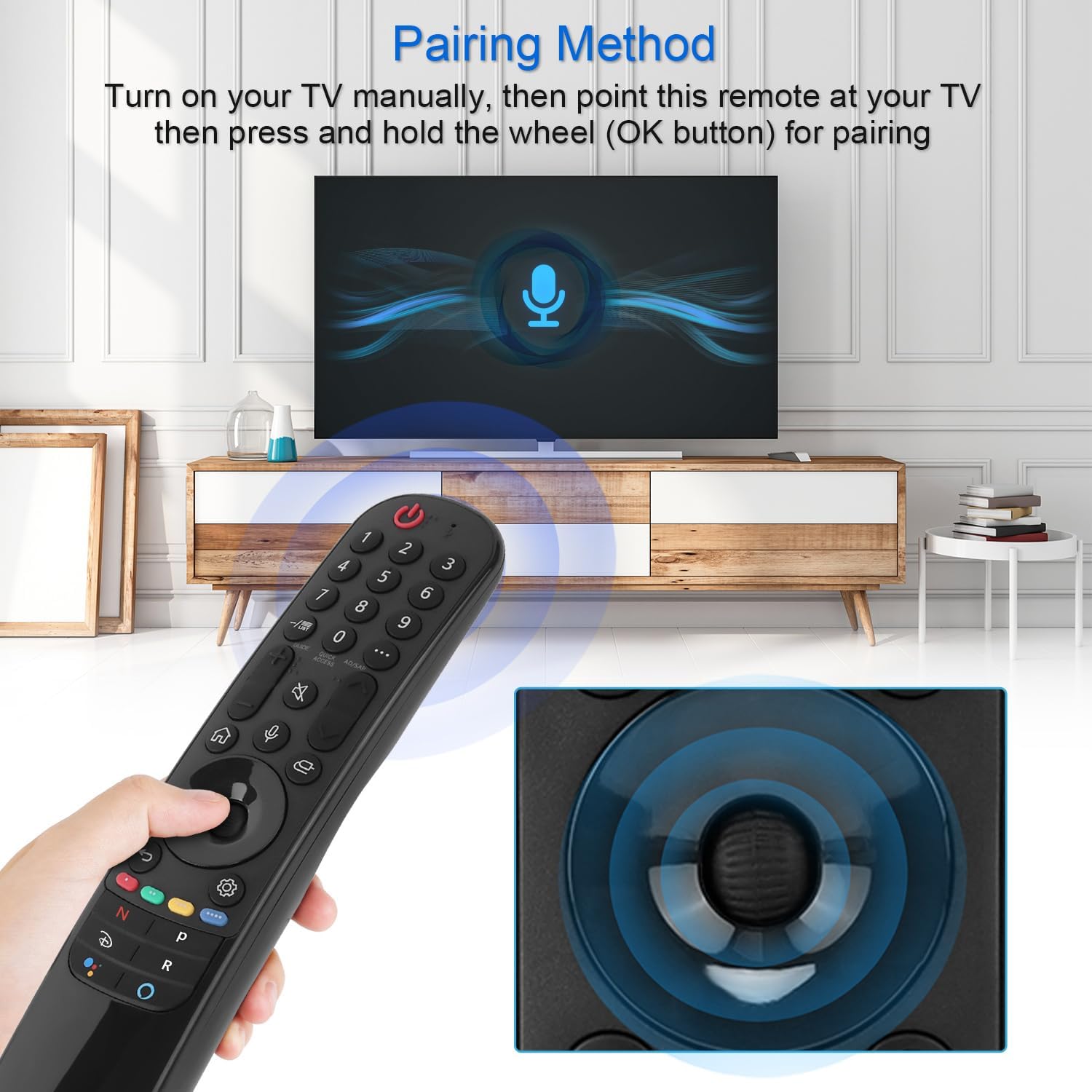
Figure 4: Demonstrating the pairing process by holding the OK button while pointing at the TV.
3. Instruccions de funcionament
The YiBiChin AN-MR21GC remote control offers multiple ways to interact with your LG Smart TV, including traditional button presses, a magic pointer, and voice commands.
3.1 Funcions bàsiques
- Botó d'encesa: Encén o apaga el televisor.
- Botons numèrics (0-9): Selecciona directament els canals.
- Pujar/baixar el volum: Ajusta el volum del televisor.
- Canal amunt/avall: Canvia els canals de televisió.
- Botó de silenci: Silencia o activa l'àudio del televisor.
- Botó d'inici: Accesses the TV's main smart interface.
- Botó enrere: Torna a la pantalla o menú anterior.
3.2 Magic Pointer Function
Once paired, the remote acts as a pointer, allowing you to move a cursor on the TV screen by simply moving the remote in the air. This provides an intuitive way to select items, scroll through menus, and interact with applications.
3.3 Control de veu
Premeu el botó Botó del micròfon to activate voice control. Speak clearly into the remote to issue commands, search for content, or control smart home devices connected to your TV. Voice commands allow for rapid access to desired programs and videos, with a response time of approximately 0.2 seconds.
3.4 Botons d'accés ràpid
The remote includes dedicated shortcut buttons for popular streaming services, providing instant access to your favorite entertainment platforms.
3.5 Control de llarga distància
The remote utilizes stable infrared and Bluetooth signals, offering a control distance of up to 33 feet (10 meters), ensuring reliable operation from various positions within your room.

Figure 5: The remote's effective operating range and quick response time.
4. Manteniment
4.1 Substitució de la bateria
When the remote control's performance degrades (e.g., unresponsive buttons, weak signal), it is likely time to replace the batteries. Follow the battery installation steps in Section 2.1 to replace the two AA batteries.
4.2 Neteja
Per netejar el comandament a distància, utilitzeu un drap suau i sec. Per a la brutícia resistent, netegeu lleugerament.ampRenta el drap amb aigua o un netejador suau i no abrasiu. Evita utilitzar productes químics agressius o humitat excessiva, ja que això pot danyar els components electrònics del comandament a distància.
5. Solució De Problemes
5.1 El comandament a distància no respon
- Comproveu les bateries: Ensure batteries are correctly installed and not depleted. Replace them if necessary.
- Reemparellament del comandament a distància: If the remote becomes unresponsive, try re-pairing it with your TV by following the steps in Section 2.2.
- Obstruccions: Assegureu-vos que no hi hagi obstacles entre el comandament a distància i el receptor d'infrarojos del televisor.
5.2 Pointer or Voice Function Not Working
- Connexió WiFi: Verify that your LG Smart TV is connected to a stable WiFi network. The pointer and voice functions rely on this connection.
- Reemparellament del comandament a distància: Re-pairing the remote (Section 2.2) can often resolve issues with these advanced functions.
- Original Remote Interference: Ensure no other smart remote is actively paired with the TV, or that the original remote's batteries have been removed.
6. Especificacions
| Marca | YiBiChin |
| Nom del model | AN-MR21GC |
| Dispositius compatibles | 2021 LG Smart TVs (OLED, QNED, NanoCell, UHD series) |
| Tecnologia de connectivitat | Wi-Fi, Infrared, Bluetooth |
| Tipus de controlador | Voice Control, Pointer |
| Font d'alimentació | Funciona amb bateria |
| Tipus de bateria | 2 x AA (no inclòs) |
| Interval màxim | 10 metres (33 peus) |
| Temps de resposta | 0.2 seconds (for voice commands) |
| Dimensions (L x A x A) | 19.2 x 5.7 x 3.1 cm (7.6 x 2.2 x 1.2 polzades) |
| Pes de l'article | 110 g (3.88 unces) |
| Color | Negre |

Figure 6: Product dimensions of the remote control.
7. Garantia i Suport
YiBiChin is committed to providing quality replacement remote controls and excellent customer service. While specific warranty details are not provided in this manual, we offer dedicated support for our products.
7.1 Atenció al client
If you have any questions, encounter issues, or require assistance with your YiBiChin AN-MR21GC Magic Remote, please do not hesitate to contact our customer support team. We aim to respond to all inquiries within 24 hours.
For support, please refer to the contact information provided with your purchase or visit the official YiBiChin store page on Amazon.
Thank you for choosing YiBiChin.