
multicomp PRO MP720780
Handheld Oscilloscope (2 Channel, 40MHz) User Manual
Model: MP720780 | Brand: multicomp PRO
1. Introducció
Thank you for choosing the multicomp PRO MP720780 Handheld Oscilloscope. This device is a versatile, portable instrument combining the functions of a 2-channel, 40MHz digital oscilloscope and a full-featured digital multimeter (DMM). Designed for engineers, technicians, and hobbyists, it offers high performance and ease of use for various electrical measurement and troubleshooting tasks. Please read this manual thoroughly before operating the device to ensure safe and correct usage.
2. Informació de seguretat
Always observe the following safety precautions to prevent personal injury and damage to the instrument:
- Do not exceed the maximum input ratings: AC 750V, DC 1000V for DMM functions.
- Use only specified probes and accessories: Ensure probes are rated for the voltage and current being measured.
- Inspect the device before use: Check for any physical damage, exposed wiring, or loose connections. Do not use if damaged.
- Eviteu mullat o damp condicions: Do not operate the device in rain or wet environments.
- Power off before connecting/disconnecting: Always turn off the device and disconnect from the power source before connecting or disconnecting probes or cables.
- Service by qualified personnel only: Demaneu tot el servei a personal de servei qualificat.
- Observe all local safety codes: Follow all applicable local and national safety regulations.
3. Què hi ha a la caixa
En desempaquetar, comproveu que hi hagi tots els elements que s'enumeren a continuació:
- Handheld Oscilloscope (DSO)
- Cable de xarxa
- Manual d'usuari
- Sonda d'oscil·loscopi
- Cable USB-Type C
- Cables de prova del multímetre
- Bossa de transport
4. Producte acabatview
The multicomp PRO MP720780 features a compact design with a clear display and intuitive controls. Below are images illustrating the device's key components and ports.

Figura 4.1: Frontal view of the oscilloscope, showing the display, function buttons, navigation keys, and multimeter input jacks.

Figura 4.2: Angle view of the device, demonstrating the integrated kickstand for convenient desktop use.

Figure 4.3: The oscilloscope held in hand, highlighting its compact and portable design.
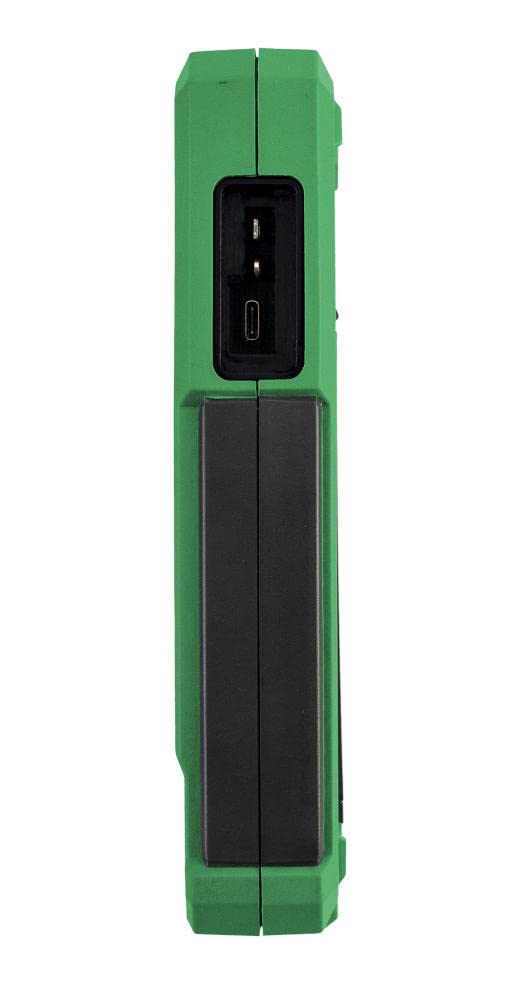
Figura 4.4: lateral view of the device, illustrating the USB Type-C communication interface for data transfer and charging.
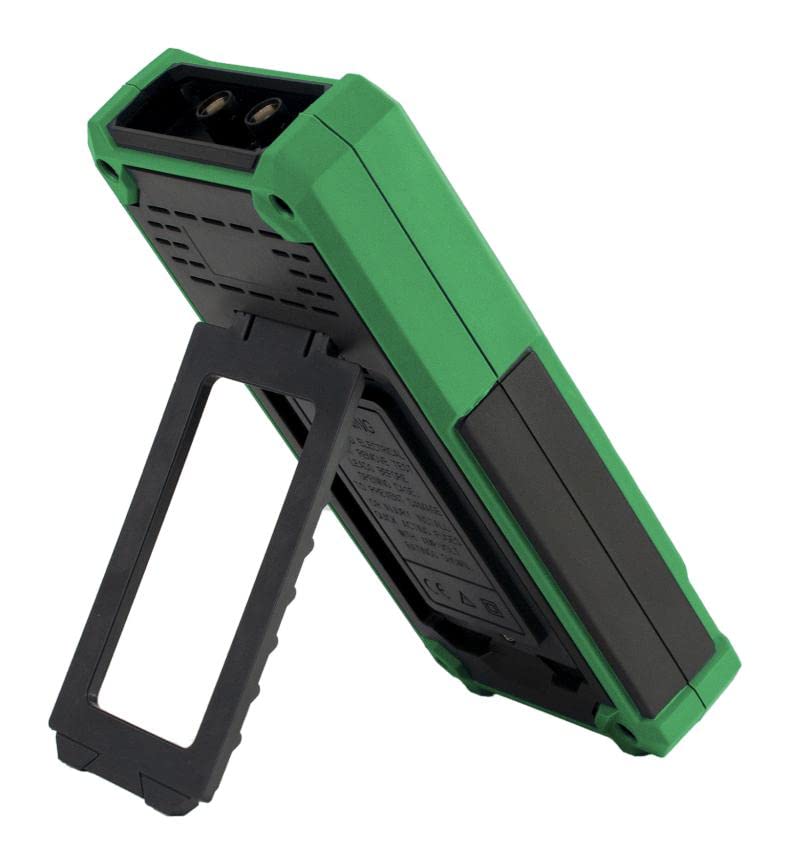
Figura 4.5: posterior view of the oscilloscope, showing the kickstand mechanism and ventilation.
5. Configuració
Follow these steps for initial setup of your handheld oscilloscope:
- Càrrega del dispositiu: Connect the provided USB Type-C cable to the device's USB port and the other end to a suitable USB power adapter (not included) or a computer. The battery indicator on the screen will show charging status.
- Encès/apagat: Premeu i manteniu premut el botó d'engegada (normalment marcat amb un símbol d'engegada) per encendre o apagar el dispositiu.
- Probe Connection (Oscilloscope): For oscilloscope measurements, connect the BNC end of the oscilloscope probe to the CH1 or CH2 input on the top of the device. Ensure the connection is secure.
- Test Lead Connection (Multimeter): For multimeter measurements, insert the red test lead into the VΩ+C jack and the black test lead into the COM jack. For current measurements, use the A or mA jacks as appropriate.
- Probe Compensation (Oscilloscope): Before making accurate measurements, compensate your oscilloscope probe. Connect the probe to a channel and the probe tip to the probe compensation output (usually a square wave signal on the device). Adjust the probe's compensation trimmer until the square wave is flat-topped on the display.
6. Instruccions de funcionament
The MP720780 offers both oscilloscope and digital multimeter functionalities. Use the 'Mode' button to switch between these modes.
6.1 Mode d'oscil·loscopi
In oscilloscope mode, the device displays waveforms, allowing for detailed analysis of electrical signals. Key features include:
- Selecció de canals: Use the 'CH1/2' button to toggle between Channel 1 and Channel 2, or view both simultaneously.
- Vertical Scale (Voltage): Adjust the vertical scale (Volts/Div) using the navigation buttons to fit the waveform on the screen. Input couplings include DC, AC, and Ground.
- Horizontal Scale (Time): Adjust the horizontal scale (Time/Div) using the 'HOR' button and navigation keys to view the desired time duration of the signal.
- Activació: The device supports Edge trigger type. Use the 'Trig/Δ' button to adjust trigger level and position. Trigger modes include Auto, Normal, and Single.
- Modes d'adquisició: Select between Sample and Peak Detect acquisition models for different signal characteristics.
- Durada del registre: The device offers 6K record lengths for capturing detailed waveforms.
- Freqüència d'actualització de la forma d'ona: Experience a fast 10,000wfrms/s waveform refresh rate for dynamic signal observation.
- Configuració automàtica: Press the 'Auto' button for automatic adjustment of vertical and horizontal settings to display a stable waveform.
- Mesura: Use the 'Measure Range' button to display automatic measurements like frequency, peak-to-peak voltage, etc.
- Saving Waveforms: Use the 'Save' button to store waveform data for later review.
6.2 Mode multímetre digital (DMM)
In DMM mode, the device functions as a precise digital multimeter. It offers 4½ digits resolution and supports the following measurement modes:
- Voltage (V): Measure DC and AC voltage. Vol d'entrada màximatage is AC 750V and DC 1000V.
- Corrent (A): Measure DC and AC current using the appropriate input jacks (A or mA).
- Resistència (Ω): Measure resistance.
- Capacitance (Farad): Mesura la capacitat.
- Prova de díode: Test diodes for forward voltage gota.
- Prova de continuïtat: Check for circuit continuity with an audible buzzer.
Use the navigation buttons to select the desired DMM function after entering DMM mode.
7. Manteniment
Proper maintenance ensures the longevity and accuracy of your device.
- Neteja: Use a soft, dry cloth to clean the exterior of the device. For stubborn dirt, a slightly damp Es pot fer servir un drap amb detergent suau, assegurant-vos que no entri líquid al dispositiu. No utilitzeu productes de neteja abrasius ni dissolvents.
- Cura de la bateria: For optimal battery life, avoid fully discharging the battery frequently. If storing the device for an extended period, charge it to about 50% and recharge every few months.
- Emmagatzematge: Store the device in a cool, dry place, away from direct sunlight, extreme temperatures, and high humidity. Use the provided carrying bag for protection during transport.
- Calibració: While the device is factory calibrated, periodic calibration by qualified personnel may be necessary to maintain measurement accuracy over time, especially in professional applications.
8. Solució De Problemes
If you encounter issues with your multicomp PRO MP720780, refer to the following common problems and solutions:
| Problema | Causa possible | Solució |
|---|---|---|
| El dispositiu no s'encén. | Bateria baixa o sense càrrega. | Connect the USB Type-C cable and charge the device for at least 30 minutes. |
| No es mostra cap forma d'ona en mode oscil·loscopi. | Probe not connected, signal too small/large, incorrect trigger settings, or incorrect vertical/horizontal scale. | Ensure probe is securely connected. Adjust vertical (Volts/Div) and horizontal (Time/Div) scales. Check trigger level and mode. Try 'Auto' button. |
| Inaccurate DMM readings. | Incorrect test lead connection, wrong measurement mode selected, or damaged test leads. | Verify test leads are in correct jacks for the measurement type. Ensure correct mode is selected. Inspect test leads for damage. |
| La pantalla està congelada o no respon. | Error de programari. | Perform a soft reset by holding the power button until the device turns off, then restart. If issue persists, contact support. |
9. Especificacions
Detailed technical specifications for the multicomp PRO MP720780 Handheld Oscilloscope:
- Número de model: MP720780
- Dimensions del producte: 1.5 x 3.78 x 7.8 polzades
- Pes: 1.32 lliures
- Oscilloscope Channels: 2
- Ample de banda: 40 MHz
- Sampli Rate: 250MSa / s
- Durada del registre: 6K
- Freqüència d'actualització de la forma d'ona: 10,000wfrms/s
- Input Couplings: CC, CA, Terra
- Tipus d'activador: Edge
- Trigger Models: Automàtic, Normal, Individual
- Acquisition Model: Sample & Peak Detect
- Digital Multimeter Function: 4½ dígits
- DMM Measurement Modes: V, A, Ohm, Farad, Diode, Continuity
- Volum d'entrada màximtage (DMM): 750 V CA, 1000 V CC
- Interfície de comunicació: USB tipus C
10. Garantia i Suport
This multicomp PRO product is designed and manufactured to high-quality standards. For specific warranty details, please refer to the documentation provided at the time of purchase or contact your retailer. In general, a 30-day return policy is typically offered by sellers for new products.
For technical support, troubleshooting assistance beyond this manual, or service inquiries, please contact multicomp PRO customer support or your authorized distributor. You can often find contact information on the manufacturer's official weblloc web o a través de la vostra plataforma de compra.
Fabricant: Multicomp Pro
Primera data disponible: 12 de desembre de 2022
Ask a question about this manual
Ask about setup, troubleshooting, compatibility, parts, safety, or missing instructions. Manuals+ will review the question and use this page’s manual context to help answer it.