
Potència màxima MPD661
Max Power Portable Speaker – MPD661 User Manual
Model: MPD661 (UPC: 647625056175)
Introducció
This manual provides comprehensive instructions for the safe and efficient operation of your Max Power Portable Speaker, model MPD661. Please read this manual thoroughly before using the device and retain it for future reference.
The Max Power MPD661 is a versatile portable sound system designed for various indoor and outdoor activities, featuring Bluetooth connectivity, USB and SD card playback, FM radio, and integrated LED lights. It is also suitable for karaoke use.
Contingut del paquet
Verifiqueu que tots els elements siguin presents al paquet:
- Max Power Portable Speaker (MPD661)
- Cable de càrrega tipus C.
- Manual d'usuari (aquest document)
Nota: Additional accessories such as microphones or auxiliary cables may be sold separately.
Producte acabatview
Familiarize yourself with the main components and controls of your MPD661 speaker.

Figura 1: Davant view of the Max Power MPD661 Portable Speaker, showcasing the main speaker grille and the illuminated green LED ring. Control buttons are visible at the top.
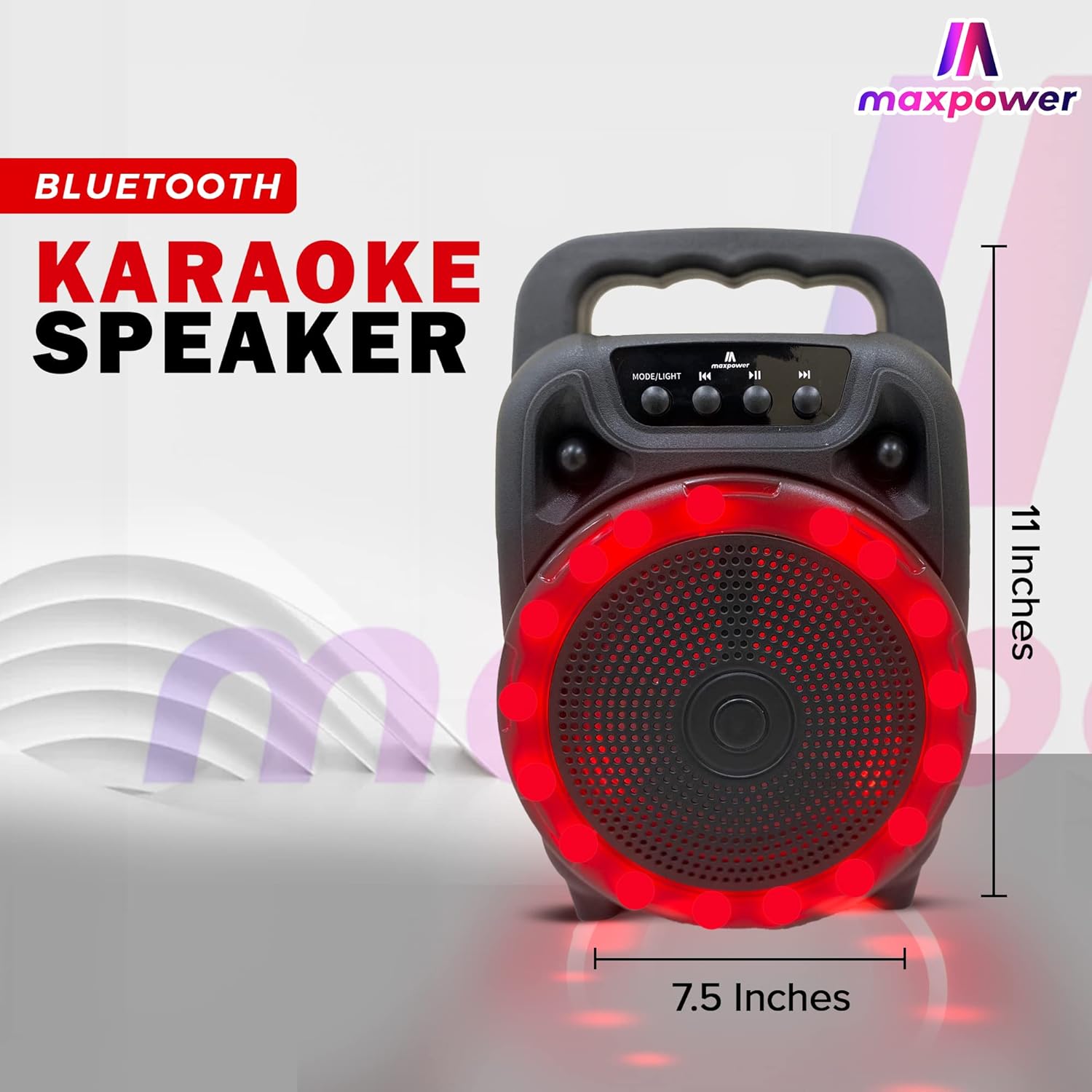
Figura 2: lateral view of the Max Power MPD661 Portable Speaker, illustrating its compact dimensions of approximately 11 inches in height and 7.5 inches in width. The integrated carry handle is visible.
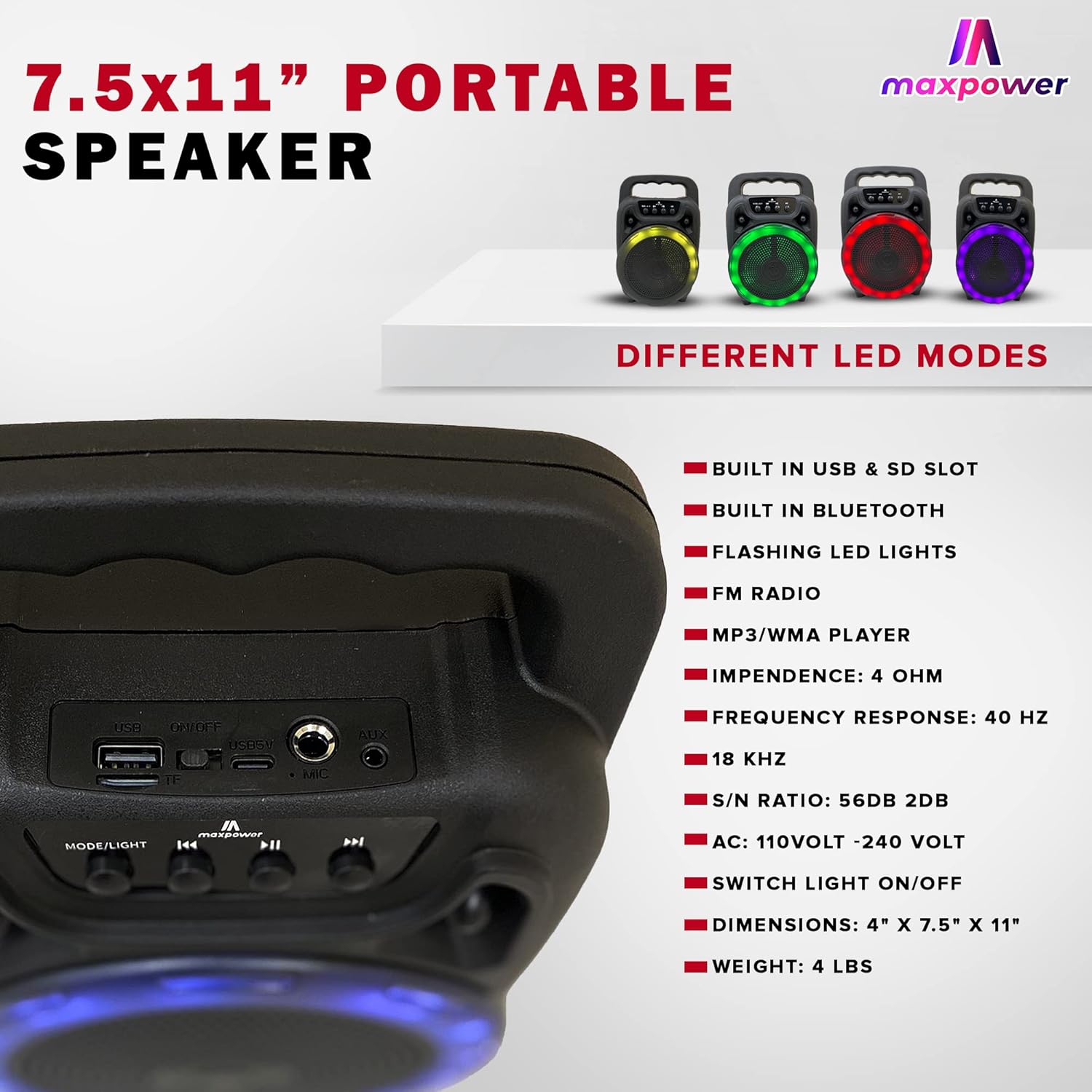
Figura 3: Rear panel of the Max Power MPD661 Portable Speaker, detailing the USB port, SD card slot, and microphone input. Key technical specifications are also listed next to the image.
Tauler de control i ports:
- MODE/LIGHT Button: Press to switch between Bluetooth, FM Radio, USB, and SD card modes. Long press to toggle LED lights on/off.
- Botó de pista anterior: Press to go to the previous track. Long press to decrease volume.
- Botó Reproduir/Pausa: Press to play or pause audio. In FM mode, long press to auto-scan and save stations.
- Botó de pista següent: Press to go to the next track. Long press to increase volume.
- Port USB: Per a la reproducció des d'una unitat flaix USB.
- Ranura per a targeta SD: Per a la reproducció amb targeta SD.
- Entrada MIC: Jack de 6.35 mm per connectar un micròfon.
- Entrada AUX: Jack de 3.5 mm per connectar dispositius d'àudio externs.
- Entrada DC 5V: Type-C port for charging the speaker.
Configuració i càrrega
Càrrega inicial:
Before first use, fully charge the speaker. Connect the supplied Type-C charging cable to the DC 5V input port on the speaker and the other end to a standard USB power adapter (not included) or a computer USB port. The charging indicator light will illuminate during charging and turn off when fully charged.
The speaker features a built-in Type-C charger that enables faster charging.
Encès/apagat:
Locate the power switch, usually on the rear or side panel. Flip the switch to the "ON" position to power on the speaker. Flip to "OFF" to power off.
Instruccions de funcionament
Mode Bluetooth:
- Power on the speaker. It will automatically enter Bluetooth pairing mode, indicated by a flashing LED light or an audible prompt.
- Al dispositiu mòbil (telèfon intel·ligent, tauleta, etc.), activeu el Bluetooth i cerqueu els dispositius disponibles.
- Select "MPD661" from the list of devices. Once connected, you will hear a confirmation sound.
- You can now play audio from your device through the speaker. Use the speaker's control buttons or your device to adjust volume, play/pause, and skip tracks.
Reproducció de targetes USB/SD:
- Insert a USB flash drive or SD card (pre-loaded with MP3/WMA audio files) al port respectiu.
- The speaker will automatically switch to USB or SD card mode and begin playing audio. If not, press the "MODE/LIGHT" button to select the correct mode.
- Use the Previous/Next Track buttons to navigate through songs and the Play/Pause button for playback control.
Mode de ràdio FM:
- Press the "MODE/LIGHT" button until you hear the FM radio prompt.
- Long press the Play/Pause button to initiate an automatic scan for available FM stations. The speaker will save all found stations.
- Feu servir els botons Pista anterior/següent per canviar entre les emissores de FM desades.
Funció de karaoke:
- Connect a wired microphone (not included) to the MIC input port.
- Play music via Bluetooth, USB, or SD card mode.
- Adjust the microphone volume and echo (if available on your microphone) for optimal sound.
Control de llum LED:
The speaker features flashing LED lights. Long press the "MODE/LIGHT" button to toggle the LED lights on or off. The speaker supports different LED display modes.

Figura 4: Illustration of the Max Power MPD661 Portable Speaker displaying various LED light color options, including green, red, blue, and purple, which can be cycled through.
Manteniment i cura
- Neteja: Feu servir un drap suau i sec per netejar l'exterior de l'altaveu. No utilitzeu productes de neteja abrasius ni dissolvents.
- Emmagatzematge: Guardeu l'altaveu en un lloc fresc i sec, allunyat de la llum solar directa i de temperatures extremes.
- Cura de la bateria: Per allargar la durada de la bateria, eviteu descarregar-la completament amb freqüència. Carregueu l'altaveu regularment, fins i tot si no l'utilitzeu durant períodes prolongats.
- Resistència a l'aigua: Aquest altaveu no és impermeable. Eviteu l'exposició a l'aigua o a una humitat excessiva.
- Manipulació: No deixeu caure l'altaveu ni el sotmeteu a impactes forts.
Resolució de problemes
| Problema | Causa possible | Solució |
|---|---|---|
| L'altaveu no s'encén. | La bateria està esgotada. L'interruptor d'alimentació està apagat. | Charge the speaker fully. Ensure the power switch is in the "ON" position. |
| No hi ha so de l'altaveu. | Volume is too low. Incorrect mode selected. Device not connected via Bluetooth. | Increase volume on both speaker and connected device. Press "MODE/LIGHT" to select correct input. Re-pair Bluetooth device. |
| Connexió Bluetooth inestable. | Device is too far from speaker. Interference from other devices. | Move device closer to the speaker (within 33 feet/10 meters). Avoid obstacles between devices. Turn off other Bluetooth devices. |
| La targeta USB/SD no es reprodueix. | Incorrecte file format. La targeta/unitat no s'ha inserit correctament. | Assegureu-vos files are MP3/WMA format. Re-insert the USB drive or SD card firmly. |
Especificacions
| Característica | Detall |
|---|---|
| Número de model | MPD661 (647625056175) |
| Dimensions | 4" x 7.5" x 11" (aprox. 10.16 cm x 19.05 cm x 27.94 cm) |
| Pes | 2.18 lliures (aprox. 0.99 kg) |
| Connectivitat | Bluetooth, USB, targeta SD, AUX |
| Entrada d'àudio | Bluetooth, USB |
| Resposta de freqüència | 40 Hz - 18 kHz |
| Relació S/N | 56 dB ± 2 dB |
| Impedància | 4 OHM |
| Font d'alimentació | Alimentat per bateria (1 bateria de ions de liti, inclosa) |
| Port de càrrega | Type-C (DC 5V) |
| Formats d'àudio compatibles | MP3/WMA |
| Característiques | Flashing LED Lights, FM Radio, Karaoke Function |
Informació i advertències de seguretat
ADVERTÈNCIA: Càncer i danys reproductius - www.P65Warnings.ca.gov
- No exposeu l'altaveu a temperatures extremes, llum solar directa ni humitat elevada.
- No desmunteu, repareu ni modifiqueu l'altaveu vosaltres mateixos. Això anul·larà la garantia i pot causar danys o lesions.
- Mantingueu l'altaveu lluny dels nens i de les mascotes.
- Feu servir només el cable de càrrega especificat.
- Eviteu escoltar a volums elevats durant períodes prolongats per evitar danys auditius.
Garantia i Suport
For warranty information or technical support, please contact Max Power customer service. Refer to the product packaging or the official Max Power weblloc per obtenir dades de contacte.
Please have your model number (MPD661) and UPC (647625056175) ready when contacting support.
Ask a question about this manual
Ask about setup, troubleshooting, compatibility, parts, safety, or missing instructions. Manuals+ will review the question and use this page’s manual context to help answer it.