
1. Introducció
This manual provides comprehensive instructions for the safe and effective operation of the multicomp PRO MP700005 Handheld Loop Calibrator. Please read this manual thoroughly before using the device and retain it for future reference.
2. Informació de seguretat
Always observe standard safety precautions when operating electrical equipment.
- Do not operate the calibrator if it appears damaged.
- Assegureu-vos d'instal·lar correctament la bateria.
- Refer to local regulations for proper disposal of batteries and the device.
3. Contingut del paquet
Verifiqueu que tots els elements que s'enumeren a continuació siguin presents al vostre paquet:
- MP700005 Handheld Loop Calibrator
- Fils de prova
- PP3 Battery
4. Producte acabatview
The multicomp PRO MP700005 is a versatile handheld loop calibrator designed for measuring and sourcing DC voltage, DC current, and 4-20mA loop current. It features manual stepping, automatic stepping, and ramping output capabilities, along with 24V loop power provision.
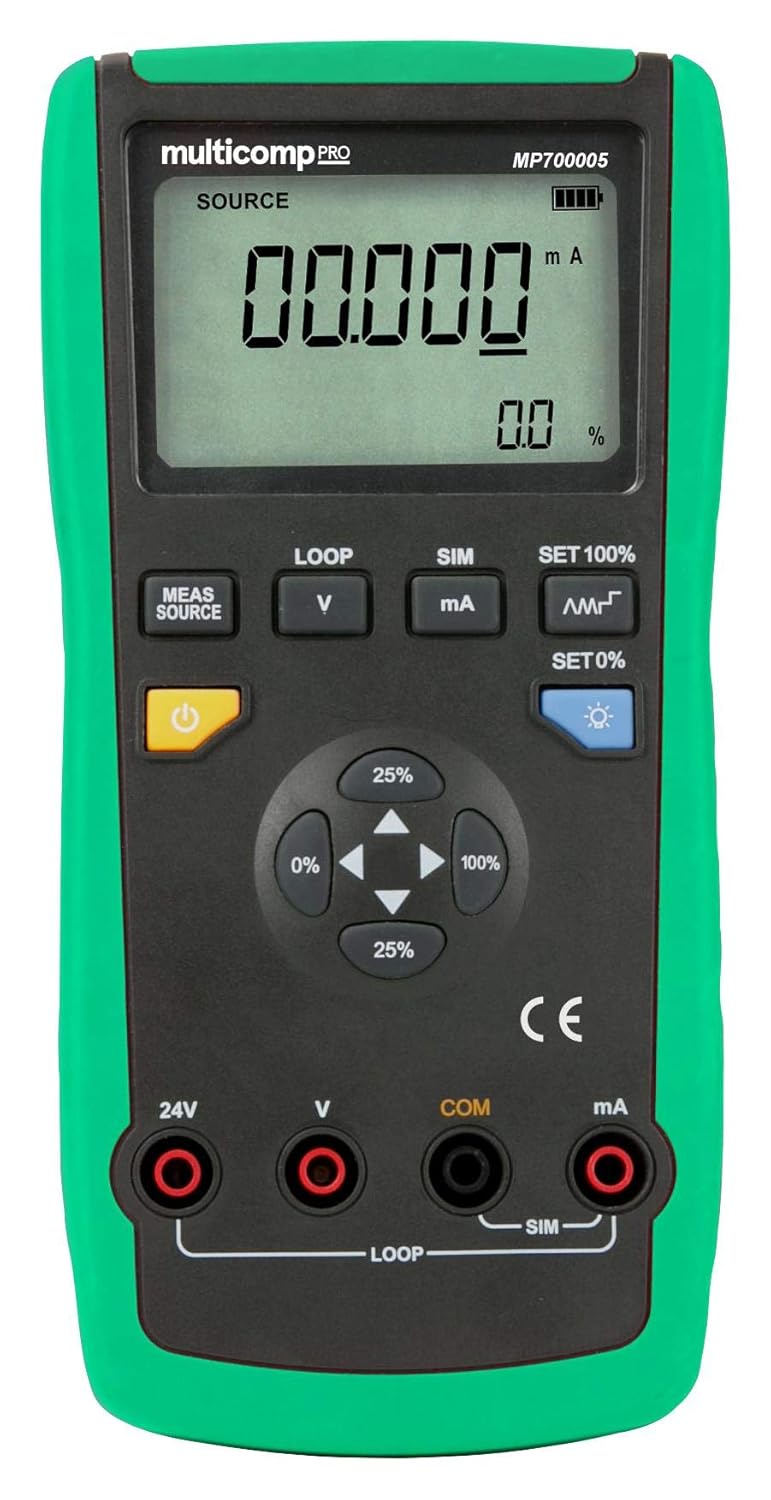
Figura 1: Frontal view of the multicomp PRO MP700005 Handheld Loop Calibrator, showing the LCD display, function buttons, and input/output terminals. The device has a green protective casing.
4.1. Característiques clau
- Measures: DC voltage, DC current, 4-20mA loop current
- Output functions: DC current, analog transmitter, 24V loop
- Manual stepping, automatic stepping, and ramping output
- Stores and recalls setup configurations
- Provides 24V loop power to transmitters while simultaneously measuring mA current
- r automàticamp for DC current output
5. Configuració
5.1. Instal·lació de la bateria
- Locate the battery compartment cover on the rear of the calibrator.
- Utilitzeu un tornavís per obrir el compartiment.
- Insert the supplied PP3 9V battery, observing correct polarity.
- Tanqueu de manera segura la tapa del compartiment de la bateria.
5.2. Engegada inicial
Press the power button (typically marked with a ⑁ symbol) to turn on the calibrator. The LCD display will illuminate and show the default measurement or source mode.
6. Instruccions de funcionament
6.1. Connexió dels cables de prova
Connect the test leads to the appropriate input/output terminals (24V, V, COM, mA) on the calibrator based on the desired measurement or sourcing function. Ensure connections are secure.
6.2. Mesura de la tensió de CCtage / Actual
- Select the desired measurement mode (e.g., V for voltage, mA for current) using the MEAS/SOURCE button or dedicated function buttons.
- Connecteu els cables de prova al circuit que es prova.
- Llegiu el valor de mesura a la pantalla LCD.
6.3. Sourcing DC Current (4-20mA Loop)
- Select the source mode for mA output.
- Use the directional buttons (25%, 0%, 100%) or ESTABLEIX EL 100%/ESTABLEIX EL 0% buttons to adjust the output current.
- The calibrator supports manual stepping, automatic stepping, and ramping output for precise control. Refer to the on-screen indicators for current output status.
6.4. Providing 24V Loop Power
The calibrator can provide 24V loop power to a transmitter while simultaneously measuring the mA current. Connect the transmitter to the designated 24V and mA terminals.
6.5. Storing and Recalling Setups
The device allows users to store and recall frequently used setup configurations. Consult the on-screen menu or dedicated buttons for these functions.
7. Manteniment
7.1. Neteja
Wipe the calibrator with a soft, damp tela. No utilitzeu netejadors abrasius ni dissolvents.
7.2. Substitució de la bateria
When the low battery indicator appears on the display, replace the 9V battery as described in the "Battery Installation" section.
8. Solució De Problemes
- Sense energia: Check battery installation and ensure the battery is not depleted.
- Lectures incorrectes: Verify test lead connections and ensure the correct measurement mode is selected.
- Output Not Functioning: Check connections to the device under test and ensure the calibrator is in the correct source mode.
Si els problemes persisteixen, poseu-vos en contacte amb el servei d'atenció al client.
9. Especificacions
| Característica | Especificació |
|---|---|
| Número de model | MP700005 |
| Marca | multicomp PRO |
| Font d'alimentació | Battery Powered (1 x 9V PP3 battery) |
| Pes de l'article | 0.01 unces |
| UPC | 713179650418 |
| Mesures | DC voltage, DC current, 4-20mA loop current |
| Funcions de sortida | DC current, analog transmitter, 24V loop |
10. Garantia i Suport
For warranty information or technical support, please refer to the documentation provided with your purchase or contact multicomp PRO customer service.