
OBZ F3
OBZ Hands-Free 1D 2D QR Barcode Scanner F3 User Manual
Model: F3
1. Introducció
Thank you for choosing the OBZ Hands-Free 1D 2D QR Barcode Scanner, Model F3. This device is designed for efficient and accurate scanning of various barcode types, enhancing productivity in retail, inventory management, and other business environments. Please read this manual carefully before use to ensure proper operation and to maximize the scanner's performance.
2. Producte acabatview
The OBZ F3 is a stationary, omnidirectional barcode scanner featuring automatic sensor detection and CMOS image technology. It supports a wide range of 1D, 2D, and QR codes, including those displayed on electronic screens.

Figure 1: OBZ F3 Hands-Free Barcode Scanner (Front View)
Característiques principals:
- Funcionament amb mans lliures: Stationary design for convenient and continuous scanning.
- High-Speed & Accurate Scanning: Utilizes CMOS image technology for rapid and precise decoding of 1D, 2D, and QR codes.
- Sensor automàtic: Automatically detects and scans barcodes when presented.
- Àmplia compatibilitat: Supports Windows, Mac OS, Linux, and Android operating systems.
- Plug & Play: No driver installation required; simply connect via USB.
- Aplicació versàtil: Ideal for retail stores, supermarkets, libraries, and various POS systems.
3. Especificacions
| Característica | Descripció |
|---|---|
| Model | F3 |
| Marca | OBZ |
| Connectivitat | Cable USB |
| Sistema operatiu compatible | Windows XP/7/8/10/11, Mac OS, Linux, Android |
| Dispositius compatibles | POS systems, Desktop PCs, Notebook PCs |
| Tecnologia d'escaneig | CMOS Image Sensor, Automatic Sensor Scan |
| Codis de barres compatibles | QR Code, Code 128, Code 39, EAN-8, EAN-13, UPC-A, UPC-E0, UPC-E1, ITF, Rakuten Pay, PayPay, LINE Pay, WeChat Pay, Alipay |
| Angle d'escaneig | Pitch ±45°, Rotation ±360°, Skew ±45° |
| Scan Depth (EAN13 13mil 90%) | 0 mm-90 mm |
| Scan Depth (Code128_19) | 20 mm-125 mm |
| Scan Depth (WeChat Pay Code) | 0 mm-320 mm |
| Scan Depth (Alipay Code) | 0 mm-36.5 mm |
| Dimensions (L x A x A) | 12.7 x 8.9 x 8.5 cm |
| Pes | 280 g (Product package), 160 g (Scanner unit) |
| Longitud del cable | 1.2 metres |
| Color | Beix |
| Material | ABS+PC |

Figure 2: Product dimensions and material specifications.
4. Configuració
- Desempaquetar l'escàner: Traieu amb cura l'escàner del seu embalatge.
- Traieu la pel·lícula protectora: A protective film may be present on the scan window. For optimal performance, gently peel off this film before use.
- Connecta't al dispositiu amfitrió: Insert the USB cable into the designated port on the scanner and then into an available USB port on your computer (POS system, desktop, or laptop).

Figure 3: Plug & Play setup with USB cable connection and OS compatibility.
- Reconeixement del sistema: The scanner is plug-and-play. Your operating system (Windows, Mac OS, Linux, Android) should automatically detect and configure the device without requiring additional driver installation.
- Col·locació: Position the scanner on a stable, flat surface where barcodes can be easily presented to its scanning window.
5. Instruccions de funcionament
The OBZ F3 scanner operates in an automatic sensor mode, simplifying the scanning process.
- Encès: Once connected via USB, the scanner is powered on and ready for use.
- Present Barcode: Hold the barcode (1D, 2D, or QR) in front of the scanner's window. The scanner will automatically detect the barcode.
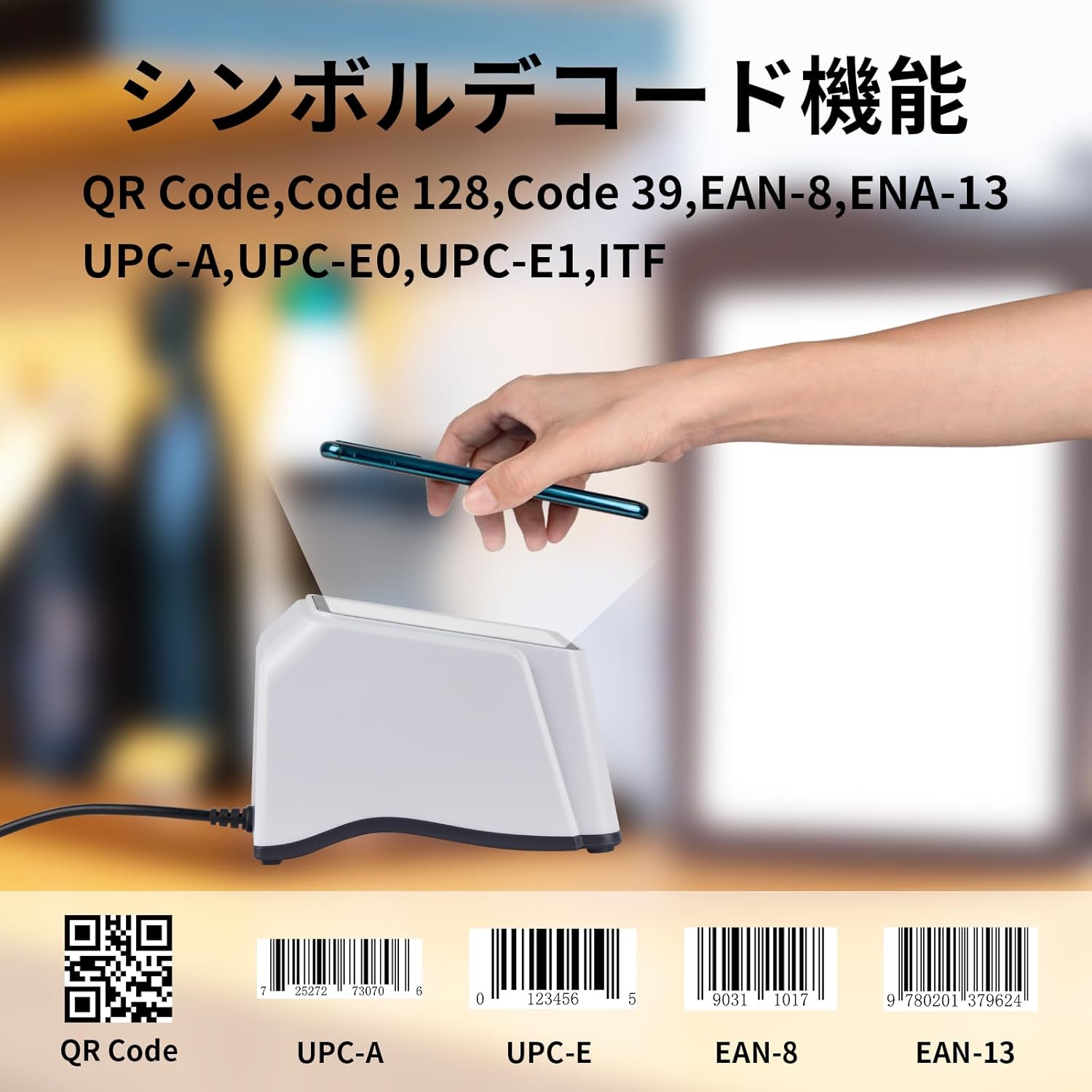
Figure 4: Scanning a QR code from a smartphone screen.
- Successful Scan: Upon a successful scan, the scanner will emit an audible beep, and the data will be transmitted to your connected device as keyboard input.
- Scanning from Screens: The CMOS image technology allows for efficient scanning of barcodes from digital displays such as smartphones and tablets.
Tipus de codis de barres compatibles:
- Codis de barres 1D: Code 128, Code 39, EAN-8, EAN-13, UPC-A, UPC-E0, UPC-E1, ITF.
- Codis de barres 2D: Codi QR.
- Payment Codes: Rakuten Pay, PayPay, LINE Pay, WeChat Pay, Alipay.
6. Manteniment
- Cleaning the Scan Window: Regularly clean the scan window with a soft, lint-free cloth. For stubborn smudges, a small amount of mild glass cleaner can be applied to the cloth (not directly to the scanner). Ensure the scanner is disconnected from power before cleaning.
- Neteja general: Netegeu l'exterior de l'escàner amb un drap suau iamp tela. Eviteu utilitzar netejadors abrasius o dissolvents.
- Cura del cable: Do not bend or twist the USB cable excessively. Avoid placing heavy objects on the cable.
- Emmagatzematge: When not in use, store the scanner in a clean, dry environment away from direct sunlight and extreme temperatures.
7. Solució De Problemes
| Problema | Causa possible | Solució |
|---|---|---|
| L'escàner no s'encén. | El cable USB no està connectat correctament o el port USB està defectuós. | Ensure the USB cable is securely connected to both the scanner and the host device. Try a different USB port or a different USB cable if available. |
| L'escàner no llegeix codis de barres. |
|
|
| Scanned data is incorrect or garbled (e.g., ':' becomes '+'). | Host device keyboard language setting mismatch. The scanner's default output is English keyboard layout. | Change the keyboard input language on your host device to English. This resolves issues where certain characters (like ':', '=', '@') are incorrectly mapped. |
| No sound after successful scan. | Beeper volume might be set to silent or very low. | Consult the advanced configuration guide (if available) for instructions on adjusting beeper volume. |
8. Garantia i Suport
OBZ provides a garantia de tres anys for this barcode scanner. If you encounter any issues or have questions regarding the product, please contact OBZ customer support. For bulk orders or custom services, please reach out to our sales team.
Per obtenir més ajuda, visiteu el OBZ Brand Store.
Ask a question about this manual
Ask about setup, troubleshooting, compatibility, parts, safety, or missing instructions. Manuals+ will review the question and use this page’s manual context to help answer it.