
KONIX PJ88CD-W
KONIX Folding Piano Keyboard User Manual
Brand: KONIX | Model: PJ88CD-W
1. Introducció
Thank you for choosing the KONIX Folding Piano Keyboard. This portable 88-key electronic piano is designed for musicians of all levels, offering a full-size semi-weighted keyboard with innovative light-up keys to assist in learning. Its foldable design ensures maximum portability, allowing you to enjoy music anywhere.
Les característiques clau inclouen:
- Portable Folding Design: Folds 180 degrees for compact storage and easy transport.
- Full-Size Semi-Weighted Keys: Provides a realistic piano feel with adjustable touch response.
- Tecles d'il·luminació: Guides users during learning and practice sessions.
- Connectivitat versàtil: Bluetooth for app integration and MIDI/USB for computer connection.
- Àmplia biblioteca de so: 128 tones, 128 rhythm patterns, and 20 built-in demo songs.
- Funcions múltiples: Includes dual keyboard, split, teach mode, dual voice, record, playback, polyphonic metronome, and transpose.
- Llarga vida útil de la bateria: Built-in rechargeable lithium battery for 6-8 hours of play time.
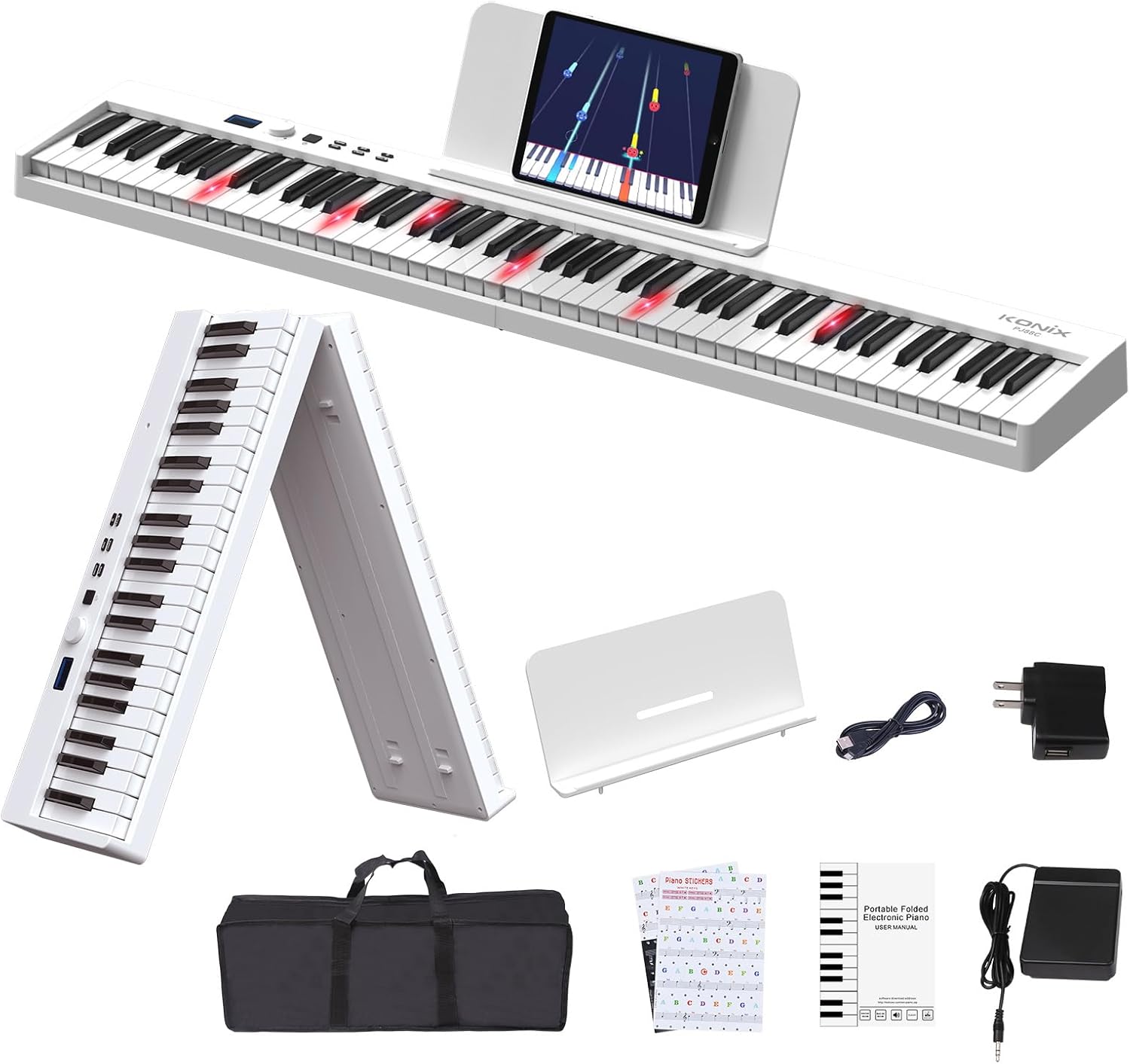
Figure 1.1: The KONIX Folding Piano Keyboard with all included accessories, showcasing el seu disseny compacte i portàtil.
2. Contingut del paquet
Si us plau, verifiqueu que tots els elements siguin presents al vostre paquet:
- KONIX Folding Piano Keyboard (White)
- Pedal de sosteniment
- Keyboard Stickers
- Music Stand (for sheet music or tablet)
- Piano Bag (portable travel carry bag)
- Cable de càrrega USB
- Adaptador d'alimentació
- Manual d'usuari (aquest document)
3. Guia de configuració
3.1 Unfolding the Keyboard
The KONIX Folding Piano Keyboard is designed for easy setup. To unfold:
- Place the folded keyboard on a flat, stable surface.
- Gently pull the two halves apart until they fully extend and lock into place. Ensure the locking mechanism engages securely.

Figure 3.1: Illustration of the one-click folding mechanism, showing how the two halves of the keyboard separate and lock into place.
3.2 Encès
The keyboard can be powered via the included power adapter or its built-in rechargeable battery.
- Ús de l'adaptador de corrent: Connect the USB charging cable to the keyboard's USB port and the power adapter, then plug into a wall outlet.
- Ús de la bateria: Ensure the built-in lithium battery is charged. The keyboard can play for 6-8 hours on a full charge.
3.3 Connexió d'accessoris
- Pedal de sosteniment: Plug the sustain pedal into the 'SUS' port on the keyboard.
- Auriculars / altaveus: Connect 3.5mm headphones or external speakers to the headphone jack for private practice or ampso lificat.
- Atril de música: Attach the included music stand to the designated slots on the keyboard for holding sheet music or a tablet.

Figura 3.2: Mésview of the various connection ports on the keyboard, including headphone/speaker, MP3/PC/Phone/Tablet, Microphone, Sustain pedal, and Power/MIDI.
Video 3.1: This video demonstrates the folding and unfolding of the KONIX Piano Keyboard, showing its compact storage and quick setup. It also highlights the various connectivity options and the light-up key feature in action.
4. Instruccions de funcionament
4.1 Funcionament bàsic
- Encès/apagat: Press and hold the power button to turn the keyboard on or off.
- Control de volum: Use the rotary knob to adjust the master volume.
- Selecció de to: Rotate the knob to browse through 128 different tones displayed on the LCD screen. Press the 'Tone' button to confirm.
- Selecció de ritme: Rotate the knob to select from 128 rhythm patterns. Press the 'Rhythm' button to confirm.
- Cançons de demostració: Rotate the knob to choose from 20 built-in demo songs. Press the 'Demo' button to play.

Figura 4.1: Primer pla view of the full-size semi-weighted keys, illustrating the 1:1 ratio to traditional piano keys and the concept of adjustable touch response for dynamic playing.
4.2 Característiques d'aprenentatge
- Tecles d'il·luminació: The light-up keys illuminate to guide you on which notes to play, making learning easier, especially with demo songs or connected apps.
- Mode d'ensenyament: Activate teach mode to follow along with built-in lessons or app-based tutorials.
- Keyboard Stickers: Apply the included keyboard stickers to help identify notes for beginners.
4.3 Funcions avançades
- Connectivitat Bluetooth: Enable Bluetooth on the keyboard and your smart device (phone, tablet, computer). Pair with piano learning apps like Garage Band, Perfect Piano, or Pop Piano for interactive lessons and games.
- MIDI/USB Interface: Connect the keyboard to a computer via USB to use it as a MIDI controller. This allows you to edit music, compose, and use various music production software (e.g., Cakewalk, Sonar, Cubase, Nuendo, VST/VSTi).
- Gravació i reproducció: Use the record function to capture your performances and the playback function to listen to them.
- Dual Keyboard/Split: Divide the keyboard into two sections, allowing two players or different instrument sounds in each section.
- Veu dual: Layer two different instrument sounds to be played simultaneously with each key press.
- Polyphonic Metronome: Use the built-in metronome to practice with precise timing.
- Transposar: Adjust the pitch of the entire keyboard up or down to play in different keys without changing your finger positions.

Figure 4.2: The MIDI function allows connection to educational apps like Garageband, Perfect Piano, and Pop Piano, enhancing the learning experience.

Figura 4.3: Un excésview of the various function options available on the keyboard, designed to assist users in their musical journey.
5. Manteniment
5.1 Neteja
To maintain the appearance and functionality of your keyboard:
- Netegeu la superfície amb un drap suau i sec.
- Per a la brutícia persistent, lleugerament dampen the cloth with water and a mild soap solution, then wipe dry immediately.
- Eviteu utilitzar netejadors abrasius, dissolvents o esprais químics, ja que poden danyar l'acabat.
5.2 Emmagatzematge
When not in use, store the keyboard in its included piano bag to protect it from dust and scratches. Store in a cool, dry place away from direct sunlight and extreme temperatures.
5.3 Cura de la bateria
To prolong the life of the built-in lithium battery:
- Carregueu la bateria completament abans del primer ús.
- Eviteu esgotar completament la bateria amb freqüència.
- Si l'emmagatzemeu durant un període prolongat, carregueu la bateria fins a un 50% aproximadament cada pocs mesos.

Figure 5.1: The keyboard supports USB/Power Bank/Lithium Battery power, offering ultra-long battery life for use anywhere.
6. Solució De Problemes
If you encounter issues with your KONIX Folding Piano Keyboard, please refer to the following common problems and solutions:
| Problema | Causa possible | Solució |
|---|---|---|
| Cap so del teclat. | Volume is too low; headphones are plugged in; power issue. | Increase volume. Unplug headphones if not needed. Ensure keyboard is powered on and charged. |
| Les tecles no s'il·luminen. | Light-up feature is off; low battery. | Check keyboard settings to ensure light-up feature is enabled. Charge the battery. |
| La connexió Bluetooth falla. | El teclat no està en mode d'emparellament; el Bluetooth del dispositiu està desactivat; hi ha interferències. | Ensure keyboard Bluetooth is active. Restart both keyboard and device. Move closer to the device. |
| El pedal de sustain no funciona. | Pedal not fully inserted; faulty pedal. | Ensure the sustain pedal is firmly plugged into the 'SUS' port. Test with another compatible pedal if available. |
If the problem persists, please contact KONIX customer support for further assistance.
7. Especificacions
| Característica | Detall |
|---|---|
| Nom del model | KONIX 88 Key Folding Electric Progressive Counterweight Keyboard Piano |
| Número de model | PJ88CD-W |
| Nombre de claus | 88 |
| Tipus de clau | Full Size Semi-Weighted, Light-Up Keys |
| Dimensions (plegades) | 24.8" x 8" x 4.7" (aproximadament) |
| Dimensions (desplegada) | 50" x 8.5" x 4.5" (aproximadament) |
| Pes de l'article | 4.05 quilograms (8.91 lliures) |
| Font d'alimentació | Battery Powered (3.7V/1800mAh), Corded Electric (USB 5V/1A) |
| Durada de la bateria | 6-8 hours (fully charged) |
| Connectivitat | Bluetooth, MIDI/USB |
| Conector d'auriculars | Jack de 3.5 mm |
| Tons | 128 |
| Patrons de ritme | 128 |
| Cançons de demostració | 20 |
| Sistema operatiu compatible | Win XP/Vista/7/8, Mac OSX |
| Programari compatible | Cakewalk, Sonar, Cubase, Nuendo, VST/VSTi |
| Nivell d'habilitat | Principiant |
| Tipus d'acabat | Glossy or Lacquered |
| Color | Blanc |

Figure 7.1: Detailed product information including weight, number of keys, and folded/unfolded dimensions.
8. Garantia i Suport
KONIX products are manufactured to high-quality standards. For specific warranty information, please refer to the warranty card included in your product packaging or visit the official KONIX weblloc.
If you require technical support, have questions about product operation, or need assistance with troubleshooting, please contact KONIX customer service. Contact details can typically be found on the product packaging, the official KONIX weblloc web o a través del vostre distribuïdor.
Ask a question about this manual
Ask about setup, troubleshooting, compatibility, parts, safety, or missing instructions. Manuals+ will review the question and use this page’s manual context to help answer it.