1. Introducció
This manual provides detailed instructions for the setup, operation, maintenance, and troubleshooting of your PowerPlay DVR Video Recorder. This device is designed for high-efficiency video capture and recording, converting analog video sources to digital H.265 (HEVC) format at 60 frames per second.
The PowerPlay DVR is ideal for preserving old memories from VHS, VHS-C, 8mm, MiniDV, and Digital8 tapes, as well as for FPV recording and other analog video capture needs.
2. Producte acabatview
The PowerPlay DVR is a compact and portable device featuring a 2.4-inch screen for real-time monitoring. It supports recording resolutions of 720x576 (PAL) at 50fps and 720x480 (NTSC) at 60fps. The device utilizes H.265 (HEVC) compression for efficient storage.
2.1 Característiques clau
- High-Efficiency Recording: Captures smooth, high-quality video with H.265 (HEVC) compression and 60fps frame rate.
- Conversió d'analògic a digital: Digitize various tape formats directly to a micro SD card (up to 512GB Class 10).
- Pantalla integrada: 2.4-inch, 480(RGB) x 640 display with 600Cd/m2 luminance for monitoring.
- Disseny portàtil: Compact and lightweight, includes a clip mount for hands-free use.
- Connectivitat integral: Features USB Type-C, AV-IN (Audio L, Audio R, CVBS), and DC-OUT.
2.2 Disseny del dispositiu
Familiarize yourself with the various ports and controls on your PowerPlay DVR.
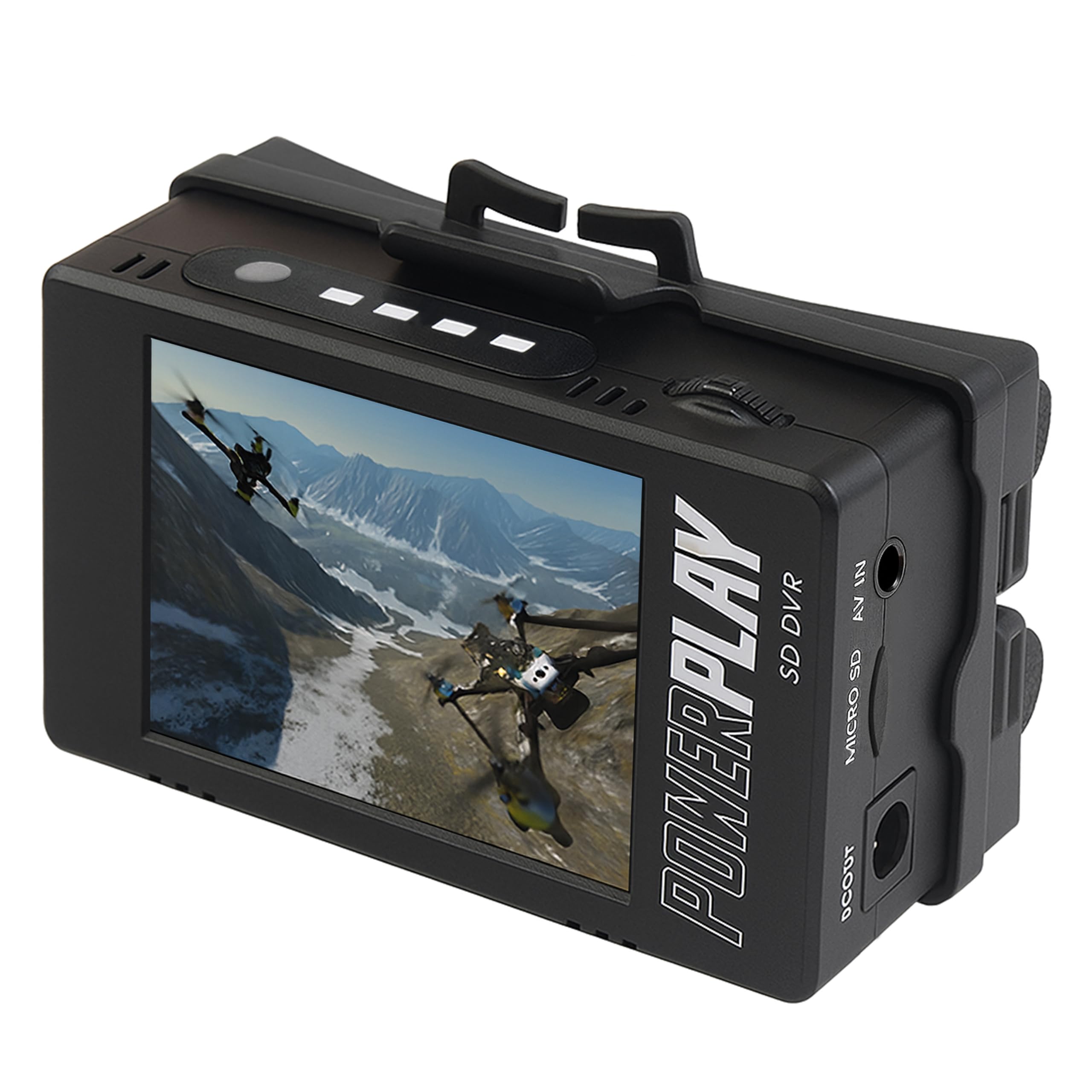
Figura 1: Frontal view of the PowerPlay DVR, showing the integrated 2.4-inch display and control buttons.

Figura 2: lateral view of the PowerPlay DVR, highlighting the DC OUT port, Micro SD card slot, and AV IN (Audio L, Audio R, CVBS) ports.

Figura 3: lateral view of the PowerPlay DVR, showing the USB Type-C port for data transfer and charging.

Figura 4: superior view of the PowerPlay DVR, displaying the navigation buttons (Back, Menu, OK, Mode, Rec/Stop), volume controls, and battery indicator lights.
3. Configuració
Follow these steps to set up your PowerPlay DVR for recording.
3.1 Instal·lació de la bateria
The PowerPlay DVR requires two 18500 Li-ion cells (≥2400mAh) for operation. Batteries are not included.
- Obriu la tapa del compartiment de la bateria.
- Insert two 18500 Li-ion cells, ensuring correct polarity (+/-).
- Tanqueu bé la tapa del compartiment de la bateria.
- If the device fails to power on after battery installation, charge via a certified USB-C cable.
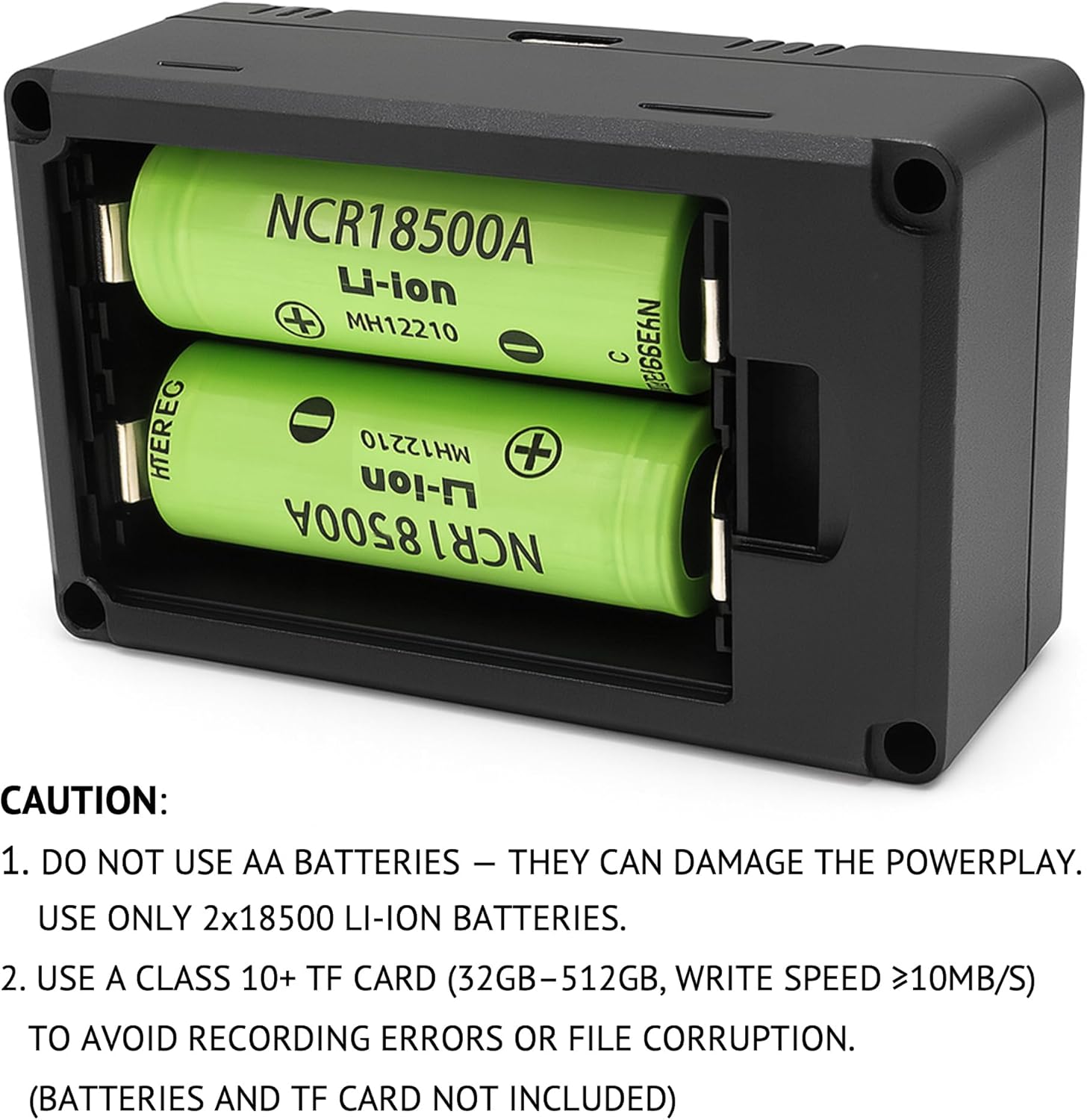
Figura 5: View of the battery compartment with two 18500 Li-ion cells correctly inserted. Note the polarity markings.
CAUTION: Do not use AA batteries, as they can damage the PowerPlay DVR. Use only 2x18500 Li-ion batteries.
3.2 Instal·lació de la targeta Micro SD
A micro SD card (up to 512GB, Class 10 or higher with write speed ≥10MB/s) is required for recording. The micro SD card is not included.
- Locate the Micro SD card slot on the side of the device (refer to Figure 2).
- Insert the micro SD card into the slot until it clicks into place.
- To avoid recording errors or file corruption, ensure the micro SD card meets the specified requirements.
3.3 Connecting Your Video Source
Use the included AV cable to connect your analog video source (e.g., VCR, camcorder, DVD player) to the PowerPlay DVR.
- Connect the red, white, and yellow RCA connectors from the "OUT" ports of your video source (typically found on the back of VCRs or camcorders) to the corresponding AV IN ports (Audio L, Audio R, CVBS) on the PowerPlay DVR.
- Ensure a secure connection for all cables.
- The PowerPlay DVR's screen will remain blank until it detects a live signal from your video source.
Video 1: This video demonstrates how to connect a VHS player to a digital converter using RCA cables and initiate recording. It shows the process of inserting a USB drive, plugging in power, connecting AV terminals, playing a VHS tape, and pressing the record button.
4. Instruccions de funcionament
4.1 Engegada/apagada
- To power on, press and hold the Power button (usually marked with a circle and a vertical line) until the screen illuminates.
- Per apagar, manteniu premut el botó d'engegada fins que el dispositiu s'apaga.
4.2 Gravació de vídeo
- Ensure your video source is connected and playing. The video feed should appear on the PowerPlay DVR's screen.
- Premeu el botó Rec/Stop button to begin recording. A red indicator light will typically illuminate to confirm recording is active.
- Per aturar la gravació, premeu el botó Rec/Stop button again. The recording will be saved to the inserted micro SD card.
Note: The PowerPlay DVR can automatically stop recording after a preset amount of time (e.g., 60, 90 minutes). Refer to the device's menu settings for configuration options.
Video 2: This video demonstrates real-time recording and monitoring on a similar mini DVR device. It shows the device's interface and how to start/stop recording to an SD card.
4.3 Reproducció
You can play back recorded videos directly on the device's screen or connect to an external display.
- Reproducció al dispositiu: Use the navigation buttons (up/down/left/right) and the OK button to browse and select recorded files for playback on the 2.4-inch screen.
- External Display Playback: Connect the PowerPlay DVR to a TV or monitor via the HDMI OUT port (if available on your model) or by inserting the micro SD card into a computer or compatible device.
4.4 Transferència Files
Per transferir gravat files to a computer or other storage device:
- Remove the micro SD card from the PowerPlay DVR.
- Insert the micro SD card into a compatible card reader connected to your computer.
- Accedeix al files on the micro SD card and transfer them to your desired location.
- Alternatively, connect the PowerPlay DVR directly to a computer using a USB Type-C cable. The device may appear as a mass storage device, allowing direct file transferència.
5. Manteniment
- Mantingueu el dispositiu net i lliure de pols. Feu servir un drap suau i sec per netejar-lo.
- Eviteu exposar el dispositiu a temperatures extremes, humitat o llum solar directa.
- Store the device and micro SD cards in a cool, dry place when not in use.
- Regularly back up your recorded files per evitar la pèrdua de dades.
6. Solució De Problemes
- No Video/Audio on Screen:
- Ensure all AV cables are securely connected to the correct IN ports on the DVR and OUT ports on your video source.
- Verify that your video source (VCR, camcorder) is powered on and playing.
- If the video is staticky or blurry, the video source itself is likely the cause, not the converter. Try connecting your video source directly to a TV to verify signal quality.
- Recording Errors or File Corrupció:
- Ensure you are using a Class 10 micro SD card (or higher) with a write speed of at least 10MB/s.
- Format the micro SD card using the device's menu options or a computer before first use.
- El dispositiu no s'encén:
- Check that the 18500 Li-ion batteries are correctly installed with proper polarity.
- Ensure the batteries are charged. Connect the device to a power source using the USB Type-C cable.
7. Especificacions
| Característica | Especificació |
|---|---|
| Interfície | USB: TYPE-C, AV-IN: Audio L, Audio R, CVBS |
| Suport de la targeta TF | MAX: 512GB, SD or SDHC (Class 10 recommended) |
| Sortida de corrent continu | 7.4V/1A |
| Pantalla | 2.4 inch, 480(RGB) * 640, Luminance 600Cd/m2 |
| Entrada de vídeo | CVBS (PAL, NTSC 1.0Vp-p ±10%) |
| Resolució de gravació de vídeo | AV 720x576 (PAL) 50fps, 720x480 (NTSC) 60fps |
| Format de captura de vídeo | H.265 (HEVC) |
| Format d'àudio compatible | AAC, MP3 |
| Dimensions del producte | 2.56 x 3.35 x 4.02 polzades |
| Pes de l'article | 5.6 unces |
| Color | Negre |
8. Garantia i assistència
Per obtenir informació sobre la garantia i assistència tècnica, consulteu el lloc web oficial del fabricant. weblloc web o poseu-vos en contacte amb el seu departament d'atenció al client. Conserveu el rebut de compra com a comprovant de compra per a qualsevol reclamació de garantia.


