
kinstone KST102SA_ROW
Kinstone 10.1" 4G LTE Android Tablet User Manual
Model: KST102SA_ROW
1. Introducció
Welcome to the Kinstone 10.1" 4G LTE Android Tablet user manual. This guide provides comprehensive instructions for setting up, operating, and maintaining your new tablet. Designed for both work and play, this tablet features an octa-core processor, 8GB RAM, 128GB internal storage (expandable up to 1TB), an 8000mAh battery, and dual SIM slots for enhanced connectivity.

Figura 1.1: Davant i darrere view of the Kinstone 10.1" Android Tablet, showcasinel seu disseny elegant i el mòdul de càmera.
2. Producte acabatview
2.1 Components i característiques
Your Kinstone tablet is equipped with advanced features for a superior user experience. Key components include:
- Visualització: 10.1-inch Full HD IPS screen with 1920x1200 resolution, 178° wide viewing angle, and low blue light technology for eye comfort.
- Processador: High-performance octa-core processor (hexa-core @2.0 GHz Cortex-A55 and dual-core @1.8 GHz Cortex-A75) with 2025 AI Chip.
- Memòria i emmagatzematge: 8GB RAM and 128GB internal storage, expandable up to 1TB via microSD card.
- Càmeres: Càmera posterior de 13MP i càmera frontal de 5MP.
- Bateria: Bateria de 8000 mAh per a un ús prolongat.
- Connectivitat: 4G VoLTE dual SIM support, Bluetooth 5.0, 2.4/5G dual-band Wi-Fi.
- Àudio: Dual speakers for stereo effect.
- Ports: Type-C charging port, 3.5mm earphone jack.

Figura 2.1: Mésview of the Android 12 OS features, highlighting efficiency, safety, entertainment, and display enhancements.

Figure 2.2: Visual summary of the Kinstone Android tablet's core features and specifications.
3. Configuració
3.1 Càrrega inicial
Before first use, fully charge your tablet. Connect the provided Type-C charging cable to the tablet's charging port and the other end to the charger. Plug the charger into a power outlet. The charging indicator will show the charging status. A full charge typically takes approximately 2 hours.

Figure 3.1: Illustration of the tablet's long-lasting 8000mAh battery life, supporting various activities.
3.2 Engegada/apagada
- Per encendre: Press and hold the Power button until the Kinstone logo appears on the screen.
- Per apagar: Premeu i manteniu premut el botó d'engegada fins que aparegui el menú d'opcions d'engegada. Seleccioneu "Apagar" i confirmeu.
- Per reiniciar: Al menú d'opcions d'energia, seleccioneu "Reiniciar".
3.3 Assistent de configuració inicial
En engegar-la per primera vegada, la tauleta us guiarà a través d'un assistent de configuració inicial. Seguiu les instruccions que apareixen a la pantalla per a:
- Seleccioneu el vostre idioma.
- Connecteu-vos a una xarxa Wi-Fi.
- Sign in with your Google account (or create one).
- Set up screen lock (PIN, pattern, password, or Face ID).
- Review i acceptar els termes i condicions.
4. Instruccions de funcionament
4.1 Navegació per la interfície d'Android
Your tablet runs on Android 12, offering an intuitive user interface. Common gestures include:
- Toca: Per seleccionar un element o obrir una aplicació.
- Llisca: Per desplaçar-se per pantalles o llistes.
- Pessiga per fer zoom: Per ampliar o reduir les imatges i web pàgines.
- Premsa llarga: Per accedir a menús contextuals o moure icones d'aplicacions.
4.2 Instal·lació d'aplicacions
Applications can be downloaded and installed from the Google Play Store. Ensure you are connected to the internet before downloading.
- Obriu el Play Store aplicació.
- Cerca the desired application.
- Toqueu Instal·lar i seguiu les instruccions a la pantalla.
4.3 Ús de Face ID
The tablet supports Face Recognition for unlocking. To set up Face ID:
- Vés a Configuració > Seguretat i privadesa > Desbloqueig facial.
- Seguiu les instruccions per registrar la vostra cara.

Figure 4.1: Display features, including Face Recognition for secure and fast unlocking.
5. Connectivitat
5.1 Connexió Wi-Fi
Connect to Wi-Fi for internet access:
- Vés a Configuració > Xarxa i Internet > Internet.
- Activa la Wi-Fi.
- Seleccioneu la xarxa desitjada i introduïu la contrasenya si cal.

Figure 5.1: Connectivity options, including dual-band Wi-Fi for fast and stable connections.
5.2 Vinculació Bluetooth
Pair your tablet with Bluetooth devices like headphones or speakers:
- Vés a Configuració > Dispositius connectats > Preferències de connexió > Bluetooth.
- Activa el Bluetooth.
- Select the device you wish to pair from the list of available devices.
5.3 4G LTE and Dual SIM
The tablet supports 4G VoLTE with dual SIM slots, allowing for simultaneous calls and browsing. You can use two SIM cards or one SIM card and one microSD card.
- Localitza la safata de la targeta SIM al lateral de la tauleta.
- Feu servir l'eina d'expulsió de la SIM proporcionada per obrir la safata.
- Insert your Nano-SIM cards and/or microSD card into the designated slots.
- Gently push the tray back into the tablet.

Figure 5.2: Dual card slot functionality for SIM cards and expandable storage.
6. Ús de la càmera
Your tablet is equipped with a 13MP rear camera and a 5MP front camera for capturing photos and videos, and for video calls.
- Obriu el Càmera app from the home screen or app drawer.
- Canvieu entre la càmera frontal i la posterior mitjançant la icona de la càmera.
- Toqueu el botó de l'obturador per fer una foto o el botó de gravació per iniciar/aturar la gravació de vídeo.
- Access various camera modes and settings within the app.
7. Gestió de la bateria
La bateria de 8000 mAh proporciona ample power for daily use. To optimize battery life:
- Redueix la brillantor de la pantalla.
- Turn off Wi-Fi, Bluetooth, and 4G when not in use.
- Tanca les aplicacions en segon pla.
- Enable battery saver mode in Configuració > Bateria.
The tablet supports fast charging via its Type-C port.
8. Gestió de l'emmagatzematge
Your tablet comes with 128GB of internal storage, which can be expanded up to 1TB using a microSD card.
- Per comprovar l'ús de l'emmagatzematge: aneu a Configuració > Emmagatzematge.
- To free up space: Delete unnecessary files, desinstal·leu les aplicacions no utilitzades o moveu fitxers grans files a una targeta microSD.

Figure 8.1: Visual representation of the tablet's generous storage capabilities.
9. Manteniment
To ensure the longevity and optimal performance of your Kinstone tablet:
- Keep the tablet clean using a soft, lint-free cloth. Avoid harsh chemicals.
- Protect the screen with a screen protector (one is included).
- Avoid exposing the tablet to extreme temperatures, direct sunlight, or moisture.
- Regularly update the operating system and applications to the latest versions.
- Perform periodic backups of important data.
10. Solució De Problemes
Si teniu problemes amb la tauleta, consulteu les solucions habituals següents:
| Problema | Possible solució |
|---|---|
| La tauleta no s'encén | Ensure the battery is charged. Press and hold the power button for at least 10-15 seconds to force a restart. |
| Problemes de connexió Wi-Fi | Restart your Wi-Fi router. Go to Settings > Network & internet > Internet, forget the network, and reconnect. Ensure the tablet is within range. |
| Les aplicacions es bloquegen o es bloquegen | Close the app and reopen it. Clear the app's cache (Settings > Apps > [App Name] > Storage & cache > Clear cache). Ensure the app is updated. |
| Rendiment lent | Tanca les aplicacions que no fas servir. Esborra la memòria cau i les aplicacions temporals files. Check storage space and free up if necessary. Restart the tablet. |
| La bateria s'esgota ràpidament | Reduce screen brightness. Disable unnecessary features like GPS, Bluetooth, or Wi-Fi when not in use. Check battery usage in settings to identify power-hungry apps. |
If problems persist, contact Kinstone customer support for further assistance.
11. Especificacions
Detailed technical specifications for your Kinstone tablet:
| Característica | Especificació |
|---|---|
| Número de model | KST102SA_ROW |
| Sistema operatiu | Android 12 |
| Mida de la pantalla | 10.1 polzades |
| Resolució de pantalla | 1920 x 1200 píxels |
| Processador | 2 GHz Octa-Core (Unisoc) |
| RAM | 8 GB DDR4 SDRAM |
| Emmagatzematge intern | 128 GB (memòria flaix) |
| Emmagatzematge ampliable | Up to 1 TB via MicroSD |
| Coprocessador gràfic | Mali-G57 MP1 |
| Tipus sense fil | 802.11a, 802.11ac (2.4G/5G Dual-band Wi-Fi) |
| Bluetooth | 5.0 |
| Càmera posterior | 13 MP |
| Càmera frontal | 5 MP |
| Capacitat de la bateria | 8000 mAh (polímer de liti) |
| Durada mitjana de la bateria | 8 hores |
| Pes de l'article | 2 lliures |
| Dimensions del producte | 15.8 x 24.1 x 0.8 polzades |
| Color | Gris |
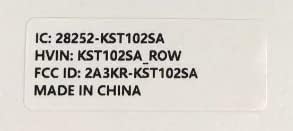
Figure 11.1: Product label with model number and regulatory information.
12. Garantia i Suport
12.1 Servei de garantia
Kinstone provides a warranty service for your tablet. Within three months from the date of purchase, Kinstone offers replacement services for eligible issues, not repair. Please retain your proof of purchase.
12.2 Atenció al client
For any questions, technical assistance, or warranty claims, please contact Kinstone customer support. You may also be eligible to receive a compatible leather case by contacting the seller after receiving your tablet.
Visit the official Kinstone store for more information and support: Kinstone Store on Amazon
Ask a question about this manual
Ask about setup, troubleshooting, compatibility, parts, safety, or missing instructions. Manuals+ will review the question and use this page’s manual context to help answer it.