
1. Introducció i finalview
The Metronic Netsocket 600 Powerline Adapter is designed to extend your home network using your existing electrical wiring. This device transforms any electrical outlet into a network connection, providing high-speed internet access throughout your home without the need for new cables. It is ideal for applications requiring high bandwidth, such as HD video streaming and online gaming.
Les característiques clau inclouen:
- Instal·lació Plug & Play: Simple setup without requiring any drivers.
- Transferència de dades d'alta velocitat: Up to 600 Mbps, suitable for demanding network activities.
- Integrated Pass-Through Socket: Ensures the electrical outlet remains available for other devices.
- Anti-Interference Filter: Reduces electrical noise from connected devices, maintaining optimal network performance.
- Àmplia compatibilitat: Works with all ADSL boxes and devices equipped with an RJ45 Ethernet port (computers, smart TVs, game consoles).
- Vinculació segura: Easy button-press pairing for adding new adapters to your network.

Imatge 1.1: Frontal view of the Metronic Netsocket 600 Powerline Adapter, showing the integrated electrical socket and indicator lights.
2. Informació de seguretat
Please read and follow these safety instructions carefully to prevent damage to the device or injury to yourself.
- No exposeu el dispositiu a l'aigua, la humitat ni a temperatures extremes.
- No obriu ni intenteu reparar el dispositiu vosaltres mateixos. Envieu totes les tasques de manteniment a personal qualificat.
- Ensure the electrical outlet used is properly grounded.
- Avoid plugging the adapter into power strips or extension cords, as this may reduce performance. Plug directly into a wall outlet.
- Mantingueu el dispositiu lluny de fonts de calor i de la llum solar directa.
- Use only the power cord and accessories provided or recommended by the manufacturer.
3. Instruccions de configuració
Setting up your Metronic Netsocket 600 Powerline Adapter is a simple Plug & Play process.
3.1 Initial Setup (Two Adapters)
- Connecteu el primer adaptador: Plug one Metronic Netsocket 600 adapter directly into a wall electrical outlet near your internet router or modem.
- Connecteu-vos al router: Use an Ethernet cable to connect the adapter's RJ45 port to an available LAN port on your internet router/modem.
- Connecteu el segon adaptador: Plug the second Metronic Netsocket 600 adapter directly into a wall electrical outlet in the room where you need network access.
- Connecta't al dispositiu: Use another Ethernet cable to connect the second adapter's RJ45 port to your device (e.g., computer, smart TV, game console).
The adapters should automatically detect each other and establish a secure network connection. The indicator lights on the adapters will confirm the connection status.
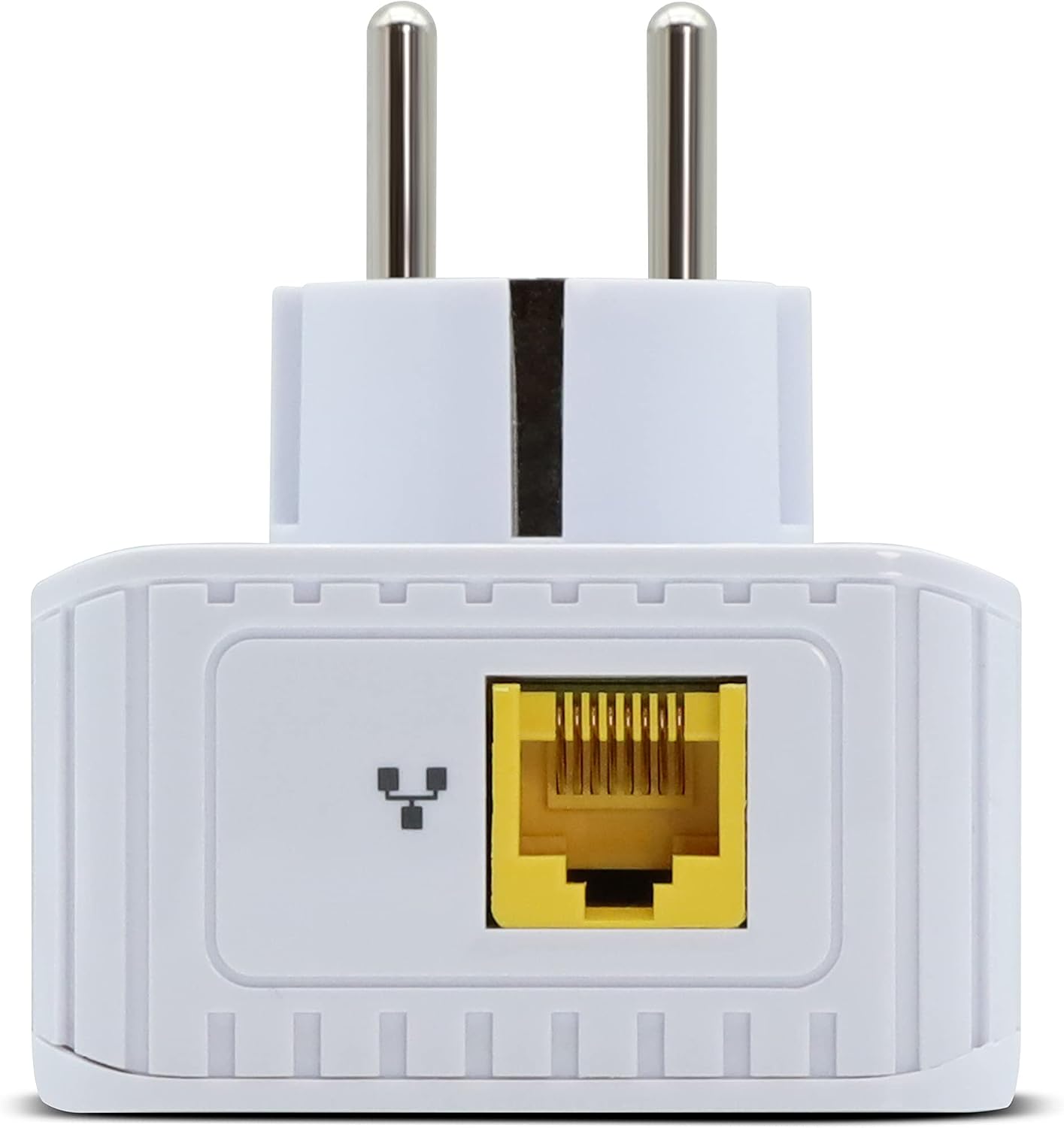
Imatge 3.1: Part inferior view of the adapter, showing the Fast Ethernet RJ45 port.
3.2 Adding More Adapters (Pairing)
To expand your Powerline network with additional Metronic Netsocket 600 adapters:
- Plug the new adapter into a wall outlet.
- Press the pairing button on one of the existing, already connected adapters for approximately 2 seconds.
- Within 2 minutes, press the pairing button on the new adapter for approximately 2 seconds.
The adapters will automatically pair and establish a secure connection (128-bit AES encryption). This process typically takes less than 30 seconds.

Image 3.2: Close-up of the adapter's indicator lights and the pairing button (often labeled with a lock icon).
4. Instruccions de funcionament
Once set up, the Metronic Netsocket 600 operates automatically. Here's what to expect:
4.1 Llums indicadors
The adapter features several indicator lights to show its status:
- Power LED (⏻): Indicates if the adapter is powered on.
- Powerline LED (⇆): Indicates the status of the Powerline connection. A solid light usually means a successful connection.
- Ethernet LED (↔): Indicates activity on the Ethernet port. Blinking suggests data transfer.
4.2 Integrated Socket
The integrated pass-through electrical socket allows you to plug other electrical devices into the same wall outlet without losing the outlet's functionality. The built-in anti-interference filter helps to prevent electrical noise from these devices from affecting your Powerline network performance.
5. Manteniment
The Metronic Netsocket 600 Powerline Adapter requires minimal maintenance.
- Neteja: Use a soft, dry cloth to clean the exterior of the adapter. Do not use liquid cleaners or aerosols.
- Medi ambient: Ensure the adapter is used in a dry, well-ventilated area, away from direct sunlight and heat sources.
- Actualitzacions de firmware: Periodically check the Metronic website for any available firmware updates for your model to ensure optimal performance and security.
6. Solució De Problemes
If you encounter issues with your Powerline adapter, try the following solutions:
6.1 No Network Connection / Slow Speed
- Comproveu la potència: Ensure both adapters are plugged directly into wall outlets and powered on.
- Check Ethernet Cables: Verify that all Ethernet cables are securely connected to both the adapters and your devices/router.
- Llums indicadores: Check the Powerline LED on both adapters. If it's off or blinking erratically, the Powerline connection may not be established.
- Try Different Outlets: Move the adapters to different wall outlets to rule out issues with a specific electrical circuit. Avoid power strips or extension cords.
- Re-Pair Adapters: Si el LED Powerline està apagat, proveu de tornar a emparellar els adaptadors tal com es descriu a la Secció 3.2.
- Interferència: Large electrical appliances (e.g., washing machines, refrigerators, microwaves) on the same electrical circuit can cause interference. Try plugging the adapters into outlets on different circuits or away from such appliances.
6.2 Problemes d'aparellament
- Ensure you press the pairing button on the first adapter, then the second, within the 2-minute window.
- Make sure both adapters are powered on and plugged directly into wall outlets during the pairing process.
7. Especificacions tècniques
| Característica | Especificació |
|---|---|
| Número de model | 495466 |
| Marca | Metrònic |
| Velocitat de transferència de dades | Fins a 600 Mbps |
| Port Ethernet | 1 x Fast Ethernet (100 Mbps) |
| Entrada de potència | 110-240V~ 50/60Hz |
| Chipset | MStar MSE1060 |
| Xifratge | AES de 128 bits |
| Powerline Standard | Homeplug AV compatible |
| Dimensions (L x A x A) | 8.5 x 19 x 15.5 cm |
| Color | Blanc |
| Dispositius compatibles | Computer, Laptop, Smart TV, Game Console |
8. Informació de la garantia
The Metronic Netsocket 600 Powerline Adapter comes with a 2 any de garantia on spare parts. Please retain your proof of purchase for warranty claims. The warranty covers defects in materials and workmanship under normal use. It does not cover damage caused by misuse, accidents, unauthorized modifications, or external causes.
9. Atenció al client
If you require further assistance or have questions not covered in this manual, please contact Metronic customer support.
- Fabricant: Metrònic
- Weblloc: www.metronic.com (Si us plau, consulteu la informació oficial) website for contact details and the latest support information.)