
Producte acabatview
The Clarion JM-Carry On is a portable speaker designed for versatile audio playback. It features a wired microphone input, multi-color light effects, and an in-built battery for on-the-go use. Its compact and portable design allows for easy transport and setup in various environments.

Image: Clarion JM-Carry On Portable Bluetooth Speaker shown with its wired microphone.
Vídeo: Un overview of the Clarion Portable Bluetooth Speaker, highlighting its features and audio performance.
Contingut del paquet
Marqueu la casella per als elements següents:
- Clarion JM-Carry On Portable Bluetooth Speaker
- Micròfon per cable
- Cable de càrrega
Configuració inicial
- Càrrega de l'altaveu: Connect the provided charging cable to the speaker's charging port and a suitable power source. The LED indicator will show charging status. Ensure the speaker is fully charged before first use for optimal battery life.
- Encès/apagat: Locate the power switch on the speaker. Slide it to the 'ON' position to power on the device. Slide it to 'OFF' to power off.
- Emparellament Bluetooth:
- Engegueu l'altaveu. Entrarà automàticament en mode d'emparellament Bluetooth, cosa que indicarà un LED intermitent.
- Al vostre telèfon intel·ligent o tauleta, activeu el Bluetooth i cerqueu els dispositius disponibles.
- Select "Clarion JM-Carry On" from the list. A confirmation tone will sound upon successful pairing.
- Connecting Wired Microphone: Insert the wired microphone's plug into the designated microphone input jack on the speaker.
Guia d’operacions
- Selecció del mode: Use the 'Mode' button to switch between Bluetooth (BT), FM Radio, USB, and AUX input modes.
- Mode Bluetooth: Once paired, audio from your connected device will play through the speaker. Use your device or the speaker's controls for volume and track navigation.
- Mode de ràdio FM: In FM mode, press and hold the 'Play/Pause' button to auto-scan and save available radio stations. Use the 'Next/Previous' buttons to navigate through saved stations.
- Mode USB/AUX: Insert a USB drive into the USB port for MP3 playback or connect an external audio device via the AUX input using a 3.5mm audio cable.
- TWS (True Wireless Stereo) Functionality: To connect two JM-Carry On speakers for stereo sound, ensure both speakers are in Bluetooth mode and not connected to any device. Press and hold the TWS button on one speaker until you hear a pairing tone. The two speakers will connect, and then you can pair your device to the primary speaker.
- Control de so: Adjust the master volume using the main rotary knob. Separate controls may be available for microphone volume and echo effects.
- Efectes de llum LED: The speaker features multi-color LED light effects. Use the dedicated 'Light' button to cycle through different light modes or turn them off.
Cura i Manteniment
- Neteja: Feu servir un drap suau i sec per netejar l'exterior de l'altaveu. No utilitzeu productes de neteja abrasius ni dissolvents.
- Emmagatzematge: Guardeu l'altaveu en un lloc fresc i sec, allunyat de la llum solar directa i de temperatures extremes.
- Cura de la bateria: Per allargar la durada de la bateria, eviteu descarregar-la completament amb freqüència. Carregueu l'altaveu regularment, fins i tot si no l'utilitzeu durant períodes prolongats.
- Resistència a l'aigua: Aquest altaveu no és impermeable. Eviteu l'exposició a l'aigua o a una humitat elevada.
Guia de resolució de problemes
| Problema | Solució |
|---|---|
| L'altaveu no s'encén. | Ensure the battery is charged. Connect the charging cable and try again. Check the power switch position. |
| No hi ha so de l’altaveu. | Check the volume level on both the speaker and the connected device. Ensure the correct input mode (BT, AUX, USB) is selected. |
| L'aparellament de Bluetooth falla. | Ensure the speaker is in pairing mode. Turn off and on Bluetooth on your device. Move the device closer to the speaker. Disconnect from other Bluetooth devices. |
| El micròfon no funciona. | Ensure the microphone is securely plugged into the correct jack. Check the microphone volume control on the speaker. |
| La recepció de ràdio FM és deficient. | Adjust the speaker's position. Extend any external antenna if available. |
Especificacions tècniques
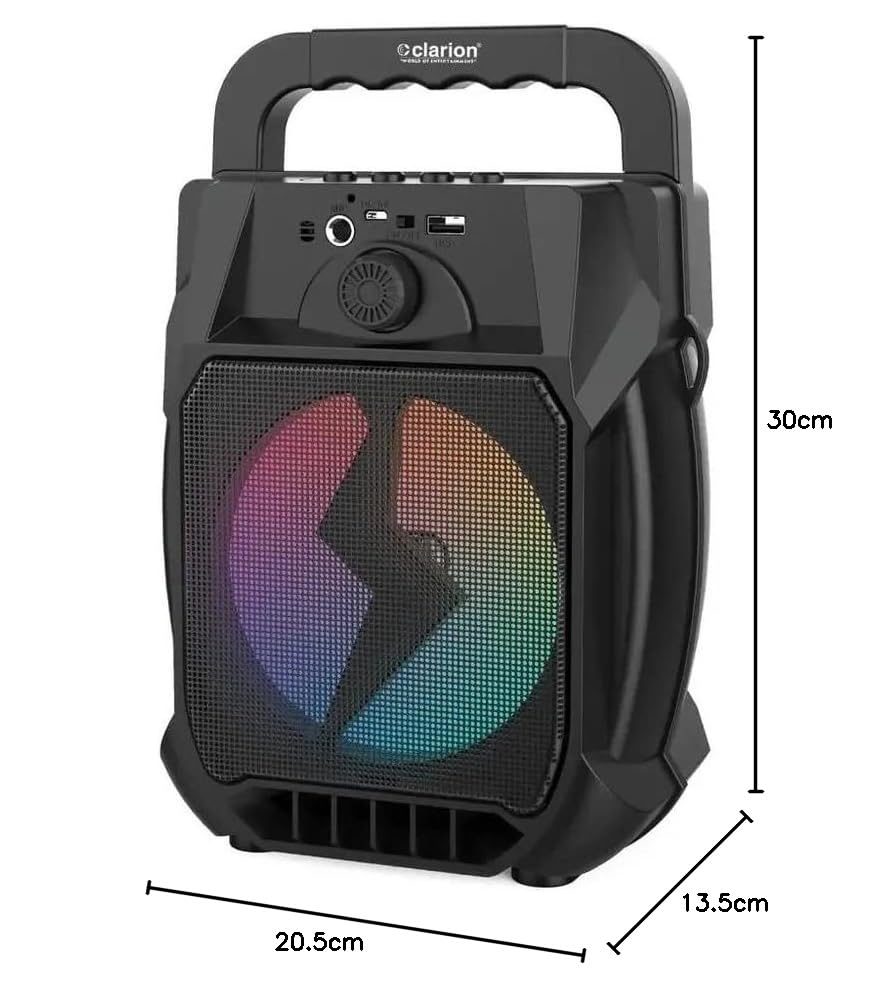
Image: Clarion JM-Carry On Portable Bluetooth Speaker with its dimensions indicated.
- Marca: Clarion (Generic)
- Nom del model: JM-Carry On
- Potència de sortida màxima dels altaveus: RMS de 20 Watts
- Tecnologia de connectivitat: Auxiliar, Bluetooth, USB
- Mode de sortida d'àudio: estèreo
- Tipus de muntatge: Terra de peu
- Tipus d'altaveu: Satèl·lit
- Característiques del producte: Built-In Microphone, Radio, Subwoofer, Multi-color Light Effect, Sound Controller
- Mètode de control: Toca
- Woofer Driver Diameter: 6.5 polzades
- Durada mitjana de la bateria: 3-4 hores
- Capacitat de la bateria: 1.2 Amp Hours (3.7V)
- Dimensions de l'article (D x W x H): 13.5 x 20.5 x 30 centímetres
- Dispositius compatibles: Smartphone, tauleta
- Font d'alimentació: Funciona amb bateria
Garantia i assistència al client
This Clarion JM-Carry On Portable Bluetooth Speaker comes with a 1 any de garantia on the speaker unit from the date of purchase. Please retain your purchase receipt as proof of warranty.
For any technical assistance, troubleshooting, or warranty claims, please contact Clarion Computers customer support. Refer to your purchase documentation for specific contact details or visit the official Clarion Computers weblloc web per obtenir informació de suport.
Note: The warranty typically covers manufacturing defects and does not cover damage caused by misuse, accidents, unauthorized modifications, or normal wear and tear.