Thank you for choosing the Xiaomi Electric Scooter 4. This manual provides essential information for the safe assembly, operation, and maintenance of your scooter. Please read this manual thoroughly before your first ride to ensure optimal performance and safety. Keep this manual for future reference.
2. Informació de seguretat
2.1 Pautes generals de seguretat
Porteu sempre casc i altres elements de protecció (genolleres, colzeres) mentre conduïu.
Assegureu-vos que tots els components estiguin ben fixats i en bon estat de funcionament abans de cada viatge.
No circuleu sota pluja intensa, neu o sobre superfícies gelades.
Respecteu les lleis i regulacions de trànsit locals.
Mantingueu una distància de seguretat amb altres vehicles i vianants.
Eviteu conduir sota els efectes de l'alcohol o les drogues.
The maximum load capacity is 110 kg. Do not exceed this limit.
2.2 Sistema de frenada
The Xiaomi Electric Scooter 4 is equipped with a dual braking system for enhanced safety:
Rear Disc Brake: Provides strong and reliable stopping power.
Front E-ABS System: An electronic anti-lock braking system on the front wheel helps prevent wheel lock-up during sudden braking, improving control.
Regularly check the brake levers and cables for proper function and adjustment.
3. Producte acabatview
The Xiaomi Electric Scooter 4 features an optimized design for a comfortable and stable ride. Key components include a robust aluminum frame, 10-inch tubeless tires, and an intuitive handlebar display.
Figura 3.1: lateral view of the Xiaomi Electric Scooter 4, showcasing its sleek black design and red cable accents.
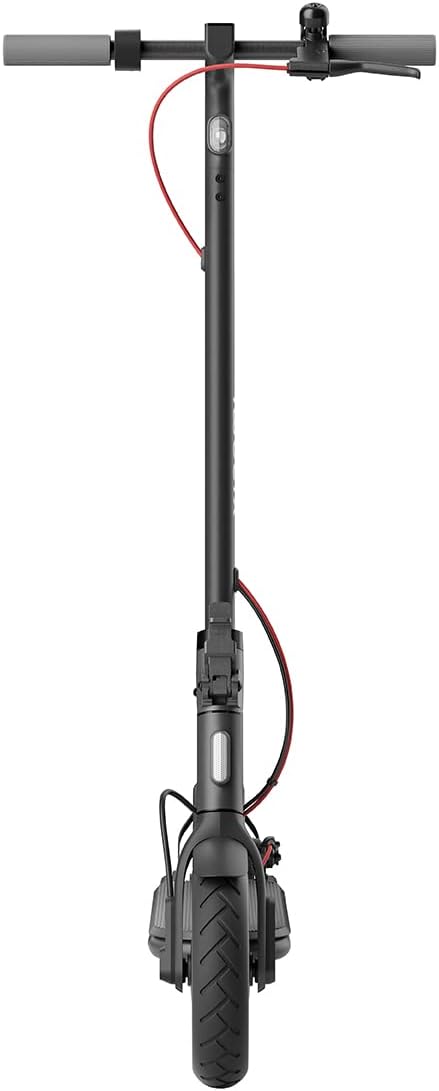
Figura 3.2: Frontal view of the scooter, highlighting the front wheel and handlebar assembly.
Figura 3.3: De dalt a baix view of the handlebars, showing the central display, bell, and brake levers.
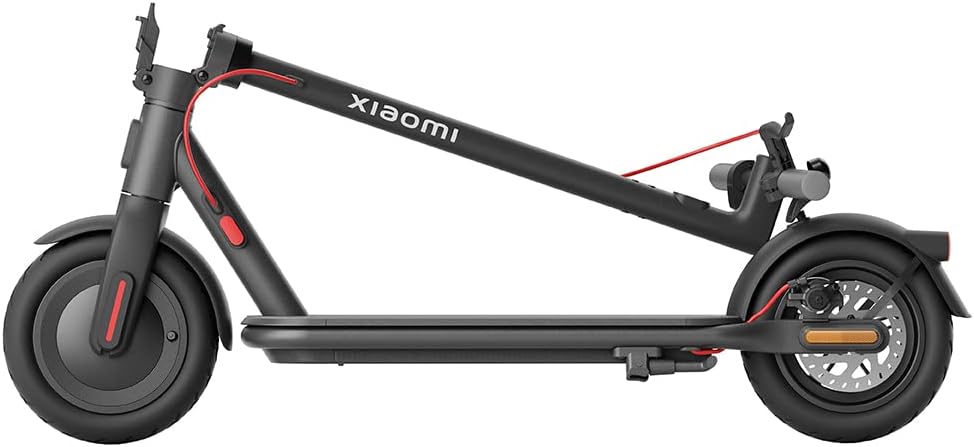
Figure 3.4: The scooter in its folded configuration, demonstrating its portability for storage or transport.
Figure 3.5: Size comparison illustrating the improved dimensions of the Xiaomi Electric Scooter 4 compared to the Electric Scooter 3, offering a more comfortable ride with increased length, height, handlebar width, and deck width.
Figure 3.6: Close-up of the 10-inch tubeless tires, designed for improved shock absorption, stability on uneven roads, and reduced puncture risk due to their deeper tread pattern.
Figure 3.7: Diagram illustrating the powerful 600W brushless Hall motor, enabling the scooter to reach speeds of up to 25 km/h and climb inclines of up to 16%.
Figure 3.8: Visual representation of the three adjustable speed levels: Pedestrian, Standard, and Sport, allowing riders to adapt to various riding conditions and preferences.
4. Configuració
4.1 Desplegament del patinet
Col·loqueu el patinet sobre una superfície plana.
Locate the new front hinge mechanism near the base of the handlebar stem.
Release the locking mechanism by pulling the lever.
Carefully lift the handlebar stem until it locks into the upright position. Ensure the locking mechanism is fully engaged.
Video 4.1: This video demonstrates the quick and easy folding and unfolding process of the Xiaomi Electric Scooter 4, highlighting the front hinge mechanism for convenient transport and storage.
4.2 Càrrec inicial
Abans del primer ús, carregueu completament la bateria del patinet.
Connect the charger to the charging port on the scooter and then to a power outlet.
The indicator light on the charger will change when charging is complete.
4.3 Comprovació de la pressió dels pneumàtics
Although equipped with tubeless tires, it is recommended to check tire pressure regularly for optimal performance and safety. Refer to the tire sidewall for recommended pressure.
5. Instruccions de funcionament
5.1 Encès/Apagat
Per engegar-lo, premeu i manteniu premut el botó d'engegada a la pantalla del manillar fins que la pantalla s'il·lumini.
Per apagar, manteniu premut el botó d'engegada fins que s'apagui la pantalla.
5.2 Modes de conducció
The scooter offers three riding modes to suit different environments and preferences:
Mode per a vianants: Maximum speed of 6 km/h. Ideal for crowded areas or when walking alongside the scooter.
Mode estàndard: Maximum speed of 20 km/h. Suitable for general urban commuting.
Mode esportiu: Maximum speed of 25 km/h. Provides maximum power and speed for experienced riders on open roads.
To switch between modes, short press the power button while the scooter is on.
5.3 Conduint el scooter
Col·loca un peu a la plataforma i empeny amb l'altre peu per guanyar impuls inicial.
Once moving, gently press the accelerator lever to engage the motor.
Maintain balance and steer by leaning and turning the handlebars.
To brake, gently squeeze the brake levers. For emergency stops, apply both brakes firmly.
5.4 Xiaomi Home App Integration
Connect your scooter to the Xiaomi Home app on your smartphone for advanced features and control:
View real-time riding data (speed, battery level, mileage).
Lock/unlock the scooter.
Actualitza el firmware.
Adjust settings and preferences.
The app provides a comprehensive overview and control over your scooter's functions.
6. Manteniment
6.1 Neteja
Netegeu el patinet amb un drap suauamp drap. No utilitzeu raigs d'aigua a alta pressió ni productes de neteja agressius.
Assegureu-vos que la coberta del port de càrrega estigui ben tancada abans de netejar-la.
6.2 Cura de la bateria
Charge the battery regularly, even if the scooter is not in use, to prolong its lifespan.
Eviteu esgotar completament la bateria.
Guardeu el patinet en un lloc fresc i sec, allunyat de la llum solar directa i de temperatures extremes.
6.3 Manteniment dels pneumàtics
Regularly inspect tires for wear, cuts, or punctures.
Maintain recommended tire pressure for optimal ride quality and tire longevity.
7. Solució De Problemes
If you encounter issues with your Xiaomi Electric Scooter 4, please refer to the following common troubleshooting tips:
Problema
Causa possible
Solució
El patinet no s'encén
Low battery; loose connections
Carregueu la bateria; comproveu totes les connexions dels cables.
The Xiaomi Electric Scooter 4 comes with a limited warranty. For detailed warranty terms and conditions, please refer to the warranty card included with your product or visit the official Xiaomi website. For technical support, spare parts, or service inquiries, please contact Xiaomi customer service or an authorized service center.
You can also find additional resources and FAQs on the Xiaomi Home app or the official Xiaomi support page: www.mi.com/global/support
Ask a question about this manual
Ask about setup, troubleshooting, compatibility, parts, safety, or missing instructions. Manuals+ will review the question and use this page’s manual context to help answer it.