
1. Introducció
This manual provides detailed instructions for the amazon basics Wired Gaming Mouse, Model ABIM03. This mouse is designed to enhance your gaming and computing experience with its adjustable DPI, customizable RGB lighting, and programmable buttons. Please read this manual thoroughly before use to ensure proper operation and longevity of your device.
2. Característiques del producte
- DPI ajustable: Up to 6400 DPI for precise cursor control and quick movements.
- Il·luminació RGB personalitzable: Personalize your mouse with various RGB lighting modes and driver customization options for PC.
- Botons programables: Equipped with multiple programmable buttons for assigning custom functions or macros.
- Gaming-Grade Sensor: Ensures accurate tracking and rapid response for gaming.
- Disseny durador: Features extra durable switches and enhanced build quality for extended use.
- Honeycomb Grip: Ergonomic honeycomb design provides a comfortable and secure grip.

Image: The amazon basics Wired Gaming Mouse highlighting its adjustable DPI settings, ranging from 1200 to 7200 (though product states up to 6400).
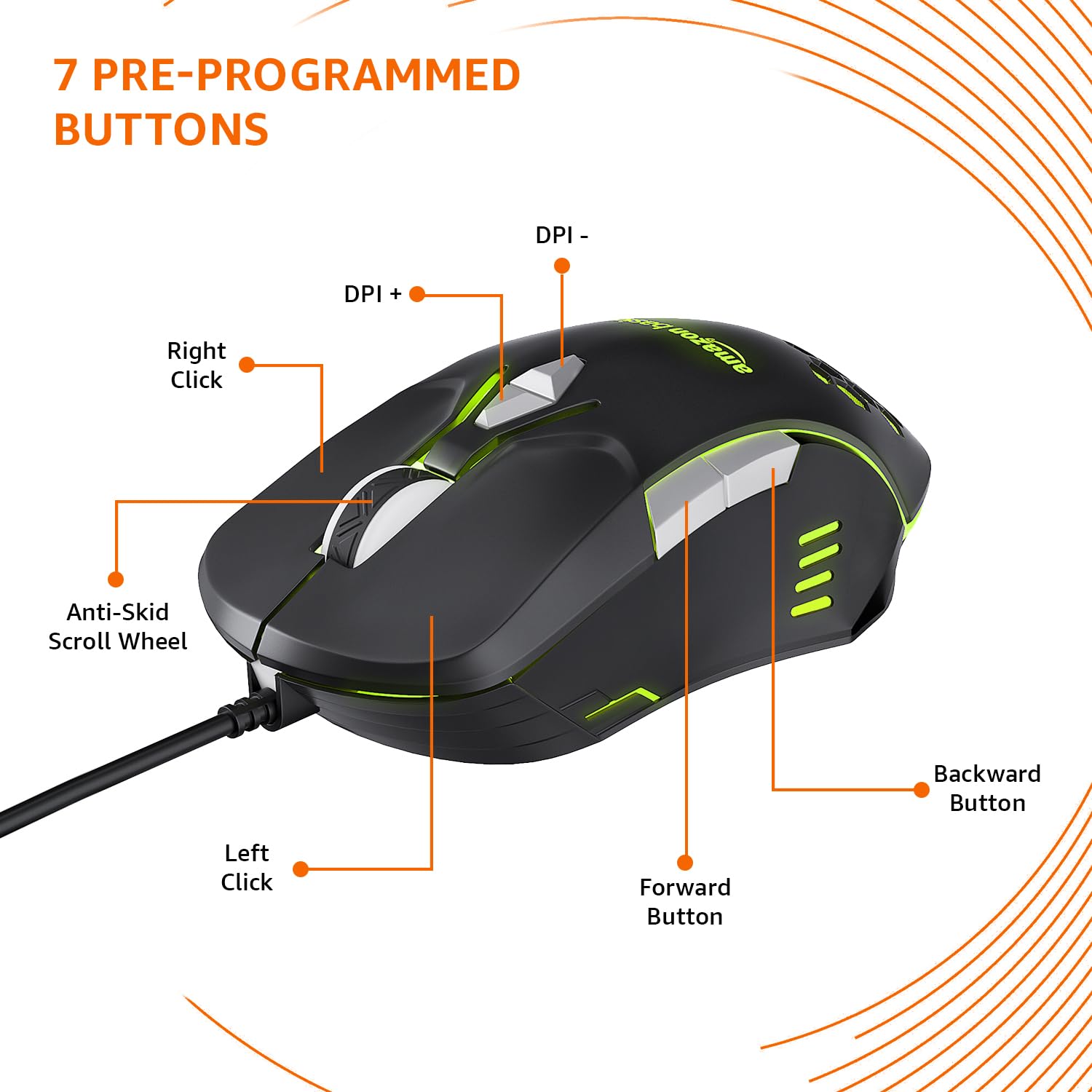
Image: The amazon basics Wired Gaming Mouse showing its 7 pre-programmed buttons, including Left Click, Right Click, Anti-Skid Scroll Wheel, DPI+, DPI-, Forward Button, and Backward Button.

Imatge: Vista de dalt a baix view of the amazon basics Wired Gaming Mouse, emphasizing its honeycomb-designed surface for improved grip and airflow.

Image: The amazon basics Wired Gaming Mouse illuminated with red RGB lighting, showcasing its light and comfortable design.
3. Instruccions de configuració
- Desempaqueta el ratolí: Carefully remove the gaming mouse from its packaging.
- Connexió al PC: Connecteu el connector USB del ratolí a un port USB disponible de l'ordinador.
- Instal·lació del controlador: Your operating system (Windows, Linux) should automatically detect and install the necessary drivers. If prompted, follow the on-screen instructions. For advanced customization of RGB and programmable keys, refer to the manufacturer's website for specific driver software.
- Col·locació: Place the mouse on a flat, clean surface or a mouse pad for optimal performance.
4. Instruccions de funcionament
4.1 Funcionalitat bàsica
- Clic esquerre: Acció primària, selecció.
- Clic dret: Secondary action, context menus.
- Roda de desplaçament: Scroll up/down pages. Pressing the scroll wheel often acts as a middle click.
- Botons Endavant/Enrere: Normalment s'utilitza per a la navegació en web navegadors o file exploradors.
4.2 Adjusting DPI (Dots Per Inch)
The mouse features dedicated DPI adjustment buttons (DPI+ and DPI-) to change cursor sensitivity on the fly. Press these buttons to cycle through different DPI levels up to 6400. A higher DPI setting results in faster cursor movement across the screen with less physical mouse movement.
4.3 Customizing RGB Lighting
The mouse includes customizable RGB lighting. Specific lighting modes can often be cycled through using a dedicated button (if present) or through the optional driver software. Refer to the driver software for advanced customization options, including color selection, effects, and brightness.
4.4 Programming Buttons
The mouse is equipped with programmable buttons. To assign custom functions, macros, or key combinations to these buttons, you will need to install and use the specific driver software provided by the manufacturer. This software typically allows you to create profiles per a diferents aplicacions o jocs.
Video: A short product highlight video demonstrating the key features of the amazon basics Wired Gaming Mouse, including adjustable DPI, RGB lighting, programmable buttons, and durable design.
5. Manteniment
- Neteja: Feu servir un drap suau i sec per netejar l'exterior del ratolí. Per a la brutícia resistent, netegeu lleugeramentamp cloth can be used, ensuring no liquid enters the mouse.
- Neteja del sensor: Occasionally, use a cotton swab lightly dampened with isopropyl alcohol to gently clean the optical sensor on the underside of the mouse. Ensure the mouse is disconnected before cleaning.
- Eviteu líquids: Do not immerse the mouse in water or any cleaning solutions.
- Emmagatzematge: Guardeu el ratolí en un lloc fresc i sec, allunyat de la llum solar directa i de temperatures extremes.
6. Solució De Problemes
| Problema | Solució |
|---|---|
| El ratolí no respon. |
|
| El moviment del cursor és erràtic o irregular. |
|
| Programmable buttons are not working. |
|
| La il·luminació RGB no funciona o està enganxada. |
|
7. Especificacions
| Característica | Detall |
|---|---|
| Marca | conceptes bàsics d'Amazon |
| Número de model | ABIM03 |
| Tecnologia de connectivitat | Amb cable (USB) |
| Tecnologia de detecció de moviment | Òptic |
| Rang de DPI | Fins a 6400 DPI |
| Tecles programables | 4 (in addition to standard left/right click and scroll) |
| Il·luminació | RGB |
| Color | Negre |
| Pes de l'article | 145 g |
| Dimensions del producte (LxWxH) | 15.8 x 10.4 x 5.4 cm |
| Plataforma de maquinari | PC |
| Compatibilitat de sistemes operatius | Linux, Windows 7 and above |
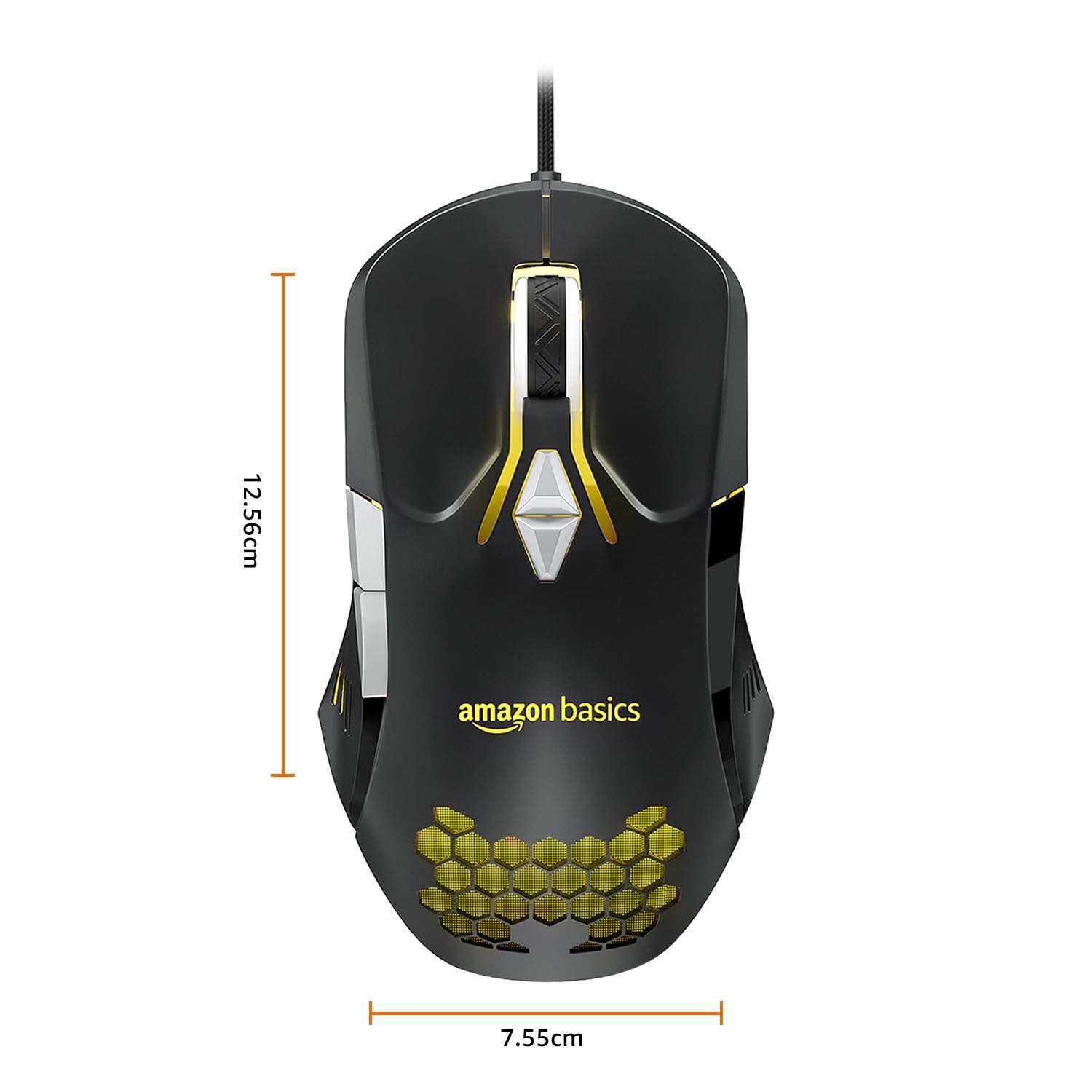
Image: The amazon basics Wired Gaming Mouse with its length (12.56cm) and width (7.55cm) dimensions indicated.
8. Informació de la garantia
This amazon basics Wired Gaming Mouse comes with a 1 anys de garantia from the date of purchase. This warranty covers manufacturing defects and issues arising from normal use. It does not cover damage caused by misuse, accidents, unauthorized modifications, or normal wear and tear. Please retain your proof of purchase for warranty claims.
9. Suport
For further assistance, technical support, or warranty claims, please visit the official amazon basics support page or contact customer service through your purchase platform. Ensure you have your product model number (ABIM03) and proof of purchase ready when contacting support.
Recursos en línia:
- Pàgina del producte: amazon.in/dp/B0BTD2YN6Y
- amazon basics Store: amazon basics Store


