
1. Introducció
Thank you for choosing the MageGee V550 Wireless Gaming Keyboard and Mouse Combo. This product is designed to provide a seamless and responsive experience for both gaming and everyday use. Featuring a 2.4GHz wireless connection, vibrant RGB backlighting, and a comfortable design, this combo aims to enhance your computing experience. Please read this manual carefully to ensure proper setup, operation, and maintenance of your new devices.
2. Contingut del paquet
Si us plau, verifiqueu que tots els elements que s'enumeren a continuació estiguin inclosos al vostre paquet:
- MageGee V550 Wireless Keyboard
- MageGee V550 Wireless Mouse
- 2.4GHz USB Receiver (typically stored in the mouse's battery compartment)
- Cable de càrrega tipus C.
- Manual d'usuari
3. Guia de configuració
3.1. Connecting the Devices
- Localitza el receptor USB: The 2.4GHz USB receiver is conveniently stored in a slot on the bottom of the wireless mouse. Gently remove it.
- Connecteu el receptor: Insert the USB receiver into an available USB port on your computer or laptop.
- Encès: Turn on the power switch located on the bottom of both the keyboard and the mouse. The devices should automatically connect to your computer.

3.2. Càrrega inicial
For optimal performance, it is recommended to fully charge both the keyboard and mouse before first use.
- Connect the included Type-C charging cable to the charging port on the keyboard and mouse, and then to a USB power source.
- The power indicator light on the keyboard will flash slowly when the battery is low and during charging. It will typically stop flashing or change color when fully charged.

4. Instruccions de funcionament
4.1. Funcions del teclat
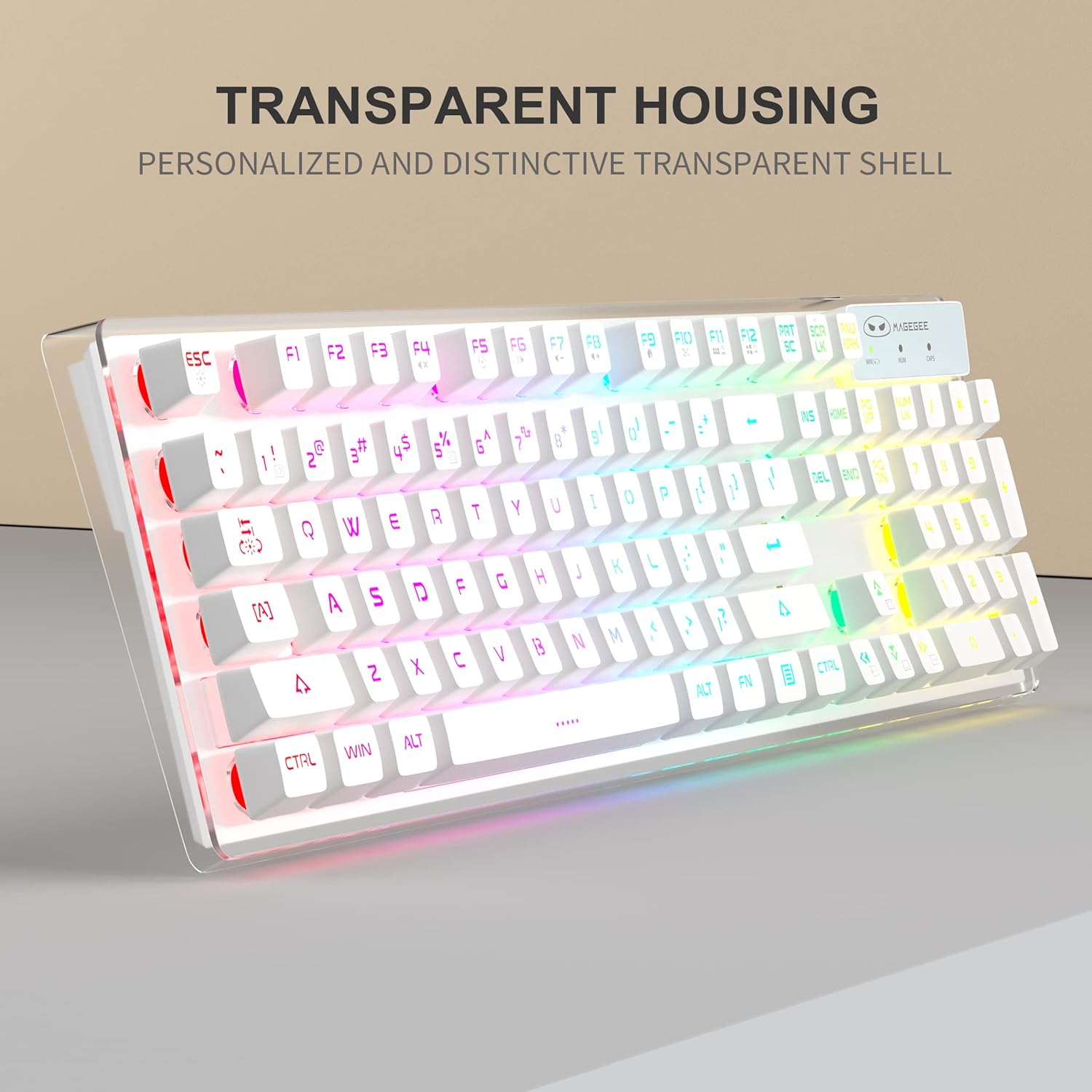
The MageGee V550 keyboard features a full-size layout with dedicated function keys and multimedia controls.
- Control de retroiluminació RGB: The keyboard offers 5 light modes, 7 solid color backlights, and 1 rainbow backlight.
- To switch between light modes: Press FN + 1~5.
- Per activar/desactivar la retroiluminació: premeu FN + Scroll.
- To adjust brightness levels (3 levels): Press FN + Up Arrow or FN + Down Arrow.
- To adjust light speed (4 speeds): Press FN + Fletxa esquerra or FN + Fletxa dreta.
- Llums indicadores: The keyboard includes indicator lights for Caps Lock, Num Lock, and Win Lock status.
- Mode de son intel·ligent: El teclat entrarà automàticament en mode de repòs després de 5 minuts d'inactivitat per estalviar bateria. Premeu qualsevol tecla per activar-lo.



4.2. Funcions del ratolí
The MageGee V550 mouse is designed for precision and comfort.
- Ajust de DPI: The mouse offers 3 adjustable DPI (Dots Per Inch) levels: 1000, 1200, and 1600. Press the DPI button (usually located behind the scroll wheel) to cycle through these settings.
- Clic silenciós: The mouse features silent click buttons, reducing noise during use.
- Recarregable: The mouse is rechargeable via the Type-C cable, eliminating the need for battery replacement.


4.3. Vídeo oficial del producte
Watch the official product video for a visual guide on the MageGee V550 Wireless Gaming Keyboard and Mouse Combo's features and operation.
5. Manteniment
Un manteniment adequat garanteix la longevitat i el rendiment òptim del teclat i del ratolí.
- Neteja: Utilitzeu un suau, lleugerament damp cloth to clean the surfaces of the keyboard and mouse. Avoid using harsh chemicals, abrasive cleaners, or excessive moisture, as these can damage the devices.
- Neteja de les tecles: For thorough cleaning, keycaps can be carefully removed. Ensure the devices are powered off before attempting this.
- Cura de la bateria: Charge the devices regularly. Avoid fully draining the battery frequently, as this can reduce its lifespan. Do not expose the devices to extreme temperatures.
- Emmagatzematge: When not in use for extended periods, store the keyboard and mouse in a dry, cool place away from direct sunlight.
6. Solució De Problemes
If you encounter any issues with your MageGee V550 combo, please refer to the following troubleshooting steps:
- Dispositius que no es connecten:
- Ensure the 2.4GHz USB receiver is securely plugged into a working USB port on your computer.
- Verify that both the keyboard and mouse power switches are in the 'ON' position.
- Check the battery levels of both devices. Recharge if necessary.
- Proveu de connectar el receptor USB a un port USB diferent.
- Reinicieu l'ordinador.
- La retroiluminació del teclat no funciona:
- Premeu FN + Scroll to ensure the backlight is not turned off.
- Check the keyboard's battery level. Low battery can affect backlight functionality.
- Keys Not Responding or Registering Incorrectly:
- Ensure the keyboard is properly connected (see 'Devices Not Connecting' above).
- Check for any debris or obstructions under the affected keycaps.
- If specific keys consistently fail, contact customer support for further assistance.
- Mouse Not Responding or Lagging:
- Ensure the mouse power switch is 'ON'.
- Check the mouse's battery level and recharge if needed.
- Ensure the USB receiver is close to the mouse and not obstructed.
- Intenta utilitzar el ratolí en una superfície diferent.
7. Especificacions
| Marca | MageGee |
| Número de model | V550 |
| Color | Blanc |
| Tecnologia de connectivitat | 2.4GHz Radio Frequency, USB |
| Característiques especials | RGB Backlit, Hotkeys and Media Keys, Rechargeable, Spillproof, Transparent Base, Silent Mouse Clicks |
| Dispositius compatibles | Consola de jocs, ordinador personal |
| Pes de l'article | 2.47 ounces (mouse) |
| Dimensions del paquet | 17.6 x 8.7 x 1.85 polzades |
8. Garantia i Suport
MageGee products are designed for reliability and performance. For warranty information or technical support, please refer to the warranty card included in your package or visit the official MageGee weblloc web. Conserveu el rebut de compra com a comprovant de compra per a qualsevol reclamació de garantia.