
Introducció
This manual provides instructions for the Panasonic KX-TGFA97B additional cordless handset. This handset is designed to expand your existing Panasonic KX-TGF94x or KX-TGF97x series landline phone system. It is not a standalone product and requires a compatible base unit to function.
Què hi ha a la caixa
- Cordless Handset (KX-TGFA97B)
- Carregador
- Piles AAA recarregables (2)
- Handset Cover
- Clip de cinturó
Compatibilitat
The KX-TGFA97B additional cordless handset is compatible with Panasonic KX-TGF94x and KX-TGF97x series landline phone systems. Ensure your existing system is one of these series for proper functionality.
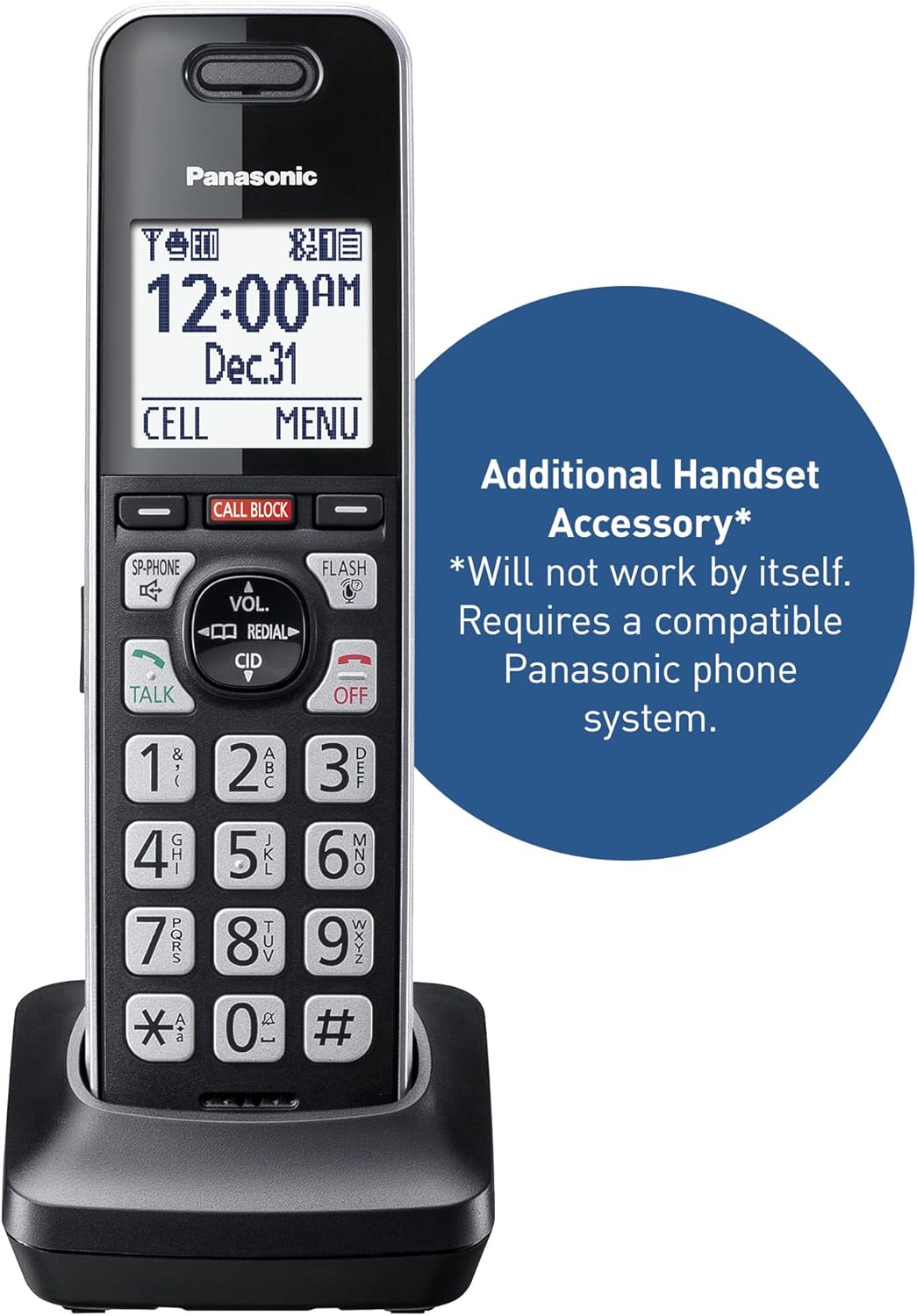
Un primer pla view of the Panasonic KX-TGFA97B additional cordless handset in its charging base. Text overlay indicates it is an 'Additional Handset Accessory' and 'Will not work by itself. Requires a compatible Panasonic phone system.'
Configuració
- Instal·leu les bateries: Open the battery compartment on the back of the handset. Insert the two supplied AAA rechargeable batteries, observing the correct polarity (+ and -). Close the compartment cover.
- Charge Handset: Place the handset on the charger. The handset will begin charging. Allow at least 7 hours for a full charge before initial use. The display will indicate charging status.
- Registre el telèfon: This additional handset must be registered to your compatible Panasonic base unit. Refer to your main system's instruction manual for specific handset registration steps. Generally, this involves putting the base unit into registration mode and then initiating registration from the new handset's menu.
- Configuració inicial: Once registered, the handset will synchronize with the base unit's settings (date, time, etc.). You may need to adjust personal preferences such as ring volume or display language through the handset's menu.

This image shows the Panasonic KX-TGFA97B additional cordless handset resting in its charging cradle. The handset features a black body with silver trim, a backlit LCD screen displaying time and date, and a standard numeric keypad with function buttons like TALK, OFF, CALL BLOCK, VOL, CID, and FLASH.
Instruccions de funcionament
Funcions de trucada bàsiques
- Fer una trucada: Dial the phone number and press the PARLAR botó.
- Respondre una trucada: Quan soni el telèfon, premeu la tecla PARLAR botó.
- Finalització d'una trucada: Premeu el botó OFF button or place the handset back on the charger.
- Torna a marcar: Premeu el botó RECOMANTA botó per view and call previously dialed numbers.
- Flash: Durant una trucada, premeu el botó FLASH button to use call waiting or transfer calls (if supported by your phone service).
Control de volum
Durant una trucada, utilitzeu VOL up/down buttons to adjust the earpiece or speakerphone volume.
Intercomunicador
Per fer una trucada d'intercomunicació a un altre auricular registrat, premeu la tecla INTERCOMUNICACIÓ button and select the desired handset. Refer to your main system manual for detailed intercom usage.
Navegació pel menú
Use the navigation buttons (up/down arrows) to scroll through menu options on the display. Press MENÚ/SELECT to enter a menu or confirm a selection. Press OFF per sortir d’un menú.
Funcions avançades
Bloqueig avançat de trucades
The system incorporates advanced features to minimize unwanted calls:
- Pre-installed Call Block: The system comes with 14,000 pre-installed numbers from a robocall database to block nuisance calls automatically.
- Bloqueig de trucades d'un sol toc: During or after a call, press the dedicated BLOC DE CONVOCAT .RIES button on the handset to add the caller's number to your block list. You can block up to an additional 2,000 numbers.
- Automated Call Block: This feature pre-blocks known robocalls.
- Bloqueig de trucades de telemàrqueting: Allows you to block announced callers, giving you control over who reaches you.
- Alerta d'estafa d'un sol anell: Protects against one-ring scams by displaying a confirmation screen if you attempt to return a one-ring call, prompting you to verify before dialing.
This video demonstrates the pre-installed call block feature of the Panasonic cordless phone system. It shows an incoming call being automatically blocked, preventing unwanted interruptions.
Enregistrament de 2 vies
The 2-Way Recording feature allows you to record telephone conversations. This can be useful for retaining important details. When activated, an announcement of "Start Recording" is played to both parties, which can also deter suspicious callers. Refer to your main system manual for detailed instructions on activating and managing 2-way recording.
Resolució de problemes
If you encounter issues with your KX-TGFA97B handset, review the following common problems and solutions. For comprehensive troubleshooting, consult the full user manual available on the Panasonic support weblloc.
- "Check tel line" Message: If the handset displays "Check tel line," ensure the main base unit is properly connected to the telephone line and power source. This message indicates a communication issue with the base unit or the telephone service.
- Durada de la bateria curta: The included 400mAh batteries typically provide 4-5 hours of talk time. If you require longer usage between charges, consider replacing them with higher capacity 1100mAh rechargeable AAA batteries.
- Inconsistent Ringing: If the handset rings out of sequence with other phones in your home, this can sometimes be a system-level issue. Check the main base unit's settings for any 'First Ring Delay' or similar features. If the problem persists, it may be related to your telephone service provider or an inherent characteristic of the system.
- Qualitat de l'altaveu: The speakerphone on the base unit may have a 'tin-like' sound. There is no tone adjustment for the speaker. This is a characteristic of the device.
- LED Indicators Always On: If the answering machine's 'answer on/off' or message indicator LEDs remain constantly lit even when the machine is off or no messages are present, this may indicate a manufacturing defect. If this occurs, contact Panasonic customer support.
- Spam Calls Still Getting Through: While the system has a large pre-installed block list, new spam numbers emerge constantly. Actively use the one-touch call block button to add new unwanted numbers to your personal block list.
Especificacions
| Marca | Panasonic |
| Número de model | KX-TGFA97B |
| Color | Negre amb ribet platejat |
| Tipus de telèfon | Sense fils |
| Nombre de bateries | Necessites 2 piles AAA (incloses) |
| Font d'alimentació | Elèctric amb cable, alimentat amb piles |
| Tipus de marcador | Teclat únic |
| Dimensions de l'article (L x A x A) | 2.87 x 2.83 x 6.73 polzades |
| Tipus de contestador | Digital (via compatible base unit) |
| Pes de l'article | 8.48 unces |
| Dispositius compatibles | KX-TGF94x and KX-TGF97x Series |
| Capacitat de trucades de conferència | 3 way (via compatible base unit) |
| Operació multilínia | Operació d'una sola línia |
| Temps d'espera del telèfon | 5 dies |
| Temps de conversa telefònica | 10 hores |
| Capacitat d’enregistrament | 22 minutes (via compatible base unit) |

This image illustrates the dimensions of the Panasonic KX-TGFA97B cordless handset and its charging base. The handset measures 6.7 inches in height, 1.9 inches in width, and 1.2 inches in depth. The base measures 2.8 inches in width and 2.9 inches in depth, with a height of 1.8 inches.
Garantia i Suport
Informació de la garantia
The Panasonic KX-TGFA97B additional cordless handset comes with a Garantia de mà d'obra d'1 any i a Garantia del fabricant de 1 anysSi us plau, conserveu el comprovant de compra per a reclamacions de garantia.
Atenció al client
For technical assistance, troubleshooting beyond this manual, or warranty service, please visit the official Panasonic support website or contact their customer service. The full, detailed instruction manual for your complete phone system (KX-TGF94x or KX-TGF97x series) can also be found on the Panasonic support weblloc.