1. Introducció
This manual provides comprehensive instructions for the setup, operation, and maintenance of your iDPRT 320E Thermal Label Printer. Please read this manual thoroughly before using the device to ensure proper functionality and to prevent damage. The iDPRT 320E is designed for efficient label printing in various environments, supporting multiple operating systems and connectivity options.
2. Què hi ha a la caixa
Verifiqueu que tots els components siguin presents en desembalar-lo:
- iDPRT 320E Thermal Label Printer
- Manual d'instruccions
- Cable de dades USB
- Adaptador d'alimentació
- Samples Etiquetes
3. Producte acabatview
The iDPRT 320E Thermal Label Printer is a compact device designed for high-speed, high-resolution label printing. It features a simple design with essential ports for connectivity and an intuitive LED indicator for operational status.
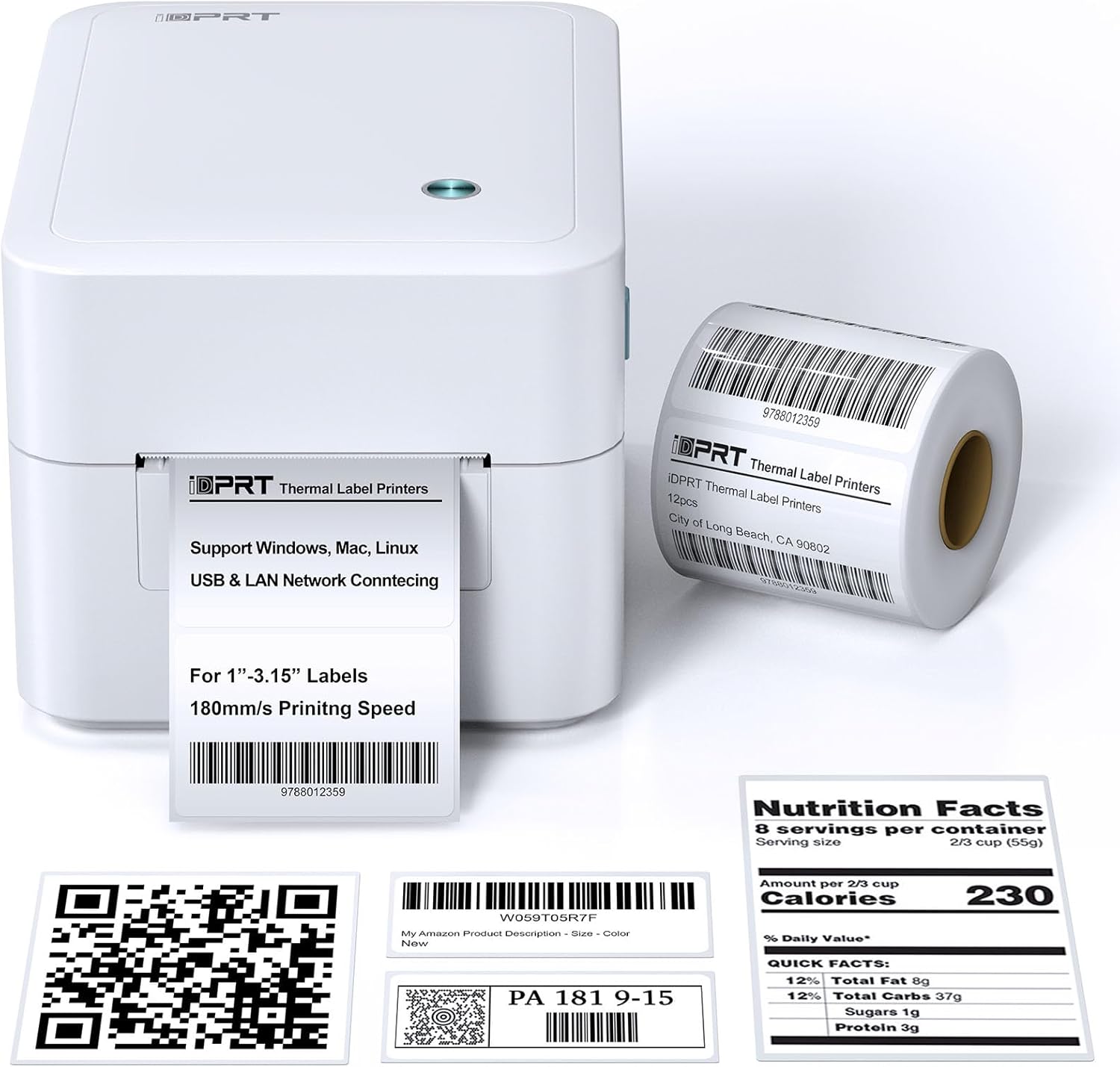
Figura 3.1: Frontal view of the iDPRT 320E Thermal Label Printer with samples etiquetes.
Components clau:
- Ranura de sortida de l'etiqueta: On emergeixen les etiquetes impreses.
- Cover Release Latches: Used to open the printer cover for label loading.
- Port d'alimentació: Es connecta a l'adaptador de corrent.
- Port USB: Per a la connexió directa a un ordinador.
- Port LAN: Per a la connectivitat de xarxa.
- Indicador LED: Mostra l'estat de la impressora.
4. Instruccions de configuració
4.1 Connexió d'alimentació
- Connecteu l'adaptador de corrent al port d'alimentació de la impressora.
- Connecteu l'adaptador d'alimentació a una presa de corrent adequada.
4.2 Càrrega d'etiquetes
The printer supports thermal labels with widths between 1 and 3.15 inches.
- Gently press the cover release latches on both sides of the printer to open the top cover.
- Place the roll of thermal labels into the label compartment, ensuring the labels feed from the bottom of the roll and the printable side faces upwards.
- Adjust the label guides to fit the width of your labels snugly, without creasinels g.
- Pull a few labels past the print head and out through the label exit slot.
- Tanqueu la coberta superior fermament fins que encaixi al seu lloc.

Figure 4.1: Correct method for loading thermal labels into the printer.
4.3 Instal·lació de controladors i programari
To use the printer with your computer, you must install the appropriate drivers and the Label Designer software.
- Visit the official iDPRT website to download the latest drivers for your operating system (Windows, Mac, or Linux).
- Download and install the free Label Designer software from the official website. This software is available for Windows and as an online editor for Mac users.
- Follow the on-screen instructions to complete the installation process for both the drivers and the software.

Figure 4.2: The iDPRT 320E printer supports multiple operating systems.
4.4 Opcions de connectivitat
The iDPRT 320E offers flexible connectivity:
- Connexió USB: Connecteu la impressora directament a l'ordinador amb el cable USB proporcionat.
- LAN Network Connection: Connect the printer to your local area network using an Ethernet cable for shared access.
- Aplicació mòbil: For direct printing from your smartphone, download the iDPRT mobile application.

Figure 4.3: USB and LAN network connectivity options.
5. Instruccions de funcionament
5.1 Creating Labels with Label Designer Software
The Label Designer software allows you to create and customize various label types.
- Launch the Label Designer software on your computer.
- Select a template or start a new label design.
- Customize your labels with text, barcodes, QR codes, images, and various fonts. The software supports different label sizes and layouts.
- Ensure the label dimensions in the software match the physical labels loaded in the printer.

Figure 5.1: Designing labels using the Label Designer software.
5.2 Impressió d'etiquetes
Once your label design is complete and labels are loaded:
- In the Label Designer software, click the 'Print' button.
- Select the iDPRT 320E printer from the list of available printers.
- Adjust print settings such as quantity and print speed if necessary. The printer supports speeds up to 180mm/s and a resolution of 203 DPI.
- Confirm the settings and initiate printing.

Figure 5.2: The printer delivers high-quality 203 DPI resolution for clear labels.
Figure 5.3: The printer is capable of high-speed printing up to 180mm/s.
5.3 LED Indicator Meanings
The LED indicator on the printer provides visual feedback on its status:
- Green (Solid On): The printer is currently printing.
- Red (Solid On): The printer cover is not properly closed, or there is a paper jam/error.
- Blue (Solid On): La impressora està a punt per funcionar.
6. Manteniment
6.1 Neteja de la impressora
Una neteja regular ajuda a mantenir la qualitat d'impressió i allarga la vida útil de la impressora.
- Assegureu-vos que la impressora estigui apagada i desendollada abans de netejar-la.
- Utilitzeu un drap suau i sense pelusa dampened with isopropyl alcohol to gently wipe the print head. Avoid touching the print head with bare hands.
- Clean the exterior of the printer with a dry, soft cloth. Do not use abrasive cleaners or solvents.
- Remove any dust or label debris from the label compartment.
7. Solució De Problemes
If you encounter issues with your iDPRT 320E printer, refer to the following common problems and solutions:
| Problema | Causa possible | Solució |
|---|---|---|
| La impressora no s'encén | Cable d'alimentació desconnectat; Presa de corrent defectuosa | Comproveu les connexions d'alimentació; proveu una presa de corrent diferent. |
| Etiquetes que no s'imprimeixen | Labels loaded incorrectly; Printer cover open; No drivers installed; Incorrect printer selected | Reload labels correctly; Close cover firmly; Install drivers; Select iDPRT 320E in print dialog. |
| Poor print quality (faded, blurry) | Print head dirty; Low-quality labels; Incorrect print density settings | Clean the print head; Use recommended thermal labels; Adjust print density in software settings. |
| Cannot connect via USB/LAN | Cable faulty; Driver issue; Network configuration problem | Try a different cable; Reinstall drivers; Verify network settings (for LAN). |
| Cannot connect via mobile app | App not installed; Printer not discoverable; Network issue | Ensure app is installed and updated; Check printer's network connection; Restart printer and app. |
| Mac Bluetooth connectivity issues | Direct Bluetooth printing to Mac is not supported; Driver limitations | Connect via USB or LAN for Mac systems. Mobile app connectivity is available for smartphones. |
8. Especificacions
Detailed technical specifications for the iDPRT 320E Thermal Label Printer:
| Característica | Especificació |
|---|---|
| Nom del model | 320E |
| Tecnologia d'impressió | Tèrmica |
| Velocitat màxima d'impressió | 180 mm/s (Monochrome) |
| Resolució d'impressió màxima | 203 DPI |
| Mida màxima del suport | 1"-3.15" inches width |
| Tecnologia de connectivitat | USB, LAN |
| Dispositius compatibles | PC (Windows, Mac, Linux), Mobile (iOS/Android via App) |
| Mètode de control | App, Software |
| Dimensions del producte | 8.11 "P x 6.1" W x 5.28" H |
| Pes de l'article | 3.78 lliures |
| Característiques especials | Automatic Label Recognition, LAN Network Connectivity |
9. Garantia i Suport
9.1 Informació de la garantia
The iDPRT 320E Thermal Label Printer comes with a limited warranty. Please refer to the warranty card included in your product packaging or visit the official iDPRT weblloc per obtenir els termes i condicions detallats.
9.2 Atenció al client
For technical assistance, troubleshooting, or any inquiries regarding your iDPRT 320E printer, please contact our customer service team. You can reach us via the Amazon messaging system or through the contact information provided on the official iDPRT website. Our team is available to assist you with any pre-sales or after-sales support needs.


