
1. Introducció
Thank you for choosing the Varmilo Minilo VXB67 Graptopetalum Mendozae 65% Bluetooth White LED Mechanical Keyboard. This manual provides detailed instructions on setting up, operating, maintaining, and troubleshooting your new keyboard to ensure optimal performance and longevity.
The Varmilo Minilo VXB67 combines wired and wireless connectivity, featuring Type-Cool sound dampening and the ability to connect to up to three Bluetooth devices. Its compact 65% layout is designed for efficiency and comfort.
2. Què hi ha a la caixa
- Varmilo Minilo VXB67 Mechanical Keyboard
- Cable USB
Assegureu-vos que tots els components estiguin presents abans de continuar amb la configuració.
3. Configuració
3.1 Connexió per cable
- Locate the USB-C port on the Varmilo Minilo VXB67 keyboard.
- Connect one end of the provided USB cable to the keyboard's USB-C port.
- Connecteu l'altre extrem del cable USB a un port USB disponible de l'ordinador.
- El sistema operatiu reconeixerà automàticament el teclat i estarà llest per al seu ús.
3.2 Connexió sense fil Bluetooth
The Varmilo Minilo VXB67 can connect to up to 3 Bluetooth devices.
- Enable Bluetooth Mode: Ensure the keyboard is in Bluetooth mode. Refer to the keyboard's physical switch or function key combination for Bluetooth activation (e.g., Fn + 1/2/3 for different profiles).
- Mode de sincronització: Press and hold the designated Bluetooth pairing key (e.g., Fn + 1, Fn + 2, or Fn + 3) for a few seconds until the indicator light flashes, indicating it's in pairing mode.
- On Your Device:
- Go to your device's Bluetooth settings (PC, tablet, smartphone).
- Cerca nous dispositius.
- Select "Varmilo Minilo VXB67" (or similar name) from the list of available devices.
- Seguiu les indicacions de la pantalla per completar el procés de vinculació.
- Dispositius de commutació: Once paired with multiple devices, you can switch between them by pressing the corresponding Fn + (1, 2, or 3) key combination.
4. Instruccions de funcionament
4.1 Key Functions and Indicators
- Indicador de bloqueig de majúscules: An indicator light next to the arrow keys will illuminate when Caps Lock is active.
- F-row Function Indicators: Indicator lights next to the arrow keys also show the status of F-row functions (e.g., Fn lock).
- Tecles multimèdia: Use the Fn key in combination with the top row keys (F1-F12) to access multimedia controls (e.g., volume, play/pause). Refer to the keycaps for specific icons.
4.2 Bateria i càrrega
- Avís de bateria baixa: A flashing indicator light will warn you when the battery is low.
- Càrrega: Connect the keyboard to a USB power source using the provided USB cable. The Escape key will light up while charging.
- Durada de la bateria: The keyboard features a rechargeable battery designed for extended use.
4.3 Type-Cool Sound Dampening
The Varmilo Minilo VXB67 incorporates Type-Cool sound dampening technology to provide a more pleasant typing experience by reducing unwanted noise.
5. Manteniment
- Neteja: Use a soft, dry cloth to wipe the keyboard surface. For deeper cleaning, gently remove keycaps (if applicable) and use compressed air to clear debris from between switches. Avoid using harsh chemicals or abrasive materials.
- Emmagatzematge: Guardeu el teclat en un lloc fresc i sec, allunyat de la llum solar directa i de temperatures extremes.
- Vessaments de líquids: In case of liquid spills, immediately disconnect the keyboard from power, turn it upside down to drain liquid, and allow it to dry completely before reconnecting. Professional service may be required for severe spills.
6. Solució De Problemes
| Problema | Causa possible | Solució |
|---|---|---|
| El teclat no respon (amb cable) | Connexió de cable fluixa, port USB defectuós, problema amb el controlador. |
|
| Keyboard not connecting (Bluetooth) | Bluetooth not enabled, not in pairing mode, interference, low battery. |
|
| Les claus no es registren o s'escriuen dues vegades | Restes sota la tapa de la tecla, mal funcionament de l'interruptor. |
|
| La bateria no manté la càrrega | Faulty cable, power source issue, battery degradation. |
|
7. Especificacions
| Model | VXB67 |
| Marca | Varmilo |
| Disseny | 65% (65 tecles) |
| Connectivitat | Wired (USB-C), Bluetooth |
| Dispositius compatibles | PC |
| Característiques especials | Rechargeable Battery, Type-Cool Sound Dampening, Connects up to 3 Bluetooth devices |
| Color (Variant) | Varmilo EC Rose V2 |
8. Imatges del producte
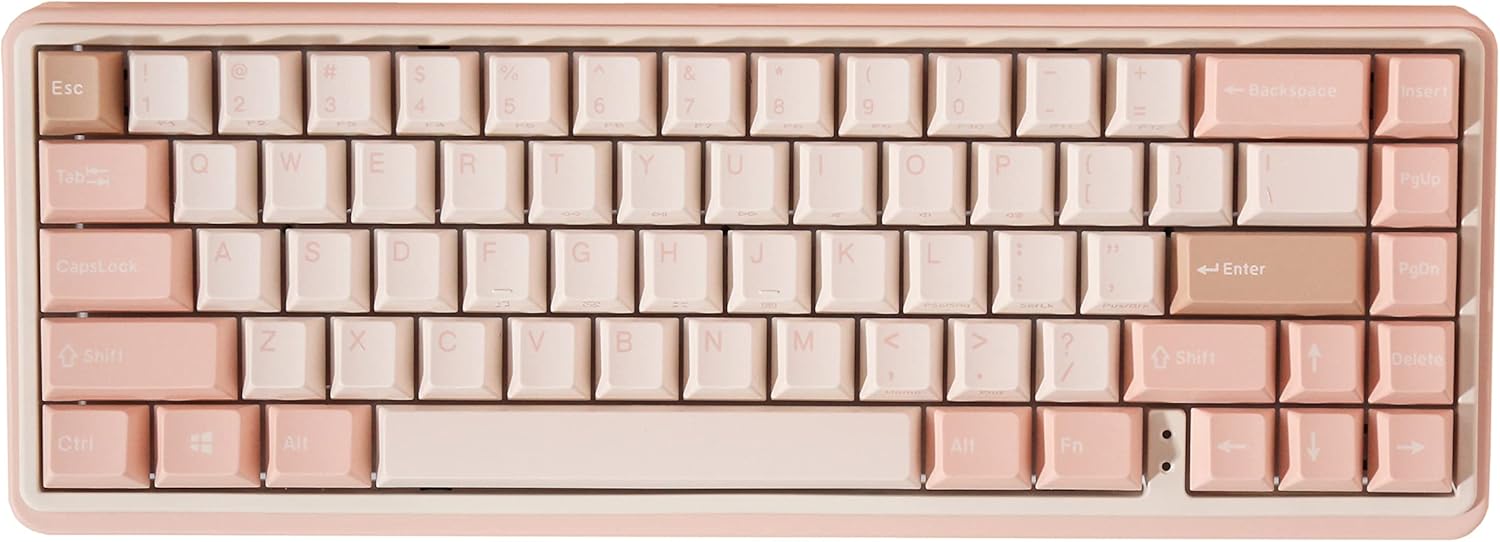


9. Vídeos de productes
This video showcases the Varmilo Minilo Graptopetalum Mendozae keyboard, highlighting its design and features. It demonstrates the keyboard's aesthetic appeal and compact form factor, noting its availability in two sizes.
10. Garantia i Suport
Varmilo products are designed for durability and performance. For specific warranty details, please refer to the warranty card included with your product or visit the official Varmilo weblloc web. Conserveu el rebut de compra com a comprovant de compra.
For technical support, troubleshooting assistance beyond this manual, or warranty claims, please contact Varmilo customer service through their official channels. Contact information can typically be found on the Varmilo weblloc web o a l'embalatge del producte.
Recursos en línia: For the latest drivers, firmware updates, and additional support resources, please visit the official Varmilo weblloc: www.varmilo.com