1. Introducció
Thank you for choosing the MAONO PD200X USB/XLR Dynamic Microphone. This manual provides detailed instructions for setting up, operating, and maintaining your microphone to ensure optimal performance for singing, PC use, and YouTube recording. The PD200X features dual-mode output (USB and XLR), programmable software, and zero-latency monitoring, making it a versatile tool for various audio applications.

Figure 1: MAONO PD200X Dynamic Microphone. This image shows the microphone with its integrated RGB lighting and shock mount, ready for use.
2. Contingut del paquet
Si us plau, verifiqueu que tots els articles que s'enumeren a continuació s'inclouen al vostre paquet. Si falta algun article o hi ha algun malmès, poseu-vos en contacte amb el servei d'atenció al client.
- Dynamic Microphone (MAONO PD200X)
- Muntatge de xoc
- 2.5m USB-C to USB-A/C Cable
- 5/8'' to 3/8'' Adapter
- Manual d'usuari
NOTE: XLR CABLE and MIC STAND are NOT INCLUDED.
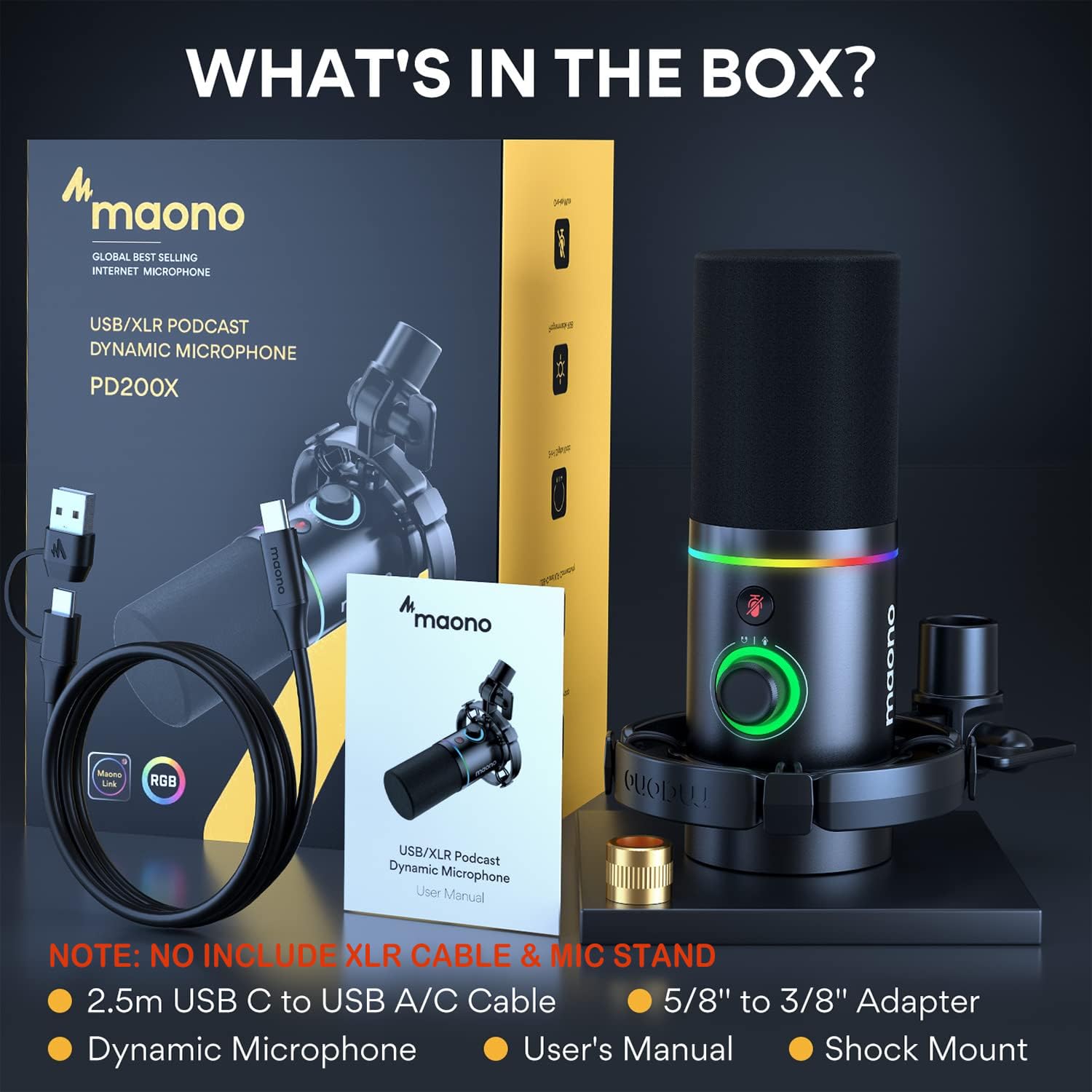
Figure 2: What's in the Box. This image displays all the components included with the MAONO PD200X microphone.
3. Guia de configuració
3.1 Muntatge del micròfon
Attach the MAONO PD200X microphone to the included shock mount. The shock mount helps to isolate the microphone from vibrations and handling noise. If using a standard microphone stand, utilize the provided 5/8'' to 3/8'' adapter as needed.
3.2 Opcions de connectivitat
The MAONO PD200X offers dual-mode output for versatile connectivity:
- Connexió USB: For direct connection to a Personal Computer (PC), Laptop, Mac OS, PS4, or PS5. Use the provided 2.5m USB-C to USB-A/C Cable. This mode allows access to the MAONO LINK software for advanced controls.
- Connexió XLR: For professional audio setups, connect the microphone to a mixer or audio interface using an XLR cable (not included). This provides a balanced analog signal for high-quality audio recording.

Figure 3: USB and XLR Connectivity. This image highlights the USB-C and XLR ports on the microphone, demonstrating its dual-mode output capability.
4. Instruccions de funcionament
4.1 2-in-1 Smart Knob
The MAONO PD200X features a versatile 2-in-1 smart knob for easy control:
- Ajust del guany del micròfon: Rotate the knob to adjust the microphone's input sensitivity.
- Control de volum dels auriculars: Press the knob to switch to headphone volume control, then rotate to adjust the monitoring volume.
- Silenciament amb un clic: The microphone includes a one-click mute key with an LED indicator, allowing you to instantly mute the mic.
- Monitorització en temps real: The 3.5mm headphone jack provides zero-latency monitoring of your output voice.

Figure 4: 2-in-1 Smart Knob. This image details the multi-functional knob and mute button on the microphone.
4.2 Controlled RGB Lighting
Customize your microphone's appearance with dynamic multi-color gradients and 8 static solid-color effects.
- Canvia els colors: Press the button at the bottom of the microphone to cycle through different colors.
- Turn On/Off RGB: Press and hold the button for approximately 2 seconds to turn the RGB lighting on or off.

Figure 5: Controlled RGB Lighting. This image illustrates the various color options available for the microphone's RGB lighting.
4.3 MAONO LINK Software
Unlock the full potential of your MAONO PD200X microphone by using the MAONO LINK software (available for download from the official MAONO website). This software provides advanced customization options in USB mode:
- Ajust de to: Choose the perfect tone for your microphone.
- Control de llum RGB: Turn on/off the RGB light or switch between 9 different colors.
- Efectes d'àudio: Supports EQ, limiter, and compressor adjustments for fine-tuning your sound.

Figure 6: MAONO LINK Software Interface. This image shows the MAONO LINK software on a computer screen, demonstrating its various audio and lighting control features.
5. Manteniment
The MAONO PD200X is constructed with high-standard metal materials for durability. To ensure the longevity and optimal performance of your microphone:
- Neteja: Use a soft, dry cloth to wipe the microphone body. Avoid using liquid cleaners or abrasive materials.
- Emmagatzematge: Guardeu el micròfon en un entorn sec i sense pols quan no l'utilitzeu.
- Manipulació: Handle the microphone with care to prevent drops or impacts, which could damage internal components.
- Cura del cable: Avoid sharp bends or kinks in the USB cable to prevent internal wire damage.
6. Solució De Problemes
If you encounter issues with your MAONO PD200X microphone, please refer to the following common troubleshooting steps:
| Problema | Causa possible | Solució |
|---|---|---|
| No sound output / Microphone not detected (USB) |
|
|
| Low volume / Weak signal |
|
|
| Background noise / Hum |
|
|
| Headphone monitoring not working / No sound from headphone jack |
|
|
If the problem persists after trying these solutions, please contact MAONO customer support for further assistance.
7. Especificacions
| Característica | Detall |
|---|---|
| Model | PD200X |
| Dispositius compatibles | Personal Computer, Audio interface, Laptop, PC |
| Color | Negre |
| Components inclosos | Dynamic Microphone, Shock Mount, 2.5m USB-C to USB-A/C Cable, 5/8'' to 3/8'' Adapter |
| Patró polar | Unidireccional |
| Sensibilitat d'àudio | 45 dB |
| Pes de l'article | 140 grams |
| Impedància | 600 ohms |
| Factor de forma del micròfon | Escriptori |
| Dimensions de l'article (L x A x A) | 20 x 8 x 8 centímetres |
| Font d'alimentació | Elèctric amb cable |
| Material | Metall |
| Ràtio senyal / soroll | 60 dB |
| Nombre de canals | 1 |
| Interval de freqüència | 70 Hz - 15 kHz |
| Resposta de freqüència | 16 kHz |
| Nivell de soroll | 60 dB |
| Tecnologia de connectivitat | USB, XLR |
| Característica especial | Dual-mode Output, RGB, Voice Isolation Technology |
8. Garantia i Suport
The MAONO PD200X Dynamic Microphone comes with a 12 Months Free Warranty des de la data de compra. Aquesta garantia cobreix els defectes de fabricació i garanteix que el producte estigui lliure de defectes de materials i de fabricació en condicions d'ús normal.
For technical support, warranty claims, or any inquiries regarding your MAONO product, please contact MAONO Technology Inc. directly:
- Correu electrònic: service@maono.com
- Fabricant: Maono Technology Inc.
Si us plau, conserveu el comprovant de compra per validar la garantia.