
1. Introducció
Thank you for choosing the ZGCINE S200 V-Mount Battery. This high-capacity 199Wh/14.8V battery is designed to provide reliable power for professional video cameras, camcorders, and other compatible devices. It features multiple output ports, including Dual DC, USB-C PD, Dual D-TAP, and a BP Interface, allowing simultaneous power delivery to various equipment. This manual provides essential information for safe and efficient operation, setup, maintenance, and troubleshooting.
2. Informació de seguretat
- No desmunteu, obriu ni esmicoleu la bateria.
- No exposeu la bateria a la calor o al foc. Eviteu l'emmagatzematge a la llum solar directa.
- No curtcircuiteu la bateria.
- No exposeu la bateria a cops mecànics.
- En cas de fuita de la bateria, no permeteu que el líquid entri en contacte amb la pell o els ulls. Si hi ha hagut contacte, renteu la zona afectada amb aigua abundant i consulteu un metge.
- Mantingueu la bateria neta i seca.
- No utilitzeu cap carregador que no sigui el proporcionat específicament per al seu ús amb l'equip.
- Eliminar la bateria correctament d'acord amb la normativa local.

Image: The ZGCINE S200 V-Mount Battery highlighting its built-in protection features including overcurrent, overpower, overvoltage, overcharge, short circuit, temperature, reset, and circuit protection.
3. Producte acabatview
The ZGCINE S200 V-Mount Battery is designed with a compact form factor and robust construction, featuring an aluminum alloy V-lock mount and an ABS cover for durability. It includes various input and output ports to meet diverse power requirements.
3.1 Port Layout and Indicators

Imatge: Part superior i lateral views of the ZGCINE S200 V-Mount Battery, clearly labeling all input and output ports including D-Tap, DC (8.4V/12V), USB-C PD, and the V-mount interface. Input/Output specifications are also shown.
- D-Tap Ports: Two D-Tap ports for input and output (Input: 16.8V/3A Max, Output: 14.8V/13A Max).
- Ports de sortida de CC: Two DC output ports (8.4V/3A and 12V/3A).
- Port USB-C PD: Bi-directional USB-C Power Delivery port for both input and output (Input: 5V/3A, 9V/3A, 12V/3A, 15V/3A, 20V/5A Max; Output: 5V/3A, 9V/3A, 12V/3A, 15V/3A, 20V/3.25A Max).
- Interfície BP: For additional power output.
- Botó d'encesa: Activates the battery and checks charge status.
- Indicadors LED: Five LED lights indicate the remaining battery capacity (20%, 40%, 60%, 80%, 100%).

Imatge: Un primer pla view of the ZGCINE S200 V-Mount Battery's top panel, showing the LED power indicators and the various output ports with their respective voltage i ampratificacions.
4. Configuració
4.1 Càrrega inicial
Before first use, fully charge the ZGCINE S200 battery. Charging can be done via the USB-C PD port or a D-Tap charger. A 100W USB-C PD charger can fully charge the battery in approximately 3.5 hours.

Image: The ZGCINE S200 V-Mount Battery connected to a wall charger via its USB-C PD port, illustrating the fast-charging capability.
4.2 Muntatge de la bateria
To mount the battery, align the V-mount plate on your camera rig or accessory with the V-lock mechanism on the battery. Slide the battery onto the plate until it clicks securely into place. To release, press the release button on the V-mount plate and slide the battery off.
5. Instruccions de funcionament
5.1 Comprovació de l'estat de la bateria
Press the power button on the side of the battery. The five LED indicators will illuminate to show the current charge level:
- 1 LED: 0-20%
- 2 LED: 20-40%
- 3 LED: 40-60%
- 4 LED: 60-80%
- 5 LED: 80-100%
5.2 Dispositius d'alimentació
Connect your camera, camcorder, LED light, monitor, or other compatible devices to the appropriate output port on the ZGCINE S200 battery. The battery supports simultaneous power delivery to multiple devices.
- USB-C PD: Use a USB-C to USB-C cable to power devices like the Sony FX3, BMPCC 4K/6K Pro, or charge smartphones/tablets.
- D-Tap: Connect D-Tap compatible accessories such as LED lights or monitors.
- Sortides de CC: Use the 8.4V or 12V DC outputs for devices requiring these specific voltages.

Image: A user holding a camera rig with the ZGCINE S200 V-Mount Battery attached, demonstrating its use in a portable setup.
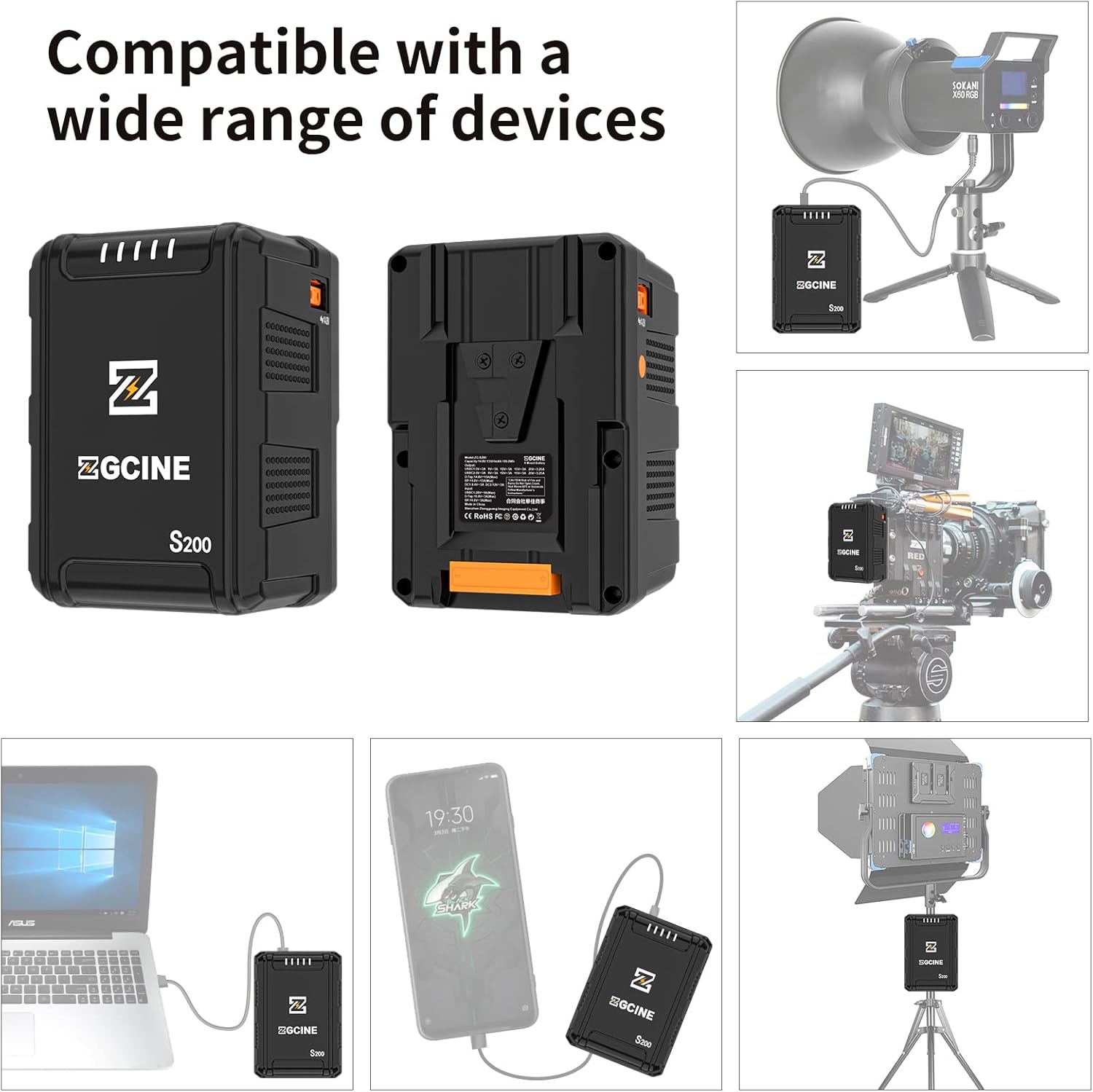
Image: Illustrations showing the ZGCINE S200 V-Mount Battery connected to a studio LED light, a camera rig, a laptop, and a smartphone, demonstrating its wide compatibility.
6. Manteniment
6.1 Emmagatzematge
When storing the battery for extended periods, ensure it is charged to approximately 50-70% capacity. Store in a cool, dry place away from direct sunlight and extreme temperatures. Avoid storing fully charged or completely depleted batteries for long durations.
6.2 Neteja
Clean the battery's exterior and contact points with a soft, dry cloth. Do not use liquid cleaners or solvents. Ensure all ports are free from dust and debris.
6.3 Consells sobre la cura de la bateria
- Eviteu les descàrregues profundes; recarregueu la bateria abans que s'esgoti completament.
- Do not expose the battery to extreme hot or cold environments.
- Regularly check the battery for any signs of damage or swelling. Discontinue use if any abnormalities are observed.
7. Solució De Problemes
- La bateria no es carrega:
- Ensure the charging cable and adapter are securely connected and functional.
- Verifiqueu que la font d'alimentació estigui activa.
- Try a different charging port (USB-C PD or D-Tap) or charger.
- Battery not powering devices:
- Comproveu si la bateria té prou càrrega.
- Assegureu-vos que el dispositiu és compatible amb el volum de sortidatage and current of the selected port.
- Verify that the connection cables are secure and undamaged.
- Press the power button to activate the battery's output.
- Els indicadors LED no funcionen:
- Press the power button firmly. If indicators still do not light up, the battery may be completely depleted or require service.
If you encounter issues not covered here, please contact ZGCINE customer support.
8. Especificacions
| Característica | Especificació |
|---|---|
| Número de model | S200 |
| Capacitat de la bateria | 199 Wh / 14.8 V |
| Composició de les cèl·lules de la bateria | Ió de liti |
| Dimensions del producte | 3.5 x 3.1 x 5.1 polzades (8.9 x 7.9 x 13 cm) |
| Pes de l'article | 2.4 lliures (1.09 kg) |
| Entrada/Sortida USB-C PD | Input: 5V/3A, 9V/3A, 12V/3A, 15V/3A, 20V/5A (Max 100W) Output: 5V/3A, 9V/3A, 12V/3A, 15V/3A, 20V/3.25A (Max 65W) |
| D-Tap Input/Output | Input: 16.8V/3A (Max) Sortida: 14.8V/13A (màx.) |
| Sortida de corrent continu | 8.4 V/3 A, 12 V/3 A |
| Usos recomanats | Camcorder, Camera, LED Light, Monitor, Smartphone, Tablet |
| Fabricant | ZGCINE |
9. Garantia i Suport
ZGCINE products are covered by a limited warranty. For specific warranty terms and conditions, please refer to the warranty card included with your product or visit the official ZGCINE weblloc web. Per a assistència tècnica, assistència per a la resolució de problemes o reclamacions de garantia, poseu-vos en contacte amb el servei d'atenció al client de ZGCINE a través dels seus canals oficials.
Informació de contacte: Please refer to the ZGCINE official website or product packaging for the most up-to-date customer support contact details.