
1. Introducció
Thank you for choosing the FLEXISPOT EF1 Basic Plus Electric Height-Adjustable Desk. This manual provides essential information for the safe and efficient assembly, operation, and maintenance of your new desk. Please read these instructions thoroughly before use and retain them for future reference.
Advertències de seguretat
- Always follow the assembly instructions carefully to prevent accidents and ensure proper function.
- Do not exceed the maximum load capacity of 70 kg (154 lbs) on the desktop. Overloading can compromise stability and cause damage.
- To prevent tipping, especially when the desk is at its maximum height (121 cm), ensure the desk is anchored correctly to a stable wall.
- Keep children and pets away from the desk during operation to avoid injury from moving parts.
- Assegureu-vos que no hi hagi obstacles en el recorregut de l'escriptori durant l'ajust de l'alçada.
- No us asseieu ni us poseu drets a l'escriptori.
- Desconnecteu l'alimentació abans de netejar o realitzar qualsevol manteniment.
2. Muntatge i muntatge
The FLEXISPOT EF1 Basic Plus desk requires assembly. Please ensure all components are present before beginning. Refer to the included assembly guide for detailed step-by-step instructions.
Desembalatge i comprovació de components
Carefully unpack all parts and lay them out on a soft, clean surface to prevent scratches. Verify that all components listed in the packing list are present.
Assemblea acabadaview
- Attach the lifting columns to the desk feet.
- Connect the crossbar to the lifting columns.
- Fixeu l'escriptori al marc muntat.
- Install the control panel and cable management tray (if included).
- Connect all motor and control cables according to the wiring diagram.
- Connecteu el cable d'alimentació a una presa de terra.

Figura 1: The FLEXISPOT EF1 Basic Plus Electric Height-Adjustable Desk with a black tabletop and white frame, set up in a home office environment.

Figura 2: This image illustrates the smooth, single-piece desktop construction of the FlexiSpot desk, contrasting it with typical multi-piece desktops that may have uneven surfaces.

Figura 3: An illustrative diagram detailing various desktop size and color options, along with key specifications for the desk frame, including adjustable height range, static and dynamic load capacities, and lifting noise levels.
3. Instruccions de funcionament
Tauler de control acabatview

Figura 4: Un detallat view of the desk's Smart Control Panel, highlighting the LED display, the up and down adjustment buttons, and four numbered buttons for memory presets.
The desk is equipped with an advanced all-in-one keypad for easy height adjustment and memory functions.
- Pantalla LED: Mostra l'alçada actual de l'escriptori en centímetres.
- Up/Down Buttons (⌃ / ⌄): Press and hold to manually adjust the desk height upwards or downwards. Release the button to stop at the desired height.
- Preajustos de memòria (1, 2, 3, 4): Four programmable buttons to save and recall your preferred sitting and standing heights.
Configuració de preajustos de memòria
- Ajusteu l'escriptori a l'alçada desitjada amb els botons Amunt/Avall.
- Press the "M" or "SET" button (if available, otherwise proceed to step 3) to activate memory mode.
- Press one of the numbered preset buttons (1, 2, 3, or 4) within 3 seconds. The LED display will show "S-1", "S-2", etc., indicating the height has been saved to that preset.
Recalling Memory Presets
Simply press the desired numbered preset button (1, 2, 3, or 4). The desk will automatically move to the saved height.
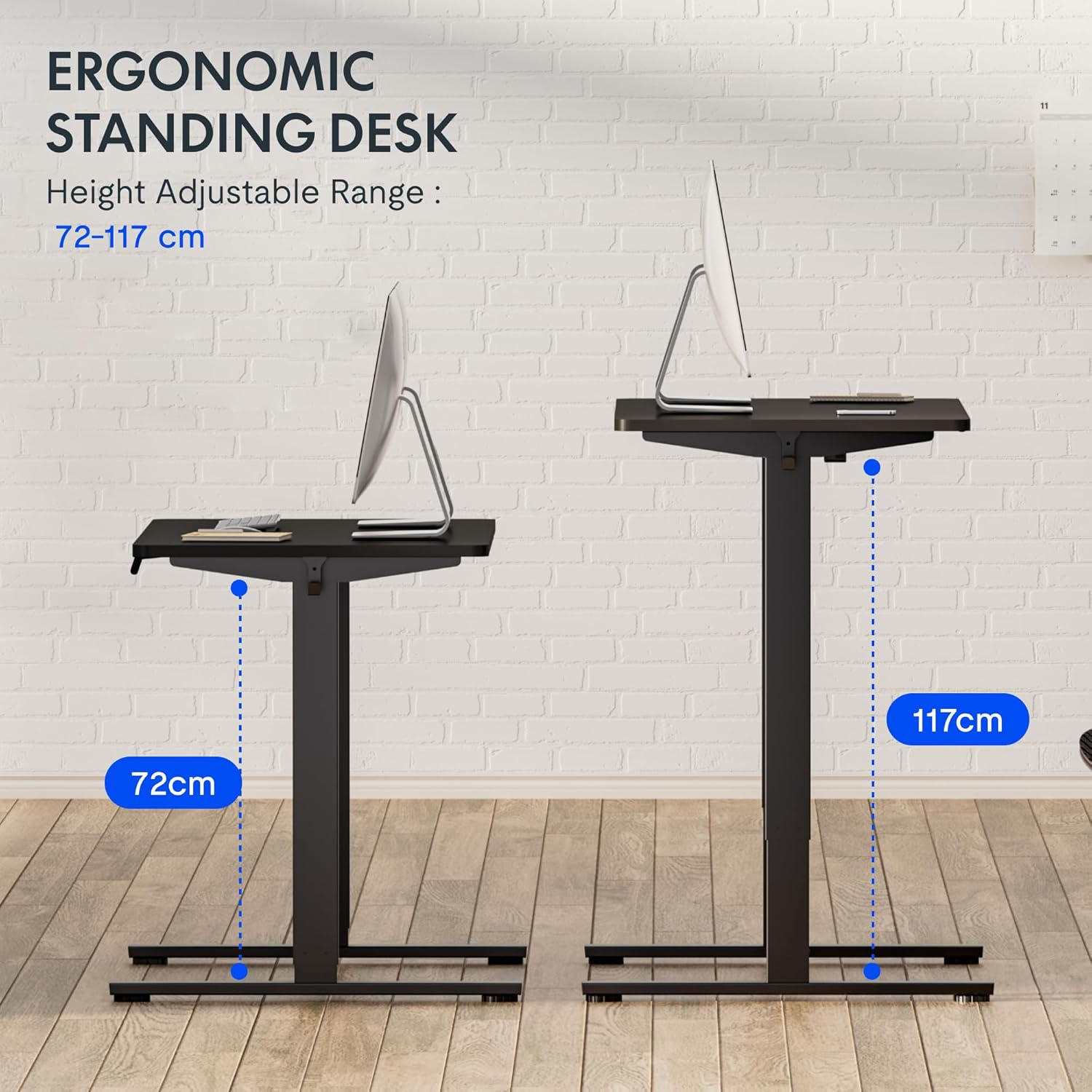
Figura 5: This image demonstrates the height adjustment capabilities of the desk, showing a range from 72 cm (sitting height) to 117 cm (standing height). Note that the full adjustable range for this model is 71 cm to 121 cm.
4. Manteniment
Regular maintenance ensures the longevity and optimal performance of your FLEXISPOT desk.
- Neteja: Netegeu l'escriptori i el marc amb un drap suauamp drap. Eviteu netejadors abrasius o productes químics agressius que puguin danyar l'acabat.
- Gestió de cables: Periodically check and organize cables to prevent tangles and ensure smooth operation.
- Inspecció: Regularly inspect all screws and bolts to ensure they are tight. Retighten if necessary.
- Lubricació: The lifting columns are generally maintenance-free. Do not attempt to lubricate internal components unless specifically instructed by customer support.
5. Solució De Problemes
Si teniu algun problema amb el vostre escriptori, consulteu els problemes i solucions més comuns següents.
| Problema | Causa possible | Solució |
|---|---|---|
| L'escriptori no es mou. |
|
|
| L'escriptori es mou de manera irregular o fa sorolls estranys. |
|
|
| Error code displayed on LED. |
|
|
Procediment de reinici
If the desk is not functioning correctly, a reset may resolve the issue.
- Press and hold the "Down" button until the desk reaches its lowest position and slightly retracts, then releases.
- If this does not initiate a reset, unplug the desk from the power outlet for at least 10 seconds, then plug it back in.
- Repeat step 1. The desk should now be reset.
6. Especificacions
| Marca | FLEXISPOT |
| Número de model | HU-XI-201 |
| Desktop Dimensions (L x W x Thickness) | 120 x 80 x 2.5 cm |
| Adjustable Height Range (without tabletop) | 71 cm - 121 cm |
| Velocitat màxima d'elevació | 2.5 cm/s |
| Capacitat de càrrega màxima | 70 kg (154 lliures) |
| Lifting Noise Level | <50 dB |
| Material d'escriptori | Engineered Wood (MDF) with High-Pressure Laminate |
| Material del marc | Acer amb recobriment en pols |
| Color | Black tabletop + White frame |
| Característiques | Electric height adjustment, 4 memory presets |
7. Garantia i Suport
Informació de la garantia
FLEXISPOT stands behind the quality of its products. Your EF1 Basic Plus desk comes with the following warranty:
- 3 any de garantia: Covers controllers and motors.
- 5 any de garantia: Covers the desk frame.
Please retain your proof of purchase for warranty claims. The warranty covers manufacturing defects under normal use. It does not cover damage caused by misuse, accidents, unauthorized modifications, or failure to follow the instructions in this manual.

Figura 6: An image outlining the warranty coverage for FlexiSpot desks, specifically mentioning a 3-year warranty for controllers and motors, and a 5-year warranty for the desk frame.
Atenció al client
For technical assistance, warranty claims, or any questions regarding your FLEXISPOT EF1 Basic Plus desk, please contact FLEXISPOT customer support.
Weblloc: www.flexispot.com (or regional equivalent)
Correu electrònic: Refer to your purchase documentation or the official FlexiSpot weblloc web per al correu electrònic de contacte.
Telèfon: Refer to your purchase documentation or the official FlexiSpot weblloc web per a un número de telèfon de contacte.


