
Introducció
This manual provides detailed instructions for the proper use and maintenance of your Sunny CRS-300AT Android Smart LED TV Remote Control. This remote is designed for compatibility with AXEN LED TVs and features a dedicated Live TV button for convenient access to live broadcasts. Please read this manual carefully before using the remote control to ensure optimal performance and longevity.
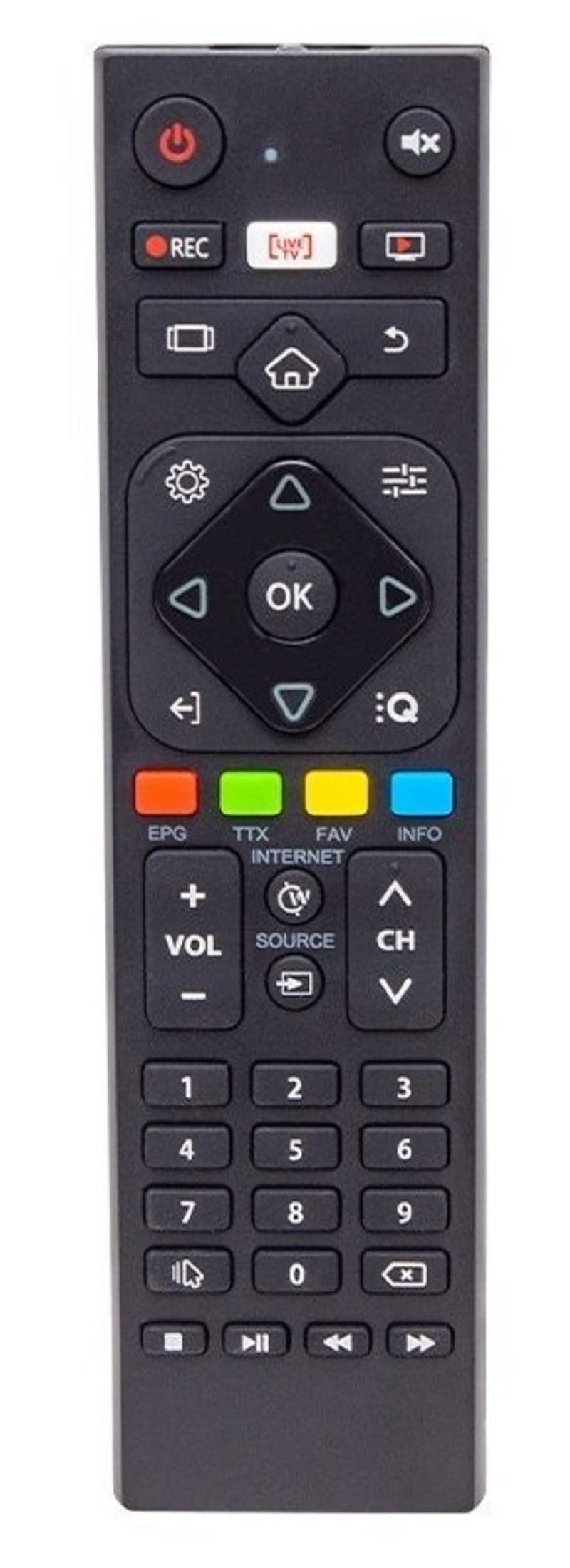
Image of the Sunny CRS-300AT remote control, showing its ergonomic design and button layout, including the dedicated Live TV button.
Configuració
Instal·lació de la bateria
- Localitzeu el compartiment de la bateria a la part posterior del comandament a distància.
- Feu lliscar la tapa del compartiment de la bateria cap avall o en la direcció indicada per una fletxa per obrir-la.
- Insert two AAA batteries (not included), ensuring the positive (+) and negative (-) terminals align correctly with the markings inside the compartment. Incorrect battery orientation can prevent the remote from functioning.
- Torneu a col·locar la tapa del compartiment de la bateria fent-la lliscar fins que faci clic de manera segura.
The remote control is an infrared (IR) device and does not require pairing. Once batteries are installed, it is ready for use with compatible AXEN LED TVs.
Instruccions de funcionament
Point the remote control directly at your television's IR receiver. Ensure there are no obstructions between the remote and the TV.
Funcions clau
- Botó d'encendre (⏻): Encén o apaga el televisor.
- Pujar/baixar el volum (Vol +/-): Ajusta el volum del so.
- Canal amunt/avall (Ch+/-): Canvia els canals de televisió.
- Silencia (🔇): Silencia o activa el so del televisor.
- Botons numèrics (0-9): Directly select TV channels or input numbers.
- Botons de navegació (▲ ▼ ◀ ▶): Navegueu pels menús i opcions.
- Botó D'acord/Entrar: Confirma les seleccions als menús.
- Botó Enrere/Retorn: Torna a la pantalla o menú anterior.
- Botó d'inici (🏠): Accesses the Smart TV home screen or main menu.
- Botó de TV en directe: Directly switches to live television broadcasting.
- Botó d'entrada/font: Changes the input source (e.g., HDMI 1, HDMI 2, AV).
- Botó de menú: Opens the TV's main settings menu.
Specific button layouts and functions may vary slightly depending on your TV model, but the core functions remain consistent.
Manteniment
Neteja
- Netegeu el comandament a distància amb un drap suau i sec.
- Per a la brutícia persistent, lleugerament dampen the cloth with water or a mild, non-abrasive cleaner. Do not spray liquids directly onto the remote.
- Avoid using harsh chemicals, solvents, or abrasive cleaning materials, as these can damage the remote's surface or internal components.
Cura de la bateria
- Canvieu les piles quan la resposta del comandament a distància esdevingui lenta o deixi de funcionar.
- Si no heu d'utilitzar el comandament a distància durant un període prolongat, traieu-ne les piles per evitar fuites i possibles danys.
- Eliminar les bateries usades d'acord amb la normativa local.
Emmagatzematge
Guardeu el comandament a distància en un lloc fresc i sec, allunyat de la llum solar directa, de temperatures extremes i d'alta humitat.
Resolució de problemes
| Problema | Causa possible | Solució |
|---|---|---|
| El comandament a distància no funciona. | Piles gastades o instal·lades incorrectament. | Canvieu les piles per unes de noves, assegurant-vos de la polaritat correcta (+/-). |
| El comandament a distància no funciona. | Obstruction between remote and TV's IR receiver. | Ensure a clear line of sight between the remote and the TV. Remove any objects blocking the signal. |
| El comandament a distància no funciona. | Remote is too far from the TV. | Move closer to the TV. The effective range for IR remotes is typically up to 7 meters (23 feet). |
| Some buttons are not responding. | Brutícia o deixalles sota els botons. | Netegeu el comandament a distància tal com es descriu a la secció Manteniment. |
| TV is not responding to any remote commands. | TV's IR receiver might be faulty or blocked. | Check your TV's user manual for troubleshooting its IR receiver. Try restarting the TV by unplugging it for a few minutes. |
Especificacions
- Model: Sunny CRS-300AT
- Marca: Sunny (Compatible with AXEN)
- Dispositius compatibles: Televisions (specifically AXEN LED TVs)
- Tecnologia de connectivitat: Infrarojos (IR)
- Font d'alimentació: 2 piles AAA (no incloses)
- ASIN: B0BW4M6SRC
Informació de la garantia
This product is typically covered by a manufacturer's warranty. For specific details regarding warranty duration, coverage, and claims process, please refer to the documentation provided with your purchase or contact the retailer where the product was acquired. Keep your proof of purchase for warranty purposes.
Suport
Si trobeu problemes que no es poden resoldre amb la guia de resolució de problemes o si necessiteu més ajuda, poseu-vos en contacte amb:
- El distribuïdor on vau comprar el comandament a distància.
- The manufacturer's customer support (refer to product packaging or manufacturer's weblloc web per obtenir dades de contacte).
When contacting support, please have your product model (CRS-300AT) and proof of purchase readily available.