
1. Producte acabatview
The Alphacool Core Distro Plate is designed to simplify the planning, setup, and maintenance of complex custom water cooling loops in personal computers. It integrates a reservoir and a pump top compatible with VPP or D5 pumps, making it an ideal solution for cooling both CPU and graphics card(s) simultaneously.
This 360mm variant features a left-positioned pump top and strategically arranged G1/4" connections to streamline tubing paths. A dedicated drain port is included on the side for convenient system draining.
Key features of the Core Design series include chrome-plated, brass G1/4" connectors. These ports are recessed directly into the acrylic, utilizing a two-part connector design with O-rings to ensure a leak-proof seal and a clean aesthetic.
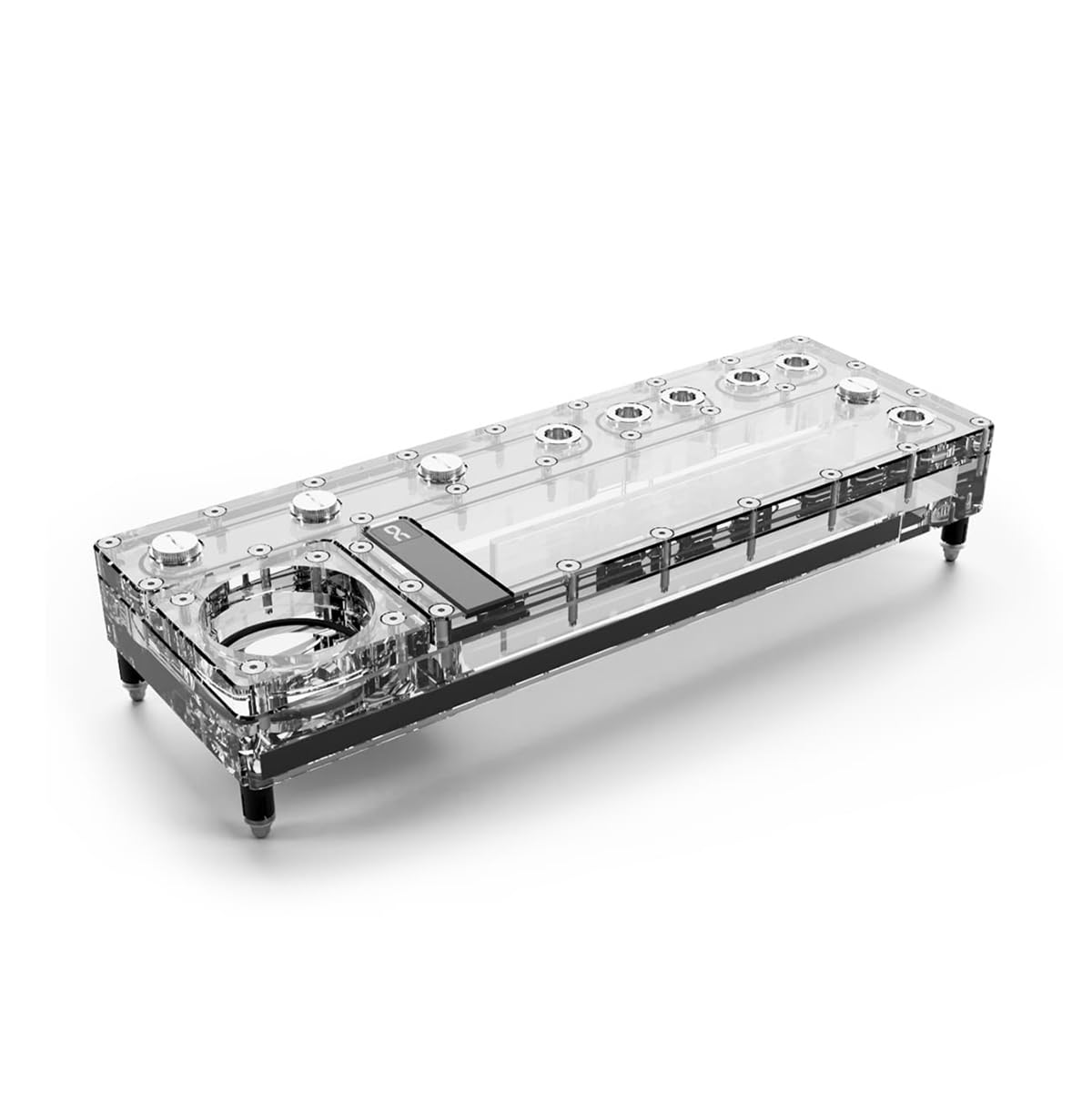
Image 1.1: Alphacool Core Distro Plate 360 Left VPP/D5. This image shows the clear acrylic construction of the distro plate, highlighting its internal channels and G1/4" port locations. The mounting points are visible at the corners.

Imatge 1.2: Part superior view of the Alphacool Core Distro Plate. This perspective clearly displays the multiple G1/4" ports for inlet, outlet, and fill/drain, along with the integrated reservoir section.
2. Informació de seguretat
- Always disconnect power from your computer before installing or performing maintenance on water cooling components.
- Handle the distro plate and other components with care to avoid damage. Acrylic can crack if overtightened or dropped.
- Ensure all fittings are securely tightened to prevent leaks. Do not overtighten, as this can damage threads or acrylic.
- Use only approved coolants for PC water cooling systems. Do not use tap water or automotive coolants.
- Perform a thorough leak test before powering on your system.
- Keep liquids away from electrical components during installation and maintenance.
3. Contingut del paquet
Verifiqueu que tots els components siguin presents i no estiguin danyats abans de continuar amb la instal·lació.
- Alphacool Core Distro Plate 360 Left VPP/D5
- Core Push Mounting Kit (metal pins, female sockets)
- Cargols de muntatge (6x)
- Renandes (6x)
- Mounting nuts (6x)
- Standoffs (6x)
- L-key for mounting
- Power cables (e.g., 3-Pin for pump, RGB cable if applicable)

Image 3.1: Included accessories and mounting hardware. This image displays the various screws, washers, standoffs, an L-key, and two power cables that come with the distro plate for installation and connectivity.
4. Configuració i instal·lació
4.1 Instal·lació de la bomba
The distro plate features an integrated pump top for VPP or D5 pumps. Carefully install your compatible pump into the designated pump top area. Ensure the O-ring is correctly seated and the pump is secured with the provided screws. Exercise caution not to overtighten the screws, as they can be easily stripped.
4.2 Mounting the Distro Plate
The Core Distro Plate utilizes the included Core Push Mounting kit for easy installation onto a case panel or radiator. Follow these steps:
- Attach the metal pins from the Core Push Mounting kit to your PC case panel or radiator at the desired mounting location.
- Secure the matching female sockets to the back of the Distro Plate.
- Align the Distro Plate with the installed pins and simply push it onto the pins until it is securely seated. This tool-free method ensures a tight fit and allows for easy removal.

Imatge 4.1: Ex.ample of the Alphacool Core Distro Plate installed in a PC case. This image demonstrates how the distro plate integrates into a custom water cooling loop, showing tubing connections to other components like a CPU block and radiator.
4.3 Tubing and Fittings
Connect your G1/4" fittings and tubing to the appropriate ports on the distro plate, CPU block, GPU block, and radiators. Plan your tubing runs carefully to minimize bends and ensure optimal flow. Ensure all fittings are hand-tightened securely to prevent leaks.
4.4 Connexions elèctriques
Connect the pump's power cable to an appropriate header on your motherboard or a fan controller. If your distro plate includes RGB lighting, connect the RGB cable to a compatible RGB header on your motherboard or a dedicated RGB controller.

Image 4.2: Alphacool Core Distro Plate showcasing its integrated RGB lighting. This image illustrates the aesthetic effect of the lighting, which can be customized to match your system's theme.
5. Funcionament
5.1 Filling the Loop
Fill the water cooling loop through the designated fill port on the distro plate. Use a funnel to prevent spills. Fill the reservoir until it is nearly full, then briefly turn on the pump (without powering the rest of the PC) to circulate the coolant. Repeat this process, refilling the reservoir as needed, until the loop is full and air bubbles are minimized.
5.2 Proves de fuites
Before powering on your entire system, perform a leak test. Run the pump for at least 12-24 hours with only the pump powered (using a jumper on the PSU or a dedicated PSU tester). Carefully inspect all fittings and connections for any signs of leaks. Place paper towels under potential leak points for easier detection. Address any leaks immediately before proceeding.
5.3 Inici inicial
Once leak testing is complete and no leaks are detected, you can power on your full system. Monitor coolant levels and temperatures. It is normal for small air bubbles to appear and gradually dissipate over the first few days of operation. Ensure the pump is running at an appropriate speed for optimal flow and cooling performance.
6. Manteniment
Regular maintenance is crucial for the longevity and performance of your water cooling system.
- Substitució del refrigerant: It is recommended to replace the coolant every 6-12 months, depending on the coolant type and usage.
- Draining the System: The integrated drain port on the side of the distro plate allows for easy and comfortable draining of the system. Connect a tube to the drain port and open the valve to empty the coolant into a suitable container.
- Neteja: Periodically inspect the distro plate and other components for any buildup or discoloration. If necessary, disassemble and clean with distilled water and a soft brush.
- Fàcil eliminació: The Core Push Mounting system allows for easy removal of the distro plate for maintenance or system upgrades without requiring tools.
7. Solució De Problemes
- Fuites: If leaks occur, immediately power down the system. Identify the source of the leak and re-tighten the fitting or replace the O-ring if damaged. Re-perform a leak test.
- La bomba no arrenca: Check all power connections to the pump. Ensure the pump is correctly seated in the pump top. Verify that the pump's power header on the motherboard or controller is enabled and functioning.
- Excessive Air Bubbles: Small bubbles are normal initially. If large or persistent bubbles remain, tilt your PC case gently in different directions to help dislodge trapped air. Ensure the reservoir is adequately filled. Over time, most bubbles will vanish.
- Rendiment de refrigeració deficient: Check pump speed and ensure it is operating correctly. Verify that all components (CPU block, GPU block, radiators) are properly installed and making good contact. Ensure there are no blockages in the loop.
8. Especificacions
| Número de model | 15476 |
| Dimensions del producte (L x A x A) | 14.17" x 4.92" x 2.71" (360 mm x 125 mm x 69 mm) |
| Material | Acrylic, Brass |
| Bombes compatibles | VPP, D5 |
| Tipus de connector d'alimentació | 3-Pin (for pump, if included) |
| Voltage | 5 Volts (for RGB, if applicable) |
| Mètode de refrigeració | Aigua |
| Dispositius compatibles | Radiator, PC Case |
| Nivell de soroll | 14 Decibels (pump dependent) |
| Pes de l'article | 4.58 lliures (aprox. 2.08 kg) |

Image 8.1: Dimensions of the Alphacool Core Distro Plate. This image provides a visual representation of the product's length (14.17"), width (4.92"), and height (2.71"), crucial for planning installation within a PC case.
9. Garantia i Suport
For warranty information, technical support, or assistance with your Alphacool Core Distro Plate, please refer to the official Alphacool weblloc web o contacteu directament amb el servei d'atenció al client. Conserveu el comprovant de compra per a reclamacions de garantia.
Official Alphacool Weblloc: www.alphacool.com


