
Introducció
This manual provides essential information for setting up, operating, and maintaining your Beelink SER3 Mini PC. Please read it thoroughly before use to ensure proper functionality and safety.
The Beelink SER3 Mini PC is a compact and powerful computer featuring an AMD Ryzen 3 3200U processor, 16GB DDR4 RAM, and a 500GB NVMe SSD, designed for various computing tasks from office work to media streaming.
Contingut del paquet
Ensure all items listed below are present in your package.
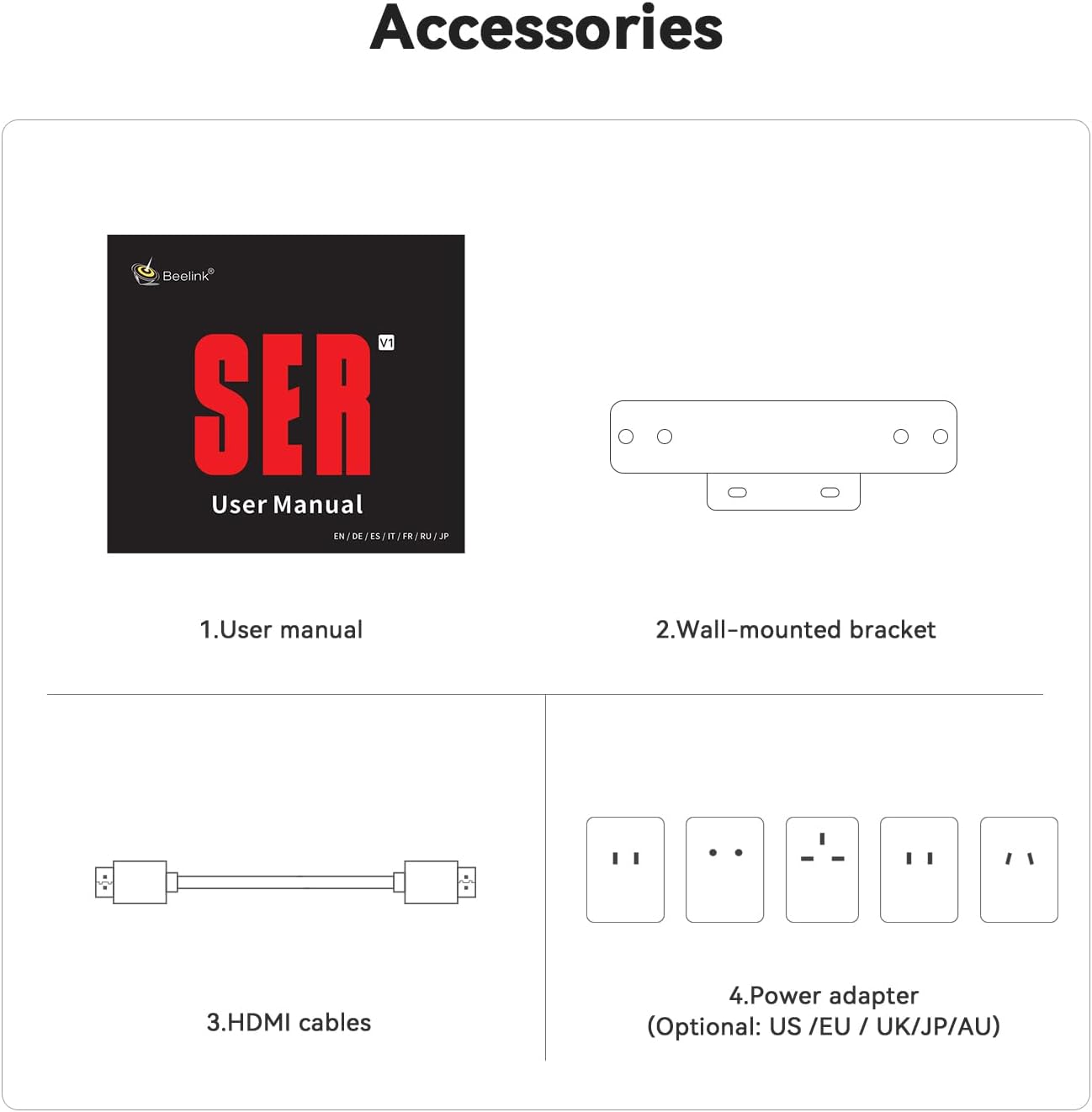
Image: Contents of the Beelink SER3 Mini PC package, showing the user manual, a wall-mounted bracket, two HDMI cables, and a power adapter with various regional plugs.
- Beelink SER3 Mini PC Unit
- Manual d'usuari
- Suport de paret
- HDMI Cables (x2)
- Power Adapter (with regional plugs)
Producte acabatview
Disseny del panell frontal i posterior
The following diagrams illustrate the ports and buttons on your Beelink SER3 Mini PC.
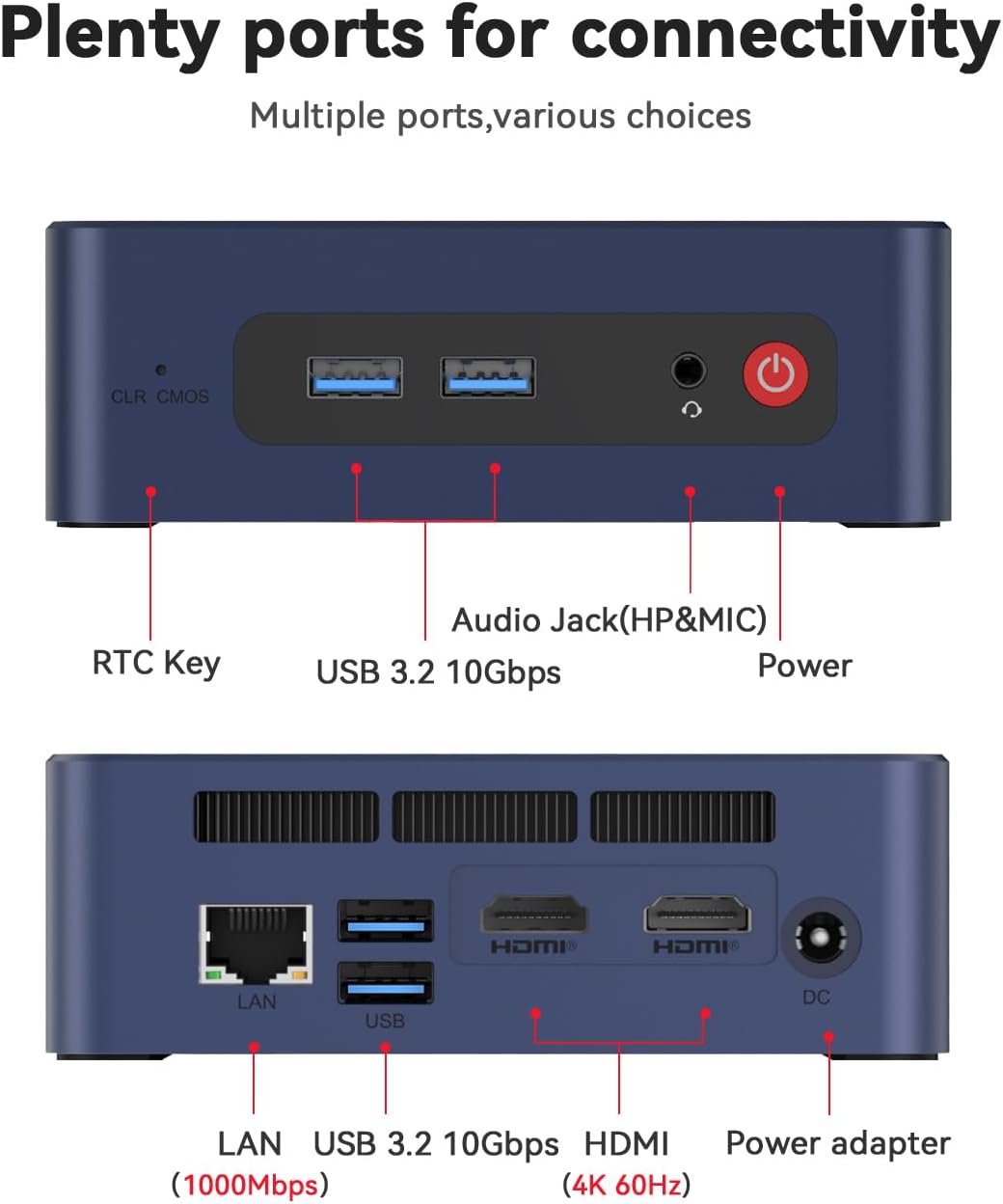
Image: Top panel of the Beelink SER3 Mini PC showing the CLR CMOS button, two USB 3.2 10Gbps ports, an Audio Jack (HP&MIC), and the Power button. The bottom panel shows the LAN port (1000Mbps), two USB 3.2 10Gbps ports, two HDMI (4K 60Hz) ports, and the DC power adapter input.
- Panell frontal:
- CLR CMOS Key: Button to clear CMOS settings.
- USB 3.2 10Gbps Ports (x2): For high-speed data transfer and peripheral connections.
- Audio Jack (HP&MIC): Per a auriculars i micròfon.
- Botó d'encesa: Per encendre/apagar el dispositiu.
- Panell posterior:
- LAN Port (1000Mbps): Per a la connexió de xarxa amb cable.
- USB 3.2 10Gbps Ports (x2): Additional high-speed USB ports.
- HDMI Ports (x2, 4K 60Hz): For connecting displays, supporting dual monitor setup.
- Jack DC: Power input for the adapter.
Components interns
Un va explotar view of the Beelink SER3 Mini PC's internal structure.
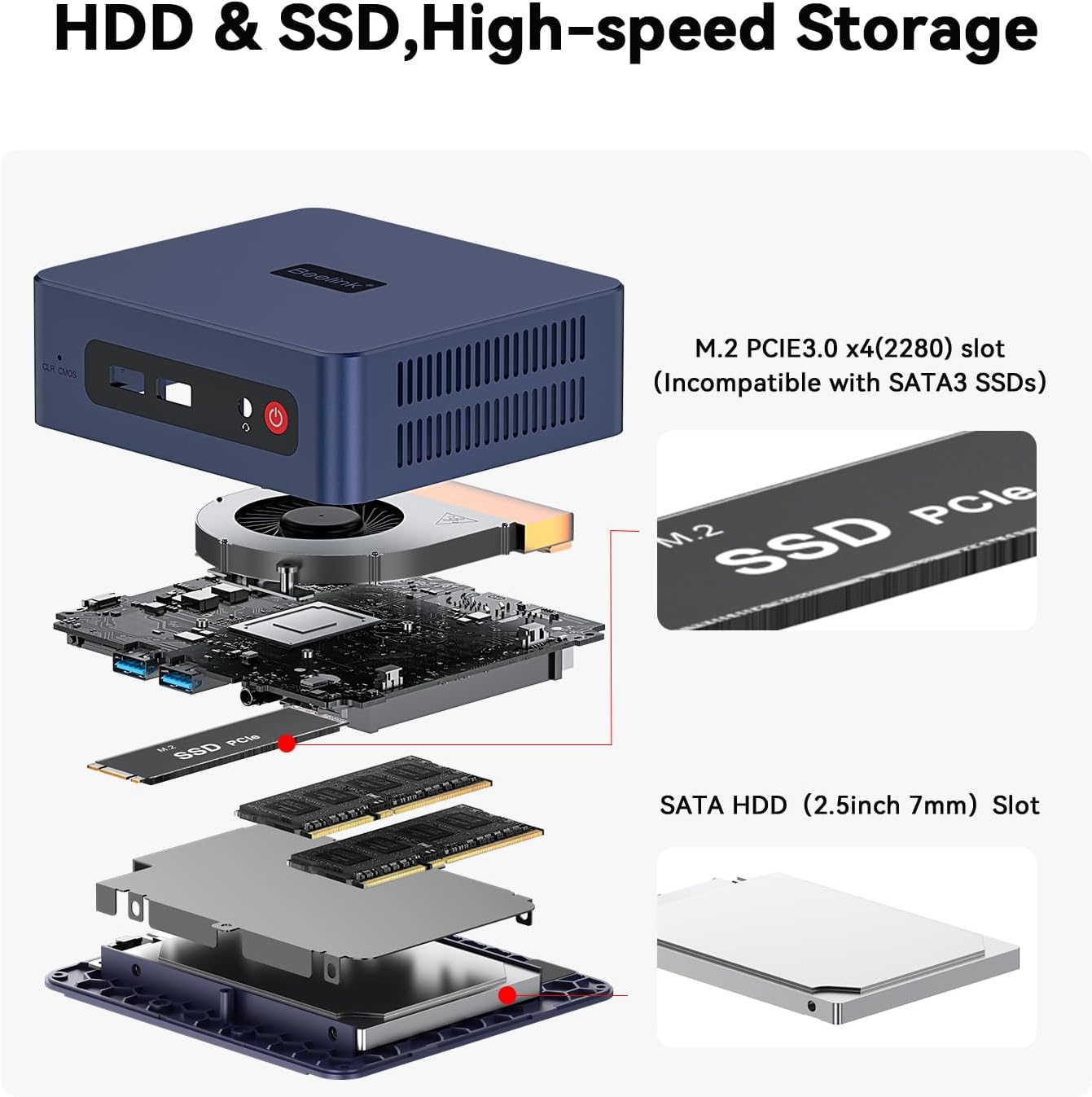
Image: An exploded diagram of the Beelink SER3 Mini PC, illustrating its components: plastic case, cooling fan, CPU, motherboard, M.2 2280 PCIe SSD, SO-DIMM DDR4 2400MT/s RAM, shielding can, and 2.5-inch HDD (7mm) bay, along with the plastic bottom panel.
- Caixa de plàstic: External housing.
- Ventilador de refrigeració: Dissipates heat from internal components.
- CPU (AMD Ryzen 3 3200U): Unitat Central de Processament.
- Placa base: Main circuit board connecting all components.
- M.2 2280 PCIe SSD: Primary storage drive.
- SO-DIMM DDR4 RAM: System memory (16GB installed, expandable).
- Shielding Can: Provides electromagnetic shielding.
- 2.5-inch HDD (7mm) Bay: Slot for additional SATA HDD/SSD storage.
- Plastic Bottom Panel: Base cover of the unit.
Configuració
Follow these steps to set up your Beelink SER3 Mini PC:
- Connecteu-vos a l'alimentació: Plug the power adapter into the DC Jack on the rear panel of the Mini PC, then connect the adapter to a power outlet.
- Connecta a la pantalla: Use an HDMI cable to connect one or both HDMI ports on the Mini PC to your monitor(s) or TV.
- Connecteu els perifèrics: Connect your keyboard, mouse, and other USB devices to the available USB 3.2 ports.
- Connexió de xarxa (opcional): For a wired internet connection, connect an Ethernet cable from your router to the LAN port on the rear panel. For wireless, ensure Wi-Fi is enabled in the operating system settings after initial setup.
- Encès: Press the Power button on the front panel to turn on the Mini PC.
Instruccions de funcionament
Basic operational guidelines for your Mini PC:
- Primer arrencada: Upon first power-on, the system may guide you through the Windows 11 Pro setup process. Follow the on-screen instructions to configure your operating system.
- Encès/apagat:
- Per encendre: Premeu el botó d'engegada.
- Per apagar: Feu clic al botó Inici del Windows i, a continuació, seleccioneu Energia > Apagar.
- Per reiniciar: Feu clic al botó Inici del Windows i, a continuació, seleccioneu Energia > Reiniciar.
- Per dormir: Feu clic al botó Inici del Windows i, a continuació, seleccioneu Energia > Suspensió.
- Connexió a Wi-Fi: In Windows, click the Wi-Fi icon in the taskbar, select your network, enter the password, and click Connect.
- Dual Display Setup: Connect two monitors to the HDMI ports. Windows should automatically detect both displays. You can configure display settings (extend, duplicate) via Display Settings in Windows.
- Expansió d'emmagatzematge: The Mini PC supports storage expansion. Refer to the "Maintenance" section for instructions on installing additional RAM or a 2.5-inch SATA HDD/SSD.
Manteniment
Un manteniment regular ajuda a garantir la longevitat i el rendiment òptim del vostre Mini PC.
Neteja
- Exterior: Use a soft, dry cloth to clean the exterior of the Mini PC. Avoid liquid cleaners.
- Ventilació: Ensure the ventilation holes are clear of dust and obstructions to prevent overheating. Use compressed air to gently clear dust from vents if necessary.
Actualitzacions de maquinari
The Beelink SER3 Mini PC allows for RAM and storage upgrades.

Image: Diagram illustrating the storage expansion options for the Beelink SER3 Mini PC, including the M.2 PCIe 3.0 x4 (2280) slot for NVMe SSDs (up to 2TB) and the SATA HDD (2.5-inch 7mm) slot for additional storage (500GB~2TB).
- Actualització de RAM: The device supports up to 32GB DDR4 RAM (2*16G). To upgrade, carefully open the case, locate the SO-DIMM slots, and install compatible RAM modules.
- NVMe SSD Upgrade: The M.2 2280 PCIe 3.0 SSD can be upgraded up to 2TB.
- 2.5-inch SATA HDD/SSD Installation: An additional 2.5-inch SATA HDD/SSD (500GB~2TB) can be installed in the dedicated bay.
Nota: Always power off and disconnect the Mini PC from the power source before performing any hardware maintenance or upgrades. Consult a professional if you are unsure about any steps.
Resolució de problemes
Problemes comuns i solucions
- No Power / System Does Not Turn On:
- Assegureu-vos que l'adaptador de corrent estigui connectat correctament tant al Mini PC com a una presa de corrent que funcioni.
- Verifiqueu que la presa de corrent funciona provant-la amb un altre dispositiu.
- Try pressing the Power button firmly.
- Sense pantalla / Pantalla negra:
- Check that the HDMI cable(s) are securely connected to both the Mini PC and the monitor.
- Ensure the monitor is powered on and set to the correct input source (HDMI 1, HDMI 2, etc.).
- Try connecting to a different monitor or using a different HDMI cable.
- Sense connexió a Internet:
- Amb cable: Check the Ethernet cable connection to both the Mini PC and your router. Verify router functionality.
- Sense fil: Ensure Wi-Fi is enabled in Windows settings. Check if other devices can connect to your Wi-Fi network. Restart your router if necessary.
- System Slowdown / Performance Issues:
- Tanca les aplicacions innecessàries que s'executen en segon pla.
- Comproveu si hi ha actualitzacions de Windows disponibles i instal·leu-les.
- Assegureu-vos una ventilació adequada per evitar el sobreescalfament.
- Consider upgrading RAM or storage if consistently experiencing performance issues with demanding tasks.
Especificacions
The following table details the technical specifications of the Beelink SER3 Mini PC.

Image: A detailed table outlining the product specifications of the Beelink SER3 Mini PC, including dimensions, CPU, graphics, system disk, internal slots, interfaces, wireless LAN, power details, operating/storage environment, and accessories.
| Característica | Detall |
|---|---|
| Marca | Beelink |
| Model | SER/3200U/16G/500G |
| Model de CPU | AMD Ryzen 3 3200U (2C/4T, up to 3.5 GHz) |
| Gràfics | AMD Radeon Vega 3 Graphics (3 core, 1200 MHz) |
| RAM | 16 GB DDR4 (ampliable a 32 GB) |
| Emmagatzematge | 500GB M.2 2280 PCIe 3.0 SSD (expandable to 2TB NVMe M.2 SSD, plus 2.5-inch SATA HDD/SSD slot) |
| Sistema operatiu | Windows 11 Pro |
| Connectivitat sense fil | WiFi 5 (802.11ac), Bluetooth 5.0 |
| Ethernet | 1000M RJ45 Port |
| Sortida de vídeo | 2 x HDMI (4K 60Hz), supports dual display |
| Ports USB | 4 x USB 3.2 Gen2 (10Gbps) |
| Àudio | 1 x Audio Jack (HP&MIC) |
| Dimensions | Approximately 4.96 x 4.45 x 1.65 inches (124 x 113 x 42mm) |
| Entrada de potència | 19V-3.42A (Input: 100-240V AC, 50/60Hz) |
| Entorn de funcionament | -10°C~45°C, 30%~90% d'humitat |
| Entorn d'emmagatzematge | -20°C~60°C, 10%~90% d'humitat |
Garantia i Suport
The Beelink SER3 Mini PC comes with a 1 any de garantia des de la data de compra, cobrint defectes de fabricació.
Beelink provides lifetime technical support, 30 days free return, and 7 days / 24 hours service. For technical assistance, warranty claims, or any questions regarding your product, please contact Beelink customer support through their official channels or the retailer where the product was purchased.
All Beelink products have obtained FCC, CE, and RoHS certifications, ensuring compliance with safety and environmental standards.