
Introducció
The Tilta Full Camera Cage TA-T45-FCC-B is specifically designed to provide protective armor for your Canon R6 Mark II camera body. This cage enhances the camera's durability and offers numerous mounting points for various accessories, expanding its functionality for professional videography and photography.
Key features include a custom fit for the R6 Mark II, integrated NATO rails, cold shoe receivers, 1/4"-20 threads with locating points, and an ARRI standard rosette for flexible accessory attachment. It also features a cable clamp for secure HDMI and USB-C connections and supports vertical shooting configurations.
Contingut del paquet
Si us plau, verifiqueu que tots els elements que s'enumeren a continuació estiguin inclosos al vostre paquet:
- 1x Tilta Full Camera Cage for Canon R6 Mark II (Black)
- 1x Micro HDMI and USB-C Cable Clamp
- 1x clau Allen
- 1 clau Allen de 2.5 mm

Image: The Tilta Full Camera Cage with its various components, including mounting points and the cable clamp.
Instruccions de configuració
- Prepara la teva càmera: Ensure your Canon R6 Mark II camera is powered off and any attached accessories are removed.
- Alinear la gàbia: Carefully align the camera cage with your Canon R6 Mark II camera body. The cage is custom-designed for a precise fit.
- Muntatge segur: Locate the main camera mounting screw on the bottom of the cage. Insert this screw into the camera's tripod socket. Tighten the screw using the provided Allen key until the camera is securely fastened within the cage. Ensure the camera mounting locating pin engages with the corresponding hole on the camera body for anti-twist stability. The cage features a silicone cushion to prevent scratching and provide a snug fit.
- Attach Cable Clamp: If using HDMI or USB-C cables, attach the micro HDMI and USB-C cable clamp to the side of the cage. Route your cables through the clamp and tighten the screws to secure them, preventing accidental disconnections during operation.

Image: A diagram illustrating the secure mounting process, highlighting the silicone cushion, camera mounting screw, and locating pin.
Operating the Camera Cage
The Tilta Full Camera Cage offers versatile options for attaching accessories and configuring your camera setup.
Flexible Mounting Points
- Ferrocarrils de l'OTAN: Utilize the integrated NATO rails on the top and sides of the cage to quickly attach and detach NATO-compatible accessories such as top handles, side handles, or monitor mounts.
- Cold Shoe Receivers: The cold shoe receivers are ideal for mounting microphones, LED lights, or other small accessories.
- 1/4"-20 Threads: Numerous 1/4"-20 threaded holes with locating points are distributed across the cage, allowing for secure attachment of articulating arms, external monitors, wireless video transmitters, and more.
- ARRI Standard Rosette: An ARRI standard rosette is available for attaching compatible handles or extension arms, providing robust and adjustable accessory mounting.
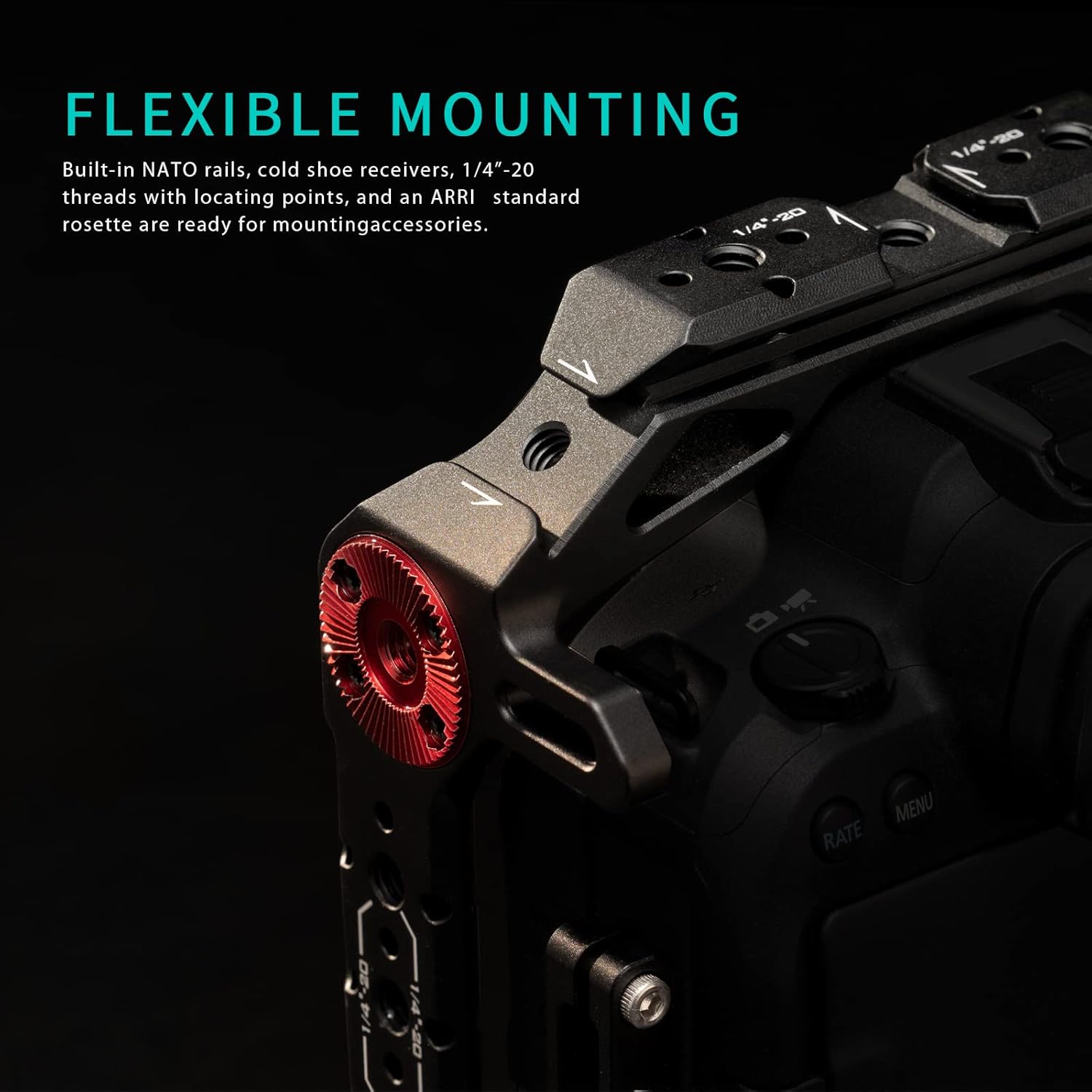
Imatge: Una imatge detallada view of the cage's flexible mounting options, including NATO rails, 1/4"-20 threads, and an ARRI rosette.
Tir vertical
The cage design, in conjunction with compatible Tilta top handles and NATO side handles (sold separately), allows for easy transition to vertical shooting configurations, optimizing your setup for social media content or specific cinematic styles.
Ronin Compatibility
The integrated Arca Swiss connection on the bottom plate of the cage ensures quick and secure mounting onto DJI Ronin series gimbals, streamlining your workflow between handheld and stabilized shots.

Image: The Tilta Full Camera Cage with a Canon R6 Mark II mounted on a gimbal, demonstrating its compatibility.
Manteniment
To ensure the longevity and optimal performance of your Tilta Full Camera Cage, follow these maintenance guidelines:
- Neteja: Wipe the cage regularly with a soft, dry, lint-free cloth to remove dust and fingerprints. For stubborn dirt, a slightly damp es pot utilitzar un drap, seguit d'assecat immediat.
- Eviteu productes químics: Do not use harsh chemicals, solvents, or abrasive cleaners, as these can damage the finish and material of the cage.
- Emmagatzematge: Store the camera cage in a clean, dry environment away from extreme temperatures and humidity when not in use.
- Inspeccioneu els cargols: Periodically check all screws and mounting points for tightness. Re-tighten any loose screws using the appropriate Allen key to maintain secure connections.
Resolució de problemes
- Cage does not fit the camera: Ensure you have the correct model of the camera (Canon R6 Mark II) and that the cage is oriented correctly. The Tilta TA-T45-FCC-B is specifically designed for this camera model.
- Accessories are not mounting securely: Verify that the accessories are compatible with the mounting points (e.g., NATO rail accessories for NATO rails, 1/4"-20 screws for threaded holes). Ensure all screws are fully tightened.
- Cables are loose despite using the clamp: Double-check that the cable clamp is properly positioned and tightened around the cables. Ensure the cables are fully inserted into their respective ports before clamping.
Especificacions
| Característica | Detall |
|---|---|
| Número de model | TA-T45-FCC-B |
| Dimensions (L x A x A) | 156 x 62 x 123 mm (aproximadament) |
| Pes | 170g ± 5g (approximate) |
| Material | Alumini |
| Color | Negre |
| Càmera compatible | Canon R6 Mark II |
| Punts de muntatge | NATO Rails, Cold Shoe, 1/4"-20 Threads with Locating Points, ARRI Rosette, Arca Swiss (bottom) |

Image: The Tilta Full Camera Cage enclosing a Canon R6 Mark II, illustrating its protective design.
Garantia i Suport
Informació de la garantia
This Tilta product comes with a 1 any de garantia des de la data de compra, que cobreix els defectes de fabricació. Conserveu el comprovant de compra per a reclamacions de garantia. La garantia no cobreix els danys causats per un mal ús, accidents, modificacions no autoritzades o desgast normal.
Atenció al client
For technical assistance, troubleshooting, or warranty inquiries, please contact Tilta customer support through their official website or the retailer from whom you purchased the product. Please have your product model number (TA-T45-FCC-B) and purchase details ready when contacting support.