
1. Introducció
This manual provides detailed instructions for the Hiearcool USB C Hub, model UCN3286. This intelligent USB C adapter is designed to expand the connectivity of your USB-C enabled devices, offering multiple ports for various peripherals and power delivery.
Les característiques clau inclouen:
- Two USB 3.0 ports for high-speed data transfer.
- One 4K@30Hz HDMI port for video output.
- SD and TF card readers for memory card access.
- Up to 100W/20V/5A Type C Power Delivery (PD) charging port.
The Hiearcool USB C Hub UCN3286 is UL/SGS approved, ensuring quality and reliability.
2. Producte acabatview
Familiarize yourself with the components and ports of your Hiearcool USB C Hub UCN3286.
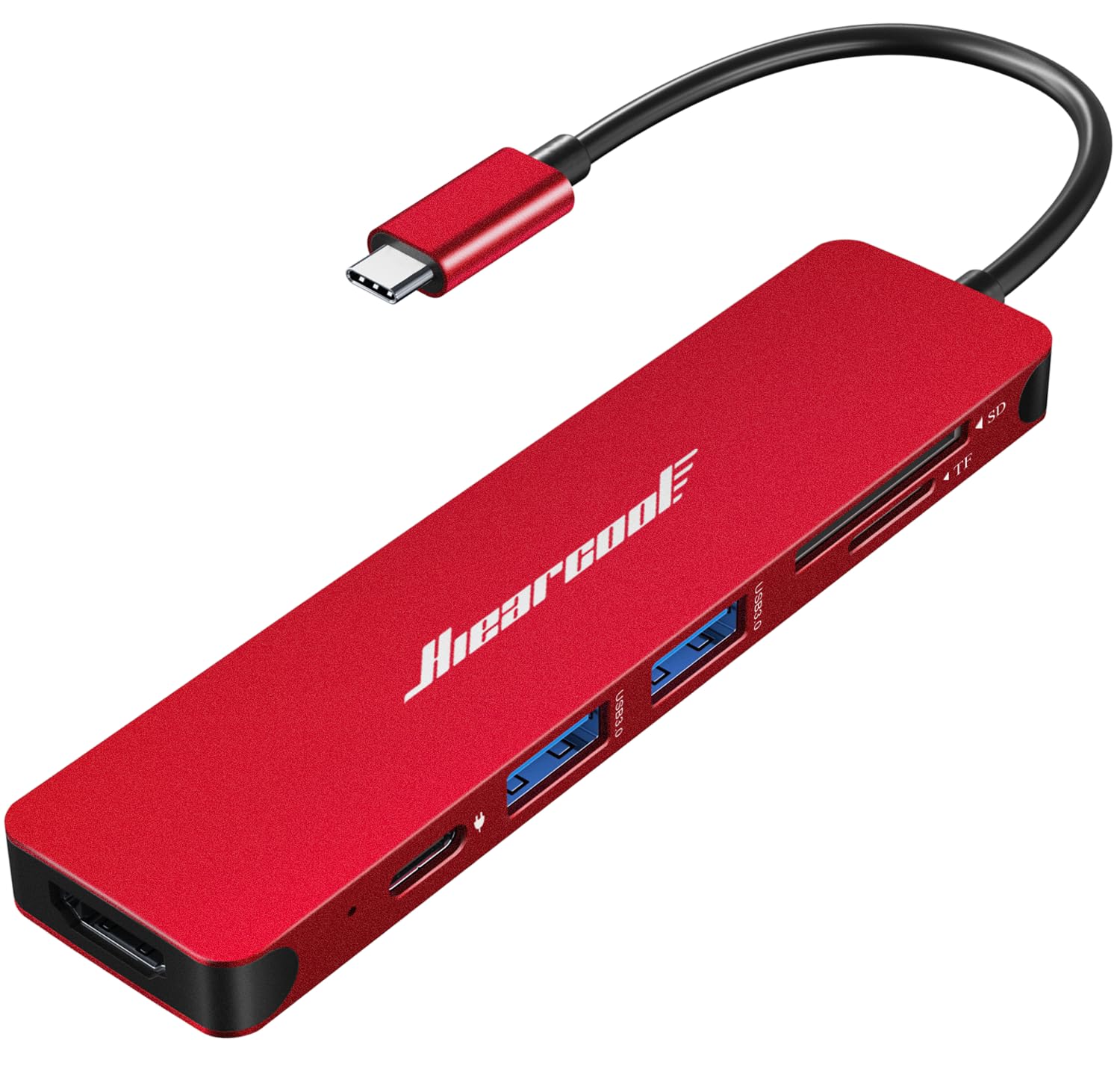
Figure 1: Hiearcool USB C Hub UCN3286. This image displays the compact, red USB C hub with its integrated USB-C cable, highlighting its sleek design and port layout.

Figura 2: Detallada view of the Hiearcool USB C Hub UCN3286 ports. This image provides a clear look at the various input/output options available on the hub, including USB-A, HDMI, and card reader slots.
3. Instruccions de configuració
- Connecteu el concentrador al vostre dispositiu: Insert the USB-C connector of the Hiearcool USB C Hub into an available USB-C port on your laptop, tablet, or smartphone. Ensure the connection is firm.
- Connexió d'alimentació (opcional): If your device requires charging or if you are connecting power-intensive peripherals, connect your USB-C power adapter to the Power Delivery (PD) port on the hub. The hub supports up to 100W power pass-through.
- Connecteu els perifèrics:
- Dispositius USB: Plug your USB-A devices (e.g., mouse, keyboard, USB flash drive) into the USB 3.0 ports.
- Pantalla HDMI: Connect an HDMI cable from your monitor or TV to the HDMI port on the hub for video output. Ensure your display is set to the correct HDMI input.
- Targetes de memòria: Insert your SD or TF (Micro SD) cards into the corresponding slots.
- Instal·lació del controlador: The Hiearcool USB C Hub is plug-and-play and typically does not require additional drivers for most operating systems (Windows, macOS, Chrome OS, Android). If a device is not recognized, try reconnecting the hub or restarting your host device.
4. Instruccions de funcionament
4.1 ports USB 3.0
The two USB 3.0 ports support data transfer speeds up to 5Gbps. These ports are backward compatible with USB 2.0 devices. Use them to connect external hard drives, USB flash drives, keyboards, mice, and other USB peripherals.
4.2 ports HDMI
The HDMI port supports resolutions up to 4K (3840x2160) at 30Hz. Connect an HDMI-enabled display to extend or mirror your device's screen. Ensure your device's USB-C port supports DisplayPort Alternate Mode (Alt Mode) for video output.
Lectors de targetes SD/TF de 4.3
The integrated SD and TF (Micro SD) card slots allow you to read and write data from memory cards simultaneously. Insert the cards firmly until they click into place. To remove, push the card in slightly to release it.
4.4 USB-C Power Delivery (PD) Port
This port is for power input only and does not support data transfer. Connect your original USB-C power adapter to this port to charge your host device (laptop, tablet) while using the hub. It supports power delivery up to 100W.
5. Manteniment
- Neteja: Feu servir un drap suau i sec per netejar el centre. Eviteu netejadors líquids o dissolvents.
- Emmagatzematge: Guardeu el concentrador en un lloc fresc i sec, allunyat de la llum solar directa i de temperatures extremes.
- Manipulació: Avoid dropping the hub or subjecting it to strong impacts. Do not attempt to disassemble or modify the device.
- Cura del cable: Do not bend the integrated USB-C cable excessively or pull on it forcefully.
6. Solució De Problemes
- Sense pantalla via HDMI:
- Assegureu-vos que el port USB-C del dispositiu amfitrió admeti el mode alternatiu de DisplayPort.
- Check the HDMI cable connection to both the hub and the display.
- Verify the display input source is correctly selected.
- Try a different HDMI cable or display if possible.
- Dispositius USB no reconeguts:
- Assegureu-vos que el dispositiu USB estigui correctament inserit al port USB 3.0 del concentrador.
- Try connecting the USB device directly to your host device to confirm it functions independently.
- If connecting a high-power USB device (e.g., external hard drive), ensure the hub is connected to a power source via its PD port.
- Reconnect the hub to your host device.
- La càrrega no funciona:
- Assegureu-vos que l'adaptador de corrent USB-C estigui connectat al port PD del concentrador i que funcioni correctament.
- Verifiqueu que el dispositiu amfitrió admeti USB-C Power Delivery.
- Check the power adapter's wattage; it should be sufficient for your device.
- Intermittent Connectivity/Sound Buffering:
- Assegureu-vos que totes les connexions estiguin ben fixades i lliures de pols o deixalles.
- Avoid using excessively long or low-quality cables with the hub.
- If experiencing audio buffering with an external display, try reducing the display resolution or refresh rate, or ensure the hub is receiving adequate power.
- Disconnect and reconnect the hub. If issues persist, try connecting the hub to a different USB-C port on your host device, if available.
7. Especificacions
| Característica | Detall |
|---|---|
| Número de model | UCN3286 |
| Marca | Hiearcool |
| Ports | 2x USB 3.0, 1x HDMI, 1x SD Card, 1x TF Card, 1x USB-C PD |
| Resolució HDMI | Up to 4K@30Hz (3840x2160@30Hz) |
| Velocitat de dades USB 3.0 | Fins a 5 Gbps |
| Lliurament d'energia | Up to 100W (input only) |
| Dimensions (LxWxH) | 4.17 x 1.4 x 0.34 polzades |
| Pes | 1.8 unces |
| Dispositius compatibles | Macbook M1/M2, Type C Laptops, iPad Air/Pro/Mini, iMac, Steam Deck, Type C Smartphones, Mouse, Keyboard, iPhone 15 series |
8. Garantia i Suport
Hiearcool offers a Two-Year Support per a aquest producte. A més, un Prova de 30 dies period is available. For any inquiries or technical assistance, please contact our support team.
Contacta amb nosaltres: Hiearcool@outlook.com
This product is UL/SGS Approved, ensuring it meets high quality and safety standards. It is also protected by the Transparency Program, which verifies its authenticity. Look for the Transparency logo and code on the product packaging to verify authenticity using the Transparency app.