1. Introducció
The PROVISION ISR DAI-340IPEN-28 is a 4MP fixed lens dome camera designed for high-security surveillance in both indoor and outdoor environments. Featuring a 2.8mm fixed lens, it is optimized for short-distance monitoring up to 20 meters. This camera incorporates advanced DDA2 Analytics for object recognition, counting, and detailed classification, significantly reducing false alarms. Its robust IK10 vandal-proof and IP67 waterproof ratings ensure durability and reliable performance in challenging conditions.

Figura 1: Frontal view of the PROVISION ISR DAI-340IPEN-28 Dome Camera, showing the lens and microphone.
2. Característiques del producte
The DAI-340IPEN-28 camera is equipped with a range of features to enhance security and monitoring capabilities:
- Sensor: 1/3″ CMOS (16:9) with 2592×1520 resolution at 25/30FPS (4MP).
- Lent: 2.8mm fixed lens providing a 100° viewangle de ing.
- Visió nocturna: True Day&Night with ICR and 20m illumination from 3 High-Power IR LEDs.
- Compressió: Supports H.265+/ H.264+ / H.265 / H.264 / MJPEG.
- Analítica general: Càmera Tampdetecció en curs.
- AI (Object Recognition): DDA Sterile Area, DDA Line Crossing, DDA Object Counting (Line), DDA Object Counting (Area), DDA Loitering Detection, DDA Illegal Parking Detection.
- AI (Face Detection): Capable of detecting up to 10 faces per frame.
- Analítica avançada: DDA2 for advanced object classification, including age, color, gender, and vehicle brand.
- Àudio: Built-in Microphone and Audio input.
- Millora de la imatge: True WDR (120dB), BLC, HLC, ROI.
- Emmagatzematge: SD Card slot for event/schedule recording (Up to 128GB).
- Connectivitat: Alarm in + Alarm out.
- Durabilitat: IP67 waterproof and IK10 vandal-proof ratings.
- Potència: DC12V/~415mA / PoE/~5W.

Figure 2: Key features and specifications represented by icons, including 4MP resolution, IP67, IK10, 20m IR, DC12V/PoE, Audio IN, and SD card support.
3. Contingut del paquet
Si us plau, verifiqueu que tots els elements siguin presents al paquet:
- PROVISION ISR DAI-340IPEN-28 Camera Body
- Manual d'instruccions (aquest document)
4. Informació de seguretat
Per garantir un funcionament segur i evitar danys, si us plau, seguiu les següents pautes de seguretat:
- Font d'alimentació: Use only the specified power supply (DC12V or PoE). Ensure the power source is stable and meets the camera's requirements.
- Instal·lació: Installation should be performed by qualified personnel. Ensure the mounting surface can support the camera's weight.
- Medi ambient: Do not expose the camera to extreme temperatures, humidity, or corrosive environments beyond its specified operating conditions.
- Neteja: Disconnect power before cleaning. Use a soft, dry cloth. Avoid harsh chemicals or abrasive cleaners.
- Desmuntatge: No intenteu desmuntar ni modificar la càmera. Això anul·larà la garantia i pot causar danys o lesions.
5. Configuració i instal·lació
The DAI-340IPEN-28 is designed for ceiling mount installation. Follow these steps for proper setup:
5.1 Muntatge de la càmera
- Choose a suitable ceiling location that provides the desired viewing angle and is within reach of power and network cables.
- Feu servir la plantilla de muntatge proporcionada (si escau) per marcar els forats al sostre.
- Drill pilot holes and insert appropriate anchors if necessary.
- Secure the camera base to the ceiling using screws.
5.2 Connexions de cablejat
Refer to the wiring diagram for proper connections:

Figure 3: Dimensions of the camera (119mm diameter, 87.8mm height) and wiring connections including Power In, RJ-45 (+PoE), Audio In, COM, Alarm Out, Alarm In, and GND.
- Alimentació: Connect the DC12V power adapter or use Power over Ethernet (PoE) via the RJ-45 port.
- RJ-45 (+PoE): Connect an Ethernet cable from your network switch or NVR. If using PoE, this cable will also provide power.
- Entrada d’àudio: Connect an external microphone if desired (the camera also has a built-in microphone).
- Entrada/Sortida d'alarma: Connect external alarm devices or sensors as required for integration with security systems.
5.3 Configuració inicial
After physical installation and wiring, connect the camera to your NVR or network. Refer to your NVR's manual or PROVISION ISR's software documentation for initial network configuration, IP address assignment, and password setup.
6. Funcionament
Once the camera is installed and configured on your network, you can access its features through a compatible NVR or client software.
6.1 Viu View i Enregistrament
Access the live video feed through your NVR or client software. Configure recording schedules, motion detection recording, or continuous recording as per your surveillance needs. The camera supports SD card recording up to 128GB for local storage.
6.2 DDA2 Analytics
The DAI-340IPEN-28 features advanced DDA2 Analytics. These can be configured via the camera's web interface or compatible NVR software:
- Sterile Area: Define specific zones where any unauthorized entry triggers an alert.
- Cruïlla de línia: Set virtual lines, and an alert is triggered when an object crosses the line in a specified direction.
- Object Counting: Count objects (e.g., people, vehicles) crossing a line or entering/exiting an area.
- Detecció de vagabundatge: Detect individuals or objects remaining in a defined area for an unusual duration.
- Illegal Parking Detection: Identify vehicles parked in restricted zones.
- Detecció de cares: Detect and identify faces within the camera's field of view.
- Advanced Object Classification: Utilize DDA2 to classify objects by age, color, gender, and vehicle brand for more granular analysis.
Proper calibration and definition of detection rules are crucial for accurate analytics and to minimize false alarms.
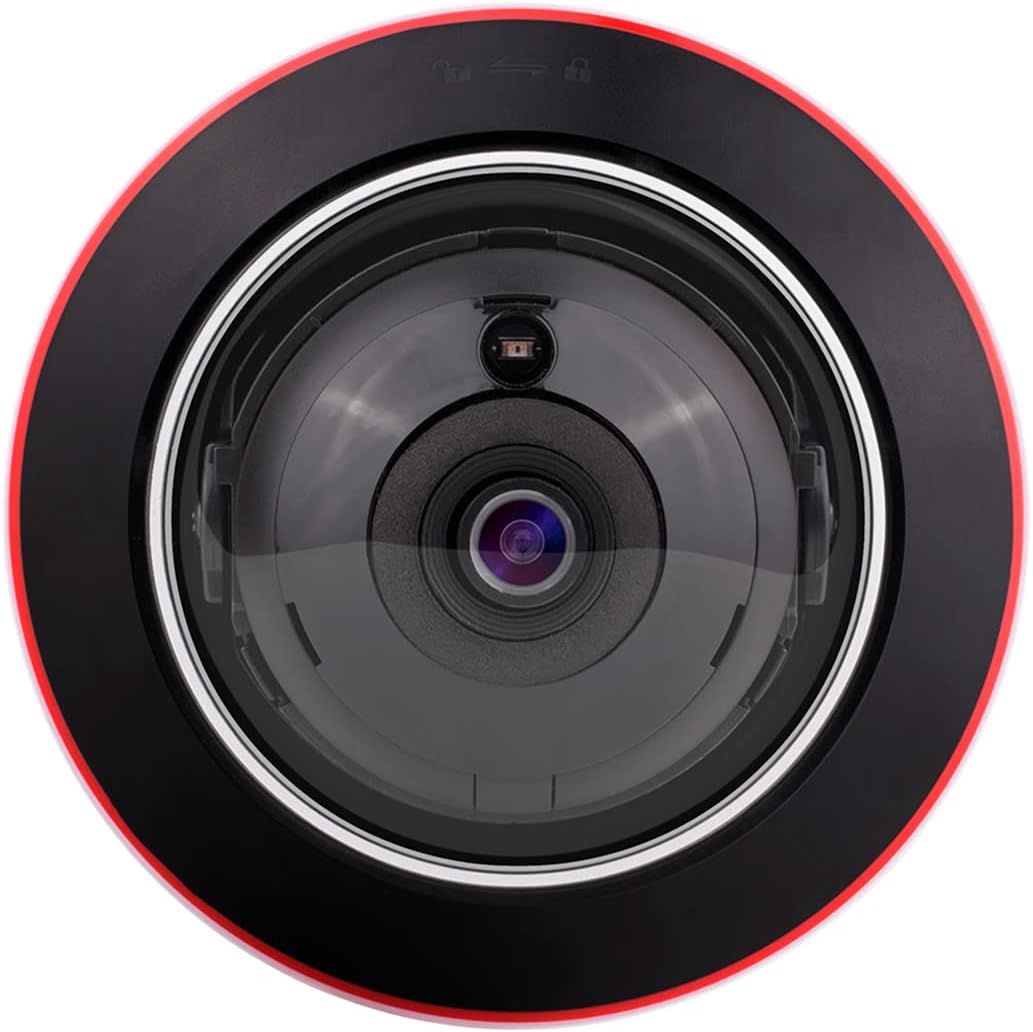
Figura 4: De dalt a baix view of the camera's lens, showing the IR illuminators and light sensor.
7. Manteniment
Regular maintenance helps ensure the longevity and optimal performance of your camera:
- Neteja de lents: Gently wipe the lens with a soft, lint-free cloth. For stubborn dirt, use a lens cleaning solution designed for optical surfaces.
- Neteja de l'habitatge: Netegeu la carcassa de la càmera amb anuncisamp tela. Eviteu els productes químics durs.
- Actualitzacions de firmware: Periodically check the PROVISION ISR weblloc web per a actualitzacions de firmware. Mantenir el firmware actualitzat pot millorar el rendiment, afegir funcions i augmentar la seguretat.
- Inspecció del cable: Regularly inspect all cables for signs of wear or damage. Replace damaged cables immediately.
8. Solució De Problemes
Si teniu problemes amb la càmera, consulteu els problemes i solucions més comuns següents:
- Sense energia:
- Check power connections (DC12V adapter or PoE).
- Assegureu-vos que la font d'alimentació estigui activa i que proporcioni el volum correctetage.
- Sense sortida de vídeo:
- Verify network cable connection to the RJ-45 port.
- Check network settings (IP address, subnet mask, gateway) on the camera and NVR/client software.
- Ensure the camera is added correctly to the NVR or monitoring software.
- Restart the camera and NVR/client software.
- Mala qualitat d'imatge:
- Netegeu la lent de la càmera.
- Check lighting conditions. Ensure IR illumination is active in low light.
- Adjust image settings (brightness, contrast, WDR) in the camera's configuration.
- Analytics Not Triggering:
- Review the analytics rule configurations (sterile areas, lines, sensitivity).
- Assegureu-vos que el firmware de la càmera estigui actualitzat.
- Check for environmental factors (e.g., strong light, moving objects outside the detection zone) that might interfere.
If problems persist, contact PROVISION ISR technical support.
9. Especificacions
| Característica | Especificació |
|---|---|
| Nom del model | DAI-340IPEN-28 |
| Resolució de captura de vídeo | 4MP (2592x1520) |
| Lent | Objectiu fix 2.8mm |
| Viewangle ing | 100 graus |
| Gamma de visió nocturna | 20 metres |
| Tecnologia de connectivitat | Amb cable (Ethernet) |
| Font d'alimentació | Corded Electric (DC12V) / PoE |
| Ús interior/exterior | Interior, Exterior |
| Classificació de protecció internacional | IP67, IK10 |
| Tipus de muntatge | Muntatge al sostre |
| Dimensions (L x A x A) | 6.25 x 5.5 x 5.5 inches (119mm x 87.8mm) |
| Components inclosos | Camera Body, Instruction Manual |
| Característiques especials | HD Resolution, Night Vision, Portable, Vandal Proof, Weather Proof, DDA2 Analytics, Built-in Microphone |
10. Garantia i Suport
This product is manufactured by PROVISION ISR. For warranty information, technical support, or service inquiries, please refer to the official PROVISION ISR weblloc web o poseu-vos en contacte amb el vostre distribuïdor autoritzat.
You can visit the official PROVISION ISR store for more information: Botiga PROVISION ISR a Amazon


