
1. Introducció
The Dynatron A42 1U Active Air Cooler is designed for high-performance AMD Ryzen Socket AM4 and AM5 processors. This compact, side-blower PWM fan provides efficient heat dissipation for CPUs up to 95 Watts in 1U server environments. The Dynatron A42 ensures optimal system performance by maintaining appropriate operating temperatures.
Característiques principals:
- Recommended for AMD Ryzen Processors, Socket AM4 and AM5.
- Supports CPU power up to 95 Watts heat dissipation.
- Features an 80x80x13mm PWM Fan and Copper Fin construction.
- Active Air Cooler suitable for 1U Server and Up.
- Overall dimensions: 110.0mm (L) x 85.0mm (W) x 27.3mm (H).
2. Contingut del paquet
Verifiqueu que tots els components siguin presents al paquet abans de continuar amb la instal·lació:
- Muntatge del dissipador de calor
- PWM Fan (integrated)
- Cable d'alimentació
- Mounting Connectors/Screws
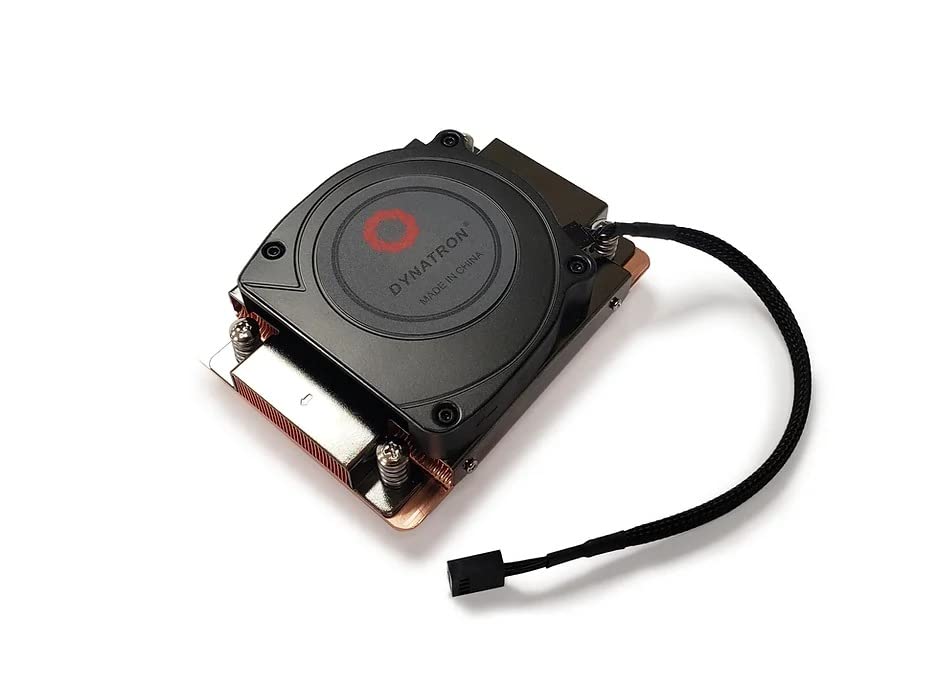
Imatge 2.1: Part superior view of the Dynatron A42 CPU Cooler, showing the integrated fan and Dynatron branding.
3. Configuració i instal·lació
Follow these steps carefully to install the Dynatron A42 CPU Cooler on your AMD AM4 or AM5 motherboard.
- Prepareu la placa base: Ensure your motherboard is compatible with AMD AM4 or AM5 sockets. Remove any existing CPU cooler and clean the CPU surface thoroughly with isopropyl alcohol to remove old thermal paste.
- Aplicar pasta tèrmica: Apply a small, pea-sized amount of high-quality thermal paste to the center of the CPU's integrated heat spreader (IHS). Avoid applying excessive amounts, as this can lead to reduced cooling performance or unintended residue.
- Col·locació del refrigerador: Carefully align the Dynatron A42 cooler with the mounting holes on the motherboard around the CPU socket. The cooler's base should make even contact with the CPU's IHS.
- Assegureu la nevera: Use the provided mounting screws to secure the cooler to the motherboard. Tighten the screws in a diagonal pattern (e.g., top-left, bottom-right, top-right, bottom-left) gradually until the cooler is firmly seated. Do not overtighten.
- Connecteu el cable del ventilador: Locate the 4-pin PWM fan header on your motherboard (typically labeled "CPU_FAN"). Connect the cooler's 4-pin fan cable to this header. Ensure the connector is fully seated.
- Comprovació final: Double-check all connections and ensure the cooler is securely mounted and does not wobble.

Imatge 3.1: Part inferior view of the Dynatron A42 CPU Cooler, showing the copper base and pre-applied thermal paste (if applicable) or area for application.

Image 3.2: Dynatron A42 CPU Cooler with indicated dimensions for reference during installation.
4. Directrius de funcionament
Once installed, the Dynatron A42 operates automatically, controlled by your motherboard's PWM fan settings. For optimal performance and longevity:
- Configuració de la BIOS/UEFI: Access your system's BIOS/UEFI to ensure the CPU fan control is set to PWM mode for dynamic fan speed adjustment based on CPU temperature.
- Monitorització de la temperatura: Regularly monitor your CPU temperatures using system monitoring software to ensure they remain within safe operating limits, especially under heavy load.
- Flux d'aire: Ensure adequate airflow within your server chassis. Proper case ventilation is crucial for the cooler's effectiveness.
5. Manteniment
Un manteniment regular ajuda a garantir la longevitat i el rendiment òptim del refrigerador de la CPU.
- Eliminació de pols: Periodically (every 3-6 months, depending on environment) use compressed air to clean dust from the fan blades and heatsink fins. Ensure the fan is not spinning during cleaning to prevent damage.
- Pasta tèrmica: If CPU temperatures rise significantly over time, consider reapplying thermal paste. This typically involves removing the cooler, cleaning both the CPU and cooler base, and applying fresh thermal paste.
- Inspecció del ventilador: Check the fan for any signs of wear, unusual noise, or obstructions. Replace the fan if it becomes excessively noisy or stops functioning correctly.
6. Solució De Problemes
If you encounter issues with your Dynatron A42 CPU Cooler, refer to the following common problems and solutions:
- Temperatures altes de la CPU:
- Assegureu-vos que el refrigerador estigui ben muntat i que faci contacte complet amb la CPU.
- Verify that thermal paste was applied correctly and not excessively.
- Check for dust buildup on the heatsink and fan.
- Confirm proper case airflow and ventilation.
- Ensure the fan is spinning and connected to the correct motherboard header.
- Fan Not Spinning or Making Noise:
- Check the 4-pin fan cable connection to the motherboard.
- Inspect for any obstructions preventing the fan blades from rotating.
- Verifiqueu la configuració del ventilador a la BIOS/UEFI.
- If the fan is making grinding or clicking noises, it may be faulty and require replacement.
- Dificultats d'instal·lació:
- Refer to the installation steps in Section 3.
- Ensure you are using the correct mounting hardware for your socket type (AM4/AM5).
7. Especificacions
| Característica | Especificació |
|---|---|
| Dimensions del producte | 3.35" de llargada x 1.07" d'amplada x 4.33" d'alçada (110.0 x 85.0 x 27.3 mm) |
| Marca | Dynatron |
| Tipus de connector d'alimentació | PWM de 4 pins |
| Voltage | 12 Volts |
| Wattage (TDP Support) | 95 watts |
| Mètode de refrigeració | Aire |
| Dispositius compatibles | Desktop (AMD AM4, AM5 Sockets) |
| Nivell de soroll | 62 decibels (màxim) |
| Material | Aleta de coure |
| Velocitat de rotació màxima | 2500 RPM |
| Capacitat de cabal d'aire | 26.25 peus cúbics per minut |
| Pes de l'article | 1 lliures |
| Número de model | A42 (840556075493) |
8. Informació de la garantia
Dynatron products are manufactured to high-quality standards. Specific warranty terms and conditions may vary by region and retailer. Please refer to the warranty documentation included with your purchase or visit the official Dynatron weblloc web per obtenir informació detallada sobre la garantia i els procediments de registre. Conserveu el comprovant de compra per a reclamacions de garantia.
9. Suport
For technical assistance, product inquiries, or further support, please visit the official Dynatron website or contact their customer service department. Online resources, FAQs, and driver downloads may also be available on the manufacturer's weblloc.
Oficial Weblloc: www.dynatron.com (Si us plau, consulteu la informació de contacte i els recursos d'assistència més actualitzats.)