
SIRS-E DMX-CON4-C2
SIRS-E DMX-CON4-C2 LED Decoder Instruction Manual
Model: DMX-CON4-C2 | Brand: SIRS-E
1. Introducció
The SIRS-E DMX-CON4-C2 is a 4-channel DMX512 LED decoder designed to control LED strips and modules. It converts standard DMX512 digital signals into PWM signals, allowing for precise brightness control of connected LED lighting. This decoder supports 1-4 color LED lights and offers 256 levels of brightness per channel, ensuring smooth dimming and color mixing. Its 5.2 kHz flicker-free frequency makes it suitable for video applications.
2. Característiques del producte
- Meets DMX512/1990 standard.
- Provides 256 levels of brightness control for full-color effects.
- Features 4 output channels with a maximum total output of 100W.
- Capable of achieving asynchronous color change effects.
- Supports control of LED lights with 1 to 4 colors (RGBW, RGB, White, Single Color).
- Allows free setting of DMX address from 1-512.
- Modular design compatible with various LED modules.
- Class 2 circuit with isolated DMX input.
- UL Listed (UL2108, E479339) for safety and reliability.
- Flicker-free operation at 5.2 kHz, ideal for video recording environments.
- Vol d’entradatage: 12-24 V DC.

Image: SIRS-E DMX-CON4-C2 LED Decoder highlighting its features and UL listing.
3. Informació de seguretat
Please read and understand all instructions before installation and operation. Failure to follow these instructions may result in electric shock, fire, or serious injury.
- Ensure the power supply is disconnected before any installation or wiring.
- This device is designed for 12-24V DC input only. Do not connect to AC power or voltagestà fora d'aquest rang.
- Ensure proper polarity when connecting power and LED outputs. Incorrect wiring can damage the device and connected LEDs.
- Do not exceed the maximum output wattage of 100W. Overloading can lead to overheating and damage.
- Install in a well-ventilated area, away from direct sunlight, high temperatures, and moisture.
- This device is UL Listed for Dry or Damp Locations. Do not expose to water or extreme humidity.
- All wiring should be performed by a qualified electrician in accordance with local electrical codes.
4. Contingut del paquet
Verifiqueu que tots els elements siguin presents al paquet:
- 1x SIRS-E DMX-CON4-C2 LED Decoder
- 1x Datasheet
5. Physical Layout and Dimensions
Familiarize yourself with the components and dimensions of the DMX-CON4-C2 decoder.

Imatge: Superior view of the DMX-CON4-C2 decoder, indicating DMX input/output, DIP switches for addressing, and LED output terminals.

Imatge: Frontal view of the DMX-CON4-C2 decoder, highlighting the RJ45 DMX In/Out ports.

Imatge: Part posterior view of the DMX-CON4-C2 decoder, showing the green terminal block for power input and LED output connections.

Diagram: Physical layout of the DMX-CON4-C2, detailing the RJ45 isolated DMX In/Out, DMX DIP switch address selector, and output channels with common V+ and DC 12V input.
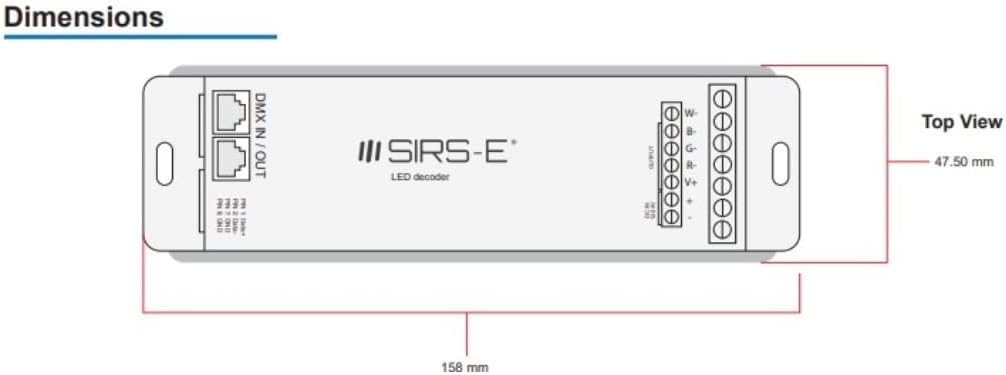
Diagram: Top view dimensions of the DMX-CON4-C2, showing a length of 158 mm and a width of 47.50 mm.

Diagram: Side view dimensions of the DMX-CON4-C2, showing a height of 22.35 mm.
6. Configuració i instal·lació
6.1 Connexions de cablejat
Before making any connections, ensure the power supply is OFF.
- Entrada d'alimentació: Connect your 12-24V DC power supply to the "DC IN 12-24V" terminals on the green terminal block. Ensure correct polarity: connect the positive (+) wire to the '+' terminal and the negative (-) wire to the '-' terminal.
- Sortida LED: Connect your LED strips or modules to the "OUTPUT" terminals. The DMX-CON4-C2 has four output channels (R, G, B, W or 1, 2, 3, 4) and a common positive (V+).
- For RGBW LED strips: Connect the Red wire to 'R', Green to 'G', Blue to 'B', White to 'W', and the common positive to 'V+'.
- For RGB LED strips: Connect Red to 'R', Green to 'G', Blue to 'B', and the common positive to 'V+'. The 'W' terminal can be left unused.
- For single color LED strips: Connect the negative wire to any of the 'R', 'G', 'B', or 'W' terminals and the positive wire to 'V+'.
- DMX Input/Output: Connect your DMX controller to the "DMX IN" RJ45 port. If daisy-chaining multiple decoders, connect the "DMX OUT" RJ45 port of the first decoder to the "DMX IN" of the next.
- Pin 1: Dades+
- Pin 2: dades-
- Pin 7: GND
- Pin 8: GND
6.2 DMX Address Setting (DIP Switches)
The DMX-CON4-C2 uses 10 DIP switches to set its DMX starting address. Each switch corresponds to a binary value, which sums up to the DMX address. Switch 1 is the least significant bit (1), and Switch 9 is the most significant bit (256). Switch 10 is typically reserved or used for special functions (e.g., test mode, master/slave, or specific dimming curves) and should generally be OFF unless specified otherwise in advanced documentation.
Per configurar l'adreça DMX:
- OFF position = 0 (switch is down)
- ON position = 1 (switch is up)
The DMX starting address is the sum of the values of the ON switches (1-9). For exampLI:
- Address 1: Switch 1 ON, others OFF.
- Address 2: Switch 2 ON, others OFF.
- Address 3: Switch 1 ON, Switch 2 ON, others OFF (1+2=3).
- Address 256: Switch 9 ON, others OFF.
Since the decoder uses 4 channels (RGBW), if its starting address is N, it will occupy DMX channels N, N+1, N+2, and N+3.
7. Instruccions de funcionament
Once the DMX-CON4-C2 decoder is correctly wired and its DMX address is set, it is ready to receive commands from a DMX512 controller.
- Encès: Apply 12-24V DC power to the decoder. The status indicator (if present) should illuminate.
- DMX Controller Setup: Configure your DMX controller to send signals to the DMX address you set on the decoder. Ensure the controller is set to output DMX512 protocol.
- Control del canal:
- The first DMX channel (your set address) controls the Red (or Channel 1) output.
- The second DMX channel (address + 1) controls the Green (or Channel 2) output.
- The third DMX channel (address + 2) controls the Blue (or Channel 3) output.
- The fourth DMX channel (address + 3) controls the White (or Channel 4) output.
- Funcionament sense parpelleig: The 5.2 kHz PWM frequency ensures smooth dimming and eliminates flickering, making it suitable for video recording and broadcast environments.
8. Manteniment
The SIRS-E DMX-CON4-C2 LED Decoder requires minimal maintenance.
- Neteja: Netegeu periòdicament l'exterior del dispositiu amb un drap suau i sec. No utilitzeu productes de neteja abrasius ni dissolvents.
- Medi ambient: Ensure the operating environment remains within specified temperature and humidity ranges. Avoid excessive dust, moisture, and direct heat sources.
- Connexions: Reviseu periòdicament totes les connexions del cablejat per assegurar-vos que estiguin ben fixades i que no presentin corrosió.
9. Solució De Problemes
| Problema | Causa possible | Solució |
|---|---|---|
| Els LED no s'encenen. | No power to decoder; incorrect power wiring; DMX signal issue; incorrect DMX address; faulty LEDs. | Comproveu la connexió de la font d'alimentació i el volumtage. Verify power supply is active. Check LED wiring polarity. Ensure DMX controller is sending signal. Verify DMX address on decoder matches controller. Test LEDs with a known working power source. |
| LEDs flicker or behave erratically. | Poor DMX signal; DMX termination issue; power supply instability; DMX address conflict. | Ensure DMX cables are secure and of good quality. Use a DMX terminator at the end of the DMX chain. Check power supply for stable output. Verify no other DMX devices are using the same address range. |
| Only some LED channels respond. | Incorrect LED wiring; DMX controller channel mapping issue. | Check wiring for the non-responsive channels. Verify DMX controller's channel mapping for RGBW outputs. |
| Device feels hot. | Overloaded output; insufficient ventilation. | Reduce the load on the output channels (ensure total wattage is below 100W). Ensure adequate airflow around the device. |
10. Especificacions
| Atribut | Valor |
|---|---|
| Número de model | DMX-CON4-C2 |
| Entrada Voltage | 12-24V DC |
| Canals de sortida | 4 Channels (RGBW) |
| Potència màxima de sortidatage | 100 watts |
| DMX Standard | DMX512/1990 |
| Nivells de brillantor | 256 levels per channel |
| Freqüència PWM | 5.2 kHz (Flicker Free) |
| Certificacions | UL Listed (UL2108, E479339), Class 2 |
| Dimensions (L x A x A) | 6.2 x 1.8 x 0.9 polzades (158 x 47.5 x 22.35 mm) |
| Pes de l'article | 6.2 unces |
| Color | Negre |
| Entorn de funcionament | Seca o Damp Ubicacions |
11. Garantia i Suport
SIRS-E products are designed for reliability and performance. For specific warranty details, please refer to the warranty card included with your product or visit the official SIRS-E weblloc web. Conserveu el rebut de compra com a comprovant de compra per a reclamacions de garantia.
For technical support, troubleshooting assistance, or inquiries about replacement parts, please contact SIRS-E customer service through their official website or the contact information provided in your product documentation. When contacting support, please have your product model number (DMX-CON4-C2) and purchase date ready.
SIRS-E Official Weblloc: www.sirs-e.com
Ask a question about this manual
Ask about setup, troubleshooting, compatibility, parts, safety, or missing instructions. Manuals+ will review the question and use this page’s manual context to help answer it.