
Introducció
This manual provides essential information for the safe and efficient use of your ONN 42-Inch Full HD LED Smart TV, Model 100018254. Please read these instructions thoroughly before operating your television and retain them for future reference.
Què hi ha a la caixa
Verifiqueu que tots els components siguin presents abans de continuar amb la configuració.
- ONN 42-Inch Full HD LED Smart TV
- Control remot
- Moble per a TV (2 peces)
- Cargols per a suport de TV
- Cable d'alimentació
- Guia d'inici ràpid (no inclosa en aquest manual)

Imatge: Frontal view of the ONN 42-inch Smart TV displaying the Roku TV home screen with various streaming app icons like Netflix, Disney+, Apple TV, Hulu, Peacock, and Roku Channel. The TV is black with slim bezels and two stand feet.
Configuració
1. Fixació del suport de TV
- Col·loqueu amb cura la pantalla del televisor amb la pantalla cap avall sobre una superfície suau i neta per evitar que es faci malbé.
- Alineeu cada peça del suport amb els forats dels cargols corresponents a la part inferior del televisor.
- Fixeu cada peça del suport amb els cargols proporcionats. Assegureu-vos que estiguin ben ajustats.

Image: A diagram illustrating the dimensions of the ONN 42-inch TV, showing its width as 43 inches and height as 37 inches when placed on its stand.
2. Muntatge a la paret (opcional)
This TV is compatible with VESA standard wall mounts. Refer to your wall mount's instructions for proper installation. Ensure the wall mount can support the weight of the television.

Imatge: Part posterior view of the ONN 42-inch TV, highlighting the VESA mounting screw holes in a square pattern and various input ports on the side and bottom right.
3. Dispositius de connexió
Connect your external devices such as cable boxes, gaming consoles, or Blu-ray players to the TV's input ports.
- HDMI: For high-definition audio and video. Use an HDMI cable to connect devices like set-top boxes, game consoles, or streaming sticks.
- USB: Per connectar dispositius d'emmagatzematge USB per reproduir contingut multimèdia files.
- Wi-Fi: For internet connectivity to access smart TV features and streaming services.
4. Assistent d'encesa inicial i configuració
- Connecteu el cable d'alimentació al televisor i després a una presa de corrent.
- Premeu el botó d'engegada del comandament a distància o del televisor mateix.
- Follow the on-screen instructions to complete the initial setup, including language selection, network connection (Wi-Fi), channel scanning, and linking to your Roku account (if applicable).
Funcionament del televisor
1. Control remot sobreview
The remote control allows you to navigate the TV's interface and control various functions.
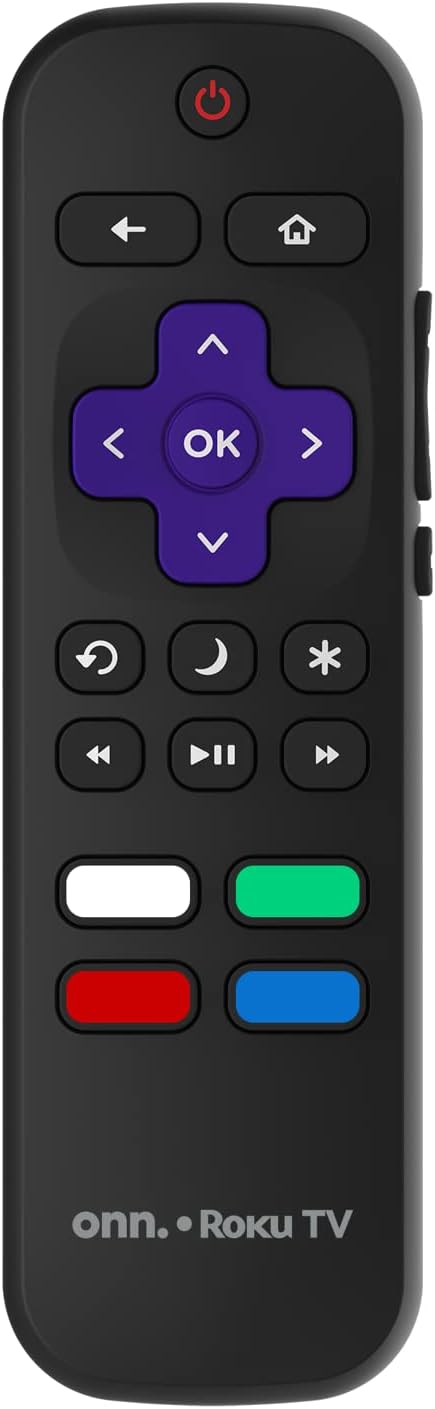
Image: The ONN Roku TV remote control, featuring a power button, directional pad, OK button, home button, back button, volume controls, and dedicated buttons for popular streaming services.
- Botó d'encesa: Encén o apaga el televisor.
- Directional Pad (D-Pad) & OK: Navega pels menús i confirma les seleccions.
- Botó d'inici: Returns to the Roku TV home screen.
- Botó enrere: Torna a la pantalla o menú anterior.
- Pujar/baixar el volum: Ajusta el volum d'àudio.
- Botó de silenci: Silencia o activa l'àudio.
- Canal amunt/avall: Changes channels (for antenna/cable inputs).
- Botons d'aplicació dedicats: Quick access to popular streaming services like Netflix, Hulu, etc.
2. Funcions de Smart TV
Your ONN Smart TV provides access to a wide range of streaming content and smart functionalities.
- Serveis de streaming: Access pre-installed apps like Netflix, YouTube, and many more through the Roku Channel Store.
- Control de veu: Compatible with Alexa and Google Assistant for hands-free control (requires a separate compatible voice assistant device).
- Actualitzacions automàtiques de programari: The TV will automatically update its software when connected to the internet, ensuring you have the latest features and security.
3. Selecció d'entrada
To switch between connected devices (e.g., cable box, game console), use the Entrada button on your remote or select the desired input from the Roku TV home screen.
4. Configuració d'imatge i so
Access the TV's settings menu to customize picture and sound preferences. Navigate to Settings > TV picture settings or Configuració > Àudio to adjust options like brightness, contrast, color, sound mode, and equalizer settings.
Manteniment
1. Neteja de la pantalla
- Always turn off the TV and unplug it before cleaning.
- Feu servir un drap suau i sense borrissol, lleugerament humitampnetejat amb aigua o amb un netejador de pantalles especialitzat.
- No ruixeu el netejador directament sobre la pantalla. Apliqueu-lo primer al drap.
- Avoid using abrasive cleaners, alcohol, benzene, or thinners, as these can damage the screen.
2. Actualitzacions de programari
Ensure your TV is connected to the internet to receive automatic software updates. These updates improve performance, add features, and enhance security. You can manually check for updates in the Configuració > Sistema > Actualització del sistema menú.
Resolució de problemes
Si teniu problemes amb el televisor, consulteu les solucions habituals següents:
Sense poder
- Comproveu si el cable d'alimentació està ben connectat tant al televisor com a la presa de corrent.
- Verifiqueu que la presa de corrent funciona connectant-hi un altre dispositiu.
- Prova de prémer el botó d'engegada del televisor, no només el comandament a distància.
Sense imatge / Imatge distorsionada
- Ensure the correct input source is selected (e.g., HDMI 1, HDMI 2).
- Comproveu totes les connexions de cable entre el televisor i els dispositius externs.
- Try a different HDMI cable if possible.
- Adjust picture settings (brightness, contrast) in the TV menu.
Sense so / So baix
- Check if the TV is muted or if the volume is turned down.
- Ensure external audio devices (soundbars, receivers) are properly connected and powered on.
- Comproveu la configuració d'àudio al menú del televisor.
Problemes de connexió de xarxa
- Verify your Wi-Fi router is powered on and functioning.
- Reinicieu el router i el mòdem.
- Vés a Configuració > Xarxa > Comprova la connexió on your TV to diagnose the issue.
- Assegureu-vos que esteu introduint la contrasenya de Wi-Fi correcta.
Especificacions
| Característica | Detall |
|---|---|
| Número de model | 100018254 |
| Mida de la pantalla | 42 polzades |
| Tecnologia de visualització | LED |
| Resolució | 1080p (Full HD) |
| Freqüència d'actualització | 60 Hz |
| Connectivitat | USB, Wi-Fi |
| Serveis d'Internet compatibles | Netflix, YouTube (and others via Roku platform) |
| Mètode de control | Voice (via Alexa & Google Assistant compatible devices), Remote Control |
| Tipus de muntatge | Suport de paret (compatible amb VESA) |
| Color | Negre |
| UPC | 671227025567 |

Image: Energy Guide label for Television Model 100018254, indicating an estimated yearly energy cost of $11 based on 12 cents per kWh and 5 hours use per day.
Garantia i Suport
For warranty information and technical support, please refer to the documentation included with your purchase or visit the official ONN support weblloc. Conserveu el rebut de compra per a reclamacions de garantia.