1. Introducció
This user manual provides detailed instructions for the installation, operation, and maintenance of your Generic DZ41-CAN Electric Bikes LCD Display. This display is specifically designed for use with M500 and BBS0102 mid-drive motors, offering a high-contrast, large-size color display for essential riding data.
Si us plau, llegiu aquest manual detingudament abans d'utilitzar el producte per garantir-ne el funcionament correcte i la seguretat.
2. Informació de seguretat
- Assegureu-vos sempre que la pantalla estigui ben muntada abans de conduir.
- Do not attempt to disassemble or modify the display. This may void the warranty and cause damage.
- The display features a waterproof design, but avoid submerging it in water or exposing it to high-pressure water jets.
- Netegeu la pantalla amb un drap suau iamp tela. No utilitzeu netejadors abrasius ni dissolvents.
- Pay attention to your surroundings while riding. Do not become overly focused on the display.
3. Contingut del paquet
Si us plau, comproveu el paquet per veure si hi ha els elements següents:
- 1 x Generic DZ41-CAN Electric Bike Display
4. Producte acabatview
4.1 Display Components
The DZ41-CAN display features a clear LCD screen and intuitive control buttons for easy operation.

Figura 1: Frontal view of the DZ41-CAN LCD Display.

Figure 2: Close-up of the control buttons.
- Pantalla LCD: Displays real-time data such as speed, battery level, assistance level, trip distance, and error messages.
- Botó '+': Increases assistance level, navigates up in menus.
- Botó '-': Decreases assistance level, navigates down in menus.
- Botó 'M' (Mode): Powers on/off, confirms selections, switches display modes.
4.2 Dimensions
The compact design ensures it fits well on most handlebars.
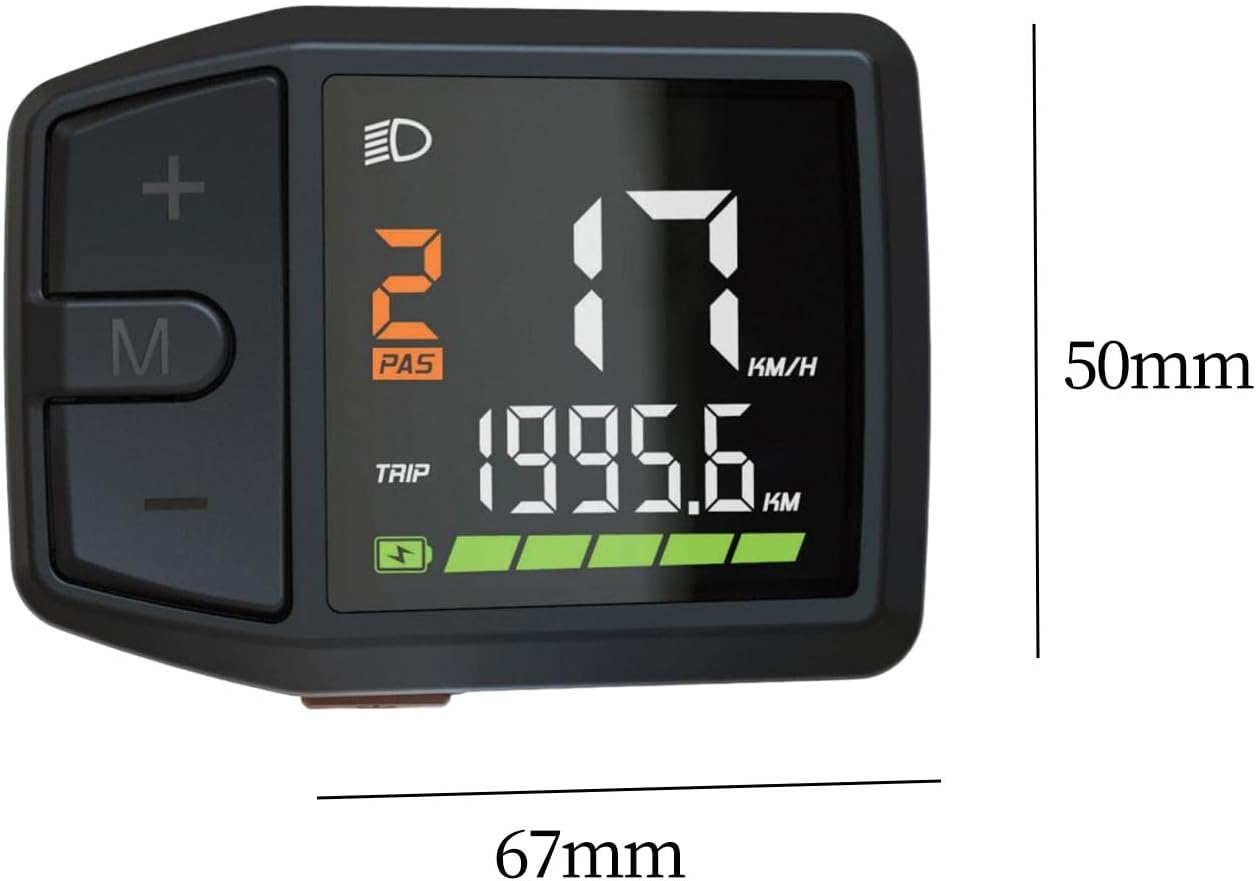
Figure 3: Display dimensions (approx. 67mm x 50mm).
5. Configuració i instal·lació
The DZ41-CAN display is designed for easy integration with M500 and BBS0102 mid-drive motors.
- Muntatge: Securely attach the display to your e-bike's handlebar using the provided mounting bracket. Ensure it is positioned for clear visibility and easy access to buttons.
- Connexió per cable: Connect the display's cable to the corresponding port on your e-bike's motor system (M500 or BBS0102). Ensure the connection is firm and secure.
- Gestió de cables: Route the cable neatly along the bike frame, securing it with cable ties to prevent interference with moving parts.
- Comprovació inicial: After installation, perform a quick check to ensure all connections are secure and the display powers on correctly.
6. Instruccions de funcionament
6.1 Encès/Apagat
- Per encendre: Press and hold the 'M' button for approximately 2 seconds until the display illuminates.
- Per apagar: Press and hold the 'M' button for approximately 2 seconds until the display turns off.
6.2 Funcions de visualització
The display provides comprehensive data for your ride:
- Velocitat: Current riding speed (KM/H or MPH).
- Nivell de bateria: Real-time battery charge indicator.
- Assistance Level (PAS): Current pedal assist level (e.g., 0-5 or 0-9).
- Distància del viatge: Distància recorreguda durant el trajecte actual.
- Comptaquilòmetres total: Total distance covered by the bike.
- Indicador de fars: Icon illuminates when headlights are active.
- Missatges d'error: Displays codes or symbols for system malfunctions.
6.3 Funcions dels botons
- Botó '+': Short press to increase pedal assistance level. Long press may activate walk mode or enter settings.
- Botó '-': Short press to decrease pedal assistance level. Long press may activate walk mode or enter settings.
- Botó 'M': Short press to cycle through display modes (e.g., Trip, Odometer, Max Speed, Avg Speed). Long press to power on/off.
6.4 Ajust de la configuració
Specific settings adjustments (e.g., unit conversion, wheel size) may be accessible through a combination of button presses. Refer to your e-bike's main controller manual for detailed instructions on advanced settings, as the display acts as an interface.
7. Manteniment
- Neteja: Regularly wipe the display screen and body with a soft, lint-free, damp cloth. Avoid using harsh chemicals or abrasive materials that could scratch the screen.
- Emmagatzematge: Quan no la feu servir durant períodes prolongats, guardeu la bicicleta elèctrica i la pantalla en un lloc fresc i sec, allunyat de la llum solar directa i de temperatures extremes.
- Inspecció del cable: Periodically check the display cable and connectors for any signs of wear, damage, or corrosion. Ensure connections remain secure.
8. Solució De Problemes
If you encounter issues with your DZ41-CAN display, refer to the table below for common problems and solutions.
| Problema | Causa possible | Solució |
|---|---|---|
| La pantalla no s'encén. | Loose cable connection; Low e-bike battery; Faulty display. | Check all cable connections; Charge e-bike battery; Contact support if issue persists. |
| No speed reading. | Speed sensor issue; Loose motor connection. | Check speed sensor alignment and connection; Ensure motor connection is secure. |
| Incorrect data displayed. | Incorrect settings (e.g., wheel size); Sensor malfunction. | Verify settings through the display or e-bike controller; Check sensor for damage. |
| La pantalla mostra un codi d'error. | System malfunction; Specific component error. | Refer to your e-bike's main controller manual for error code definitions and solutions. |
9. Especificacions
| Característica | Detall |
|---|---|
| Model | DZ41-CAN |
| Compatibilitat | Bafang M500, BBS0102 mid-drive motors |
| Tipus de visualització | LCD, High Contrast Color |
| Mida de la pantalla | 6.7 centímetres |
| Material | PP and PC |
| Disseny impermeable | Sí |
| Tipus de muntatge | Muntatge de manillar |
| Entrada de la interfície humana | Botons |
| Color | Negre |
10. Garantia i Suport
For warranty information and technical support, please refer to the documentation provided with your e-bike or contact the seller directly. Keep your purchase receipt as proof of purchase.

