
1. Introducció
Gràcies per la compraasing the LFF LDR113-EU Kitchen Radio. This manual provides essential information for the safe and efficient operation of your device. Please read it thoroughly before use and retain it for future reference.
The LFF LDR113-EU is a versatile kitchen radio featuring DAB+, FM, and Bluetooth connectivity. It includes dual alarms, a sleep timer, and 60 station presets, designed for both tabletop use and under-cabinet mounting.
2. Informació de seguretat
- Font d'alimentació: Feu servir només l'adaptador de corrent proporcionat. Assegureu-vos que el volumtage coincideix amb la vostra font d'alimentació local.
- Aigua i humitat: Do not expose the device to water, rain, or excessive moisture. Avoid placing liquids near the radio.
- Ventilació: Assegureu-vos que hi hagi una ventilació adequada al voltant del dispositiu. No bloquegeu les obertures de ventilació.
- Calor: Mantingueu el dispositiu allunyat de fonts de calor com ara radiadors, registres de calor, estufes o altres aparells que produeixin calor.
- Neteja: Disconnect from power before cleaning. Use a soft, dry cloth. Do not use liquid cleaners or aerosol cleaners.
- Manteniment: No intenteu atendre aquest producte vosaltres mateixos. Consulteu tots els serveis a personal de servei qualificat.
- Col·locació: Place the radio on a stable, level surface or mount it securely according to the instructions.
3. Contingut del paquet
Si us plau, comproveu que tots els elements siguin presents al paquet:
- LFF LDR113-EU Kitchen Radio
- Adaptador d'alimentació
- Mounting Kit (screws, spacers, mounting template)
- Manual d'usuari (aquest document)
4. Producte acabatview
Familiaritzeu-vos amb els components i els controls de la ràdio.

Figura 4.1: Davant view of the LFF LDR113-EU Kitchen Radio, showing the LCD display on the left, control buttons in the center, and a large rotary knob on the right. The buttons include power, mode, menu, info, preset, timer/sleep, and navigation arrows. The rotary knob is for volume and selection.

Figura 4.2: Diagram illustrating the key features of the LFF Kitchen Radio, including DAB/DAB+ radio, FM radio, two alarms, sleep timer, Bluetooth connectivity, and 60 station presets.
4.1. Controls i pantalla
- Pantalla LCD en color: Shows current mode, station information, time, and settings.
- Botó d'encesa: Encén/apaga la ràdio.
- Botó de mode: Switches between DAB+, FM, and Bluetooth modes.
- Botó de menú/informació: Accesses menu options or displays station information.
- Botons predefinits (1-5): Quick access to saved stations.
- Timer/Sleep Button: Configura les funcions de temporitzador de son o d'alarma.
- Botons de navegació (amunt/avall/esquerra/dreta): Navigates through menus and station lists.
- Rotary Knob (Volume/Enter): Adjusts volume, scrolls through options, and confirms selections.
5. Configuració
5.1. Connexió d'alimentació
- Connect the power adapter to the DC IN port on the back of the radio.
- Connecteu l'adaptador de corrent a una presa de corrent.
- La ràdio s'encén o entra en mode d'espera.
5.2. Initial Scan (DAB+ and FM)
Upon first power-on, the radio will typically perform an automatic scan for DAB+ and FM stations. If not, follow these steps:
- Premeu el botó Mode per seleccionar el mode DAB+ o FM.
- For DAB+, the radio will usually initiate a full scan automatically. If not, navigate to the 'Full Scan' option in the DAB+ menu and press the rotary knob to confirm.
- For FM, navigate to the 'Auto Scan' option in the FM menu and press the rotary knob to confirm.
- The radio will search for available stations and store them.

Figura 5.1: The LFF Kitchen Radio's LCD color screen displaying the main menu with icons for Digital Radio (DAB+), FM Radio, and Bluetooth, indicating available modes.
6. Instruccions de funcionament
6.1. Encendre/apagar
Premeu el botó Poder button to turn the radio on or off (standby mode).
6.2. Selecció de mode
Premeu el botó Mode button repeatedly to cycle through DAB+, FM, and Bluetooth modes.
6.3. Funcionament de la ràdio DAB+
- In DAB+ mode, use the Amunt/Avall navigation buttons or the rotary knob to browse available stations.
- Press the rotary knob to select a station.
- Premeu Menú/Informació a view station information (e.g., program type, signal strength).
6.4. Funcionament de la ràdio FM
- En el mode FM, feu servir la Amunt/Avall navigation buttons to tune to stations manually.
- Manteniu premut el botó Amunt/Avall buttons for automatic station seeking.
- Premeu Menú/Informació a view informació de l'estació.
6.5. Connectivitat Bluetooth
Connect your smartphone or other Bluetooth-enabled device to the radio.
- Premeu el botó Mode per seleccionar el mode Bluetooth. La pantalla mostrarà "Emparellament Bluetooth".
- Al dispositiu mòbil, activeu el Bluetooth i cerqueu els dispositius disponibles.
- Select 'LFF LDR113-EU' from the list of devices.
- Once connected, the radio display will show 'Bluetooth Connected'. You can now play audio from your device through the radio.
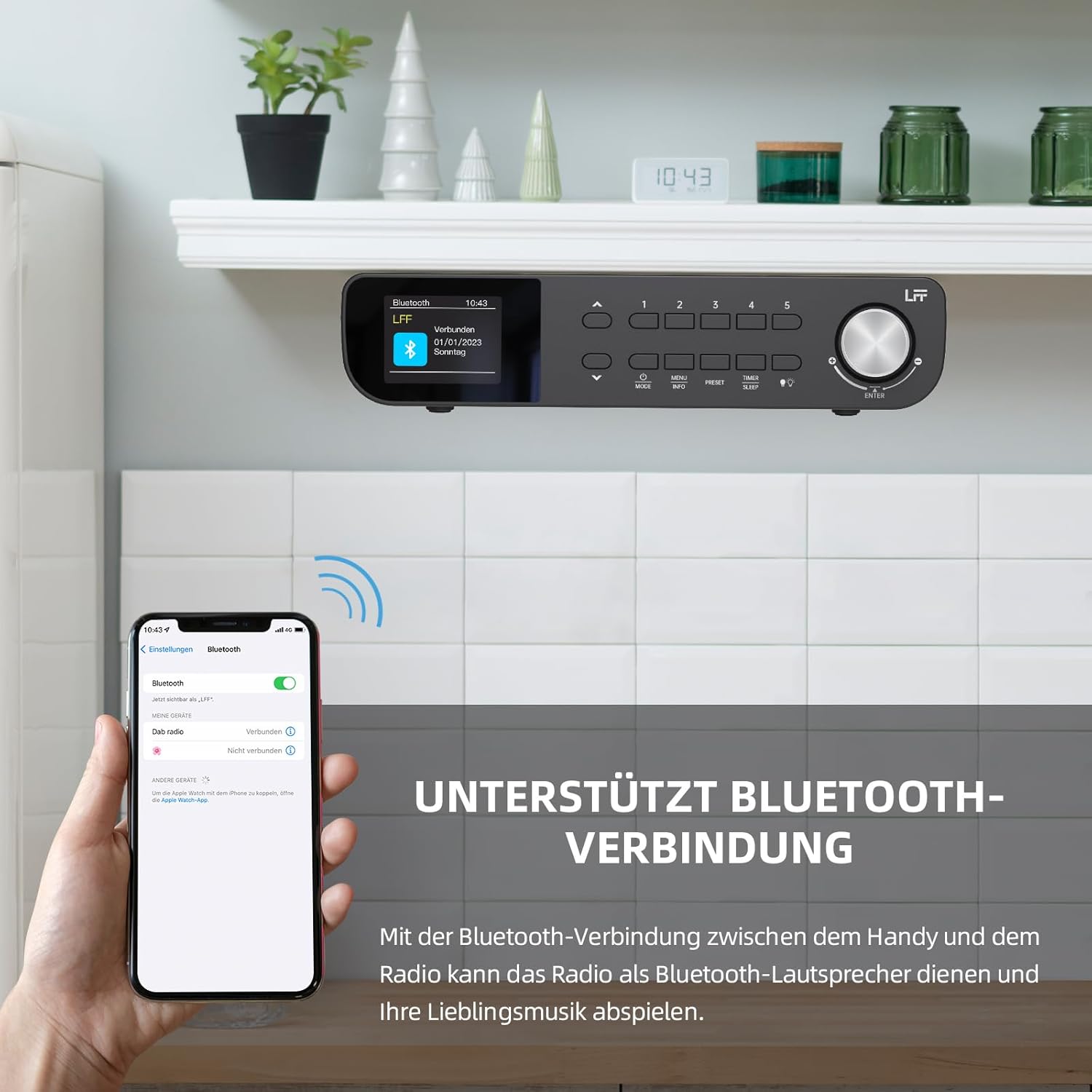
Figura 6.1: The LFF Kitchen Radio displaying a successful Bluetooth connection, with a smartphone screen showing the radio as a connected device.

Figura 6.2: Primer pla view of the radio's display indicating 'LFF' and 'Connected' under the Bluetooth menu, confirming a successful pairing.
6.6. Configuració d'alarmes
The radio features two independent alarms.
- Premeu el botó Temporitzador/repòs button repeatedly until 'Alarm 1' or 'Alarm 2' appears.
- Use the navigation buttons and rotary knob to set the alarm time, source (DAB+, FM, or Buzzer), and frequency (daily, weekdays, weekends, once).
- Confirm settings by pressing the rotary knob.

Figura 6.3: Close-up of the radio's display showing the current time and options to activate or deactivate Alarm 1 and Alarm 2.
6.7. Temporitzador de son
El temporitzador de son permet que la ràdio s'apagui automàticament després d'un període de temps definit.
- Premeu el botó Temporitzador/repòs button repeatedly until 'Sleep Timer' appears.
- Use the navigation buttons or rotary knob to select the desired sleep duration (e.g., 15, 30, 60 minutes).
- Confirmeu prement el botó giratori.

Figura 6.4: Close-up of the radio's display showing the 'Sleep Timer' setting, with an option to set the duration, for example, to 30 minutes.
6.8. Presets
Save up to 60 favorite stations for quick access.
- Per desar una configuració predefinida: Sintonitza l'emissora desitjada. Prem i mantén premut un dels botons Predefinició (1-5) buttons until 'Preset Saved' appears. For additional presets, use the 'Preset Store' option in the menu.
- Per recuperar un valor predefinit: Premeu breument un dels Predefinició (1-5) buttons. For other presets, navigate to 'Preset Recall' in the menu.
6.9. Llum LED
The radio includes an integrated LED light, useful for illuminating the area below if mounted under a cabinet.
- Premeu el botó Llum button (if available, or navigate through menu) to turn the LED light on or off.

Figura 6.5: The LFF Kitchen Radio mounted under a kitchen cabinet, with its integrated LED light providing illumination to the countertop below.
6.10. Brillantor de la pantalla
Adjust the display backlight brightness to suit your environment.
- Access the 'Display' or 'Settings' menu.
- Select 'Brightness' and choose from High, Medium, or Low settings.

Figura 6.6: A visual comparison of the LFF Kitchen Radio's display at three different backlight brightness levels: High, Medium, and Low, demonstrating the adjustable visibility.
7. Instruccions de muntatge
The LFF LDR113-EU Kitchen Radio offers flexible placement options: tabletop or under-cabinet mounting.
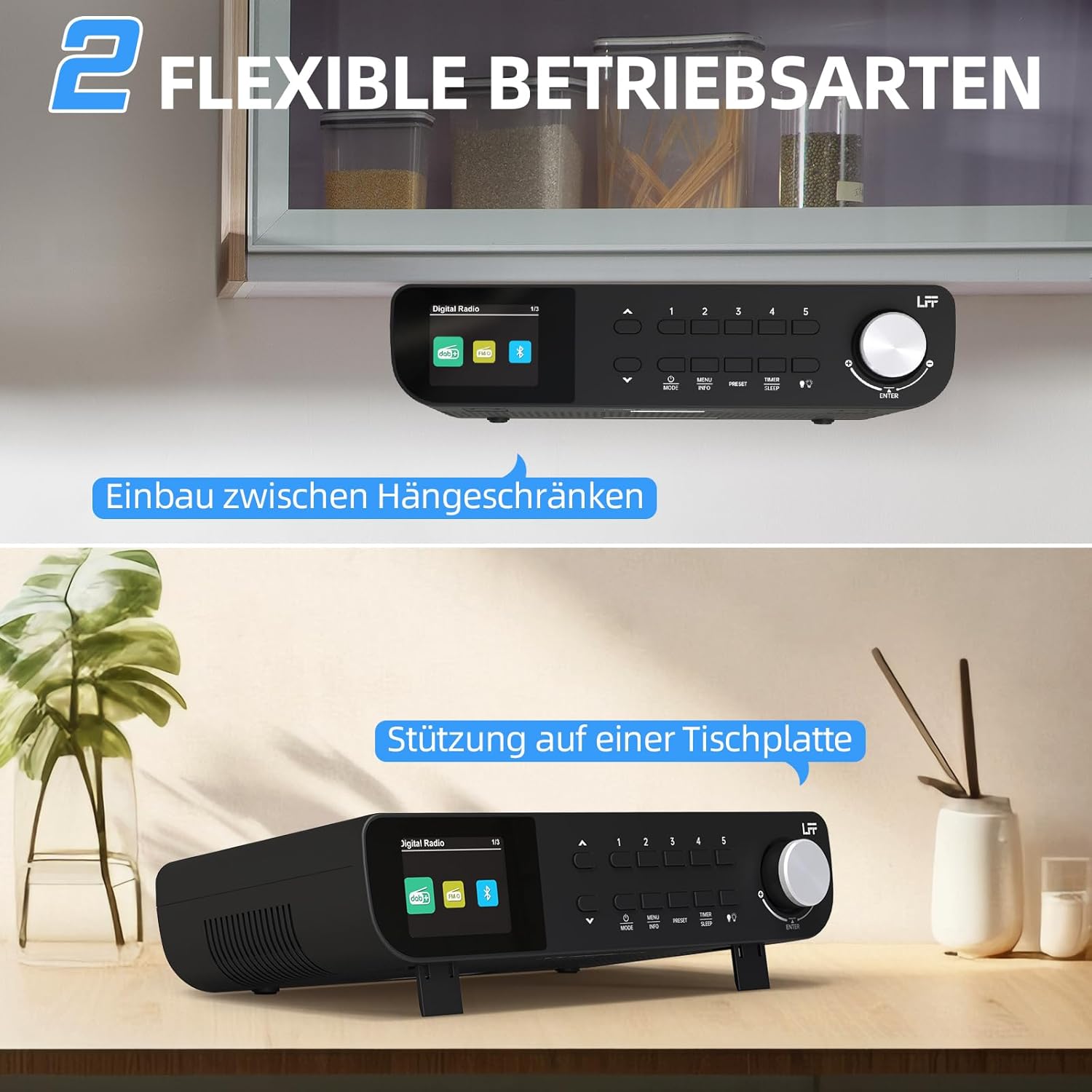
Figura 7.1: The LFF Kitchen Radio displayed in two common installation scenarios: mounted underneath a kitchen cabinet and placed freestanding on a tabletop.
7.1. Tabletop Placement
Simply place the radio on a stable, flat surface. Ensure it is not near the edge to prevent accidental falls.
7.2. Under-Cabinet Mounting
For under-cabinet installation, use the provided mounting kit.
- Preparar la ubicació: Choose a suitable location under a kitchen cabinet, ensuring there is enough space and access to a power outlet.
- Marqueu els forats de perforació: Use the provided mounting template to mark the drill holes on the underside of the cabinet.
- Perforar forats pilot: Perforeu forats pilot a les posicions marcades.
- Attach Mounting Plate (if applicable): Some models may include a separate mounting plate. Attach this to the cabinet using the screws.
- Secure the Radio: Align the radio with the mounting holes or plate and secure it using the provided screws. Ensure it is firmly attached.
- Connectar l'alimentació: Connecteu l'adaptador de corrent.

Figura 7.2: Detailed diagram showing the steps for under-cabinet mounting, including measuring distances (e.g., 58mm) and securing the radio with screws.
8. Manteniment
- Neteja: To clean the radio, disconnect it from the power supply. Use a soft, dry, lint-free cloth. Do not use abrasive cleaners, waxes, or solvents.
- Antena: Ensure the antenna is extended for optimal reception in DAB+ and FM modes. Handle it gently to avoid damage.
- Emmagatzematge: Si guardeu la ràdio durant un període prolongat, desconnecteu-la de l'alimentació i guardeu-la en un lloc fresc i sec.
9. Solució De Problemes
| Problema | Causa possible | Solució |
|---|---|---|
| Sense poder | L'adaptador de corrent no està connectat o la presa de corrent està defectuosa. | Comproveu la connexió elèctrica. Proveu una altra presa de corrent. |
| Mala recepció DAB+/FM | Antena no estesa, senyal feble o interferències. | Fully extend the antenna. Reposition the radio. Perform a full scan. |
| Bluetooth no connectat | Radio not in pairing mode, device too far, or already connected to another device. | Assegureu-vos que la ràdio estigui en mode Bluetooth. Acosteu el dispositiu. Desconnecteu-lo d'altres dispositius. |
| Sense so | Volume too low, mute activated, or incorrect mode. | Increase volume. Check if mute is active. Ensure correct mode (DAB+, FM, Bluetooth). |
| La pantalla no funciona | Brightness too low or device malfunction. | Adjust display brightness. If problem persists, contact support. |
10. Especificacions

Figura 10.1: Diagram showing the dimensions of the LFF Kitchen Radio: 250mm length, 146mm width, and 55mm height.
| Característica | Detall |
|---|---|
| Marca | Extensió LFF |
| Número de model | LDR113-EU |
| Color | Negre |
| Connectivitat | Bluetooth |
| Tecnologia d'afinació | DAB Plus, FM |
| Font d'alimentació | Cable elèctric |
| Freqüència | 108 MHz (FM max) |
| Dimensions (L x A x A) | 250 mm x 146 mm x 55 mm |
| Presets | 60 |
| Mostra | LCD Color Screen |
| Característiques especials | Dual Alarms, Sleep Timer, Under-cabinet mounting option, LED Light |
11. Garantia i Suport
This product comes with a standard manufacturer's warranty. Please refer to the warranty card included in your package for specific terms and conditions. For technical support, troubleshooting assistance, or warranty claims, please contact your retailer or the LFF customer service department.