
Introducció
This manual provides detailed instructions for the setup, operation, and maintenance of your MINISFORUM HX99G Mini PC. Please read this guide thoroughly before using the device to ensure proper functionality and longevity.

Image: The MINISFORUM HX99G Mini PC, a compact desktop computer.
Producte acabatview
The MINISFORUM HX99G is a high-performance mini PC featuring an AMD Ryzen 9 6900HX processor and AMD Radeon RX 6600M discrete graphics. It is designed for demanding tasks such as gaming, video editing, and multitasking, offering robust connectivity and expandability in a small form factor.
Vídeo: Un overview of the MINISFORUM HX99G Mini PC's physical appearance and design.
1. Configuració
1.1 Contingut del paquet
Verifiqueu que tots els elements que s'enumeren a continuació s'inclouen al vostre paquet:
- 1x HX99G Mini PC
- 1x cable HDMI
- 1x adaptador de corrent dels EUA
- 1x Base Support
- 1x Manual (this document)
- Cargols per a la instal·lació
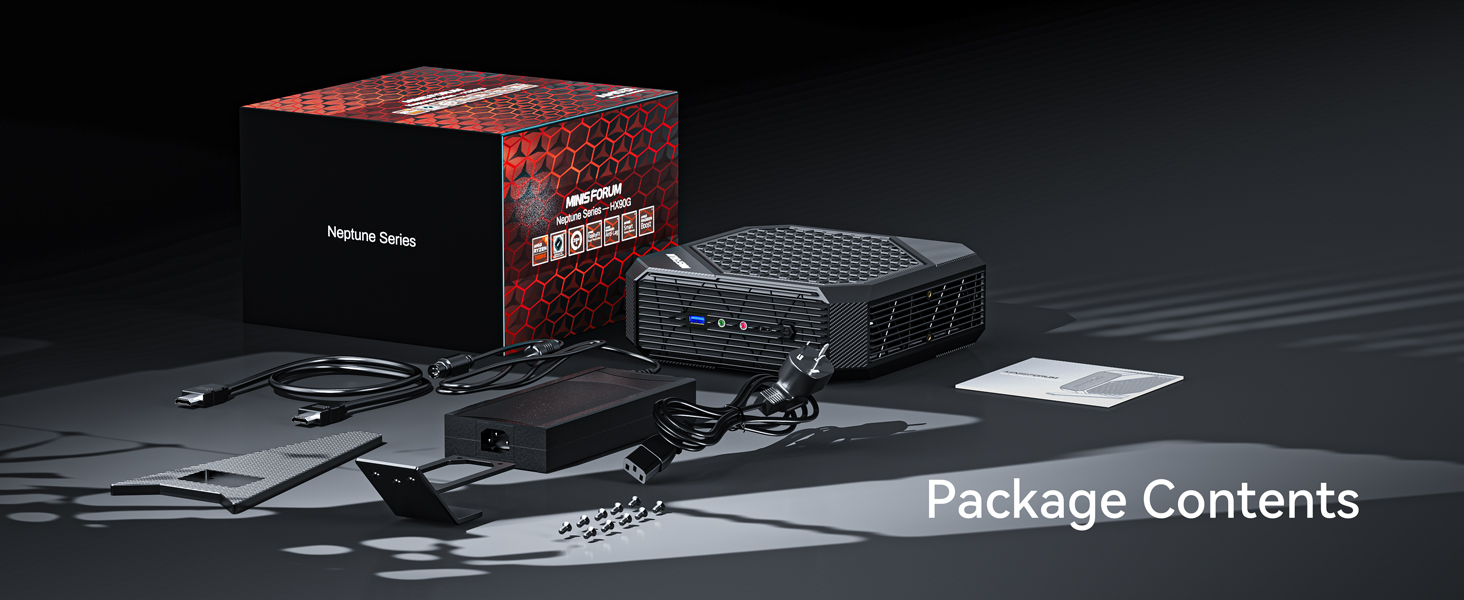
Image: All components included in the MINISFORUM HX99G Mini PC package.
Video: An unboxing demonstration of the HX99G Mini PC and its accessories.
1.2 Connexió de perifèrics
Connect your monitor(s), keyboard, and mouse to the appropriate ports on the Mini PC. The HX99G supports up to four independent displays via two HDMI ports (4K@60Hz) and two USB4 ports (8K@60Hz).

Image: Diagram illustrating the various ports on the MINISFORUM HX99G Mini PC.
1.3 Connexió d'alimentació
Connect the US Power Adapter to the Mini PC's power input and then plug it into a wall outlet.
1.4 Installing the Base
The Mini PC includes a base support for vertical orientation. Attach the base using the provided screws.
Video: Instructions on how to install the base support for the HX99G Mini PC.
1.5 Storage Installation (Optional)
The HX99G allows for storage expansion. You can install additional M.2 2280 SSDs (PCIe4.0 or SATA/NVMe) in the available slots. Refer to the video for detailed installation steps.

Image: Diagram showing the internal layout for storage expansion in the HX99G Mini PC.
Video: A guide on how to install additional storage (SSD) in the HX99G Mini PC.
2. Instruccions de funcionament
2.1 Engegada/apagada
Press the power button located on the front of the Mini PC to turn it on. To shut down, use the operating system's shutdown procedure.
2.2 Configuració de la pantalla
The HX99G supports up to four displays. Connect your monitors to the HDMI and USB4 ports. Configure display settings through your operating system.

Image: Illustration of the HX99G Mini PC connected to four displays for extended workspace.
2.3 Connectivitat de xarxa
Connect to a wired network using the 2.5Gbps LAN port or connect to a wireless network via the integrated Wi-Fi (802.11ax).
3. Manteniment
3.1 Sistema de refrigeració
The HX99G features an efficient cooling system with dual fans and 7 heat pipes. Ensure that the ventilation openings are not obstructed to maintain optimal performance and prevent overheating.

Image: Diagram showcasing the efficient heat dissipation system of the HX99G Mini PC.
3.2 Expansió d'emmagatzematge
For future storage needs, the device supports additional M.2 2280 SSDs. Consult the 'Storage Installation' section for guidance.
3.3 Neteja
Regularly clean the exterior of the Mini PC with a soft, dry cloth. Avoid using liquid cleaners directly on the device. Periodically check and clean the ventilation grilles to prevent dust buildup.
4. Solució De Problemes
If you encounter issues with your MINISFORUM HX99G Mini PC, refer to the following common solutions:
- Sense sortida de pantalla: Ensure all display cables are securely connected to both the Mini PC and the monitor. Verify the monitor is set to the correct input source.
- El sistema es reinicia inesperadament: Check for proper ventilation and ensure the Mini PC is not overheating. Update drivers and the operating system to the latest versions.
- Audio/Microphone Not Working: Confirm that audio devices are correctly plugged into the headphone or microphone jacks. Check audio settings within your operating system. Ensure all audio drivers are up to date.
- Problemes de connectivitat de xarxa: For wired connections, verify the Ethernet cable is properly connected. For Wi-Fi, check network settings and ensure the Wi-Fi adapter is enabled.
- Problemes generals de rendiment: Ensure all drivers are updated. The MINISFORUM website may provide specific driver updates.
5. Especificacions
Key technical specifications for the MINISFORUM HX99G Mini PC:
| Característica | Detall |
|---|---|
| Marca | MINISFÒRUM |
| Sistema operatiu | OS (User-installed) |
| Model de CPU | AMD Ryzen 9 6900HX |
| Velocitat de la CPU | 3.3 GHz (up to 4.9 GHz boost) |
| Targeta gràfica | AMD Radeon RX 6600M (GDDR6 8GB) |
| Memòria (RAM) | 64 GB DDR5-4800 (2x SODIMM slots, max 64GB) |
| Emmagatzematge | 1TB PCIe4.0 SSD (1x M.2 2280 slot, supports SATA/NVMe SSD, up to 2TB) |
| Sortida de vídeo | 2x HDMI (4K@60Hz), 2x USB4 (8K@60Hz) - Quad Display Support |
| Xarxa | 2.5Gbps LAN, Wi-Fi (802.11ax), Bluetooth |
| Ports | USB3.2 Gen1 Type-A, USB3.2 Gen2 Type-A, USB3.2 Gen1 Type-C, Headphone Jack, Microphone Jack |
| Mètode de refrigeració | Dual Fan with 7 Heat Pipes |
| Dimensions | Aprox. 8.07 x 7.99 x 2.73 polzades |
6. Garantia i Suport
MINISFORUM provides a standard warranty for the HX99G Mini PC. For specific warranty terms and conditions, please refer to the documentation included with your purchase or visit the official MINISFORUM website. For technical support, driver updates, or service inquiries, please contact MINISFORUM customer support through their official channels.