
MageGee STAR98
MageGee STAR98 Mechanical Gaming Keyboard and Mouse User Manual
Model: STAR98
Introducció
This manual provides comprehensive instructions for the setup, operation, and maintenance of your MageGee STAR98 Mechanical Gaming Keyboard and Mouse. Please read this manual thoroughly before using the product to ensure optimal performance and longevity.
Producte acabatview
The MageGee STAR98 Mechanical Gaming Keyboard and Mouse combo is designed for an enhanced gaming and computing experience, featuring responsive mechanical switches, customizable backlighting, and an ergonomic design.
Característiques del teclat
- 94% Layout with Number Pad: This keyboard features 98 keys, providing a compact design while retaining essential keys like arrow keys, number keys, and multimedia keys. It offers more desk space compared to a standard full-size keyboard.
- Angles d'inclinació ajustables: Two-step rear feet allow for setting the keyboard at 3 different tilt angles for ergonomic comfort.
- 2-in-1 Multifunctional Knob: Located in the upper right corner, this knob controls both audio volume and backlight settings.
- Interruptors vermells lineals: Equipped with responsive red mechanical switches, offering a smooth and less audible keystroke, ideal for gaming and typing. These switches have an expected lifespan of 50 million actuations.
- 100% anti-fantasma: Ensures every keystroke is detected correctly, even when multiple keys are pressed simultaneously.
- Gorgeous Rainbow Backlighting: Features 8 light modes (static & dynamic), 5 brightness levels, and 4 speed levels for customizable illumination.
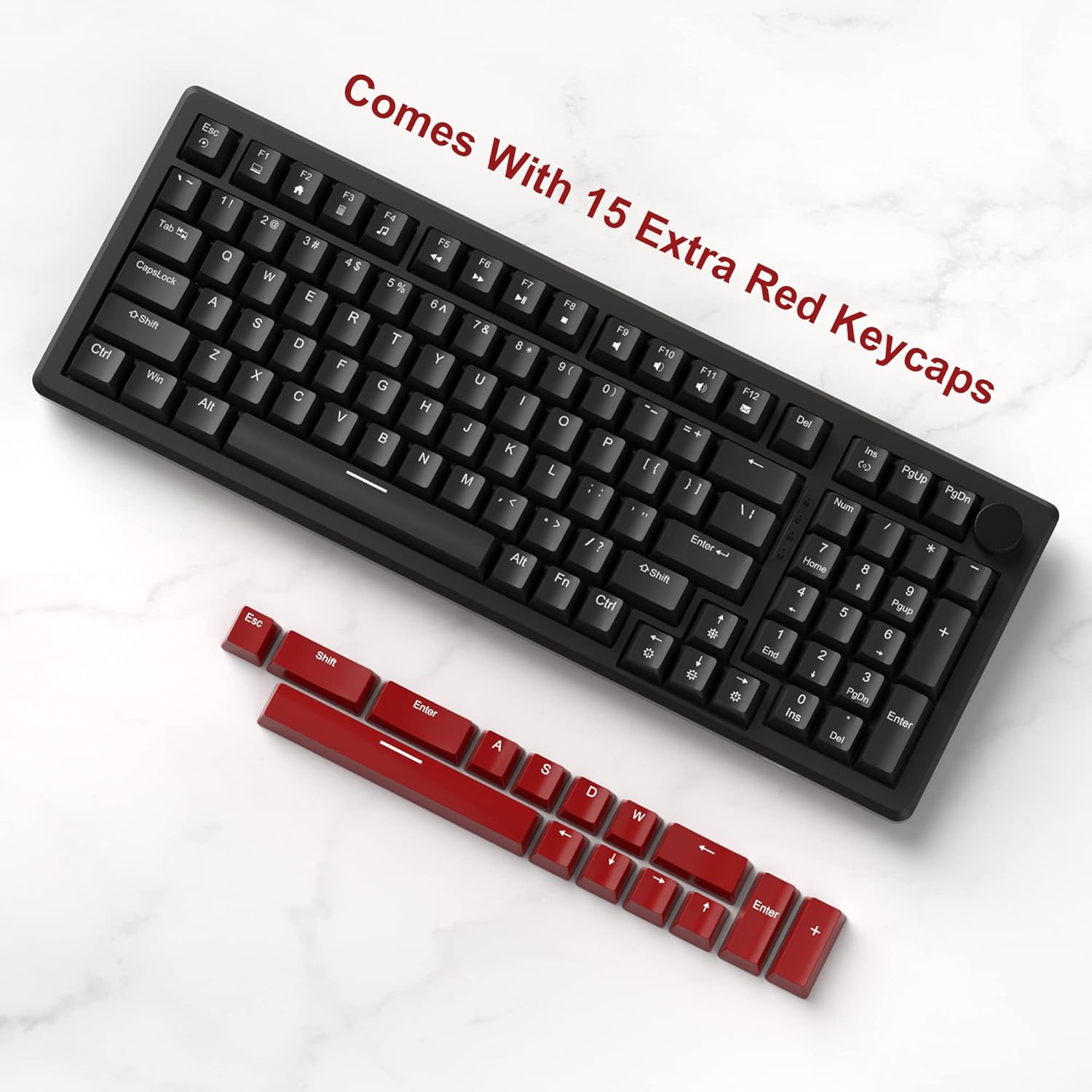
- Extra Keycaps: Includes an additional 15 red/yellow keycaps for DIY customization.
Funcions del ratolí
- Ergonomic Gaming Mouse: Designed for comfort and control, fitting perfectly in the palm with an anti-slip design.
- 7 Botons: Provides versatile control for various applications and games.
- 6 Speed Levels (DPI): Adjustable DPI settings (600/800/1200/1600/2400/3200) allow for easy customization of mouse speed to suit different scenarios.
- 7-Color Breathing LED Lights: The mouse features breathing LED lights in white, yellow, blue, purple, green, red, and cyan, enhancing the gaming atmosphere.
- Accurate Positioning and Stable Transmission: Ensures smooth and precise gameplay.
Configuració
Follow these steps to set up your MageGee STAR98 Mechanical Gaming Keyboard and Mouse:
- Desempaquetar el producte: Carefully remove the keyboard and mouse from their packaging. Ensure all components, including the additional keycaps and USB cable, are present.
- Connecteu el teclat: Locate the USB cable attached to the keyboard. Plug the USB-A connector into an available USB port on your computer (desktop PC or laptop). The keyboard is plug-and-play and does not require additional drivers for basic functionality.
- Connecteu el ratolí: Locate the USB cable attached to the mouse. Plug the USB-A connector into another available USB port on your computer. The mouse is also plug-and-play.
- Ajusta la inclinació del teclat: Flip the keyboard over and extend the two-step adjustable feet to your preferred typing angle. There are three possible angles.
- Engegada inicial: Once connected, the keyboard and mouse backlighting should illuminate, indicating they are powered on and ready for use.


Instruccions de funcionament
Funcionament del teclat
- Tecles multimèdia: The function keys (F1-F12) often have secondary multimedia functions. These are typically accessed by pressing the Fn tecla simultàniament amb la tecla de funció desitjada. Per exempleampel, Fn + F1 for Media Player, Fn + F2 for Volume Down, etc.
- Pom multifuncional:
- Volume Control (Default): Turn the knob left to decrease volume, right to increase volume. Short press the knob to pause or play media.
- Mode de llum de fons: Long press the knob to switch to backlight control mode. The 'M' indicator light will illuminate. In this mode:
- Turn the knob left or right to adjust backlight brightness.
- Short press the knob to cycle through different backlight effects/modes.
- Backlight Control (Fn Combinations):
- Canvia els modes de llum: Premeu Fn + Ins to cycle through 8 different light modes (static & dynamic).
- Encendre/apagar la llum: Premeu Fn + Del per activar o desactivar la retroiluminació.
- Ajusta la velocitat de la llum: Premeu Fn + Fletxa esquerra to decrease light speed, Fn + Fletxa dreta to increase light speed (for dynamic modes).
- Ajusta la brillantor de la llum: Premeu Fn + Fletxa amunt to increase brightness, Fn + Fletxa avall per disminuir la brillantor.
- Personalització de tecles: Use the provided keycap puller (if included) to carefully remove existing keycaps and replace them with the additional red/yellow keycaps for a personalized look.


Funcionament del ratolí
- Ajust de DPI: The mouse features a dedicated DPI button (usually located behind the scroll wheel). Press this button to cycle through the 6 available speed levels (600/800/1200/1600/2400/3200 DPI). The LED lighting may change color to indicate the current DPI setting.
- 7-Color Breathing LED: The mouse's LED lights automatically cycle through 7 colors, creating a breathing effect. There is no manual control for specific colors or modes for the mouse lighting.
- Disseny ergonòmic: Position your hand comfortably over the mouse, utilizing its ergonomic shape and anti-slip surface for extended use.

Manteniment
Proper maintenance ensures the longevity and optimal performance of your keyboard and mouse:
- Neteja:
- Desconnecteu els dispositius de l'ordinador abans de netejar-los.
- Utilitzeu un drap suau i sense pelusa lleugerament dampened with water or a mild cleaning solution to wipe down the surfaces.
- For the keyboard, use compressed air to remove dust and debris from between the keycaps.
- For deeper cleaning, keycaps can be carefully removed using a keycap puller and cleaned separately. Ensure they are completely dry before reattaching.
- Eviteu utilitzar productes químics agressius, netejadors abrasius o dissolvents.
- Emmagatzematge: Store the keyboard and mouse in a cool, dry place away from direct sunlight and extreme temperatures when not in use for extended periods.
- Manipulació: Avoid dropping the devices or exposing them to excessive force, which can damage internal components or switches.
Resolució de problemes
If you encounter issues with your MageGee STAR98 Mechanical Gaming Keyboard and Mouse, refer to the following common solutions:
| Problema | Causa possible | Solució |
|---|---|---|
| El teclat/ratolí no respon | Connexió USB fluixa, port USB defectuós, problema amb el controlador. |
|
| La retroiluminació no funciona o parpelleja | Backlight turned off, brightness too low, software conflict. |
|
| El cursor del ratolí és erràtic o no respon | Dirty sensor, incorrect DPI setting, surface issue. |
|
| Les claus no es registren o s'escriuen dues vegades | Restes sota la tapa de les tecles, interruptor defectuós. |
|
Especificacions
- Marca: MageGee
- Model: ESTRELLA98
- Disseny del teclat: 94% (98 tecles)
- Tipus d'interruptor: Interruptors vermells lineals
- Il·luminació de fons: Rainbow LED (8 modes, 5 brightness, 4 speed)
- Connectivitat: USB per cable
- Dimensions del teclat: Aproximadament 15.1 x 5.4 x 1.6 polzades
- Botons del ratolí: 7
- Mouse DPI Levels: 6 (600/800/1200/1600/2400/3200)
- Mouse Lighting: 7-Color Breathing LED
- Dimensions del ratolí: Aproximadament 5.1 x 2.8 x 1.6 polzades
- Pes de l'article: 2.44 kg (teclat i ratolí combinats)
- Dispositius compatibles: Ordinador portàtil, ordinador personal
- Compatibilitat del sistema operatiu: Windows


Garantia i Suport
MageGee products are manufactured to high-quality standards. For warranty information, technical support, or service inquiries, please refer to the contact information provided with your product packaging or visit the official MageGee weblloc web. Si us plau, conserveu el comprovant de compra per a qualsevol reclamació de garantia.
Ask a question about this manual
Ask about setup, troubleshooting, compatibility, parts, safety, or missing instructions. Manuals+ will review the question and use this page’s manual context to help answer it.