
1. Introducció
Thank you for choosing the ErGear Electric Standing Desk. This manual provides detailed instructions for the assembly, operation, and maintenance of your new desk. Designed for versatility and comfort, this desk allows seamless transitions between sitting and standing positions, promoting a healthier work environment. Please read this manual thoroughly before use and retain it for future reference.

Figure 1: ErGear Electric Standing Desk in a typical office setup.
2. Informació de seguretat
To ensure safe operation and prolong the lifespan of your ErGear Electric Standing Desk, please observe the following safety guidelines:
- Capacitat de pes: Do not exceed the maximum load capacity of 80kg. Overloading can cause instability and damage to the desk.
- Detecció de col·lisions: The desk is equipped with a collision detection sensor. If the desk encounters an obstruction during height adjustment, it will stop movement. Ensure the area around the desk is clear before adjusting the height.
- Nens i animals de companyia: Keep children and pets away from the desk during height adjustments to prevent injury. The collision detection feature helps prevent pinching, but supervision is recommended.
- Font d'alimentació: Use only the provided power adapter. Ensure the power cord is not pinched or damaged.
- Només per a ús interior: This desk is designed for indoor use in dry environments. Avoid exposure to moisture or extreme temperatures.
- Low VOC Coating: The desk features a low VOC (Volatile Organic Compound) coating, meeting EPA and CARB emission standards for improved indoor air quality.
3. Contingut del paquet
Before assembly, verify that all components are present and undamaged. Refer to the assembly guide included in your package for a complete list of parts and hardware.
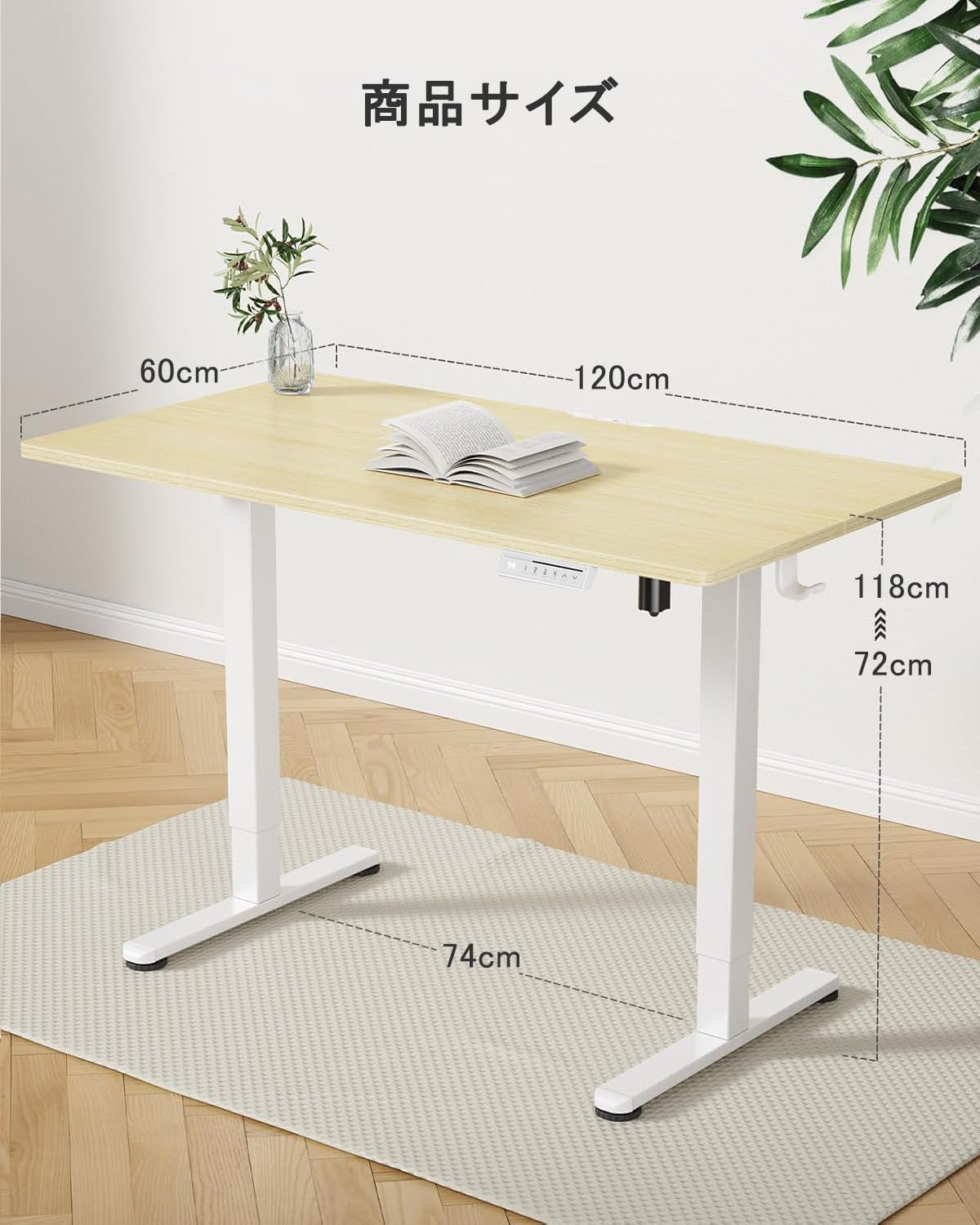
Figura 2: Mésview of the ErGear Electric Standing Desk and its accessories.
4. Instruccions de muntatge i instal·lació
Follow these steps to assemble your ErGear Electric Standing Desk. It is recommended to have two people for assembly.
4.1. Guia de vídeo de muntatge
For a visual step-by-step guide, please watch the official assembly video:
Video 1: ErGear Electric Standing Desk Assembly Guide. This video demonstrates the complete assembly process for the EGESD4/5/6 series desk, including attaching the frame, brackets, tabletop, and connecting cables.
4.2. Muntatge pas a pas
- Fixeu les columnes elevadores: Secure the lifting columns to the crossbar using the provided screws. Ensure they are firmly attached.
- Instal·leu els peus: Fixeu els peus de l'escriptori a la part inferior de les columnes elevadores.
- Muntar la taula: Carefully place the tabletop onto the assembled frame. Align the pre-drilled holes and secure the tabletop with the appropriate screws.
- Connect the Control Panel: Attach the control panel to the underside of the tabletop and connect the necessary cables to the motor and power supply.
- Gestió de cables: Use the included cable management clips and grommets to organize and secure all cables, preventing tangles and damage.

Figure 3: Cable management hooks for an organized workspace.
5. Instruccions de funcionament
Your ErGear Electric Standing Desk offers intuitive controls for height adjustment and memory presets.
5.1. Ajust d'alçada
The desk's height can be adjusted steplessly from 72cm to 118cm, accommodating users of various heights and preferences. Use the up and down arrow buttons on the control panel to adjust the desk to your desired height.

Figure 4: The desk supports both sitting and standing positions.
5.2. Preajustos de memòria
The control panel features three memory preset buttons (1, 2, 3) to save and recall your preferred heights. This allows for quick and convenient transitions between sitting and standing positions with a single touch.
- Per desar una alçada: Adjust the desk to your desired height. Press the 'M' button, then press one of the number buttons (1, 2, or 3) until you hear a beep or see the display flash, indicating the height is saved.
- Per recordar una alçada: Press the corresponding number button (1, 2, or 3) to automatically move the desk to the saved height.

Figure 5: Control panel with memory presets and integrated headphone hook.
5.3. Smooth and Stable Operation
The desk is designed with a robust frame and high-performance motor for smooth and quiet height adjustments. Even at its highest position, the desk maintains stability, minimizing wobble.

Figure 6: Smooth height adjustment ensures items remain stable on the desk.
5.4. Característiques acabadesview Vídeo
Explore the key features of your ErGear Electric Standing Desk:
Video 2: ErGear Electric Standing Desk Features. This video highlights the ergonomic benefits, height adjustment range, and stability of the desk, showing various users interacting with it.
6. Manteniment
Un manteniment regular garanteix la longevitat i el rendiment òptim del vostre escriptori.
- Neteja: Netegeu la superfície i el marc de l'escriptori amb un drap suau iamp tela. Eviteu netejadors abrasius o productes químics durs que puguin danyar l'acabat.
- Inspecció del cable: Periodically check all cables for any signs of wear, fraying, or damage. Replace damaged cables immediately.
- Estancament del cargol: Occasionally check and tighten any loose screws to maintain stability.
7. Solució De Problemes
If you encounter any issues with your ErGear Electric Standing Desk, refer to the following common troubleshooting steps:
| Problema | Causa possible | Solució |
|---|---|---|
| L'escriptori no es mou | Cable d'alimentació desconnectat, error del motor o sobrecàrrega. | Check power connections. Reduce weight on the desk. Unplug and replug the power for 10 seconds to reset. |
| Ajust d'alçada desigual | Obstruction or uneven floor. | Clear any obstructions. Ensure the desk is on a level surface. Adjust the foot pads if necessary. |
| Desk stops during adjustment | Collision detection activated. | Remove the obstruction. The desk should resume normal operation. |
| Els preajustaments de memòria no funcionen | Procediment de desament incorrecte. | Follow the 'To Save a Height' instructions in Section 5.2 carefully. |
8. Especificacions
Detailed specifications for the ErGear Electric Standing Desk (120x60cm variant):
- Marca: ErGear
- Model: EGESD4/5/6 Series
- Dimensions: 120cm (Width) x 60cm (Depth) x 72-118cm (Height)
- Capacitat de pes: 80 kg
- Ajust d'alçada: Electric, Stepless (72cm to 118cm)
- Preajustos de memòria: 3 programmable height settings
- Característiques especials: Collision detection, Low VOC coating, Quiet operation
- Material del marc: Metall
- Tabletop Finish: Natural Wood Grain (variant specific)
- Leg Color: White (variant specific)

Figure 7: The desk's robust construction supports up to 80kg.
9. Garantia i Suport
ErGear provides a 2-year manufacturer's warranty for this product. For warranty claims, technical support, or any inquiries, please contact ErGear customer service through your purchase platform or the official ErGear weblloc.

Figure 8: 2-Year Extended Warranty.