
1. Introducció
Thank you for choosing the VISSPL V30 Smart Projector. This manual provides essential information for setting up, operating, and maintaining your projector. Please read it thoroughly before use to ensure optimal performance and safety.
2. Informació de seguretat
- No mireu directament a la lent del projector quan estigui encès.amp està activat.
- Assegureu-vos una ventilació adequada al voltant del projector per evitar el sobreescalfament.
- Mantingueu el projector allunyat de l'aigua, la humitat i les temperatures extremes.
- Feu servir només l'adaptador de corrent que s'inclou amb el projector.
- No intenteu desmuntar ni reparar el projector vosaltres mateixos. Poseu-vos en contacte amb personal de servei qualificat.
3. Contingut del paquet
Verifiqueu que tots els elements siguin presents al vostre paquet:
- VISSPL V30 Smart Projector
- Control remot
- Cable d'alimentació
- Cable HDMI
- Manual d'usuari
4. Producte acabatview
Característiques clau
- Native 1080P Resolution, 4K Supported
- Dual-band 5G+2.4G WiFi for stable connectivity
- Bluetooth 5.1 for external audio devices
- Auto Keystone Correction (±50° Horizontal/Vertical/Rotational) and 4-Point Correction
- Digital Zoom (50-100%)
- Multiple input interfaces: HDMI, USB, 3.5mm Audio, AV Port
- Eye Protection and Sleep Timer Shutdown functions
- Advanced Cooling System for extended lamp vida
Guia visual

Imatge 4.1: VISSPL V30 Projector Display Quality Comparison. This image illustrates the projector's native 1080P resolution, 28000L brightness, and 15000:1 contrast ratio compared to other projectors.

Imatge 4.2: VISSPL V30 Projector Key Features Overview. This image highlights the projector's main capabilities including Native 1080P, 480 ANSI, 5G+2.4G WiFi, Bluetooth 5.1, 6D/4P Keystone, Office Suite compatibility, 100%-50% Zoom, and MAX 400" projection size.

Imatge 4.3: VISSPL V30 Projector Multi-Device Compatibility. The projector supports connection with various devices including iOS, Android, laptops/PCs, PS5, USB drives, and TV boxes.
5. Configuració
5.1 Col·locació
Place the projector on a stable, flat surface such as a tabletop. Ensure there is adequate space around the projector for ventilation. The optimal projection distance varies based on desired screen size.
5.2 Connexió d'alimentació
- Connecteu el cable d'alimentació al port d'entrada d'alimentació del projector.
- Connecteu l'altre extrem del cable d'alimentació a una presa de corrent.
- Premeu el botó d'engegada del projector o del comandament a distància per encendre'l.
5.3 Enfocament inicial i ajust trapezoidal
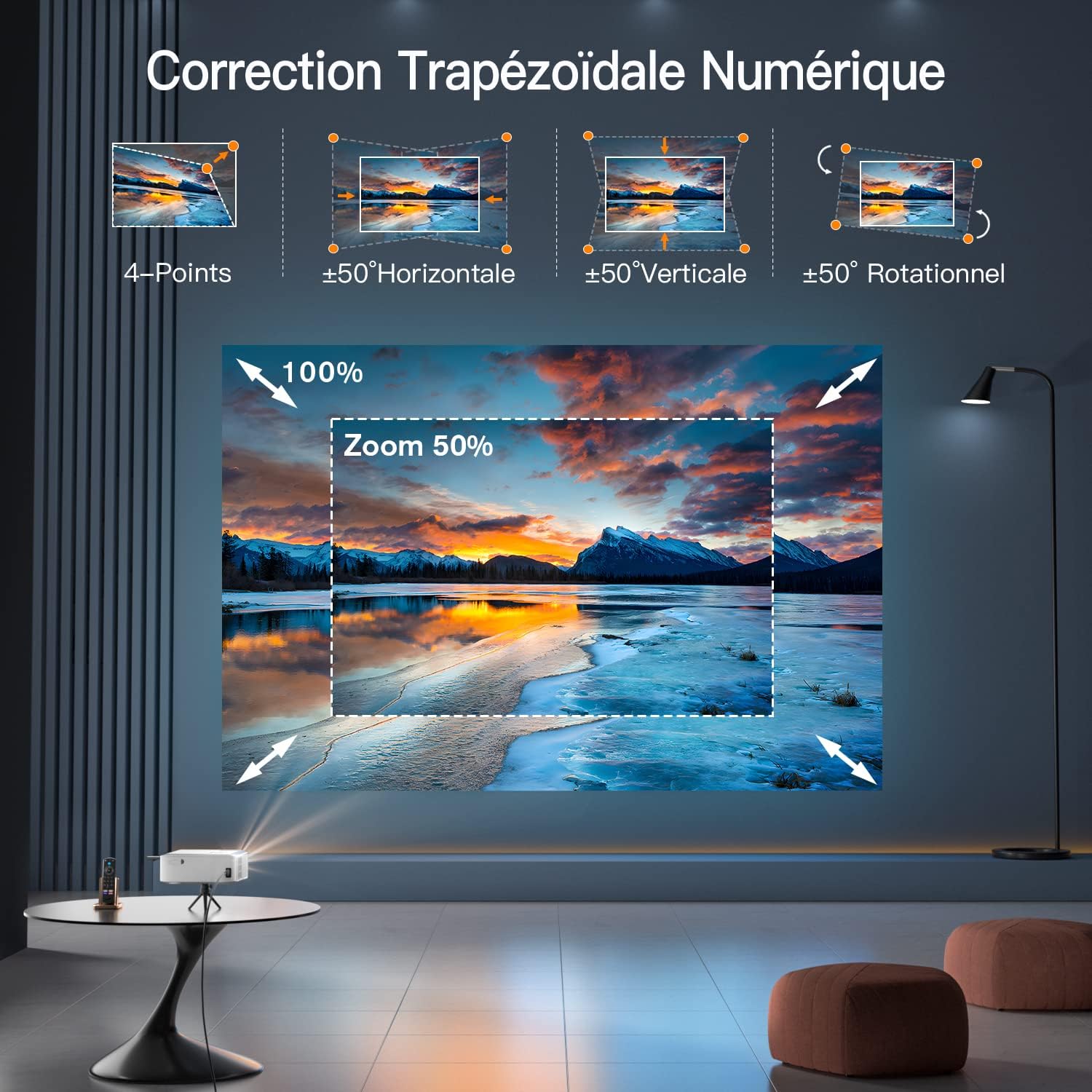
Imatge 5.1: VISSPL V30 Projector Digital Keystone Correction and Zoom. This image demonstrates the projector's capabilities for 4-point, horizontal, vertical, and rotational keystone correction, as well as digital zoom.
- Focus: Ajusteu l'anell d'enfocament de la lent del projector fins que la imatge sigui nítida.
- Keystone automàtic: The V30 features automatic keystone correction. If manual adjustment is needed, navigate to the settings menu to access 4-Point, Horizontal, Vertical, and Rotational keystone correction options.
- Zoom: Use the digital zoom function in the settings to adjust the screen size from 50% to 100% without moving the projector.
5.4 Connexió de dispositius
The VISSPL V30 supports various connection methods:
- HDMI: Connect devices like laptops, game consoles (e.g., PS5), or TV sticks using an HDMI cable.
- USB: Inseriu una unitat USB per reproduir contingut multimèdia files directly. The projector supports various document formats for presentations.
- WiFi: Connect to your home network (5G or 2.4G) for online streaming and screen mirroring.
- Bluetooth: Pair with external Bluetooth speakers or headphones for enhanced audio.
- Port AV: Connecteu dispositius més antics amb un cable AV.

Imatge 5.2: VISSPL V30 Projector 5G+2.4G WiFi Connectivity. This image highlights the projector's support for both 5G and 2.4G WiFi networks, ensuring faster and more stable connections.

Imatge 5.3: VISSPL V30 Projector Bluetooth 5.1 Audio Connection. This image shows the projector connected to a Bluetooth speaker, illustrating its Bluetooth 5.1 capability for an enhanced audio experience.
6. Funcionament
6.1 Encès/Apagat
Premeu el botó d'engegada del projector o del comandament a distància per encendre o apagar la unitat.
6.2 Selecció de la font
Use the 'Source' button on the remote or projector to cycle through input options (HDMI, USB, AV, Screen Mirroring).
6.3 Navegació de menús
Use the arrow keys and 'OK' button on the remote to navigate the on-screen menu for settings adjustments (e.g., picture mode, sound, network settings).
6.4 Mirall de pantalla
To mirror your Android, iOS, or Windows device, select the appropriate screen mirroring option from the projector's main menu and follow the on-screen instructions.
6.5 USB Playback and Presentations

Imatge 6.1: VISSPL V30 Projector USB and Laptop Presentation Capability. This image shows the projector being used for a business presentation, highlighting its ability to display content directly from a USB drive or a connected laptop, supporting formats like PPT, Excel, PDF, and Word.
Insert a USB drive into the USB port. The projector's interface will allow you to browse and play media files or open documents (PPT, Excel, PDF, Word) directly.
7. Manteniment
7.1 Neteja de la lent
Feu servir un drap suau i sense borrissol dissenyat específicament per a lents òptiques per netejar suaument la lent del projector. No utilitzeu productes de neteja abrasius ni força excessiva.
7.2 Neteja del cos del projector
Wipe the exterior of the projector with a soft, dry cloth. For stubborn stains, a slightly damp es pot fer servir un drap, seguit d'un drap sec.
7.3 Neteja del filtre d'aire
Regularly check and clean the air filter (if accessible) to ensure proper airflow and prevent dust buildup, which can affect performance and lamp vida.
7.4 Emmagatzematge
When not in use for extended periods, store the projector in a cool, dry place, protected from dust and direct sunlight. Use the original packaging or a protective case if available.

Imatge 7.1: VISSPL V30 Projector Long Life Span Lamp. This image highlights the projector's durable lamp designed for extended operational life.

Imatge 7.2: VISSPL V30 Projector Advanced Cooling System. This image illustrates the projector's advanced cooling system, which helps maintain optimal operating temperature and contributes to lamp longevitat.
8. Solució De Problemes
Si teniu problemes, consulteu els següents problemes i solucions habituals:
| Problema | Causa possible | Solució |
|---|---|---|
| No es mostra cap imatge | Power cable loose, incorrect input source, device not connected | Check power connection, select correct input source, ensure device is properly connected. |
| La imatge és borrosa | Focus not adjusted, keystone incorrect | Adjust the focus ring, use auto or manual keystone correction. |
| Sense so | Volume too low, external speaker not connected, audio format not supported | Increase volume, check Bluetooth connection, ensure audio format is compatible. |
| El comandament a distància no funciona | Batteries dead, obstruction, remote not paired | Replace batteries, remove obstructions, ensure remote is pointed at the IR receiver. |
| Connexió WiFi inestable | Weak signal, interference | Move projector closer to router, reduce interference from other devices, try 2.4Ghz band if 5Ghz is unstable. |
9. Especificacions
| Característica | Especificació |
|---|---|
| Marca | VISSPL |
| Model | V30 |
| Tecnologia de visualització | LCD |
| Resolució nativa | 1280 x 800 (Supports 4K) |
| Relació d'aspecte | 16:9, 4:3 |
| Zoom digital | 50-100% |
| Correcció de pedra clau | Auto, 4-Point, ±50° Horizontal, ±50° Vertical, ±50° Rotational |
| Estàndard sense fils | 5G+2.4G WiFi, Bluetooth 5.1 |
| Interfície del maquinari | 3.5mm Audio, AV Port, HDMI, USB |
| Voltage | 220 Volts |
| Wattage | 90 watts |
| Factor de forma | Portàtil |
| Tipus de muntatge | Muntatge de taula |
| Dimensions del producte | 22.48 x 17.98 x 9.19 cm |
| Pes de l'article | 2.67 kg |
10. Garantia i Suport
10.1 Informació de la garantia
The VISSPL V30 Smart Projector comes with a standard manufacturer's warranty. Please refer to the warranty card included in your package for specific terms and conditions, including warranty period and coverage details.
10.2 Atenció al client
For technical assistance, troubleshooting not covered in this manual, or warranty claims, please contact VISSPL customer support. Contact details can typically be found on the VISSPL official weblloc web o a la targeta de garantia.


