
1. Instruccions de seguretat importants
- Llegiu atentament aquestes instruccions abans d'utilitzar el producte.
- Conserveu aquest manual com a referència futura.
- Do not expose the product to extreme temperatures, humidity, or corrosive environments.
- Eviteu escoltar a nivells de volum elevats durant períodes prolongats per evitar danys auditius.
- Do not disassemble, repair, or modify the product. Contact authorized service personnel for assistance.
- Mantingueu el producte lluny de nens i mascotes.
- Desfeu-vos del producte i de la bateria de manera responsable d'acord amb la normativa local.
2. Contingut del paquet
Verifiqueu que tots els elements siguin presents al paquet:
- Edifier TO-U6+ True Wireless Earbuds (Left and Right)
- Estoig de càrrega
- Cable de càrrega USB
- Puntes per a les orelles (diverses mides)
- Manual d'usuari (aquest document)
3. Producte acabatview
The Edifier TO-U6+ earbuds are designed for comfortable in-ear fit and provide high-quality audio with touch controls.
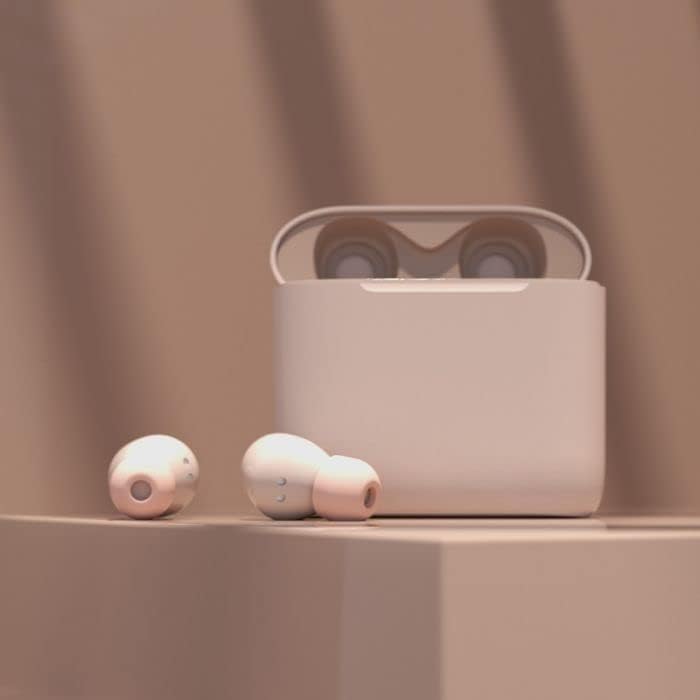
Image: Edifier TO-U6+ Earbuds removed from their open charging case, showcasing el seu disseny.

Image: A person wearing Edifier TO-U6+ earbuds, demonstrating their ergonomic fit during use.
The charging case protects the earbuds and provides additional battery life for extended listening.
4. Configuració
4.1 Càrrega dels auriculars i l'estoig
Abans del primer ús, carregueu completament els auriculars i l'estoig de càrrega.
- Col·loca els auriculars a l'estoig de càrrega. Assegura't que estiguin correctament col·locats.
- Connecteu el cable de càrrega USB al port de càrrega de la carcassa i a una font d'alimentació USB.
- The indicator light on the charging case will show charging status. A full charge provides up to 8 hours of playback for the earbuds and an additional 24 hours from the case, totaling 32 hours. A 15-minute charge can provide 1 hour of music playback.
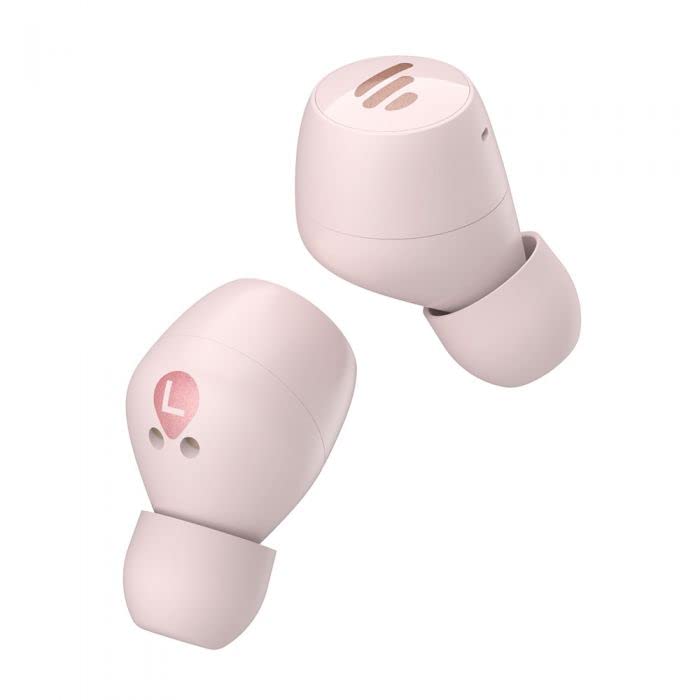
Image: The Edifier TO-U6+ charging case, illustrating its compact design.
4.2 Vinculació Bluetooth
- Obre l'estoig de càrrega. Els auriculars entraran automàticament en mode d'emparellament, cosa que s'indicarà amb una llum intermitent als auriculars.
- Al dispositiu (telèfon intel·ligent, tauleta, etc.), activeu el Bluetooth.
- Cerca available Bluetooth devices and select "Edifier TO-U6+" from the list.
- Once connected, the earbud indicator lights will turn off or show a steady light, depending on the model.
- If pairing fails, place the earbuds back into the case, close the lid, and then reopen to re-enter pairing mode.
5. Instruccions de funcionament
5.1 Controls tàctils
The Edifier TO-U6+ earbuds feature intuitive touch controls on each earbud. The touch-sensitive area is located on the outer surface of each earbud.

Imatge: Superior view of the Edifier TO-U6+ earbuds, highlighting the touch control area.
| Acció | Funció |
|---|---|
| Toc únic (esquerra/dreta) | Reproduir/Pausar música, Respondre/Finalitzar trucada |
| Doble toc (auricular dret) | Pista següent |
| Doble toc (auricular esquerre) | Activa l'Assistent de veu |
| Toc triple (auricular dret) | Pista anterior |
| Premda llarga (esquerra/dreta) | Rebutja la trucada |
5.2 Trucades de veu
The earbuds feature CVC 8.0 voice call noise cancellation, which reduces ambient noise for clearer conversations. Use the single tap action to answer or end calls, and long press to reject incoming calls.
6. Manteniment
6.1 Neteja
- Netegeu regularment les puntes de les orelles amb un drap suau i sec.
- Wipe the charging contacts on the earbuds and inside the case with a dry cotton swab to ensure proper charging.
- No utilitzeu productes químics o materials abrasius per netejar.
6.2 Emmagatzematge
- Guarda sempre els auriculars a la seva funda de càrrega quan no els facis servir per protegir-los i mantenir-los carregats.
- Guardeu el producte en un lloc fresc i sec, allunyat de la llum solar directa i de temperatures extremes.
6.3 Resistència a l'aigua i la pols
The Edifier TO-U6+ earbuds are IP55-rated for dust and water resistance. This means they are protected against limited dust ingress and low-pressure water jets from any direction. They are suitable for workouts and light rain, but no for swimming or submersion in water.
7. Solució De Problemes
If you encounter issues with your Edifier TO-U6+ earbuds, refer to the following common solutions:
- Sense so: Ensure earbuds are charged, properly paired, and volume is adjusted on both the earbuds and your device.
- Problemes d'aparellament: Turn off Bluetooth on your device, place earbuds back in the case, close and reopen the lid, then try pairing again. Clear previous Bluetooth connections on your device if necessary.
- Un auricular no funciona: Place both earbuds back in the case, close the lid, wait a few seconds, then take them out again. This often re-syncs them.
- Problemes de càrrega: Check the charging cable and power source. Ensure charging contacts on earbuds and case are clean and free of debris.
- Qualitat de trucada baixa: Ensure earbuds are properly seated in your ears. Check for strong Bluetooth signal.
If problems persist, consult the Edifier support weblloc o contacteu amb el servei d'atenció al client.
8. Especificacions
| Característica | Detall |
|---|---|
| Model | TO-U6+ |
| Connectivitat | Sense fil, Bluetooth 5.0 |
| Bluetooth Profiles | A2DP, AVRCP, HFP |
| Tecnologia d'àudio | Qualcomm APTX |
| Reducció de soroll de trucades | CVC 8.0 |
| Temps de joc (auriculars) | Fins a 8 hores |
| Temps de reproducció total (amb estoig) | Fins a 32 hores |
| Càrrega ràpida | 15 minutes for 1 hour playback |
| Resistència a l'aigua | IP55 resistent a la pols i a l'aigua |
| Mètode de control | Toca |
| Dimensions del producte | 2 x 2 x 3 cm (earbuds); 180 g (total weight) |
| Dispositius compatibles | Telèfons intel·ligents, tauletes, ordinadors portàtils, ordinadors de sobretaula |
9. Garantia i Suport
Edifier products are covered by a limited warranty. For detailed warranty information, please refer to the warranty card included with your purchase or visit the official Edifier weblloc.
For technical support, product registration, or further inquiries, please visit the Edifier customer support portal or contact their authorized service centers. Keep your proof of purchase for warranty claims.


