
1. Introducció
Gràcies per la compraasing the Eonon D2122J 6.2-inch Touch Panel Car DVD Player. This manual provides detailed instructions for the proper installation, operation, and maintenance of your device. Please read this manual thoroughly before use to ensure optimal performance and to prevent damage.
The D2122J is a versatile 2DIN car multimedia system featuring a 6.2-inch electrostatic touch panel display, DVD playback, Bluetooth connectivity, smartphone mirroring, Wide FM radio, and a built-in 4-channel power ampmés viu.

Imatge: Més deview of the Eonon D2122J car DVD player highlighting its 6.2-inch electrostatic touch panel, DVD player, Bluetooth, mirroring, Wide FM, steering control, dimmer, and USB/Micro SD card slot.
2. Característiques del producte
- 6.2-inch Electrostatic Touch Panel: Provides smooth and intuitive operation.
- 2DIN Standard Size: Compatible with standard 2DIN car openings.
- Mirall del telèfon intel·ligent: Supports screen mirroring for both iPhone and Android devices.
- Connectivitat Bluetooth: For hands-free calling and audio streaming from mobile phones.
- Wide FM Tuner: Built-in radio tuner with 30 programmable stations (AM12/FM18).
- DVD/CD Player: Supports various disc formats including DVD, DVD+R/RW, DVD-R/RW, VCD, CD, CD-RW, MP3, AVI, JPEG.
- USB/SD Card Slot: Supports media playback from USB drives and Micro SD cards up to 32GB.
- Potència incorporada Ampmés viu: 4x45W surround stereo output (FR/FL/RR/RL 4-channel).
- Control del volant: Allows control of basic functions directly from your vehicle's steering wheel buttons.
- Funció dimmer: Adjusts display brightness for optimal viewde dia o de nit.
- One-Touch Screen OFF: Quickly turns off the display.
- Interfície personalitzable: Select from 24 startup emblem logos, 12 wallpapers, and 8 LED button light colors.
- Modes d'equalitzador: Pre-set equalizer settings (Rock, Pop, Classic, Jazz, Standard, Electric).
- Rear Camera Linkage: Automatically switches to rear camera view when reversing (camera sold separately).
- Time Display Function: Pantalla de rellotge integrada.
- Multi-language Menu: Supports Japanese, English, Arabic, Hebrew, Russian, Spanish, French, Italian, Portuguese, Dutch, Latin, Persian, Indonesian, Thai, Turkish.
3. Configuració i instal·lació
3.1 Notes importants d'instal·lació
- Abans de la compraasing, please confirm the size and shape of your vehicle's console panel to ensure compatibility. If the product size does not match, contact the manufacturer directly.
- Professional installation is highly recommended for this product. Eonon does not provide support for installation procedures.
- Ensure all power is disconnected from the vehicle's battery before beginning installation.
3.2 Panel Size

Image: Front panel dimensions of the D2122J unit. The panel measures 172mm (width) x 97mm (height).
3.3 Installation Size

Image: Overall installation dimensions of the D2122J unit. The unit measures 178mm (width) x 167mm (depth) x 100mm (height).
3.4 Esquema de cablejat
Image: Detailed wiring diagram for the D2122J. Connections include SWC1, SWC2, Antenna, Front/Rear Speakers (+/-), Brake Signal, Reverse Signal, Illumination, ACC, 12V Battery, Ground, and Rear Speakers (+/-). The wiring uses standard connectors, simplifying installation without needing to cut or strip wires.
- SWC1
- SWC2
- Potència de l'antena
- Altaveu davanter dret +
- Altaveu frontal dret -
- Altaveu frontal esquerre +
- Altaveu frontal esquerre -
- Brake Signal Cable
- Reverse Signal Cable
- Il·luminació
- ACC
- 12V Battery Power Cable
- Cable a terra
- Altaveu posterior dret +
- Altaveu posterior dret -
- Altaveu posterior esquerre +
- Altaveu posterior esquerre -
4. Instruccions de funcionament
4.1 Funcionament bàsic
The D2122J features an electrostatic touch panel for intuitive control. Simply touch the desired icons or areas on the screen to operate.

Image: The electrostatic touch panel offers smoother and more responsive operation compared to traditional resistive touch screens.
- Encès/apagat i volum: Press the power switch/volume knob briefly to turn the unit on/off. Rotate it left or right to adjust the volume.
- One-Touch Screen OFF: Use the dedicated button or menu option to turn off the display while audio continues to play.
- Restablir: A reset button is available on the front panel (usually a small pinhole) to restart the system if needed.
4.2 Media Playback (DVD, USB, SD)
- Reproducció de DVD: Insert a DVD disc into the disc slot. The unit will automatically detect and begin playback. Supported formats include DVD, DVD+R/RW, DVD-R/RW, VCD.
- Reproducció USB/SD: Insert a USB drive into the USB port or a Micro SD card into the SD card slot. The unit supports various media files (MP3, AVI, JPEG). Navigate through files utilitzant la interfície en pantalla.
4.3 Radio (Wide FM)
The D2122J includes a Wide FM tuner, allowing reception of both AM and FM bands. You can preset up to 30 stations (12 AM, 18 FM) for quick access.

Image: The radio interface allows selection between AM and FM bands and displays preset stations for easy tuning.
- tuning: Feu servir els controls en pantalla per sintonitzar o cercar emissores manualment.
- Presets: Save your favorite stations to the preset memory for one-touch recall.
- Reception Areas: Supports reception in Japan, Europe, America1, America2, Australia, and China.
Bluetooth 4.4
Connect your mobile phone via Bluetooth for hands-free communication and wireless audio streaming.

Image: Bluetooth interface displaying music playback with album art and controls. The unit supports music streaming and hands-free calls.
- Maridatge: Enable Bluetooth on your phone and search for the D2122J. Select the device and confirm pairing.
- Trucades mans lliures: Make and receive calls directly through the unit's built-in microphone and car speakers.
- Transmissió d'àudio: Play music from your phone's apps (e.g., Spotify, Apple Music) wirelessly through the car's audio system.
4.5 Smartphone Mirroring
Mirror your iPhone or Android smartphone screen onto the D2122J display. This allows you to view your phone's content, such as navigation, photos, and videos, directly on the larger screen.
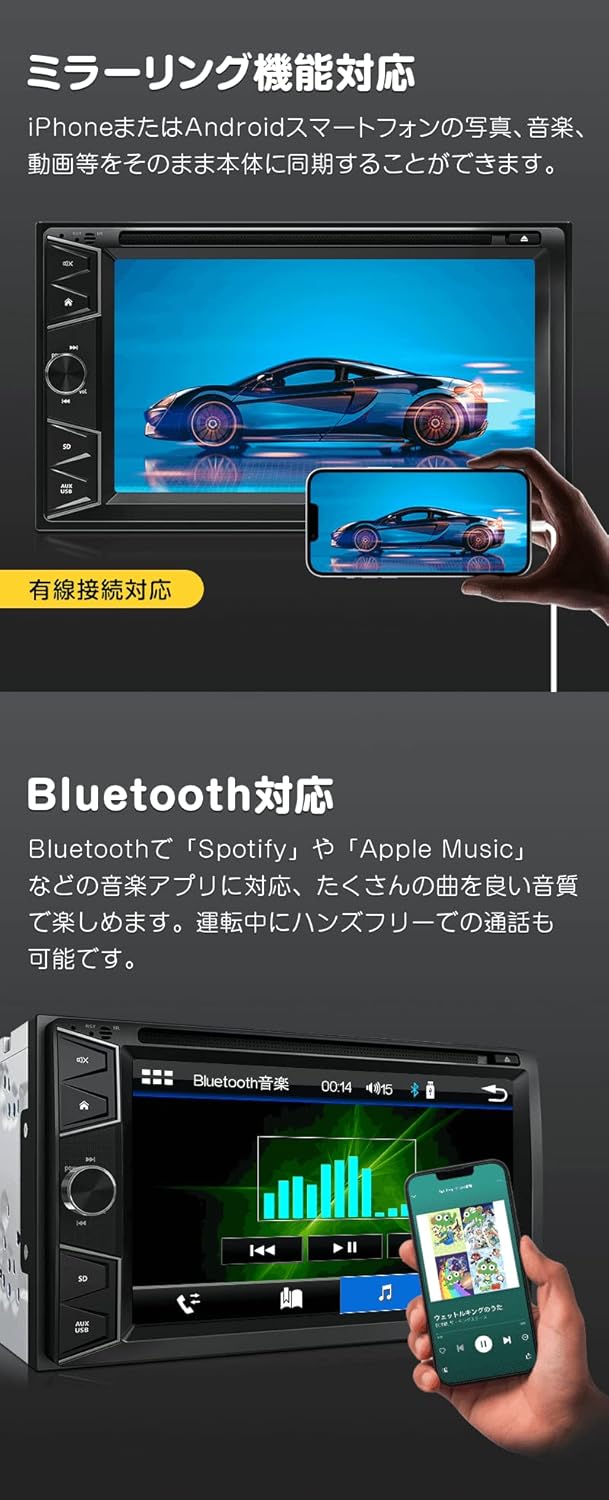
Image: The mirroring function displays your smartphone's screen on the D2122J unit, typically via a wired connection.
- Connexió: Connect your smartphone to the unit using a compatible USB cable.
- Activació: Select the mirroring function from the unit's main menu. Follow on-screen prompts to complete the connection.
4.6 Control del volant
If your vehicle supports steering wheel controls, you can program the D2122J to respond to these buttons. This allows for safe operation without taking your hands off the steering wheel.

Image: The steering wheel control interface allows users to assign functions to their vehicle's steering wheel buttons for convenient operation.
- Configuració: Accediu a la configuració del control del volant al menú del sistema.
- Programació: Follow the instructions to assign functions (e.g., volume up/down, track skip, mode change) to your vehicle's steering wheel buttons.
4.7 Other Functions and Settings
Image: Front panel layout of the D2122J, indicating the location of the reset button, DVD disc slot, eject button, mute button, home button, next track, power/volume knob, AUX input, USB port, and Micro SD card slot.
- Restableix
- DVD Disc Slot
- Botó d'expulsió del disc
- Botó de silenci
- Botó d'inici
- Pista següent
- Interruptor d'alimentació / botó de volum
- Entrada AUX
- Port USB
- Ranura per a targeta Micro SD
- Equalitzador: Switch between various equalizer modes (Rock, Pop, Classic, Jazz, Standard, Electric) to optimize audio output.
- Configuració de la pantalla: Adjust screen brightness, contrast, hue, and saturation via the display settings menu.
- Idioma del sistema: Select your preferred menu language from the available options.
- Fons de pantalla: Choose from 12 different wallpapers to customize the display background.
- LED Button Lights: Select from 8 LED button light colors (Blue, Green, Light Blue, Red, Yellow, White, Pink, Color) to match your vehicle's interior.
- Startup Logo: Choose from 24 different emblem logos for the unit's startup screen.
- Rear Camera Linkage: When a compatible rear camera (sold separately, EONON A0119J/A0126J) is connected and the vehicle is in reverse gear, the display will automatically switch to the camera view. Note: This unit supports CVBS signals only.
- TV Viewing: By connecting an external terrestrial digital tuner (EONON V0050, sold separately), you can watch TV on the unit's display.
Image: The unit displaying TV content (requires external tuner) and a rear camera view (requires external camera).
5. Especificacions
| Característica | Especificació |
|---|---|
| Mida de la pantalla | 6.2 polzades |
| Tipus de visualització | Digital Electrostatic Touch Screen |
| Resolució | 800 x 480 (WVGA) |
| Potència de sortida | 4 x 45W Surround Stereo |
| Formats de disc compatibles | AVI, DVD, DVD+R/RW, DVD-R/RW, VCD, MP3, CD, CD-RW, JPEG |
| Compatibilitat amb targetes USB/SD | Fins a 32 GB |
| Sintonitzador de ràdio | Built-in, 30 programmable stations (AM12/FM18) |
| Bluetooth | Yes (Hands-free calling, A2DP audio streaming) |
| Mirall del telèfon intel·ligent | Yes (iPhone/Android) |
| Control del volant | Sí |
| Funció dimmer | Sí |
| Micròfon incorporat | Yes (on front panel) |
| Entrada/sortida | Radio Antenna x1, USB x1, RCA Video Output, CAM IN Video Input x1, AUX Video Input, RCA Audio FR/FL/RR/RL/Subwoofer Output, AUX Audio R/L Input |
| Pes de la unitat | 1.6 kg |
| Pes brut | 2.2 kg |
| Installation Size (W x D x H) | 178 mm x 167 mm x 100 mm |
| Mida del panell (amplada x alçada) | 172 mm x 97 mm |
6. Accessoris
The following items are included with your Eonon D2122J unit:
- Cable d'alimentació x1
- Control remot x1
- Instruction Manual (Japanese) x1
- Targeta de garantia x1
Image: Included accessories: Remote control, Power cable, Japanese Instruction Manual, and Warranty Card.
7. Garantia i Suport
- Garantia del fabricant: This product comes with a 1-year manufacturer's warranty.
- Warranty Claim Requirement: To claim warranty service, the serial number displayed on the outer packaging is required. This serial number cannot be reissued. Please retain your product packaging.
- Initial Defects: Support for initial defects will be handled according to the manufacturer's warranty policy. For detailed information, please refer to the following external URL: Eonon Warranty Information.
- Support Limitations: Eonon does not provide support for product installation or usage methods. It is strongly recommended to have the unit installed by a professional.
- Variacions del producte: Please note that the appearance and specifications of the product may be subject to minor changes depending on the manufacturing period.