
1. Introducció
This manual provides detailed instructions for the Loutoc Voice Remote Control, Model 1385a. This remote is designed as a replacement and upgrade for specific Samsung Smart TVs from 2021 and 2022, offering voice control and quick access to popular streaming services. It features a fast response time of 0.5 seconds and durable silicone buttons tested for over 15,000 clicks. Please read this manual carefully to ensure proper use and optimal performance.

Image 1: Loutoc Voice Remote Control, front view.
2. Compatibilitat
The Loutoc Voice Remote Control (Model 1385a) is specifically compatible with 2021/2022 Samsung Neo QLED / Crystal UHD 4K Smart TVs that have Alexa Built-in. It is designed to replace or function similarly to the following Samsung TV remote models with voice function:
- TM2180A (BN68-11642A, BN68-11929A, BN68-11929B, BN68-11929D)
- TM2180E (BN68-11645A, BN68-11645G)
- TM2280E (BN68-13842D, BN68-13842H, BN68-13842J)
- BN68-11645D
Nota: This remote control may not be fully compatible with Samsung TVs from other years or models that do not support voice control or the listed remote models.

Image 2: The remote is compatible with 2021/2022 Samsung Neo QLED and Crystal UHD 4K Smart TVs with Alexa Built-in.

Image 3: Visual representation of compatible Samsung TV remote models.
3. Configuració
3.1. Instal·lació de la bateria
The Loutoc Voice Remote Control requires dues piles AAA for operation. To install the batteries:
- Localitzeu la tapa del compartiment de la bateria a la part posterior del comandament a distància.
- Slide the cover downwards or press the latch (if present) to open it.
- Introduïu dues piles AAA, assegurant-vos que els terminals positiu (+) i negatiu (-) s'alineïn correctament amb les marques de l'interior del compartiment.
- Tanqueu bé la tapa del compartiment de la bateria.
3.2. Instruccions d'aparellament
For full functionality, including voice control and advanced features, the remote control must be paired with your Samsung Smart TV. If the remote does not automatically pair upon battery installation, follow these steps:
- Assegureu-vos que el vostre televisor intel·ligent Samsung estigui encès.
- Point the Loutoc remote control directly at the front of your TV.
- Simultàniament, manteniu premut el botó "Retorn" botó (fletxa corba) i el "Play/Pause" button (triangle and two vertical lines) for at least 3 to 5 seconds.
- Release the buttons when a pairing message appears on your TV screen, indicating that the pairing process has begun or is complete.
- The TV screen should display a confirmation message once pairing is successful.
If pairing fails, ensure the batteries are correctly inserted and try again. Maintain a clear line of sight to the TV during the pairing process.
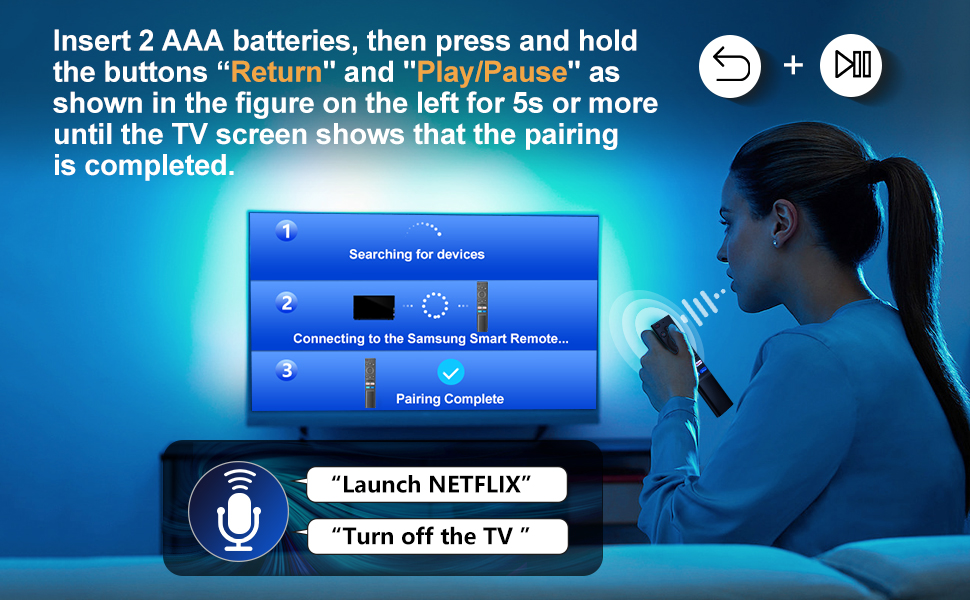
Image 4: Visual guide for pairing the remote control with your Samsung Smart TV by holding the Return and Play/Pause buttons.
4. Instruccions de funcionament
The Loutoc Voice Remote Control offers intuitive navigation and quick access to various TV functions and streaming services.
4.1. Funcions dels botons més amuntview
Refer to the diagram below for a detailed overview of each button's function:

Image 5: Labeled diagram of the Loutoc Voice Remote Control buttons and their functions.
| Botó/Funció | Descripció |
|---|---|
| Poder | Premeu per engegar o apagar el televisor. |
| MIC / LED | Used as MIC when using voice recognition with the remote control. The LED indicates remote activity. |
| Assistent de veu | Press and hold this button to speak commands to the voice assistant (e.g., Alexa). Supported languages and features may vary by geographical region. |
| Color / Number button (123) | Press once to display the virtual numeric pad and color buttons. Use these to access additional options or enter numbers/text. Press and hold for 1 second or more to access the TTX menu. |
| Multi View | Press this button directly to enter the Multi View function. Press and hold for 1 second or more to access the Shortcuts menu screen. |
| Directional buttons (Up, Down, Left, Right) | Moves the focus and changes values on the TV's menu. |
| Seleccioneu | Selects or runs a focused item. When pressed while watching a broadcast program, detailed program information appears. |
| Tornar | Returns to the previous menu. When pressed for 1 second or more, the running function is terminated. When pressed while watching a program, the previous channel appears. |
| Smart Hub (Home) | Torna a la pantalla d'inici. |
| Reproduir/Pausa | Controls media playback. Use to pause/play content. When pressed, the playback controls appear. Using these controls, you can control the media content that is playing. To use Game Bar, press and hold the button in Game Mode. Game Bar may not be supported depending on the model or geographical area. |
| Volum (+/-) | Moves the button up or down to adjust the volume. To mute the sound, press the button. When pressed for 1 second or more, the Accessibility Shortcuts menu appears. |
| Canal (amunt/avall) | Moves the button up or down to change the channel. To see the Guide screen, press the button. When pressed for 1 second or more, the Channel List screen appears. |
| Launch App buttons (NFLX, Rakuten TV, Prime Video, Dis) | Press each button to launch its respective application directly. |
4.2. Voice Control Function
The remote features a dedicated voice control button, allowing you to interact with your Samsung Smart TV using voice commands. This function is particularly useful for searching content, changing settings, or controlling smart home devices connected to your TV's voice assistant.
- Manteniu premut el botó Assistent de veu button (microphone icon).
- Speak your command clearly into the microphone located on the remote.
- Release the button once you have finished speaking.
Examples of commands include: "Launch Netflix", "Turn off the TV", "Cerca action movies".

Image 6: The remote control highlighting the voice function button.

Image 7: A user demonstrating the voice control feature to launch applications or control the TV.
4.3. Quick Access Shortcut Buttons
The remote includes four dedicated shortcut buttons for instant access to popular streaming applications:
- NFLX: Launches Netflix.
- Rakuten TV: Launches Rakuten TV.
- Prime Video: Launches Amazon Prime Video.
- Dis: Launches Disney+.

Image 8: Close-up of the dedicated shortcut buttons for streaming services.
5. Manteniment
To ensure the longevity and proper functioning of your Loutoc Voice Remote Control, follow these maintenance guidelines:
- Neteja: Feu servir un drap suau i sec per netejar el comandament a distància. Per a la brutícia resistent, netegeu lleugerament.ampNetegeu el drap amb aigua o un netejador suau i no abrasiu. Eviteu utilitzar productes químics agressius o materials abrasius.
- Substitució de la bateria: Canvieu les piles quan la resposta del comandament a distància es torni lenta o deixi de funcionar. Canvieu sempre les dues piles alhora per unes de noves del mateix tipus (AAA).
- Emmagatzematge: Guardeu el comandament a distància en un lloc fresc i sec, allunyat de la llum solar directa, de temperatures extremes i d'alta humitat.
- Eviteu les gotes: Protegiu el comandament a distància d'impactes físics, ja que les caigudes poden danyar els components interns.
6. Solució De Problemes
If you encounter issues with your Loutoc Voice Remote Control, refer to the following common problems and solutions:
- El comandament a distància no respon:
- Comproveu si les piles estan correctament inserides i tenen prou càrrega. Substituïu-les si cal.
- Assegureu-vos que no hi hagi obstacles entre el comandament a distància i el televisor.
- Re-pair the remote control with your TV by following the "Pairing Instructions" in Section 3.2.
- El control per veu no funciona:
- Ensure the remote is properly paired via Bluetooth/RF (not just infrared).
- Make sure you are pressing and holding the Voice Assistant button while speaking.
- Speak clearly and close to the microphone on the remote.
- Check your TV's settings to ensure the voice assistant feature is enabled and configured correctly.
- Delayed response or intermittent functionality:
- This can sometimes occur if the remote is not fully paired or if there's interference. Try re-pairing the remote.
- Ensure you are within the effective operating range (up to 8 meters / 26 feet).
- Canvieu les piles si estan baixes.
- Specific shortcut buttons not working:
- Ensure your TV has the corresponding application installed and updated.
- Verify that the remote is correctly paired.
Si el problema persisteix després d'intentar aquestes solucions, poseu-vos en contacte amb l'atenció al client.
7. Especificacions
| Característica | Detall |
|---|---|
| Marca | Loutoc |
| Número de model | 1385a |
| Font d'alimentació | 2 piles AAA (no incloses) |
| Tecnologia de connectivitat | Bluetooth/RF (for pairing and voice control), Infrared (for basic functions) |
| Interval màxim | Fins a 8 metres (26 peus) |
| Tipus de controlador | Control per veu, control per botons |
| Nombre de botons | Approx. 20 (including directional pad) |
| Característiques especials | Ergonomic design, No programming required (after pairing), Lightweight, Universal (for compatible Samsung models) |
| Color | Negre |
| Dimensions (L x A x A) | Aproximadament 19.7 x 4.8 x 1.5 cm (7.76 x 1.89 x 0.59 polzades) |
| Pes | Aproximadament 40 grams (1.41 unces) |
| País d'origen | Xina |

Image 9: Dimensions of the Loutoc Voice Remote Control.
8. Garantia i Suport
Loutoc is committed to providing quality products and customer satisfaction. If you have any questions regarding your Loutoc Voice Remote Control or encounter any issues, please do not hesitate to contact our customer support team.
- Atenció al client: For inquiries about your order or product, please contact us directly. We aim to respond within 12 hours on business days.
- Garantia: Specific warranty details may vary. Please refer to your purchase documentation or contact customer support for more information.