
1. Introducció
This manual provides essential information for the setup, operation, maintenance, and troubleshooting of your A4tech FX60H QWERTY Gaming Keyboard. Please read these instructions carefully to ensure optimal performance and longevity of your device.
The A4tech FX60H is a wired QWERTY keyboard featuring 12 multimedia navigation keys, two integrated USB ports, and a vibrant neon backlight. Its slim design with X-key scissor switches offers a comfortable and quiet typing experience.
2. Configuració
2.1 Connexió del teclat
- Unpack the A4tech FX60H keyboard and its USB cable.
- Localitza un port USB disponible al teu ordinador (PC o portàtil).
- Insert the USB connector of the keyboard's cable into the computer's USB port.
- The keyboard is Plug & Play, meaning it should be automatically recognized by your operating system (Windows, Mac) without requiring additional driver installation.
- Wait for your operating system to confirm the device installation. The keyboard is now ready for use.

Figure 2.1: Connecting the A4tech FX60H keyboard via USB.
3. Instruccions de funcionament
3.1 Funcions bàsiques del teclat
The A4tech FX60H features a standard QWERTY layout for typing. All standard alphanumeric and symbol keys function as expected.
3.2 Tecles multimèdia
The keyboard is equipped with 12 dedicated multimedia keys for quick access to various functions. These keys are typically located along the top row of the keyboard or integrated with function keys (F1-F12) and accessed via a 'Fn' key combination. Refer to the keycap legends for specific functions such as volume control, media playback, and web browser shortcuts.
Control de retroiluminació LED de 3.3
The A4tech FX60H features a multi-colored LED backlight. The intensity of the backlight can be adjusted, or it can be turned off completely. Specific keys or key combinations are used to cycle through brightness levels or toggle the backlight on/off. Consult the keyboard's keycap legends for the designated backlight control keys, often indicated by a sun or light bulb icon.
3.4 Integrated USB Ports
The keyboard includes two additional USB ports. These ports can be used to connect other low-power USB devices, such as a mouse, USB flash drive, or charging small accessories. Avoid connecting high-power devices to these ports to prevent potential issues.
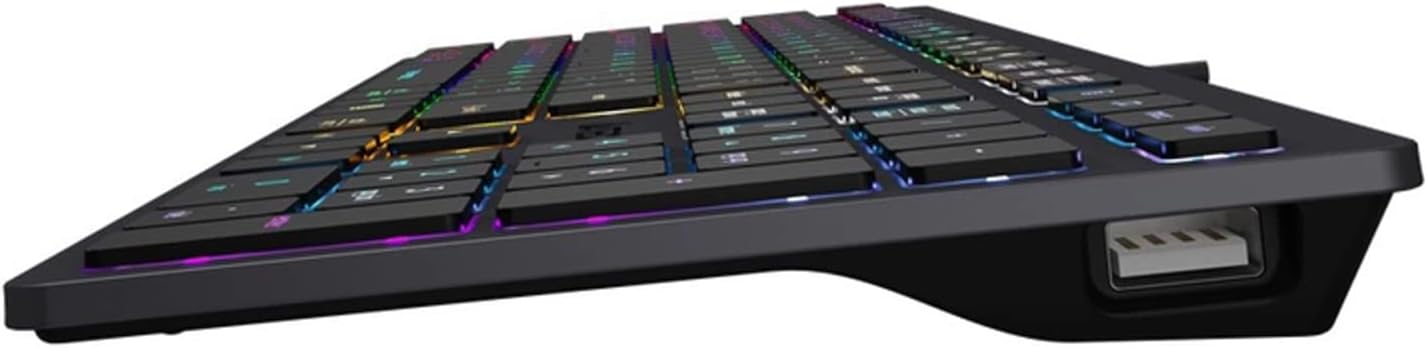
Figure 3.4: Integrated USB port on the A4tech FX60H keyboard.
4. Manteniment
4.1 Neteja del teclat
Per mantenir l'aspecte i la funcionalitat del teclat:
- Desconnecteu el teclat de l'ordinador abans de netejar-lo.
- Utilitzeu un drap suau i sense pelusa lleugerament dampEsbandiu amb aigua o una solució netejadora suau per netejar les tecles i la superfície.
- Eviteu utilitzar productes químics agressius, netejadors abrasius o ruixar líquids directament sobre el teclat.
- Feu servir aire comprimit per eliminar la pols i les restes que hi ha entre les tecles.
4.2 Splash Protection
The A4tech FX60H keyboard features splash protection. While it is designed to withstand minor spills, it is not fully waterproof. In case of a liquid spill, immediately disconnect the keyboard, gently wipe away the liquid, and allow it to dry completely before reconnecting.
5. Solució De Problemes
5.1 El teclat no respon
- Assegureu-vos que el cable USB estigui connectat correctament tant al teclat com a l'ordinador.
- Prova de connectar el teclat a un port USB diferent de l'ordinador.
- Prova el teclat en un altre ordinador per determinar si el problema és amb el teclat o amb el port/controladors USB de l'ordinador.
- Reinicieu l'ordinador.
5.2 La retroiluminació no funciona
- Check if the backlight has been turned off or set to the lowest brightness level using the dedicated backlight control keys.
- Assegureu-vos que el teclat estigui connectat correctament i que rebi alimentació.
5.3 Multimedia Keys Not Functioning
- Ensure you are pressing the correct key combinations (e.g., 'Fn' key + F-key) if required for your specific multimedia functions.
- Verify that your operating system's media player or browser is active and supports the multimedia commands.
6. Especificacions
| Característica | Descripció |
|---|---|
| Marca | A4tech |
| Nom del model | FX60H |
| Tecnologia de connectivitat | USB (per cable) |
| Longitud del cable | 1.5 metres |
| Tipus de teclat | QWERTY |
| Mecanisme clau | X-structure (Scissor-Switch) |
| Tecla de tecla | Pro baixfile (1.5 mm actuation point) |
| Nombre de claus multimèdia | 12 |
| Llum de fons | Multi-colored LED (Neon Backlight), adjustable intensity |
| Ports USB integrats | 2 x USB 2.0 |
| Compatibilitat | Windows, Mac |
| Característiques especials | Splash protection, "Chocolate" design, Laser engraved key markings |
| Material | Plàstic |
7. Informació de la garantia
The A4tech FX60H QWERTY Gaming Keyboard comes with a Garantia del fabricant de 2 anys. Please retain your proof of purchase for warranty claims. For detailed terms and conditions, refer to the warranty documentation provided with your product or contact A4tech customer support.
8. Suport
If you encounter issues not covered in this manual or require further assistance, please visit the official A4tech website for support resources, FAQs, and contact information for customer service.