
1. Introducció
Thank you for choosing the SIYEGK BXRadio-376B Emergency Weather Radio. This device is designed to provide reliable communication and essential functions during emergencies, outdoor activities, or daily use. It features multiple power sources, including solar, hand crank, and internal battery, along with AM/FM/NOAA radio reception, a powerful flashlight, a reading lamp, an SOS alarm, and a power bank function for charging external devices. Please read this manual thoroughly to understand its operation and ensure optimal performance.
2. Producte acabatview
Familiarize yourself with the components of your SIYEGK BXRadio-376B radio.
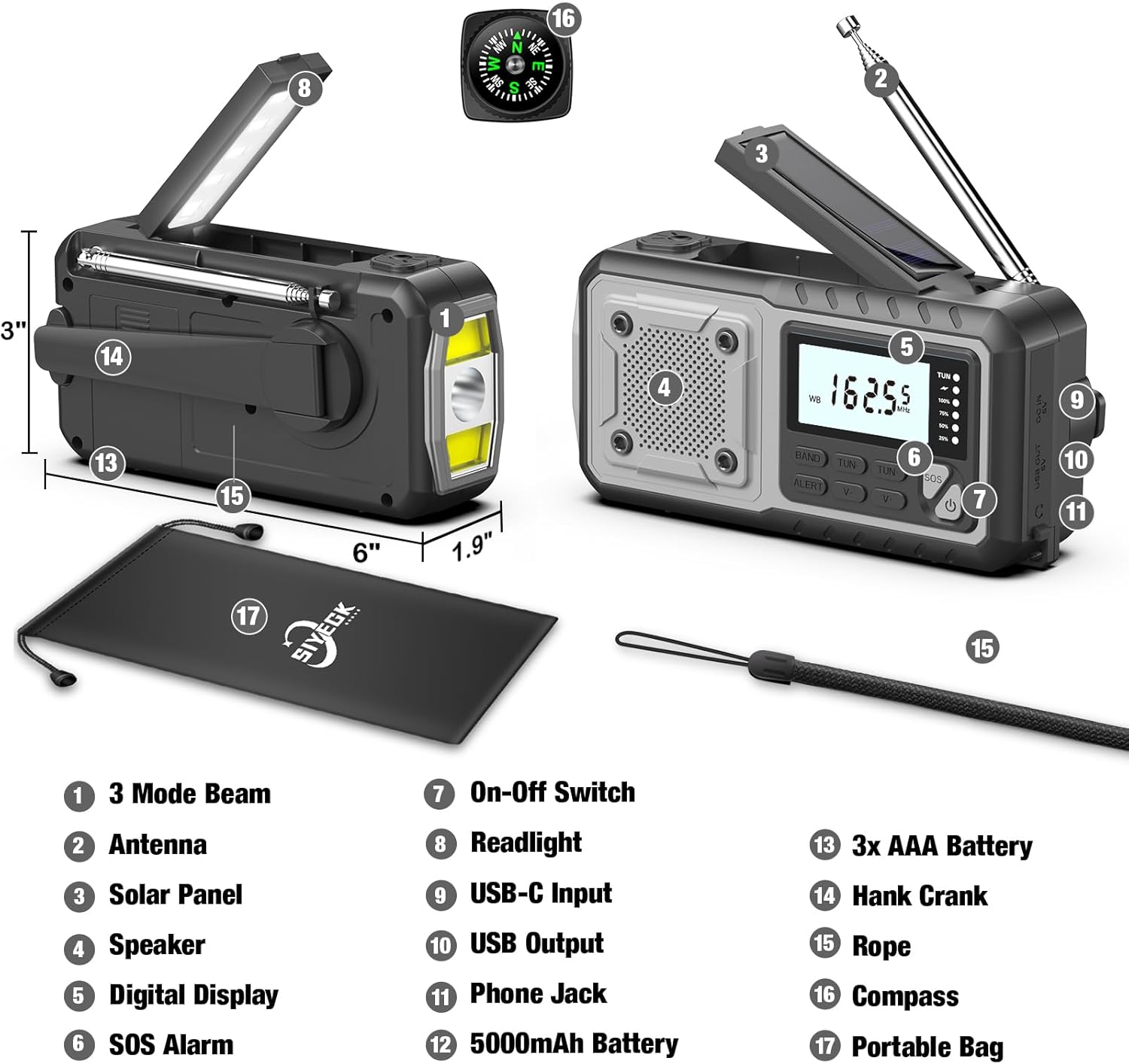
Figura 2.1: Component Diagram of the SIYEGK BXRadio-376B Emergency Weather Radio. Key features include the 3-mode flashlight, extendable antenna, solar charging panel, integrated speaker, clear digital display, SOS alarm button, power switch, foldable reading lamp, USB-C input for charging, USB-A output for device charging, 3.5mm headphone jack, internal 5000mAh battery, AAA battery compartment, hand crank, wrist strap, compass, and a portable bag.

Figura 2.2: Detallada view highlighting the digital display for day and night readability, the comfortable reading lamp, the super long antenna for enhanced signal reception, the solar panel for recharging, the 5000mAh premium battery, the USB-C charge line, and the flip cover protecting the USB ports.
Components clau:
- Pantalla digital: Shows frequency, band, and battery level.
- Antena: Extendable for improved radio reception.
- Panell solar: For trickle charging the internal battery.
- Manovella: For manual power generation.
- Llanterna: Multi-mode LED light for illumination.
- Lectura de Lamp: Plegable lamp for ambient light.
- Ponent: Per a la sortida d'àudio.
- Alarma SOS: Activates a loud siren and flashing light.
- Entrada USB-C: For charging the radio's internal battery.
- Sortida USB: Per carregar dispositius externs (funció de bateria externa).
- Presa d'auriculars de 3.5 mm: Per a una escolta privada.
- Compartiment de piles AAA: Per a alimentació amb piles AAA opcionals.
3. Configuració
3.1 Càrrega inicial
Before first use, fully charge the internal 5000mAh battery using the provided USB-C cable. Connect the USB-C end to the radio's USB-C input port and the USB-A end to a standard USB power adapter (not included) or a computer USB port. The battery indicator on the digital display will show charging progress. A full charge typically takes several hours.
3.2 AAA Battery Installation (Optional)
The radio can also be powered by 3 AAA batteries (not included) as an alternative power source.
- Locate the AAA battery compartment on the back of the radio.
- Obriu la coberta del compartiment.
- Introduïu 3 piles AAA, assegurant-vos de la polaritat correcta (+/-).
- Tanqueu la coberta del compartiment de manera segura.

Figura 3.1: The AAA battery compartment provides an additional power option. The image also illustrates the radio's capability to charge a smartphone and provides estimated operational times for the reading light (60+ hours), radio (50+ hours), far beam flashlight (25+ hours), and mixed beam flashlight (13+ hours).
4. Instruccions de funcionament
4.1 Engegada/apagada
Premeu el botó Botó d'engegada ( ) per encendre o apagar la ràdio.
4.2 Radio Functions (AM/FM/NOAA)
- Selecciona la banda: Premeu el botó BANDA button to cycle through FM, AM, and WB (Weather Band) modes.
- Amplia l'antena: For optimal reception, fully extend the telescopic antenna when listening to FM or Weather Band. For AM, the internal antenna is generally sufficient, but adjusting the radio's orientation may improve reception.
- Emissores de sintonització: Utilitza el TUN + i TUN- buttons to manually tune to desired frequencies. Press and hold these buttons for automatic station seeking.
- Control de volum: Utilitza el V+ i V- botons per ajustar el volum.
- Alerta meteorològica de la NOAA: In WB mode, press the ALERTA button to activate the weather alert function. The radio will automatically scan for and alert you to severe weather broadcasts from NOAA.

Figura 4.1: The radio functions as a portable power bank, provides an SOS alarm for emergencies, and offers reliable NOAA weather alerts for events like blizzards.
4.3 Fonts d'alimentació
The radio offers five ways to power itself:
- 5000mAh Internal Battery: La font d'alimentació principal, recarregable mitjançant USB-C, energia solar o maneta.
- Càrrega USB-C: Connecteu-lo a una font d'alimentació USB per a una càrrega ràpida.
- Panell solar: Expose the solar panel to direct sunlight for trickle charging. This method is ideal for maintaining battery charge or extending playtime, not for rapid charging.
- Manovella: Rotate the hand crank clockwise or counter-clockwise at a steady pace (approx. 130-150 RPM) for manual power generation. Cranking for 1 minute can provide approximately 5-10 minutes of radio use or 15-20 minutes of flashlight use.
- Piles AAA: Insert 3 AAA batteries into the compartment for an additional backup power source.
4.4 Flashlight & Reading Lamp
- Llanterna: Premeu el botó dedicat Botó de la llanterna (often integrated with the power button or a separate button labeled with a light icon) to turn on the flashlight. Press repeatedly to cycle through different modes: Far Beam, Dipped Beam, and Mixed Beam.
- Lectura de Lamp: Lift the solar panel to reveal the reading lamp. It will automatically turn on. Fold it back down to turn it off.

Figura 4.2: The flashlight offers three distinct modes: Far Beam for long-distance illumination, Dipped Beam for wider, closer-range light, and Mixed Beam combining both for comprehensive visibility.
4.5 Alarma SOS
En cas d'emergència, premeu i manteniu premut el botó SOS button for 3 seconds to activate the loud siren and flashing flashlight. This feature is designed to attract attention. Press the SOS button again to deactivate it.
4.6 Funció de bateria externa
The radio can charge external USB devices, such as smartphones, using its internal 5000mAh battery.
- Open the protective cover over the USB output port.
- Connect your device's USB charging cable to the radio's USB output port.
- The radio will begin charging your device.
- Close the protective cover after use to prevent dust and moisture ingress.
5. Manteniment
- Neteja: Netegeu la ràdio amb un suau, damp tela. No utilitzeu productes químics aggressivs ni netejadors abrasius.
- Emmagatzematge: Store the radio in a cool, dry place away from direct sunlight and extreme temperatures. If storing for extended periods, ensure the internal battery is partially charged (around 50%) and recharge it every 3-6 months to prolong battery life.
- Resistència a l'aigua: The radio is designed to be splash-proof, but it is not waterproof. Do not submerge it in water. Ensure all port covers are securely closed to protect against moisture.
- Cura de la bateria: Avoid fully discharging the internal lithium-ion battery frequently, as this can reduce its lifespan.
6. Solució De Problemes
| Problema | Causa possible | Solució |
|---|---|---|
| La ràdio no s'encén. | Internal battery is depleted. AAA batteries are depleted or incorrectly installed. | Charge the internal battery via USB-C or hand crank. Check and replace AAA batteries if used. |
| Mala recepció de ràdio. | Antena no estesa. Zona de senyal feble. Interferències. | Esteneu completament l'antena telescòpica. Reposicioneu la ràdio. Allunyeu-vos dels dispositius electrònics que causen interferències. |
| Llanterna/Lectura lamp no funciona. | Battery is low. Light function not activated correctly. | Charge the internal battery. Ensure the correct button is pressed for the flashlight or the reading lamp està totalment obert. |
| No es poden carregar dispositius externs. | Radio battery is too low. Cable is faulty. Device not compatible. | Ensure the radio's internal battery has sufficient charge. Try a different USB cable. Verify device compatibility. |
| Hand crank is stiff or not charging. | Mechanism obstruction. Incorrect cranking speed. | Ensure no debris is obstructing the crank. Maintain a steady, moderate cranking speed. |
7. Especificacions
| Característica | Especificació |
|---|---|
| Número de model | BXRadio-376B |
| Dimensions del producte | 6.1" de llargada x 2.2" d'amplada x 2.7" d'alçada (15.5 x 5.6 x 6.9 cm) |
| Pes de l'article | 1.01 lliures (0.46 kg) |
| Bateria interna | Ió de liti de 5000 mAh (inclosa) |
| External Battery Option | 3 piles AAA (no incloses) |
| Fonts d'alimentació | Battery Powered, Solar, Hand Crank, AAA Battery |
| Bandes de ràdio compatibles | AM/FM/7-Band NOAA Weather Band |
| Tecnologia de connectivitat | USB (USB-C Input, USB-A Output) |
| Característiques especials | Built-In AM Antenna, Lightweight, Portable, Rechargeable, Flashlight (3 modes), Reading Lamp, Alarma SOS |
8. Garantia i Suport
SIYEGK is committed to providing quality products and customer satisfaction. If you encounter any issues or have questions regarding your BXRadio-376B Emergency Weather Radio, please refer to the included owner's manual for specific warranty details or contact SIYEGK customer support directly. Our team is available to assist you and ensure your satisfaction with your purchase.
For support, please visit the official SIYEGK store or contact the seller through your purchase platform.