
Sorandy Sorandy9y5o6gd8eu-12
Sorandy 64GB Portable Digital Lossless MP3 Player
Model: Sorandy9y5o6gd8eu-12
Introducció
Thank you for choosing the Sorandy 64GB Portable Digital Lossless MP3 Player. This device is designed for high-quality audio playback, offering a compact and convenient solution for music on the go. It is suitable for various activities, including sports and daily use, providing a phone-free listening experience. This manual will guide you through the features and functions of your new MP3 player.
Contingut del paquet
Si us plau, verifiqueu que tots els elements siguin presents al vostre paquet:
- Sorandy 64GB Portable Digital Lossless MP3 Player
- Auriculars
- Corda

Image: The MP3 player shown alongside its included earphones and lanyard, demonstrating the complete package contents.
Configuració
Càrrega del dispositiu
The MP3 player has a built-in 180mAh battery. Before first use, fully charge the device. Connect the player to a USB power source (e.g., computer USB port or USB wall adapter) using the integrated USB connector. The device does not have a display to indicate charging status, but a full charge typically takes a few hours.

Imatge: Una imatge detallada view of the MP3 player's integrated USB-A connector, which is used for charging and data transfer.
Inserció d'una targeta Micro SD
The player supports up to 64GB of external memory via a Micro SD card. Locate the SD card slot on the side of the device. Gently insert the Micro SD card into the slot until it clicks into place. Ensure the card is inserted correctly to avoid damage.
S'està carregant música Files
Per carregar música files, connect the MP3 player to your computer via the integrated USB connector. The device will appear as a removable storage device. Drag and drop your desired audio files (e.g., MP3 format) into the player's storage or the inserted Micro SD card. Disconnect safely after transfer.
Connexió d’auriculars
Plug the included earphones into the 3.5mm audio jack located on the device. Ensure the plug is fully inserted for proper audio output.

Imatge: Un primer pla view of the 3.5mm audio jack on the MP3 player, where earphones are connected.
Instruccions de funcionament
Encès/Apagat
Locate the power switch on the back of the device. Slide the switch to the 'On' position to power on the MP3 player. Slide it to the 'Off' position to power off the device.
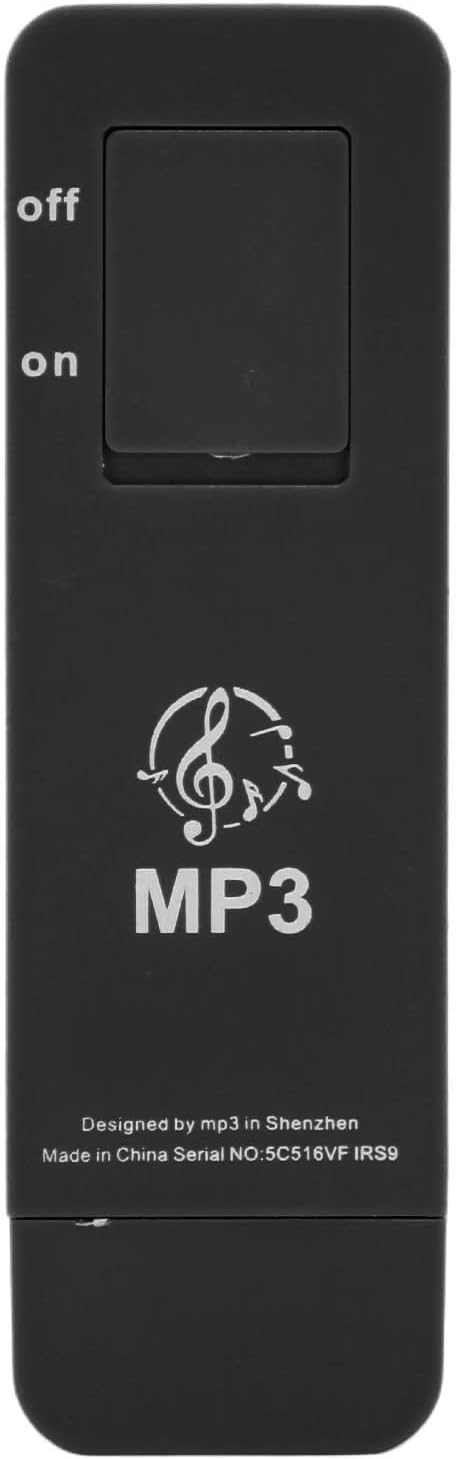
Image: The rear side of the MP3 player, highlighting the physical 'On' and 'Off' slide switch.
Controls bàsics
The MP3 player features a simple control interface on its front:

Image: The front of the MP3 player, displaying the circular control pad with playback and volume buttons.
- Reprodueix/Pausa (►▮▮): Press the center button to play or pause the current track.
- Next Track (►►): Press the right button to skip to the next track.
- Pista anterior (◀◀): Press the left button to go back to the previous track.
- Puja el volum (+): Premeu el botó superior per augmentar el volum.
- Baixar el volum (-): Press the bottom button to decrease the volume.
Reproducció
The player will automatically begin playing music files stored on the device or the inserted Micro SD card once powered on. Playback is sequential, and the device does not feature a display for track selection or directory browsing.

Image: This image illustrates the versatility of the MP3 player, showing individuals enjoying music during exercise, at a workplace, while cooking, and during meditation, highlighting its suitability for diverse daily activities.
Manteniment
Neteja
Netegeu el dispositiu amb un drap suau i sec. No utilitzeu netejadors líquids ni materials abrasius, ja que poden danyar la superfície o els components interns.
Emmagatzematge
Store the MP3 player in a cool, dry place away from direct sunlight and extreme temperatures. If storing for an extended period, ensure the battery is partially charged (around 50%) to prolong its lifespan.
Cura de la bateria
To maintain battery health, avoid fully discharging the battery frequently. Charge the device regularly, even if not in constant use.
Resolució de problemes
- El dispositiu no s'encén: Ensure the battery is charged. Connect the player to a USB power source for at least 30 minutes. Verify the power switch is in the 'On' position.
- Sense so: Check if the earphones are properly plugged into the 3.5mm jack. Increase the volume using the '+' button. Ensure music files are loaded onto the device or Micro SD card.
- No es pot transferir files: Ensure the MP3 player is properly connected to your computer's USB port. Try a different USB port. Ensure the device is powered on when connected.
- Player not recognized by computer: Try restarting your computer. Ensure the USB connection is secure.
- Music playback is choppy or distorted: Assegureu-vos l'àudio files are not corrupted. Try re-transferring the files. Check if the earphones are damaged.
Especificacions
| Característica | Especificació |
|---|---|
| Número de model | Sorandy9y5o6gd8eu-12 |
| Material | ABS |
| Capacitat de la bateria | 180 mAh |
| Capacitat d'emmagatzematge de memòria | 64 GB (internal, plus Micro SD card support) |
| Suport màxim de targeta Micro SD | 64 GB |
| Tecnologia de connectivitat | Auxiliar, USB |
| Tecnologia de visualització | Sense pantalla |
| Color | Negre |
| Pes de l'article | 1.13 unces |
| Dimensions del paquet | 5.31 x 2.99 x 0.71 polzades |
| Components inclosos | Lanyard, Earphone |

Image: A visual representation of the MP3 player's key specifications, including material (ABS), battery capacity (180mAh), maximum memory support (64GB), and included accessories (earphone, lanyard).

Image: This image highlights the compact and portable design of the MP3 player, showing its approximate dimensions and close-ups of the integrated USB connector and headphone jack.
Garantia i Suport
For warranty information and customer support, please refer to the seller's policy on the platform where the product was purchased. Keep your proof of purchase for any warranty claims.
Ask a question about this manual
Ask about setup, troubleshooting, compatibility, parts, safety, or missing instructions. Manuals+ will review the question and use this page’s manual context to help answer it.