Introducció
This document provides instructions for the Generic Replacement Remote Control. This remote is designed as a dedicated replacement for various Pioneer Car Stereo models, including XR-A3800, XR-A4800, XR-A6800, and XR-A9800, and is also compatible with certain TV, Audio, and Projector systems. It operates using Infrared (IR) communication.
Please note that this is a replacement remote control and not an original manufacturer's product. Consequently, some advanced or specific functions present on the original remote may not be fully supported or may operate differently. This is a characteristic of replacement units and not an indication of a defective product.
Configuració
Instal·lació de la bateria
The remote control requires two (2) AAA batteries for operation. Batteries are not included with the remote control.
- Localitzeu el compartiment de la bateria a la part posterior del comandament a distància.
- Premeu la pestanya i feu lliscar la tapa de la bateria cap avall per obrir-la.
- Introduïu dues piles AAA, assegurant-vos que els terminals positiu (+) i negatiu (-) s'alineïn correctament amb les marques de l'interior del compartiment.
- Feu lliscar la coberta de la bateria al seu lloc fins que faci un clic de manera segura.
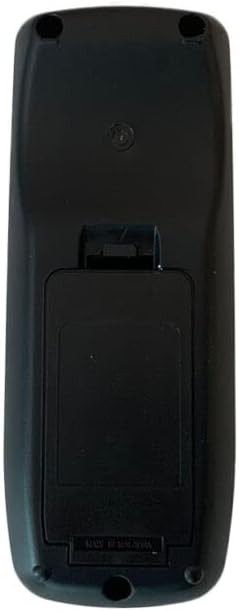
Imatge: Part posterior view of the remote control with the battery compartment cover. The cover is located on the lower half of the remote's back, designed to slide open for battery insertion.
Ús inicial
No programming or complex setup is required for this replacement remote control. Once batteries are correctly installed, the remote is ready for use with compatible devices.
Instruccions de funcionament
To operate your device using this remote control:
- Assegureu-vos que el comandament tingui piles noves instal·lades.
- Point the front of the remote control directly towards the infrared receiver on your Pioneer Car Stereo or other compatible device.
- Press the desired function button (e.g., Power, Volume Up/Down, Channel, Play, Pause).
- Maintain a clear line of sight between the remote and the device. Obstructions can block the infrared signal.
The remote is designed for a stable performance and a farther transmitting distance, offering sensitive and easy operation due to its compact size.
Manteniment
Cura de la bateria
- Remove batteries from the remote control if it will not be used for an extended period (e.g., several weeks or months) to prevent battery leakage and potential damage to the remote.
- No barregeu piles velles i noves.
- Do not mix different types of batteries (e.g., alkaline with rechargeable).
- Always replace all batteries at the same time with new ones of the same type.
Neteja
To clean the remote control, gently wipe it with a soft, dry cloth. Do not use liquid cleaners, abrasive pads, or chemical solvents, as these can damage the remote's surface or internal components.
Resolució de problemes
- El comandament a distància no respon: Ensure batteries are correctly installed and have sufficient charge. Replace with new batteries if necessary. Check for any obstructions between the remote and the device's IR receiver. Ensure you are within the effective operating range.
- Algunes funcions no funcionen: As a replacement remote, certain functions may not be fully compatible with all features of your original device. This is expected behavior for a non-original replacement and does not indicate a defect.
- Funcionament intermitent: This could be due to low battery power or interference. Try replacing batteries and ensuring a clear line of sight.
For optimal compatibility, if you encounter persistent issues, providing your original remote's part number or your unit's specific model number to the seller may help in identifying potential solutions or alternative replacement options.
Especificacions
| Tipus de producte | Comandament a distància de recanvi |
| Tecnologia de connectivitat | Infrarojos (IR) |
| Font d'alimentació | 2 piles AAA (no incloses) |
| Material | ABS/Plàstic |
| Dispositius compatibles | Pioneer XR-A3800, XR-A4800, XR-A6800, XR-A9800 Car Stereo, DVD/Blu-ray Player, Home Theater, Set Top Box, Stereo System, Television |
| Nombre màxim de dispositius compatibles | 1 |
| Color | Black or White (color may vary as per availability) |
Informació de la garantia
Specific warranty details for this Generic Replacement Remote Control are not provided in the product information. For any warranty-related inquiries or claims, please contact the seller directly through your purchase platform.
Suport
Should you require further assistance, have questions about compatibility, or experience issues not covered in this manual, please reach out to the seller from whom you purchased this product. They will be able to provide specific support related to your purchase.


