
GoveeLife H5121
GoveeLife Motion Sensor User Manual
Model: H5121 | Marca: GoveeLife
1. Introducció
The GoveeLife Motion Sensor (Model H5121) is a compact, wireless device designed to enhance smart home automation by detecting motion and triggering actions across compatible GoveeLife intelligent devices. This sensor provides hands-free control, making it ideal for various areas within your home, such as bedrooms, hallways, and bathrooms, to automatically manage lighting or other connected appliances.

Figure 1: GoveeLife Motion Sensor with adjustable stand.
2. Què hi ha a la caixa
The GoveeLife Motion Sensor package includes the following items:
- Motion Sensor Unit
- CR2 Battery (pre-installed with insulation strip)
- Adhesive Tape (for mounting)
- Manual d'usuari (aquest document)
3. Especificacions
| Característica | Detall |
|---|---|
| Dimensions del producte | 1.57 x 1.57 x 3.07 polzades |
| Pes de l'article | 1.76 unces (0.05 quilograms) |
| Número de model | H5121 |
| Font d'alimentació | Battery Powered (1 x CR2 battery included) |
| Durada de la bateria | Aproximadament 4 mesos |
| Color | Blanc |
| Angle de detecció de moviment | 120° |
| Human Sense Detection Range | Up to 16-19 feet (8 meters) |
| Interval sense fil Bluetooth | Fins a 180 peus (55 metres) |
| Compatibilitat | Supports 50+ GoveeLife smart ecological devices (requires GoveeLife dual-mode devices as Distributed Gateway) |
4. Guia de configuració
4.1. Instal·lació de la bateria
The GoveeLife Motion Sensor comes with a pre-installed CR2 battery. Before first use, you must remove the insulation strip to activate the battery. To do this, gently separate the two halves of the sensor unit. Locate the blue pull tab connected to the battery and carefully remove it. Reassemble the sensor by aligning the two halves and snapping them back together.

Figura 2: Explotat view illustrating battery placement and pull tab.
4.2. Muntatge del sensor
The sensor includes a 120° adjustable mount and adhesive backing for flexible placement. Choose a location where motion detection is desired, such as a hallway, bathroom, or kitchen. Ensure the area is clean and dry before applying the adhesive. The adjustable mount allows you to direct the sensor's detection area for optimal coverage.

Figura 3: Example of sensor placement under a cabinet.

Figure 4: Illustration of the sensor's 120° adjustable detection range, up to 180ft Bluetooth range, and 16-19ft human sense detection.
4.3. Connecting to Govee Home App and Distributed Gateway
The GoveeLife Motion Sensor requires connection to the Govee Home App and utilizes GoveeLife dual-mode devices (sold separately) as a "Distributed Gateway" for full functionality. These dual-mode devices support both Wi-Fi and Bluetooth, maintaining an effective communication distance of up to 55m/180ft between the sensor and other devices.
To set up the Distributed Gateway and create automation rules:
- Obre l'aplicació Govee Home.
- Navigate to the "Automation" page.
- Tap "Auto Run" and then press the "+" button to add a new function.
- Enter a name for your new automation.
- Set up an "If" variable by selecting the Motion Sensor and setting "Movements Detected" as the trigger.
- Then, select the corresponding GoveeLife device(s) and the action you want it to execute (e.g., turn on/off lights, activate a humidifier).
- Press "Save" to activate your custom automation.
You can manage your Distributed Gateway settings and view connected Node Devices (products acting as central communication hubs) by pressing the icon next to the "+" button on the Devices homepage.
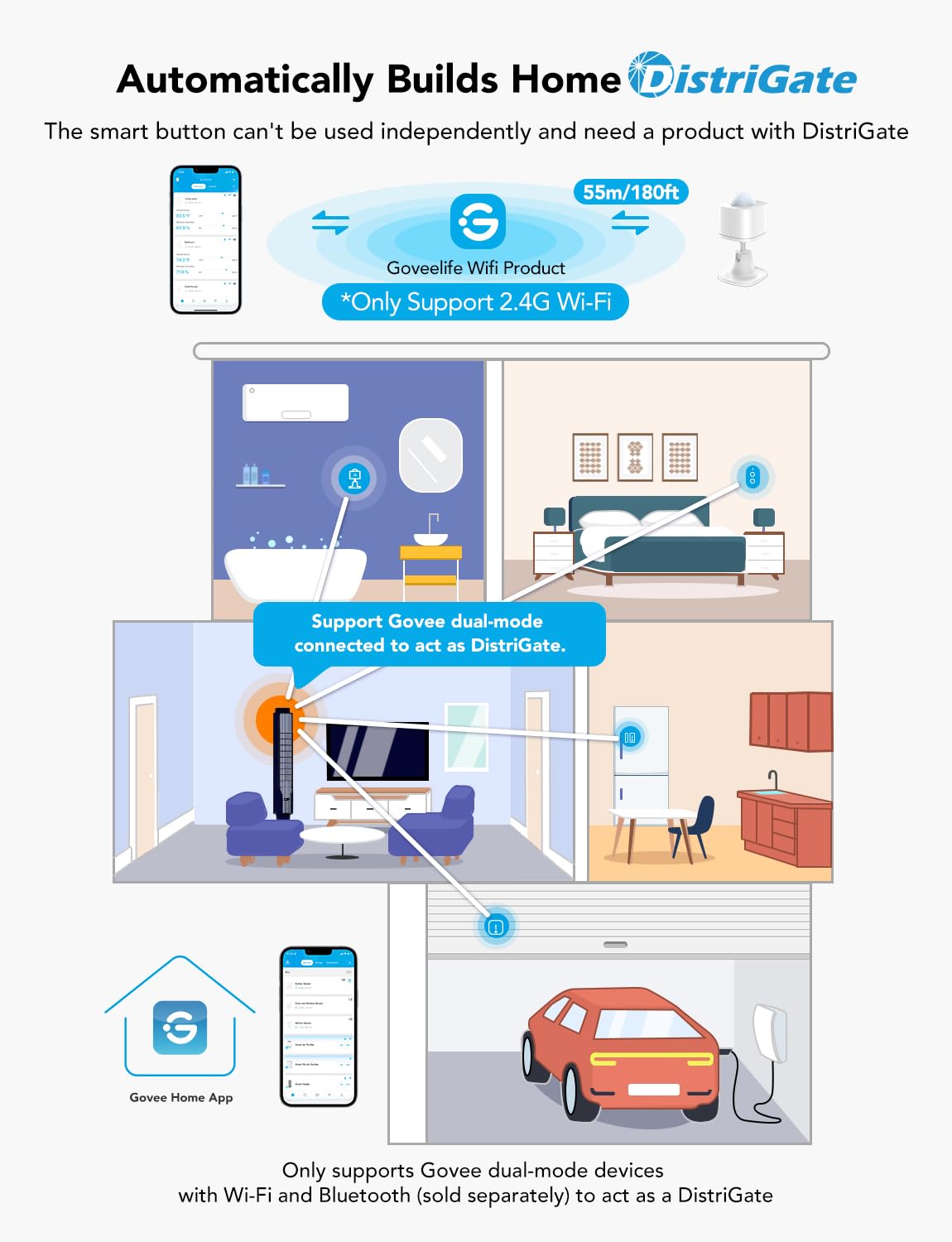
Figura 5: Mésview of the Distributed Gateway system, showing sensor communication with GoveeLife Wi-Fi products.

Figure 6: The motion sensor can automate various GoveeLife smart devices.
Video 1: An official GoveeLife video explaining "What is a Distributed Gateway?" and how to set it up within the Govee Home App for automation.
5. Funcionament del sensor de moviment
Once set up, the GoveeLife Motion Sensor operates automatically. It detects motion within its 120° field of view and up to 16-19 feet (8 meters) away. Upon detection, it communicates with your designated GoveeLife devices via the Distributed Gateway to execute the programmed actions.
Les aplicacions habituals inclouen:
- Il·luminació automatitzada: Lights turn on when you enter a room and turn off after a set period of no motion, saving energy.
- Smart Appliance Control: Automatically activate or deactivate other GoveeLife smart appliances like humidifiers, air purifiers, or fans based on presence.

Figure 7: The motion sensor can be used to automate devices in a kitchen environment.

Figure 8: The motion sensor can automate devices in a bedroom environment.
6. Manteniment
6.1. Substitució de la bateria
The GoveeLife Motion Sensor is powered by a single CR2 battery, which typically lasts for approximately four months. When the battery is low, you may notice a decrease in responsiveness or the sensor may stop functioning. To replace the battery, gently separate the two halves of the sensor unit, remove the old CR2 battery, and insert a new one, ensuring correct polarity. Reassemble the unit securely.
6.2. Neteja
To maintain optimal performance, periodically clean the sensor's lens and exterior. Use a soft, dry cloth to wipe away dust or smudges. Avoid using abrasive cleaners or solvents, as these can damage the device.
7. Solució De Problemes
- El sensor no detecta moviment:
- Ensure the insulation strip has been removed from the battery.
- Comproveu si cal canviar la bateria.
- Verify the sensor's placement and angle. Ensure there are no obstructions blocking its field of view.
- Confirm the sensor is within the Bluetooth range of a Distributed Gateway device (up to 180ft/55m).
- Automation not triggering:
- Check the automation rules in the Govee Home App to ensure they are correctly configured.
- Verify that the target GoveeLife devices are online and functioning correctly.
- Ensure the Distributed Gateway device is powered on and connected to your Wi-Fi network (2.4G Wi-Fi only).
- Limited device compatibility:
- The GoveeLife Motion Sensor is designed to work with GoveeLife smart ecological devices that support the Distributed Gateway function. It supports over 50 types of GoveeLife products.
- Note: This device does not support direct connection to third-party voice assistants like Amazon Alexa or Google Assistant.
- App account limitations:
- A single Govee Home App account supports connecting up to 10 sensors. If more sensors are needed, create an additional account for pairing.
8. Garantia i Suport
GoveeLife products come with a limited warranty. For detailed warranty information, product support, or to contact customer service, please visit the official GoveeLife website or refer to the warranty card included in your product packaging. You can also reach out through the Govee Home App's support section.
For the latest updates and support resources, please visit: www.govee.com