1. Introducció
This manual provides essential instructions for the operation and maintenance of your new Generic replacement remote control. This remote is designed to work with Tesla 43V505BUS Smart LCD LED HDTV TVs, as well as other compatible Audio/Video Players and Projectors. Please read this manual carefully before use to ensure proper functionality and to understand its features.
2. Producte acabatview
The replacement remote control is an aftermarket product designed to offer basic functionality for your compatible devices. It features an ergonomic design made from durable ABS material for comfortable handling.
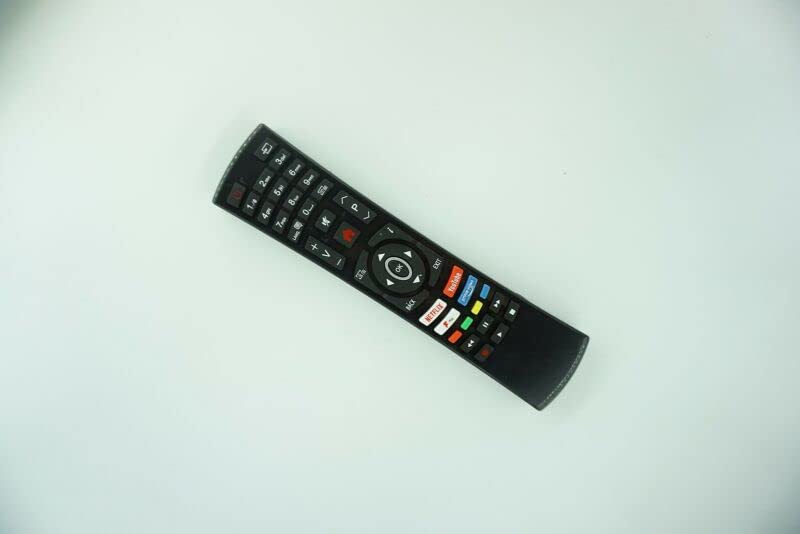
Figura 1: Davant view of the Generic Replacement Remote Control. The remote is black with various buttons for numbers, volume, channel, navigation, and quick access to streaming services like Netflix and YouTube.
This remote utilizes Infrared (IR) wireless communication for reliable control of your devices.
3. Configuració
3.1 Instal·lació de la bateria
- Localitzeu el compartiment de la bateria a la part posterior del comandament a distància.
- Obriu la tapa del compartiment de la bateria.
- Introduïu dues (2) piles AAA, assegurant-vos que els terminals positiu (+) i negatiu (-) s'alineïn correctament amb les marques de l'interior del compartiment.
- Tanqueu bé la tapa del compartiment de la bateria.
Nota: Les piles no estan incloses amb el comandament a distància.
3.2 Initial Pairing / Programming
This replacement remote control requires no programming or setup. Once batteries are installed, it is ready for immediate use with compatible devices.
4. Instruccions de funcionament
Point the remote control directly at the infrared receiver on your device (e.g., TV, DVD player, projector) and press the desired button.
4.1 Funcions bàsiques
- Botó d'encesa: Encén o apaga el dispositiu.
- Botons numèrics (0-9): Per a la selecció directa de canals.
- Volume Up/Down (+V/-V): Ajusta el nivell de volum.
- Channel Up/Down (+P/-P): Canvi de canals.
- Botons de navegació (amunt, avall, esquerra, dreta, D'acord): S'utilitza per a la navegació i selecció de menús.
- Botons Enrere/Sortida: Torna a la pantalla anterior o surt d'un menú.
- Botons d'accés ràpid: Dedicated buttons for popular streaming services like Netflix and YouTube (functionality depends on device compatibility).
Nota important: As this is an aftermarket replacement remote control, some advanced functions or specific features of your original remote may not be supported or may operate differently. This is not indicative of a product defect.
4.2 dispositius compatibles
This remote is compatible with a variety of devices, including:
- Television (HDTV, Smart LCD LED TV)
- Audio/Video Players
- DVD/Blu-ray Players
- Sistemes de cinema a casa
- Set Top Boxes
- Sistemes estèreo
- Projectors
5. Manteniment
5.1 Cura de la bateria
- Traieu les piles del comandament a distància si no el fareu servir durant un període prolongat per evitar fuites.
- No barregeu piles velles i noves.
- No barregeu diferents tipus de piles (per exemple, alcalines i recarregables).
- Eliminar les bateries usades de manera responsable d'acord amb la normativa local.
5.2 Neteja
Wipe the remote control with a soft, dry cloth. Avoid using liquid cleaners or abrasive materials, as these can damage the surface or internal components.
6. Solució De Problemes
- El comandament a distància no respon:
- Assegureu-vos que el comandament a distància estigui apuntat directament al receptor d'infrarojos del dispositiu.
- Comproveu si les piles estan correctament instal·lades amb la polaritat correcta.
- Substituïu les piles velles per unes de noves.
- Assegureu-vos que no hi hagi obstruccions entre el comandament a distància i el dispositiu.
- Algunes funcions no funcionen:
- This is a replacement remote control, and some functions may not be identical to the original remote. This is considered normal operation for a universal or replacement remote.
- Verify that your device model is listed as compatible.
- Distància de transmissió curta:
- Substituïu les piles per unes de noves.
- Ensure there are no strong light sources or other IR devices interfering with the signal.
7. Especificacions
| Característica | Detall |
|---|---|
| Marca | Genèric |
| Número de model (ASIN) | B0BZ7M8XCT |
| Tecnologia de connectivitat | Infrarojos (IR) |
| Font d'alimentació | 2 piles AAA (no incloses) |
| Material | ABS/Plàstic |
| Nombre màxim de dispositius compatibles | 1 |
| Dispositius compatibles | DVD/Blu-ray Player, Home Theater, Set Top Box, Stereo System, Television |
| Color | Black or white (color sent randomly) |
8. Garantia i Suport
Warranty information for this Generic replacement remote control is not provided in this manual. For specific warranty details or technical support, please contact the seller or retailer from whom you purchased the product. It is recommended to retain your proof of purchase for any warranty claims.